


Research from Texas A&M reveals that employees using standing desks can be up to 45% more productive than those who remain seated. However, simply owning the hardware isn't enough to see these results. Many Australians find that without setting up a sit-stand workstation correctly, they merely swap lower back pain for new issues like leg fatigue or neck strain. It's a common frustration for procurement officers and home office users alike who want to see a genuine return on their ergonomic investment.
We understand that you want a workspace that supports your health rather than hindering it. This guide will help you master the precise measurements and postural adjustments required to maximise the health benefits of your desk. We'll provide clear, measurable benchmarks for monitor height and desk alignment based on the latest 2026 ergonomic standards. You'll learn the essential 20-8-2 rhythm to keep your body moving and ensure your workstation remains a professional-grade tool for efficiency. By the end of this article, you'll have the technical knowledge to transform your desk into a pain-free hub of productivity.
Key Takeaways
- Understand the principles of neutral posture to align your skeletal structure and minimise the physical strain of static office work.
- Master the technical benchmarks for setting up a sit-stand workstation correctly by matching your desk height to your resting elbow level in both positions.
- Learn the precise monitor placement required to eliminate neck strain, including the ideal arm's length distance and eye-level alignment.
- Implement the 20:8:2 movement rhythm to effectively balance sitting, standing, and active movement for a more productive workday.
The Fundamentals of Workplace Ergonomics and Neutral Posture
Neutral posture isn't just a technical term; it's the physical state where your body is aligned and under the least amount of strain. When you maintain this position, you minimise the mechanical stress on your joints, tendons, and muscles. For those spending forty hours a week at a desk, this alignment is the primary defence against chronic pain. Achieving this balance starts with setting up a sit-stand workstation correctly, ensuring your spine remains in its natural S-curve rather than being forced into a slouched position.
The human body isn't designed for static positions. Remaining seated for eight hours a day can lead to significant spinal health issues, as prolonged compression reduces the hydration of spinal discs and tightens the hip flexors. By reviewing the History of Standing Desks, we see that professionals have long sought ways to break this sedentary cycle. Modern sit-stand desks allow for regular movement, which improves blood flow and supports metabolic health by helping the body process fats and sugars more efficiently throughout the day.
To better understand this concept, watch this helpful video:
Defining the Neutral Reach Zone
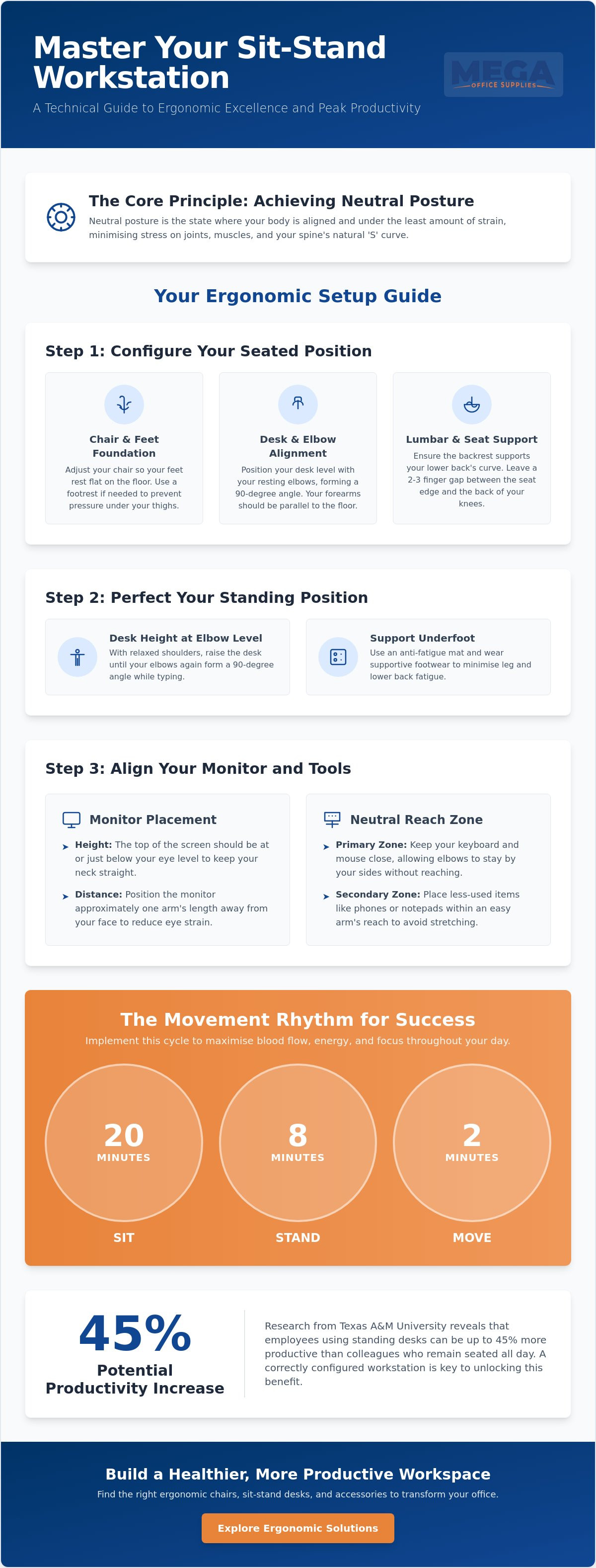
Your desk layout should prioritise accessibility to reduce repetitive strain. The primary reach zone includes the area where you use your keyboard and mouse. These should be positioned so your elbows remain at your sides without reaching forward. The secondary zone is for items used occasionally, such as office supplies or a telephone. Keeping these within arm's length prevents the need for excessive stretching, which is a common cause of shoulder and neck fatigue in Australian offices.
The Importance of Joint Alignment
Effective ergonomics relies on the 90-degree rule. This standard dictates that your elbows, hips, and knees should ideally be kept at right angles to maintain a neutral load on your skeletal structure. Your wrists must remain straight, not tilted up or down, to avoid the nerve compression associated with carpal tunnel issues. Finally, ensure your head is positioned directly over your shoulders. This alignment reduces the cervical load on your neck, preventing the strain often caused by leaning toward a poorly positioned screen.
Step-by-Step Guide to Setting Up Your Sitting Position
The chair is the foundation of any ergonomic environment. When setting up a sit-stand workstation correctly, the sitting configuration serves as your baseline for comfort and mechanical alignment. Begin by adjusting your chair height so your feet rest flat on the floor. If your desk height requires you to raise the chair to a point where your feet dangle, you must employ a footrest to maintain stability. This prevents pressure on the underside of your thighs, which can otherwise restrict circulation and lead to lower limb discomfort.
Once your feet are secure, set the desk height to match your resting elbow height. With your shoulders relaxed, your forearms should be parallel to the floor when resting on the desk surface or keyboard tray. Ensure there's sufficient clearance for your thighs under the desk; you shouldn't feel restricted or forced to sit with your legs crossed. Finally, align the backrest to provide firm lumbar support. The chair's curve should fit snugly into the small of your back, maintaining the spine's natural integrity during long periods of focused work.
Chair and Desk Synchronisation
Modern ergonomic office chairs offer multiple points of adjustment to support the natural S-curve of your spine. Adjust the seat pan depth to ensure there's a two to three-finger gap between the edge of the seat and the back of your knees. This gap is vital for maintaining blood flow to the lower legs. Utilise the armrests to offload weight from your upper back and shoulders, but ensure they don't prevent you from pulling the chair close to the desk. Investing in high-quality ergonomic office chairs ensures that your seating foundation supports your body's natural mechanics throughout the day.
Foot Placement and Support
Stable foot placement is often overlooked but remains a core requirement for spinal health. Use a footrest if you're unable to reach the floor while maintaining the 90-degree knee angle required for neutral posture. It's vital to avoid the habit of 'perching' on the edge of the chair, as this removes the support of the backrest and increases the load on your lumbar discs. Ensure your weight is distributed evenly across both feet. This balanced stance prevents pelvic tilting and reduces the risk of developing hip or lower back pain over the course of a standard shift.
Transitioning to Standing: Achieving the Perfect Height
Transitioning from a seated position to standing requires more than just pushing a button. When setting up a sit-stand workstation correctly, the standing height must be calibrated to your specific physiology. The primary benchmark is your elbow height. With your shoulders relaxed and your elbows tucked in at a 90 to 100-degree angle, the desk surface should meet your forearms perfectly. This alignment prevents you from leaning into the desk or hunching your shoulders, common errors that lead to upper-body strain and fatigue.
Standing for long periods requires supportive footwear. Professional environments, from healthcare centres to warehouses, often overlook this detail. Flat-soled shoes with adequate cushioning are preferable to heels or rigid boots. Additionally, maintain a slight micro-bend in your knees. Locking your joints restricts blood flow and increases the load on your lower back. This practice, combined with the right office furniture supplies, ensures the standing phase of your workday is as restorative as it is productive.
In 2026, the focus has shifted toward behavioural ergonomics. It's no longer just about the hardware; it's about how you interact with it. Standing should feel dynamic. If you feel static or rigid, your desk height is likely incorrect. A desk that's too high forces the shoulders up, while a desk that's too low leads to a forward lean. Both positions negate the benefits of standing and can cause long-term musculoskeletal issues.
The Elbow Height Benchmark
To measure your resting elbow height, stand naturally and bend your elbows to 90 degrees. Measure from the floor to the underside of your arm. This is your baseline for typing. If you are using pens for manual writing or reading documents, you may prefer the desk 2-5cm higher to bring the work closer to your eyes without straining your neck.
Standing Surface Considerations
The floor surface is as important as the desk height. Using an anti-fatigue mat is a professional-grade solution to reduce pressure on the lower back. These mats encourage micro-movements in the calves, which aids circulation. Recognising the signs of standing fatigue, such as shifting weight excessively or leaning heavily on the desk, is critical for knowing when to return to a seated position.
Beyond Height: Monitor, Keyboard, and Accessory Alignment
Setting up a sit-stand workstation correctly involves more than just the desk's vertical travel. Once you've established your elbow height benchmarks, you must address the alignment of your peripherals to prevent secondary strain. Your monitor should be positioned approximately an arm's length away, which is generally between 50cm and 70cm from your eyes. This distance reduces ocular fatigue by allowing the eyes to focus without constant adjustment. Set the top of the screen at or slightly below eye level. This ensures your neck remains in a neutral position, preventing the forward head posture that often leads to cervical spine issues.
Centre your keyboard and mouse directly in front of you. Reaching to one side to operate a mouse for several hours a day can cause significant shoulder and upper back imbalances. Maintaining an organised workspace is equally vital. By neatly arranging your stationery and essential documents, you ensure that the primary reach zone remains clear for high-frequency tasks. An uncluttered desk supports better mental focus and reduces the risk of accidental equipment damage in busy Australian office environments.
Monitor and Vision Ergonomics
Tilt your screen 10 to 20 degrees backward. This matches your natural line of sight, which tends to look slightly downward when your neck is relaxed. Managing glare is another critical factor for workplace safety. Position your desk so that windows are to the side rather than directly in front or behind your monitors. If overhead lighting causes reflections, adjust the screen's angle or consider a glare filter. Monitor arms are highly recommended for sit-stand setups. They provide independent height and depth adjustment, allowing you to fine-tune the screen position as you transition between sitting and standing postures.
Input Device Placement
Keep your mouse as close to the keyboard as possible to minimise shoulder abduction. If you're using a full-sized keyboard with a numeric keypad, you may find yourself reaching too far to the right. In such cases, consider a compact keyboard to keep your arms within a neutral shoulder width. Use a wrist rest only during breaks. Resting your wrists on a pad while actively typing can increase pressure on the carpal tunnel. Instead, let your hands float above the keys for better mechanical efficiency and reduced tendon strain.
If you're ready to optimise your workspace, selecting professional-grade computer accessories will ensure your peripherals match the quality of your ergonomic furniture.
Best Practices for Sit-Stand Success and Movement Rhythms
Setting up a sit-stand workstation correctly is only the initial phase of improving workplace health. The genuine benefits are realised through the implementation of dynamic movement rhythms. Industry experts advocate for the 20:8:2 rule to prevent the hazards of static posture. This protocol dictates sitting for 20 minutes, standing for 8, and engaging in active movement for 2 minutes. By following this cycle, you maintain high metabolic activity and avoid the leg fatigue often caused by excessive standing.
Transitioning to this movement-based workflow should be a deliberate process. Don't attempt to stand for extended periods on the first day. Instead, increase your standing time incrementally over a fortnight to allow your musculoskeletal system to adapt. Using automated reminders or mobile apps can facilitate these transitions, ensuring that position changes become a seamless part of your daily routine rather than an afterthought.
Incorporate light activity while in the standing phase. Simple movements like calf raises or weight shifting help pump blood back to the heart and reduce pressure on the lower back. This approach is particularly effective in high-pressure environments like call centres, where research from Texas A&M has shown workers can be up to 45% more productive when using sit-stand solutions compared to their seated colleagues.
The Transition Phase
Moving from a sitting desk to standing desk should be managed with care. Listen to your body's signals; persistent aching in the feet or lower back indicates a need to return to your ergonomic chair. Maintain the precise monitor-to-eye alignment established in previous sections regardless of the desk's height. This consistency prevents the development of secondary strain in the neck and shoulders as you alternate positions throughout the shift.
Organising for Productivity
Logistical efficiency is critical for a functional sit-stand setup. Implement comprehensive cable management to prevent wires from snagging or disconnecting during height adjustments. A 'clean desk' policy is also beneficial, as it removes physical obstacles that might hinder the desk's movement. Procurement officers should ensure that their chosen office furniture is rated for frequent mechanical use. High-capacity providers offer hardware with the durability required for thousands of cycles, providing a secure return on investment for any organisation focused on long-term employee wellness. By focusing on these logistical details, you ensure that setting up a sit-stand workstation correctly translates into a sustainable, high-performance work environment.
Optimising Your Professional Environment for 2026
Achieving a pain-free workday requires more than just high-quality hardware; it demands a commitment to neutral posture and consistent movement. By mastering the 20:8:2 rhythm and maintaining the 90-degree alignment for your joints, you transform your desk from a static surface into a dynamic tool for productivity. Remember that setting up a sit-stand workstation correctly is an ongoing process of adjustment based on your body's signals and the specific tasks at hand.
As a trusted supplier to government and corporate sectors with over 20 years of combined industry experience, we understand the logistical demands of modern Australian workplaces. We provide reliable, professional-grade solutions backed by national Australian delivery to ensure your organisation remains supported regardless of location. Whether you're equipping a healthcare centre, a school, or a home office, the right equipment is the foundation of long-term spinal health.
Upgrade your workspace with our range of ergonomic standing desks and experience the benefits of a correctly configured environment. Take the first step toward a more active, efficient, and comfortable professional life today.
Frequently Asked Questions
How long should I stand at my desk each day?
You should aim to stand for a total of two to four hours over the course of a standard eight-hour shift. It's vital to avoid standing in long, static blocks, as this can lead to leg fatigue and joint strain. Instead, use the 20:8:2 rhythm to alternate between sitting and standing. Beginners should start with shorter intervals of 15 minutes and gradually build their tolerance as their core and leg muscles adapt to the new routine.
Is it better to sit or stand while working?
Neither position is superior in isolation; the health benefits come from frequent movement and postural variation. Prolonged sitting is linked to metabolic issues, while excessive standing can cause circulatory problems like varicose veins. The primary goal of setting up a sit-stand workstation correctly is to facilitate a dynamic workflow. By switching positions every half hour, you maintain better blood flow and keep your spinal discs hydrated throughout the day.
What is the ideal height for a standing desk?
The ideal height is exactly at your resting elbow level when your shoulders are relaxed. With your feet flat on the floor or an anti-fatigue mat, bend your elbows to a 90-degree angle and adjust the desk until the surface meets your forearms. Because everyone has unique physical proportions, there's no single measurement that works for everyone. You must ensure your wrists remain straight and your shoulders don't shrug upward during operation.
Do I need a special chair for a sit-stand desk?
You don't require a specific "standing" chair, but a high-quality ergonomic office chair remains essential for the sitting phases of your day. Your chair must offer adjustable lumbar support and seat depth to maintain neutral posture when you aren't standing. Some professionals prefer adding a perching stool or a drafting chair to their setup, which allows for a semi-supported leaning position at higher desk elevations without fully committing to standing.
Can I use a laptop on a standing desk correctly?
Using a laptop on its own is generally not recommended because the screen and keyboard are joined, making it impossible to achieve correct ergonomics for both your neck and wrists. If the keyboard is at elbow height, the screen will be too low, leading to "tech neck." To use a laptop correctly, you should place it on a riser or use a monitor arm to bring the screen to eye level, then connect a separate external keyboard and mouse.
Should I use an anti-fatigue mat with my standing desk?
Using an anti-fatigue mat is highly recommended, especially if you work on hard surfaces like concrete or timber floors. These mats provide a cushioned surface that encourages micro-movements in your calves and feet. This activity helps pump blood back toward the heart and significantly reduces the pressure on your lower back. It's a professional-grade accessory that makes the transition to standing much more comfortable for most Australian office workers.
What are the common mistakes when setting up a sit-stand workstation?
The most frequent errors include locking your knees while standing and neglecting to adjust your monitor height to match your new eye level. Many users also leave their keyboard too far forward, which causes them to lean and strain their shoulders. Another common oversight when setting up a sit-stand workstation correctly is poor cable management. Cables that are too short or poorly organised can snag or disconnect as the desk rises, potentially damaging your hardware.
How do I know if my desk is at the correct height?
You can confirm your desk is at the correct height by checking if your body maintains a neutral alignment across three key points. Your elbows should be at a 90 to 100-degree angle, your wrists should be flat rather than tilted, and the top of your monitor should be at eye level. If you find yourself slouching, leaning on the desk, or shrugging your shoulders to reach the keys, your desk height needs immediate adjustment to prevent musculoskeletal strain.

Article by
Mega Office Supplies Team
The Mega Office Supplies Team provides practical guidance for Australian businesses, schools, government organisations, healthcare providers, hospitality venues, warehouses and home offices. Based in Tweed Heads South, Mega Office Supplies is a family-owned and operated Australian business offering office stationery, workplace furniture, technology products, labels, printers, cleaning and janitorial supplies, safety products, art materials, education resources and everyday business essentials from trusted brands.
General Information
This article is provided as general information only to help customers compare and choose office, workplace, school, cleaning, technology, furniture, safety and business supplies. Product details, specifications, compatibility, availability, pricing and suitability may vary. Always check the individual product page, manufacturer information, workplace requirements and relevant safety guidance before purchasing or using a product.


