


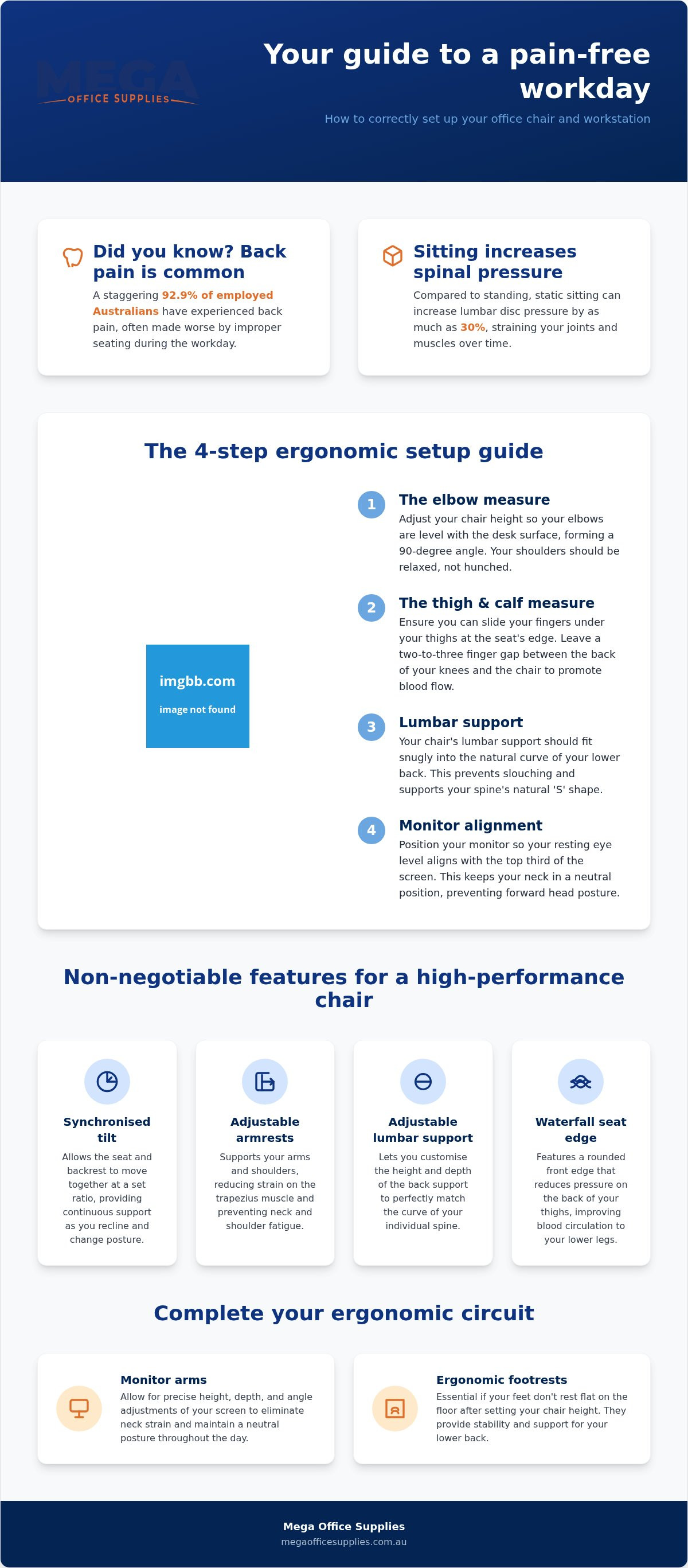
Did you know that 92.9% of employed Australians have experienced back pain? If you find yourself shifting in your seat after four hours or rubbing a stiff neck by lunchtime, you're not alone. We understand how frustrating it is to feel like your furniture is working against you. While we can't do your actual work for you, we can ensure your spine doesn't feel like it's completed a ten-round boxing match by 5 PM. Focusing on preventing back pain from office chair setups is a practical necessity for your long-term health. We'll show you how to configure your workstation and select the right ergonomic hardware to eliminate seated discomfort. This guide provides clear criteria for choosing new furniture and simple steps to adjust your current equipment for a pain-free workday.
Key Takeaways
- Understand why static sitting increases lumbar disc pressure by 30% and how to mitigate the resulting strain on your joints and muscles.
- Apply the "elbow", "thigh", and "calf" measures to personalise your workstation for optimal blood flow and spinal alignment.
- Identify non-negotiable features for commercial-grade seating, such as synchronised tilt mechanisms, to ensure long-term durability and support.
- Master the combination of adjustable hardware and disciplined habits to succeed in preventing back pain from office chair use throughout the workday.
The mechanics of seated posture and why standard chairs fail
Spending six hours or more in a static seated position often leads to persistent aches that shouldn't be ignored. While standing feels like more effort, research shows that lumbar disc pressure actually increases by 30% when you sit down; it turns out even relaxing is hard work for your spine. This added strain on your joints and muscles is a primary reason why many find preventing back pain from office chair setups so difficult. Standard chairs often lack the necessary structural support to counteract this pressure, leaving your spine to bear the load unaided, which leads to long-term musculoskeletal issues.
To better understand how these physical forces impact your body, watch this helpful video:
Most workers naturally succumb to slouching as muscles tire, which creates significant tension in the neck and upper back. To combat this, we recommend moving toward active sitting. This approach relies on the ergonomic principles of office chairs designed to support micro-movements, which is essential for preventing back pain from office chair use. Instead of acting as a rigid platform, a high-quality chair facilitates subtle weight shifts, keeping your core engaged and reducing static load.
Identifying the ergonomic gap in your current setup
Evaluate your current equipment by checking for independent tilt and height adjustments in the lumbar region. A critical feature often missed is the waterfall seat edge, which curves downwards to maintain circulation in your legs and prevent that pins and needles sensation. If your seat lacks these basics, it might be time to browse our range of office chairs to find a professional-grade solution. Proper hardware ensures your body isn't forced to adapt to a flawed design, protecting your health throughout the work week.
Adjusting your workstation for long-term spinal health
Personalising your workspace requires more than just twisting a few knobs at random. To succeed in preventing back pain from office chair use, you must follow a systematic approach based on OSHA workstation guidelines. Start with the elbow measure. Adjust your seat height until your elbows are level with the desk surface when your shoulders are relaxed. Next, perform the thigh measure by ensuring you can slide your fingers easily under your thighs at the front edge of the seat. The calf measure is equally vital. There should be a two to three finger gap between the back of your knees and the chair to maintain blood flow. Ensure the lumbar support sits firmly in the small of your back. Finally, align your resting eye level with the top third of your monitor to prevent the forward head posture that causes cervical strain. Without these precise settings, even a high-end chair is just an expensive way to develop a permanent slouch.
Essential ergonomic accessories beyond the chair
While the seat is central, secondary hardware completes the ergonomic circuit. We often recommend Kensington monitor arms to achieve precise height and tilt, ensuring your neck remains neutral throughout the day. If your feet don't rest flat on the floor after setting your elbow height, ergonomic footrests are essential for maintaining lower back stability. These tools bridge the gap between fixed furniture and individual body proportions. For those looking to incorporate more movement, you might consider browsing our office furniture supplies for standing desk options and dynamic workstation configurations. Investing in these small adjustments can lead to significant long-term health benefits.
Selecting high-performance seating for Australian workplaces
Choosing the right hardware is the final step in preventing back pain from office chair use. We prioritise commercial-grade seating that includes non-negotiable features like synchronised tilt mechanisms. This technology allows the seat and backrest to move in unison at a specific ratio, ensuring your spine remains supported during varied movements. Adjustable armrests are equally critical to prevent trapezius strain and shoulder fatigue. For high-traffic Australian environments, we prefer brands like Kensington and Floortex for their proven durability. While a home office setup might focus on aesthetics, high-volume fit-outs for healthcare or schools require industrial-strength materials that withstand constant use. You can find a detailed comparison in our office chairs collection. It's about matching the hardware to the intensity of the task; a dining chair is for eating, not for conquering a twelve-hour spreadsheet. Investing in a synchronised mechanism ensures that the chair adapts to you, rather than forcing your body to compensate for a rigid frame.
Procurement considerations for schools and government departments
Large-scale organisations require a streamlined acquisition process that respects strict budget cycles. We facilitate this by accepting official Australian Government purchase orders, allowing administrators to secure professional-grade hardware without retail friction. For private volume buyers, our business application form provides access to bulk pricing and dedicated account management. Our team can help you select high-capacity office furniture supplies that prioritise preventing back pain from office chair configurations in busy workplaces. This reliability ensures your organisation receives high-capacity solutions that protect staff health and long-term spinal longevity.
Securing your long-term spinal health
Protecting your physical health in a sedentary role requires a combination of disciplined habits and professional-grade hardware. By implementing the adjustment measures we've discussed and transitioning to active sitting, you take the most effective steps toward preventing back pain from office chair use. It's about ensuring your workstation adapts to your body rather than the other way around. Our team at Mega Office Supplies, the SHE-COM Brand of the Year winner, can help you select the right equipment. We simplify procurement for schools and departments by accepting official Australian government purchase orders nationally. You don't have to accept daily discomfort as a standard part of your work life.
Browse our range of commercial ergonomic office chairs
Making these changes today will safeguard your mobility for years to come. We look forward to helping you create a supportive and productive workspace.
Frequently Asked Questions
How can I tell if my office chair is causing my back pain?
You likely have a chair issue if your discomfort peaks late in the afternoon but improves significantly after you stand up or finish for the day. Physical signs include a lack of contact between your lower back and the backrest, or feet that cannot rest flat on the floor. If the seat pan is too deep, it can restrict circulation, leading to the leg numbness often associated with poor ergonomics.
Can a standing desk really help prevent lower back pain from sitting?
Standing desks help by breaking up prolonged sedentary periods, which Safe Work Australia classifies as a workplace hazard. Alternating your position every 30 minutes redistributes pressure across different muscle groups and joints. While a desk change is beneficial, it works best when paired with high-performance seating to ensure your body remains supported during the sitting phases of your workday.
What is the best way to sit in an office chair to avoid neck strain?
Position your monitor so your resting eye level hits the top third of the screen to maintain a neutral cervical spine. This prevents the "forward head" tilt that places immense strain on your neck muscles. Ensure your chair's armrests support your forearms without hunching your shoulders. This alignment is a vital component of preventing back pain from office chair setups in any professional environment.
Is it worth investing in an ergonomic chair for a home office?
Yes, because your home becomes a recognised workplace under Australian WHS law when you work remotely. Employers retain a duty of care to ensure your setup is safe. A commercial-grade chair provides the durability and adjustability needed to protect your spinal health over years of use. It is a functional investment in your productivity and long-term physical wellbeing, rather than just a furniture purchase.
Article by
Mega Office Supplies Team
The Mega Office Supplies Team provides practical buying guides and workplace advice for Australian businesses, schools, government organisations, healthcare providers, hospitality venues, warehouses and home offices. Family owned and operated since 2008 and based in Tweed Heads South on the Gold Coast–Tweed border, Mega Office Supplies helps Australian workplaces choose the right office supplies, furniture, technology, cleaning, safety and education products — backed by genuine local service from real people.
General Information
This article is provided as general information only to help customers compare and choose office, workplace, school, cleaning, technology, furniture, safety and business supplies. Product details, specifications, compatibility, availability, pricing and suitability may vary. Always check the individual product page, manufacturer information, workplace requirements and relevant safety guidance before purchasing or using a product.


