




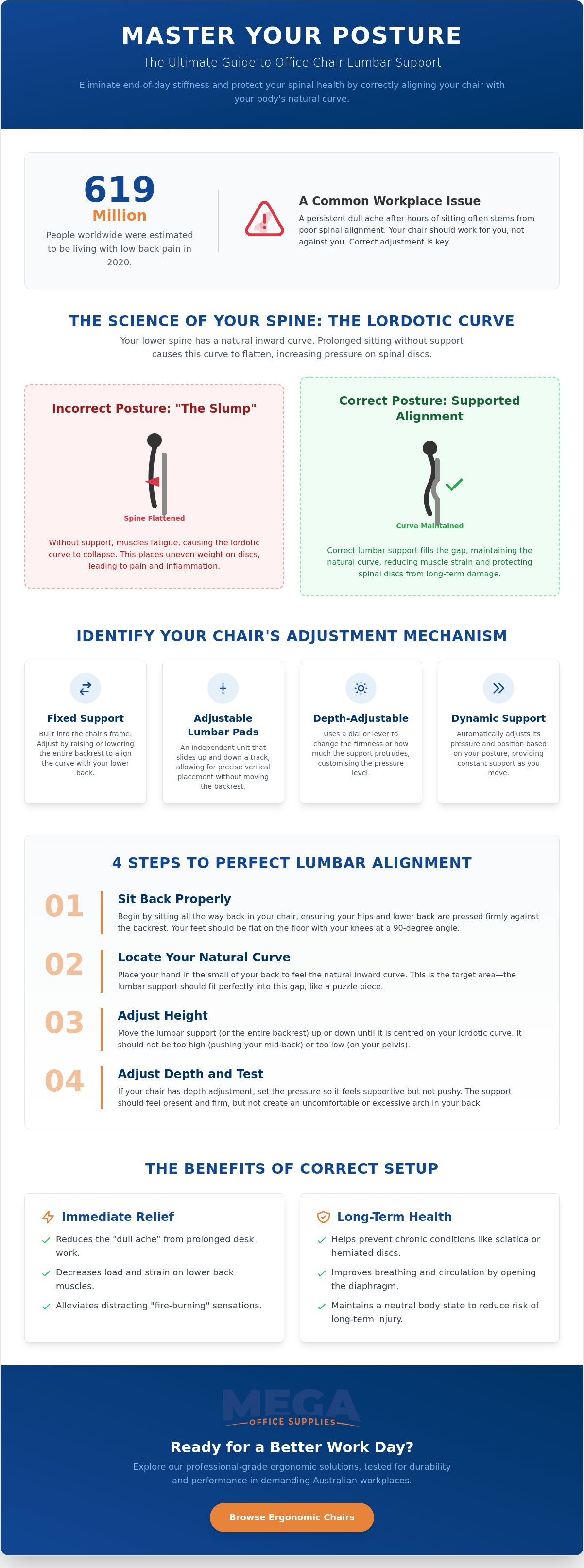
Did you know that an estimated 619 million people worldwide were living with low back pain in 2020? In the Australian workplace, this often manifests as a persistent dull ache that sets in after just a few hours of sitting. You might feel like your chair is constantly pushing you forward or find yourself overwhelmed by a complex array of dials and levers that don't seem to offer any real relief. It's a common frustration, but it's one that usually stems from a simple lack of technical calibration.
Mastering the process of adjusting lumbar support on an office chair correctly is the most effective way to protect your long term spinal health and eliminate end of day stiffness. This guide provides the precise steps required to align your chair with the natural curve of your lower back, ensuring your equipment works for you rather than against you. We'll examine how to set the ideal height and depth for your support, giving you the confidence to maintain a professional grade ergonomic setup in any environment, from the warehouse office to the corporate boardroom.
Key Takeaways
- Understand the anatomy of the lordotic curve to ensure your chair effectively fills the natural gap in your lower spine.
- Identify whether your workplace seating uses a fixed backrest height adjustment or independent sliding units to deliver targeted support.
- Master the technical steps for adjusting lumbar support on an office chair correctly to eliminate the dull aches caused by poor spinal alignment.
- Troubleshoot common ergonomic issues such as the "slouch factor" and discomfort from overly aggressive support settings.
- Learn to evaluate professional-grade ergonomic solutions using Australian standards like AFRDI certification for long-term durability in high-use environments.
Understanding the Role of Lumbar Support in Workplace Health
Lumbar support is a physical feature of a professional office chair designed specifically to fill the gap between the seat back and the lower spine. While many users view it as an optional comfort setting, it's actually a vital engineering requirement for long term health. The modern office chair has evolved to provide this support to counteract the natural tendency of the spine to slump during high volume tasks.
When you're focused on a screen for eight hours, your muscles eventually fatigue. This leads to a "flattening" of the lower back, which increases pressure on spinal discs and can cause significant discomfort. Understanding the mechanics of your equipment is the first step toward adjusting lumbar support on an office chair correctly to maintain a neutral posture.
To better understand this concept, watch this helpful video:
The Science of the Lordotic Curve
The human spine is not straight. It features a natural inward curve in the lower region, known as the lordotic curve, which involves the L1 through L5 vertebrae. This inward bow is structurally designed to distribute weight and absorb shock during movement. However, prolonged sitting without adequate support causes this curve to collapse. When the spine flattens, it places uneven weight on the intervertebral discs, leading to inflammation and dull aches. The lordotic curve is the primary target for all ergonomic chair adjustments.
Muscle fatigue is the main driver of poor posture. Without a physical barrier to hold the spine in its neutral position, the back muscles must work constantly to stay upright. Eventually, these muscles tire, and the sitter slumps forward. This creates a cycle of strain that only a correctly positioned lumbar unit can break.
Short-term vs Long-term Benefits of Correct Setup
Investing the time to calibrate your chair offers immediate and enduring advantages for your physical wellbeing. In the short term, you'll notice a reduction in lumbar muscle strain and those distracting "fire-burning" sensations that often occur by mid afternoon. There is a distinct difference between passive support, which merely exists as a static cushion, and active ergonomic adjustment that allows you to customise the pressure against your vertebrae.
- Immediate relief: Reducing the load on the lower back muscles prevents the "dull ache" associated with desk work.
- Disease prevention: Proper alignment helps prevent chronic conditions such as sciatica or herniated discs.
- Enhanced physiological function: A correct setup opens the diaphragm, which improves breathing and circulation by preventing a collapsed ribcage.
By maintaining the integrity of the lordotic curve, you ensure that your body remains in a neutral state. This reduces the risk of long term injury and keeps you focused on your professional objectives rather than your physical discomfort.
Identifying Your Chair’s Lumbar Adjustment Mechanisms
Not all office chairs are built with the same ergonomic philosophy. To succeed in adjusting lumbar support on an office chair correctly, you must first identify which hardware system your specific model utilises. Most professional chairs fall into four primary categories: fixed, adjustable pads, depth-adjustable, or dynamic. Knowing the difference ensures you don't waste time turning dials that serve a different purpose.
- Fixed Lumbar Support: This is a common feature in mid-tier commercial seating. The support is built directly into the frame. To change its position, you typically raise or lower the entire backrest.
- Adjustable Lumbar Pads: These are independent units, often found on mesh chairs, that slide vertically along a track. They allow for precision placement without moving the rest of the chair.
- Depth-Adjustable Support: This system uses a dial or lever to increase the "firmness" or protrusion of the curve. It's essential for users who require a more pronounced support profile.
- Dynamic Lumbar Support: High-performance models often feature self-adjusting systems. These react to your movement in real-time, pivoting as you shift your weight.
Manual vs. Automatic Support Systems
Locating the controls is your first hurdle. Look for knobs on the side of the backrest or sliding handles located behind the mesh. Some chairs utilise a "ratchet" system for height adjustment. You pull the backrest up click by click until it reaches the desired height. If you pull it too far, it resets to the lowest position. Manual dials are often preferred by precision-obsessed users because they offer granular control over tension. For detailed technical guidance on these movements, the Canadian Centre for Occupational Health and Safety provides an excellent resource on How to Adjust Office Chairs.
Integrated Mesh vs. Padded Support
The material of your chair dictates how the support feels against your spine. Mesh chairs rely on tension. If the mesh is too loose, the lumbar pad may feel like it is poking through the fabric. Padded chairs offer more "give" and distribute pressure across a wider surface area. Maintaining a neutral spine throughout the day requires a balance between the support's firmness and the material's flexibility. High-quality ergonomic office chairs are designed to integrate these features seamlessly, ensuring the hardware doesn't cause uncomfortable pressure points. If your current seat lacks these critical adjustment options, it might be time to browse professional seating solutions that offer the necessary precision for a healthy workplace.
The Step-by-Step Guide to Correct Lumbar Alignment
Achieving the correct ergonomic setup requires a methodical approach. You can't simply guess the position while leaning forward; you must be fully engaged with the chair's architecture. Follow these five steps for adjusting lumbar support on an office chair correctly to ensure your spine remains in a neutral, supported state throughout the workday.
- Step 1: Sit as far back in the chair as possible. Your tailbone must be firmly against the backrest to ensure the lumbar support can actually reach your spine.
- Step 2: Feel for the "small of your back." This is the deepest part of your inward spinal curve, usually located just above your belt line.
- Step 3: Move the lumbar support vertically until the most prominent part of the cushion or mesh fits snugly into that curve.
- Step 4: If your chair allows for depth adjustment, increase the pressure until you feel firm but comfortable support. It shouldn't feel like it's "poking" you, but you should feel the contact clearly.
- Step 5: Test the position. Lean back and try to slide your hand between your lower back and the chair. If there's a gap, the adjustment isn't yet precise.
This systematic process aligns with OSHA's official ergonomic chair guidelines, which emphasise the importance of maintaining the spine's natural S-curve to prevent fatigue. It's a simple calibration that pays dividends in comfort by the time 3:00 pm rolls around.
Finding the "Sweet Spot" (L3-L5 Vertebrae)
The primary target for your support is the lumbar region, specifically the L3 through L5 vertebrae. You'll find this area just above your hips. In shared office environments, a "one size fits all" approach fails because every torso length is different. Always perform the "hand test" after someone else has used your desk. If you can slide your hand behind your back while sitting, the support is either too low or too high. Resetting this takes thirty seconds but prevents hours of muscular strain.
Coordinating with Seat Depth and Height
Lumbar alignment doesn't happen in isolation. You must adjust your seat height first to ensure your feet are flat on the floor with your knees at a 90 degree angle. Once your height is set, check your seat depth. You should be able to fit roughly two fingers between the edge of the seat and the back of your knees. This ensures you can sit far enough back to actually utilise the lumbar support. For a broader look at how these elements work together, you can find more detail in our guide on Maintaining Posture: The Ergonomics of a Chair Explained.
Troubleshooting Common Posture Mistakes and Discomfort
Even after adjusting lumbar support on an office chair correctly, you might still experience persistent strain if you fall into common mechanical traps. Precision setup is a dynamic process; it requires ongoing attention to how your body interacts with the chair's hardware. If you find yourself fidgeting or experiencing new pressure points, it's usually a sign that one of several variables has shifted out of alignment.
The "Aggressive Support" problem is a frequent complaint among new users. Deeper is not always better. If the lumbar pad feels like a hard protrusion poking into your vertebrae rather than a gentle cradle, the depth is likely set too high. This over-correction can lead to localised muscle bruising or inflammation. Similarly, the "Too Low" trap occurs when the support sits on the sacrum, or tailbone. Positioning the unit this low pushes the pelvis forward and actually flattens the natural lumbar curve, which defeats the purpose of ergonomic seating.
Clothing thickness is another variable that many professionals overlook. A thick winter jacket or a heavy woollen knit adds significant depth to your physical profile. If you calibrated your chair while wearing a thin summer shirt, that same setting will feel overly restrictive in colder months.
Correcting the "Perching" Habit
Perching happens when your lumbar depth is pushed too far forward, forcing your body toward the front edge of the seat. You end up sitting on the edge of the chair, losing the benefit of the backrest entirely. This often occurs because the user is trying to find "firmer" support but ends up displacing their centre of gravity. To fix this, dial back the depth and use the tilt-tension knob to ensure the chair provides resistance without pushing you out. Discomfort often stems from support that is too high, rather than too firm.
When the Chair Isn’t the Problem
Sometimes the chair is calibrated perfectly, but external factors interfere with your posture. If your monitor is positioned too low, you will naturally lean forward and away from the backrest to see the screen. This "Slouch Factor" negates even the best lumbar support. Integrating a standing desk is a necessary partner to a good chair for total spinal relief, as it allows you to alternate between sitting and standing throughout the day. Remember to take micro-breaks every 30 minutes to reset your spine and prevent static loading. If your current chair lacks the mechanical range to accommodate these adjustments, it may be time to upgrade to a more professional ergonomic seating solution that offers the precision you require.
Selecting the Right Ergonomic Solutions for Long-term Support
Procuring professional grade hardware for a high-use workplace requires a shift in focus from aesthetics to mechanical capability. For procurement officers and facility managers, the primary objective is to select seating that accommodates the widest possible range of body types. In Australia, the benchmark for this reliability is AFRDI certification. Choosing chairs that meet these rigorous standards ensures the frame and adjustment mechanisms withstand the demands of a 24/7 commercial environment while maintaining their ergonomic integrity.
When evaluating new equipment, prioritising adjustable features over trendy design is essential for workplace health. A chair might look modern, but if it lacks the depth or height range required for adjusting lumbar support on an office chair correctly, it will eventually lead to worker dissatisfaction and physical strain. For environments where specialised ergonomic chairs aren't feasible, such as reception areas or staff kitchens, auxiliary lumbar rolls or portable cushions can provide a necessary stopgap to prevent slouching during short periods of sitting.
What to Look for in a New Office Chair
A high-performance chair must offer independent back-height adjustment. This feature is critical because it allows the lumbar curve to be positioned accurately for both taller and shorter users without affecting the seat's tilt. Additionally, look for breathable mesh backrests that maintain high tension over time. Poor quality mesh can sag after six months, causing the integrated support to lose its effectiveness. For a detailed comparison of current models, you can consult The Professional Buying Guide to Ergonomic Office Chairs in Australia to find a solution that fits your specific sector requirements.
Investing in Quality Workplace Furniture
The long-term return on investment for high-quality furniture is found in the reduction of workers' compensation claims and the improvement of daily productivity. Providing staff with the tools to manage their own comfort is a proactive approach to workplace safety. Mega Office Supplies supports Australian businesses by providing office furniture designed for durability and manual precision. As a family owned and operated business since 2008, we understand the logistical needs of kitting out a professional centre. We focus on providing stable, reliable solutions that help you maintain a healthy, efficient workforce without the friction of frequent equipment failures or ergonomic discomfort.
Optimising Your Professional Workspace for Long Term Health
Precision alignment of the lumbar pad with the L3 through L5 vertebrae is the foundation of a healthy posture. We've identified that adjusting lumbar support on an office chair correctly requires more than a simple guess; it demands a technical understanding of your chair's specific mechanisms and seat depth. By following a methodical setup process, you can eliminate the dull aches that often disrupt a productive afternoon.
Mega Office Supplies has been family owned and operated since 2008. We specialise in providing expert procurement support for government and educational sectors across the country. If your current seating lacks the necessary manual precision to protect your spine, it's time to invest in a professional grade solution. Upgrade your workspace with our range of professional Ergonomic Office Chairs today. Taking a few minutes to recalibrate your setup will safeguard your long term physical wellbeing and keep your focus on the task at hand.
Frequently Asked Questions
Where exactly should the lumbar support sit on my back?
The lumbar support should sit directly in the small of your back, specifically targeting the L3 to L5 vertebrae. This area is generally located just above your belt line where the spine bows inward. If the support is too high, it pushes your ribcage forward; if it is too low, it flattens your sacrum. Ensuring it fits snugly into the deepest part of your back's curve is essential for stability.
Can too much lumbar support cause back pain?
Yes, excessive lumbar support can lead to localised pressure points and muscle inflammation. When the depth is adjusted too aggressively, it forces the spine into an unnatural arch, which strains the surrounding ligaments. You should feel a firm presence without the sensation of a hard object poking into your vertebrae. Finding the right balance is a key part of adjusting lumbar support on an office chair correctly.
How do I know if my office chair has adjustable lumbar support?
You can identify adjustable features by checking the rear of the backrest for sliding tracks, knobs, or levers. On many mesh models, you will find a plastic or padded bar that slides vertically. If your chair lacks these, look for a height-adjustable backrest; raising the entire back often moves the integrated lumbar curve. If neither exists, your chair likely features a fixed, non-adjustable support system.
Should I use a lumbar pillow if my chair already has support?
You should only use an additional lumbar pillow if the chair's built-in support is insufficient for your specific spinal curve. Adding a pillow to an already ergonomic chair can often push your torso too far forward, causing you to lose contact with the upper backrest. This creates a "perching" habit that strains the neck and shoulders. It's usually better to calibrate the existing hardware before adding auxiliary cushions.
Why does my lower back hurt even with an ergonomic chair?
Pain often persists because the chair's features aren't calibrated to your unique dimensions or you are sitting away from the support. Many users "perch" on the edge of the seat, which leaves the lumbar region unsupported regardless of the chair's quality. Additionally, poor monitor height can cause you to lean forward, negating the benefits of the backrest. Mastering the process of adjusting lumbar support on an office chair correctly is only effective if you maintain full contact.
How often should I readjust my lumbar support settings?
You should check your settings whenever you change your footwear or clothing thickness, or if another person has used your workstation. A change in heel height alters your pelvic tilt, which can shift how your back interacts with the lumbar pad. Similarly, a heavy winter jacket requires less depth than a thin summer shirt. Regular micro-adjustments ensure the support remains precise as your physical profile changes throughout the year.
Does the tilt of my chair affect the lumbar support?
Yes, the tilt angle significantly changes the pressure and position of the support against your spine. When you recline, your pelvis rotates, which can cause the lumbar pad to shift slightly higher or lower relative to your vertebrae. If you prefer a slight recline for tasking, you may need to increase the depth or tension of the lumbar unit to ensure it maintains consistent contact with your lower back.
What is the "neutral spine" position for office workers?
A neutral spine is a position where the three natural curves of the back, cervical, thoracic, and lumbar, are present and aligned. In this state, the spine is not perfectly straight but maintains its natural S-shape with minimal muscular effort. Achieving this requires your feet to be flat on the floor, your knees at a 90 degree angle, and your lower back firmly supported by the chair's lumbar unit.

Article by
Mega Office Supplies Team
The Mega Office Supplies Team provides practical guidance for Australian businesses, schools, government organisations, healthcare providers, hospitality venues, warehouses and home offices. Based in Tweed Heads South, Mega Office Supplies is an Australian business, family owned and operated since 2008, offering office stationery, workplace furniture, technology products, labels, printers, cleaning and janitorial supplies, safety products, art materials, education resources and everyday business essentials from trusted brands.
General Information
This article is provided as general information only to help customers compare and choose office, workplace, school, cleaning, technology, furniture, safety and business supplies. Product details, specifications, compatibility, availability, pricing and suitability may vary. Always check the individual product page, manufacturer information, workplace requirements and relevant safety guidance before purchasing or using a product.


