


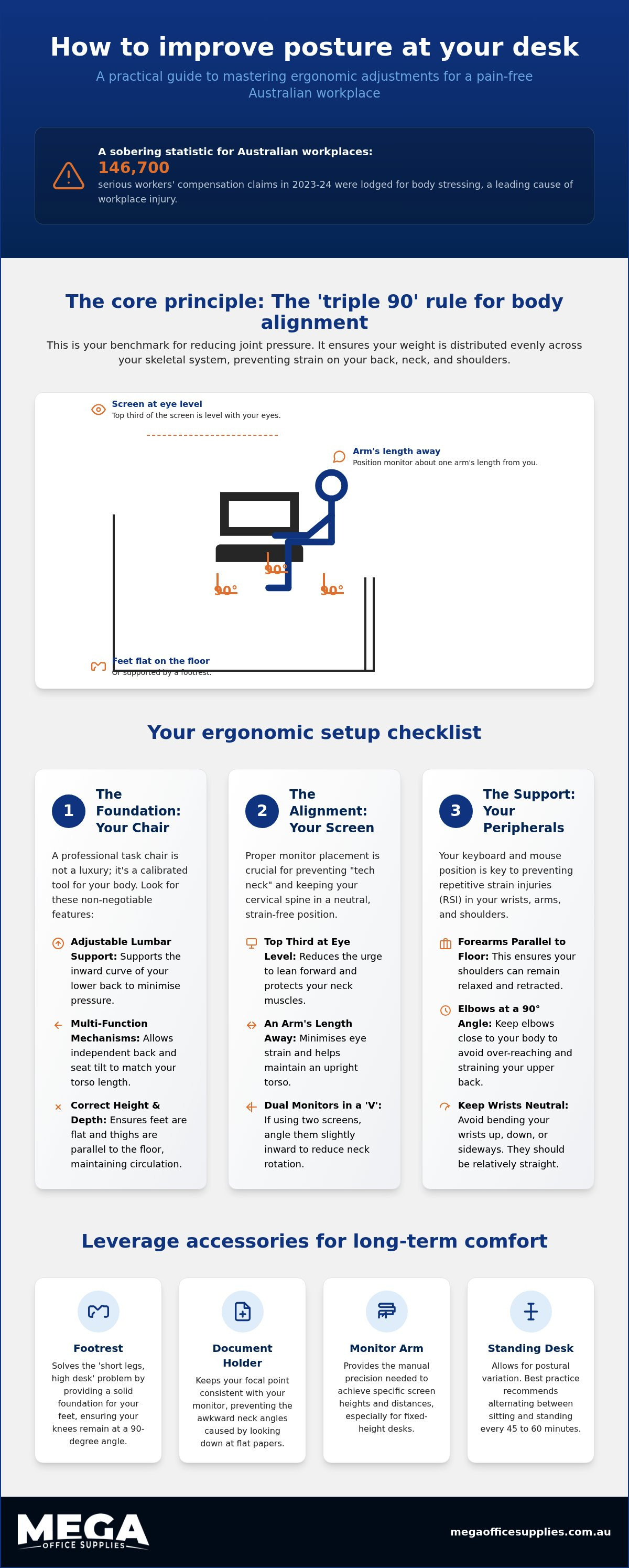
Did you know that body stressing remains a leading cause of the 146,700 serious workers' compensation claims lodged in Australia over the 2023-2024 period? It is a sobering figure, yet many of us continue to ignore the dull ache in our lower back or the persistent strain of "tech neck" until it impacts our daily output. We agree that sitting for long periods shouldn't feel like a physical endurance test; your spine shouldn't have more curves than the Great Ocean Road. This guide will show you exactly how to improve posture while sitting at a desk by mastering practical adjustments and equipment choices. We will walk through the essential ergonomics of your existing furniture and identify which accessories, such as monitor arms or footrests, offer the best return on investment for your health. It is time to build a workspace that actually supports your frame.
Key Takeaways
- Understand why a professional grade ergonomic chair is the essential foundation for lumbar support and lower limb circulation during long shifts.
- Discover how to improve posture while sitting at a desk by implementing the "triple 90" rule to align your ankles, knees, and hips correctly.
- Identify which ergonomic accessories, from footrests to document holders, provide the best return on investment for preventing neck strain and fatigue.
- Master the technical calibration of your equipment to eliminate chronic pain and meet your duty of care requirements in any Australian workplace.
Selecting the right foundations for workplace ergonomics
While a dining chair is excellent for a Sunday roast, it is the primary enemy of your lumbar spine during a ten-hour shift. These chairs lack the necessary support to maintain the spine's natural curve, often leading to significant body stressing. When considering how to improve posture while sitting at a desk, the structural integrity of your seat is the first technical variable to address. Professional ergonomic office chairs provide the resistance required to keep your torso upright without manual effort.
To better understand this concept, watch this helpful video:
Adjustability is critical for long-term health. A chair with a gas-lift height adjustment ensures your feet remain flat while your thighs stay parallel to the floor. This maintains circulation to your lower limbs and prevents pressure on the back of the knees. Modern designs also encourage Active sitting, which allows for micro-movements that reduce muscle fatigue. Without adjustable seat depth, users often find themselves perching on the edge of the seat, which removes all benefit of the backrest.
The non-negotiable features of a professional task chair
A high-quality task chair should act as a calibrated tool for your specific body type. When we evaluate hardware for Australian government departments or home offices, we prioritise these technical specifications to help you understand how to improve posture while sitting at a desk:
- Multi-function mechanisms: These allow independent back and seat tilt to accommodate different torso lengths and sitting preferences.
- Adjustable lumbar support: This feature is essential to support the inward curve of the lower back and minimise joint pressure.
- User-specific ratings: Ensure the chair’s weight capacity and seat width match the user to prevent instability or poor alignment.
Implementing the 90-degree rule for body alignment
Once you have selected a supportive chair, the next step in learning how to improve posture while sitting at a desk is mastering body alignment. The "triple 90" rule is a reliable benchmark for reducing joint pressure. It requires your ankles, knees, and hips to all maintain a 90-degree angle. This alignment follows the fundamental principles of good posture by ensuring weight is distributed evenly across the skeletal system. If your desk is too high to achieve this with your feet on the floor, you may need to adjust your chair height and introduce a footrest.
Shoulder position is equally vital. While "The Hunchback of Notre Dame" is a literary classic, it is rarely the aesthetic we want in an Australian boardroom. Keep your shoulders retracted and relaxed rather than rounded forward. Your keyboard and mouse must be positioned so your forearms remain parallel to the floor, with elbows bent at a right angle. This prevents excessive wrist extension, which is a primary cause of repetitive strain injuries in high-volume data entry roles.
Optimising screen height to eliminate tech neck
Correct monitor placement prevents "tech neck" by keeping the cervical spine in a neutral position. Position the top third of your screen at eye level and roughly an arm’s length away. If you use dual monitors, angle them in a slight "V" shape to minimise repetitive neck rotation. For fixed-height desks, using ergonomic monitor arms can provide the manual precision needed to achieve these specific heights. This technical setup reduces eye strain and the physical urge to lean forward into the screen.
Leveraging ergonomic accessories for long-term comfort
Accessories represent the final technical layer of ergonomic success. If a chair cannot be lowered further without compromising desk height, a footrest is the professional solution to the "short legs, high desk" dilemma. This hardware ensures your feet have a solid foundation, which is essential for how to improve posture while sitting at a desk. Document holders are also critical; they keep your focal point consistent with your monitor, preventing the awkward neck angles caused by looking down at flat papers or cradling a phone between your shoulder and ear.
Integrating a standing desk allows for postural variation throughout the day. Best practice recommends alternating positions every 45 to 60 minutes to maintain circulation and reduce static load. This transition encourages micro-movements that prevent the physical fatigue associated with fixed positions.
Creating a movement-friendly workspace
High-performance Kensington accessories, such as wrist rests and trackballs, provide the manual precision needed to reduce repetitive strain. We suggest setting a recurring reminder every hour to stand, stretch, and reset your pelvic position. If a full furniture replacement isn't feasible in your current budget cycle, a standing desk converter offers a practical entry point. These tools ensure your workspace remains a high-capacity environment where health and efficiency are prioritised.
Securing your long-term workplace health
Building a pain-free workspace requires a technical approach to your environment. By prioritising a professional task chair and implementing the "triple 90" rule, you create a foundation for spinal health. We've shown that adjustments like monitor height or adding a footrest are final pieces in the puzzle of how to improve posture while sitting at a desk. With over 17 years of operation and combined team experience exceeding 150 years, we understand the demands of the Australian workplace. We provide national delivery and local support from real people to ensure you receive the right ergonomic hardware. Consistency is the primary driver of success; don't let your posture revert to a question mark by lunchtime.
Take the time to reset your station today. Your body will thank you for the investment.
Frequently asked questions
How do I know if my desk height is correct for my height?
Your desk height is correct when your forearms rest parallel to the floor while your shoulders remain relaxed. When learning how to improve posture while sitting at a desk, remember that if you've to lift your shoulders to reach the keyboard, the surface is too high. For a standard 720mm desk, you'll likely need to raise your chair and use a footrest.
Is it better to sit at 90 degrees or lean back slightly?
While the 90-degree rule is a standard benchmark, modern research suggests a slight recline of 100 to 110 degrees can reduce spinal disc pressure. This position allows the chair's backrest to take more of your upper body weight. However, you must ensure your lumbar support remains in contact with your spine to prevent slouching and maintain a neutral pelvic position.
What is the best way to sit at a desk with lower back pain?
The best way to sit at a desk with lower back pain is to ensure your lumbar spine is fully supported by a professional grade backrest. You should sit back into the chair rather than on the edge. Integrating a standing desk helps by allowing you to change positions frequently; this prevents the static loading that aggravates chronic lower back issues.
Can I improve my posture without buying a new ergonomic chair?
You can certainly learn how to improve posture while sitting at a desk using existing equipment by adding specific accessories. A portable lumbar support cushion can correct a flat backrest, while a monitor arm ensures your screen reaches eye level. These targeted additions provide a high return on investment for health without the immediate need for a full furniture fit out.

Article by
Mega Office Supplies Team
The Mega Office Supplies Team provides practical buying guides and workplace advice for Australian businesses, schools, government organisations, healthcare providers, hospitality venues, warehouses and home offices. Family-owned and operated since 2009 and based in Tweed Heads South on the Gold Coast–Tweed border, Mega Office Supplies brings more than 150 years of combined team experience to helping Australian workplaces choose the right office supplies, furniture, technology, cleaning, safety and education products — backed by genuine local service from real people.
General Information
This article is provided as general information only to help customers compare and choose office, workplace, school, cleaning, technology, furniture, safety and business supplies. Product details, specifications, compatibility, availability, pricing and suitability may vary. Always check the individual product page, manufacturer information, workplace requirements and relevant safety guidance before purchasing or using a product.


