


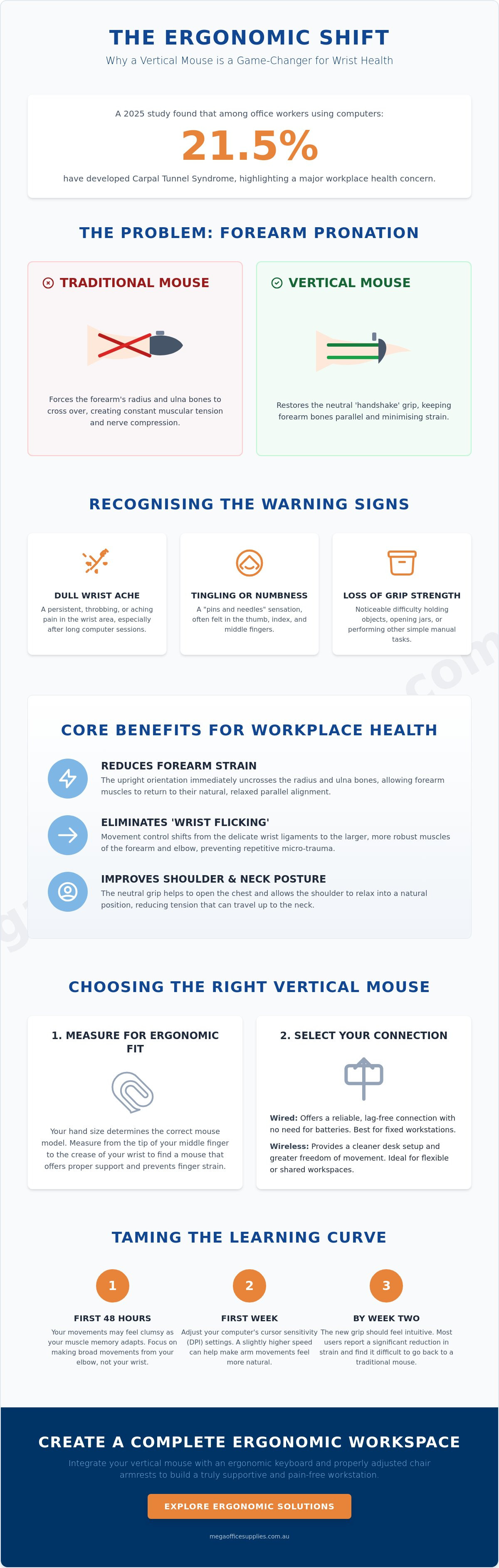
Did you know that a 2025 study found the prevalence of carpal tunnel syndrome among office workers using computers has reached 21.5%? This statistic highlights a growing concern for Australian businesses and home office users who spend hours at a workstation. If you've experienced chronic wrist ache or forearm fatigue during long shifts, you're likely searching for the benefits of a vertical mouse for wrist pain to help manage these symptoms. Most professionals agree that traditional horizontal mice force the forearm into an unnatural, pronated position, which often leads to long-term musculoskeletal disorders.
This guide will show you how switching to a vertical mouse can neutralise wrist strain and transform your long-term workplace health. We'll explore the scientific justification for the ergonomic "handshake" alignment, review high-performance hardware options, and outline a clear transition plan to ensure your new setup feels natural within two weeks. By the end of this article, you'll have the practical knowledge needed to organise a pain-free workstation and make a confident investment in your physical wellbeing.
Key Takeaways
- Understand why traditional mouse designs cause forearm pronation and how restoring a neutral alignment can minimise chronic muscular tension.
- Discover the key benefits of a vertical mouse for wrist pain, specifically how the "handshake grip" reduces bone torsion and shifts strain away from the wrist.
- Identify the correct way to measure your hand for an ergonomic fit and evaluate whether wired or wireless connectivity suits your specific workplace requirements.
- Learn how to manage the initial learning curve by adjusting cursor sensitivity and allowing muscle memory to adapt during the first 48 hours of use.
- Explore how to integrate your mouse into a complete ergonomic workspace by ensuring synergy with chair armrests and professional-grade keyboards.
Understanding the Link Between Standard Mice and Wrist Pain
Standard computer mice require a palm-down orientation that contradicts the natural anatomy of the human arm. When you place your hand flat on a desk to grip a traditional mouse, you're engaging in "forearm pronation". This posture forces the radius and ulna bones in your forearm to cross over one another, creating a persistent state of muscular tension. This isn't just about comfort; it's about the structural load placed on your tendons and nerves during a standard eight-hour shift. Understanding these anatomical mechanics is essential when considering the benefits of a vertical mouse for wrist pain.
In the traditional palm-down position, the carpal tunnel is compressed against the hard surface of the desk, which can irritate the median nerve over time. This pressure, paired with the repetitive micro-movements required for clicking and scrolling, often leads to chronic Repetitive Strain Injury (RSI). Most traditional designs encourage "wrist flicking", where small cursor movements are controlled by pivoting the wrist side-to-side. Because these movements are so frequent, the body doesn't have time to recover between actions, leading to inflammation that eventually crowds the nerve pathways.
To better understand this concept, watch this helpful video:
The Problem with Forearm Pronation
The physiological neutral state of the human arm is one where the palm faces the body, similar to a relaxed handshake. Rotating the palm 90 degrees to be flush with a desk surface is an unnatural posture that maintains a constant torque on the forearm muscles. Ergonomic designs aim to reduce wrist pronation by keeping the radius and ulna bones in a parallel, stress-free alignment. Pronation-related strain is a primary cause of office-based wrist fatigue and long-term discomfort in Australian workplaces.
Recognising the Warning Signs of Mouse-Related Strain
Identifying symptoms early is the key to maintaining long-term workplace health and avoiding extended medical leave. Common warning signs include a persistent dull ache in the wrist, tingling in the thumb and first two fingers, or a noticeable loss of grip strength when handling everyday items. While some users dismiss these as temporary fatigue, they are often the precursors to serious musculoskeletal disorders. Early intervention, such as upgrading your office technology to include ergonomic peripherals, is critical before these symptoms escalate into chronic conditions that impact your productivity and quality of life.
Core Benefits of a Vertical Mouse for Workplace Health
The primary benefits of a vertical mouse for wrist pain stem from the immediate reduction of mechanical torsion within the forearm. By rotating the device to an upright orientation, you're effectively uncrossing the radius and ulna bones, which allows the muscles to return to their natural, parallel alignment. This structural shift eliminates the constant twisting force required by traditional mice. For those managing existing discomfort, this change provides a stable foundation for recovery while maintaining full operational capacity during the workday.
One of the most significant functional improvements is the elimination of "wrist flicking". Standard mice often encourage users to navigate the screen by pivoting the wrist side-to-side, a movement that places immense strain on the small ligaments of the carpal tunnel. Vertical designs shift this recruitment to the larger, more robust muscles of the forearm and the elbow. This distribution of effort prevents the micro-trauma associated with repetitive small-scale movements and encourages a more fluid, healthier range of motion across the desk surface.
The impact of a vertical mouse extends beyond the hand. When your palm is flat, it often triggers a subtle inward rotation of the humerus, leading to "shoulder hiking" and tension in the neck. Adopting a vertical grip opens the chest and allows the shoulder to drop into a relaxed, neutral position. This chain reaction helps to minimise the secondary aches often felt in the upper back and trapezius muscles after long hours of data entry or administrative work. It's a holistic approach to ergonomics that treats the arm and torso as a single, connected system.
Restoring the Handshake Position
Most professional vertical mice utilise an angle between 57 and 90 degrees to mimic the natural resting state of the human hand. This specific geometry significantly reduces activity in the extensor muscles, which are typically overtaxed in a palm-down posture. For users currently dealing with tendonitis or lateral epicondylitis, this unweighted position offers immediate relief. It provides a supportive cradle for the hand, ensuring that the weight of the arm is borne by the desk rather than the sensitive tissues of the wrist.
Impact on Long-Term Productivity
Physical comfort is directly linked to mental focus and overall output. When chronic aches are removed from the equation, workers experience less cognitive fatigue and can maintain higher levels of accuracy throughout the day. Investing in professional grade ergonomic peripherals ensures durability in high-volume environments like government departments or healthcare reception areas. To achieve a complete ergonomic solution, you should also consult our ergonomic office chair guide to ensure your seated posture supports your new arm alignment. You can explore a full range of supportive office furniture to further enhance your workplace health and comfort.
Choosing the Right Vertical Mouse for Your Requirements
Selecting an ergonomic peripheral is a precise exercise in matching hardware to your unique anatomy. While the general benefits of a vertical mouse for wrist pain are well-documented, the actual effectiveness of the device depends heavily on physical fit. A mouse that is too large will force your fingers to overreach for the buttons. Conversely, a device that is too small can lead to cramping in the palm. Professional buyers should evaluate options based on hand dimensions and specific task requirements to ensure the investment yields long-term health results.
Reliability is another cornerstone of a professional Australian office environment. You must decide between the flexibility of wireless connectivity and the consistent, battery-free operation of a wired model. Wireless mice are excellent for modern hot-desking and reducing cable clutter, but they require a charging schedule. Wired models are often preferred in high-security government or healthcare settings where data integrity and constant availability are non-negotiable. Both options provide the same ergonomic relief, provided the internal sensor is high-quality.
Anatomical Fit and Hand Sizing
To find your ideal size, measure the distance from the crease of your wrist to the tip of your middle finger. Most manufacturers categorise their vertical mice into small, medium, and large brackets based on these measurements. A dedicated thumb rest is a critical feature to look for. It supports the thumb in a relaxed, neutral position and prevents "pinch" strain, which occurs when the thumb must constantly grip the side of the device to maintain control. Left-handed users must be particularly careful to select southpaw-specific models, as the asymmetric nature of vertical designs makes them impossible to use with the opposite hand.
Technical Specifications for Professional Use
Technical performance is just as vital as physical comfort for maintaining productivity. High DPI (Dots Per Inch) settings allow the cursor to move further across the screen with minimal physical movement of the hand. This is particularly useful for multi-monitor setups common in administrative and design roles. You can find a range of high-precision mice and complementary technology category accessories to refine your workstation. Consider the weight and glide of the device as well. A lighter mouse with high-quality PTFE feet will glide effortlessly across most surfaces, further reducing the muscular effort required for daily navigation.
Taming the Learning Curve: Tips for a Smooth Transition
Adopting a vertical orientation requires a fundamental shift in your motor patterns. For most users, the first 48 hours feel distinctly unusual. This is a natural response as your brain attempts to apply old horizontal movement patterns to a vertical plane. While you'll immediately notice the benefits of a vertical mouse for wrist pain through reduced tension, your precision might temporarily dip as you recalibrate your hand-eye coordination. Stick with it. Most professionals report that the new grip becomes second nature within a week of consistent use.
One common hurdle is the "knocking over" phenomenon. Because vertical mice are taller than traditional models, you may accidentally strike the device when moving your hand from the keyboard. You can mitigate this by slightly increasing the distance between your peripherals or adjusting your desk reach. You should also consider increasing your cursor sensitivity or DPI settings. Since you're now using the larger muscles of your forearm rather than the fine-motor muscles of your wrist, a faster cursor allows you to cover more screen area with less physical effort.
Developing New Muscle Memory
Don't force a full eight-hour shift on your first day. Instead, use the vertical mouse in 90-minute intervals to allow your forearm muscles to adapt without fatigue. This gradual approach helps you transition from "wrist-pivoting" to a much healthier "forearm-gliding" motion. Keep your old mouse nearby as a temporary backup for high-stakes tasks during the first few days, but aim to phase it out entirely by day three to solidify your new habits.
Optimising Your Desk Layout
Proper arm positioning is vital for ergonomic success. Ensure your desk height allows for a 90-degree bend at the elbow, which prevents you from reaching upward and straining the shoulder. A high-quality mouse pad with a low-friction surface will further enhance precision and reduce the force required for movement. For detailed height adjustment tips, consult our standing desk guide. To complete your workstation upgrade, browse our full range of ergonomic mice and find the model that fits your specific workflow.
Beyond the Mouse: Creating a Complete Ergonomic Workspace
A vertical mouse is a critical tool for neutralising forearm strain, but its effectiveness is capped by the surrounding workstation environment. To fully realise the benefits of a vertical mouse for wrist pain, you must consider the synergy between all desk peripherals. If your monitor is too low or your keyboard requires you to reach forward, the postural benefits of the vertical grip are negated by shoulder tension and neck strain. A holistic approach ensures that the "handshake" alignment of your arm is supported by a foundation of proper desk height and equipment placement.
Organising your desk into a "neutral reach zone" is a fundamental step in workplace maintenance. This involves placing your most frequently used items, like your mouse and keyboard, within a 30 to 40-centimetre radius of your body. This setup prevents overreaching, which can cause the shoulder to rotate and the wrist to deviate from its neutral path. Pairing a vertical mouse with a split or contoured keyboard further minimises the need to rotate your palms downward, maintaining a consistent, low-stress posture across both hands.
- Monitor Alignment: Position the top of your screen at eye level to prevent slouching.
- Keyboard Synergy: Use a tenkeyless keyboard to keep the mouse closer to your body's centre line.
- Surface Clearance: Ensure there's enough space to move the taller vertical device without obstruction.
The Role of Arm and Shoulder Support
An ergonomic office chair provides the essential foundation for wrist health. If your chair doesn't have adjustable armrests, you're likely to fall into the "floating arm" mistake, where the weight of the limb is supported entirely by the neck and shoulder muscles. This tension travels down the arm, increasing the load on the wrist. By ensuring your armrests are level with your desk, you allow your forearm to glide effortlessly. Stabilising the lower body with footrests can also improve your overall seated posture, reducing the tendency to lean forward and put pressure on your wrists.
Procurement for the Modern Australian Office
For office managers and administrators, standardising ergonomic rollouts is a proactive way to minimise long-term WHS risks. While individual needs vary, providing a high-capacity range of adjustable tools allows for a versatile workplace that accommodates diverse body types. Balancing your procurement budget with high-quality, durable hardware is an investment in staff longevity. When organisations understand the benefits of a vertical mouse for wrist pain, they can make informed decisions that protect their workforce. For a comprehensive selection of workplace solutions and office supplies, choosing a reliable Australian partner ensures your team has access to the professional grade equipment needed for a healthy environment.
Future-Proof Your Professional Workstation
Transitioning to an upright peripheral is a proactive step toward eliminating the anatomical strain caused by traditional horizontal designs. By restoring your forearm to a natural handshake alignment, you can effectively experience the benefits of a vertical mouse for wrist pain while protecting your long-term productivity. This hardware works best when integrated into a complete ergonomic setup, including supportive seating and proper monitor placement. While the first 48 hours of use might feel unusual, the reduction in muscular tension provides a clear path toward a pain-free workday.
Mega Office Supplies is an Australian family-owned and operated business with over 20 years of combined industry experience. We provide national delivery for businesses and schools, ensuring your team has access to professional-grade hardware wherever they're located. It's time to move beyond temporary fixes and invest in a workstation that supports your physical wellbeing. View our range of ergonomic mice and workplace technology today to find the right fit for your requirements. Your hands will thank you for making the switch.
Frequently Asked Questions
Do vertical mice actually help with carpal tunnel syndrome?
Yes, vertical mice help by reducing direct pressure on the median nerve within the carpal tunnel. Traditional mice force the palm down, which compresses this sensitive area against the hard surface of your desk. By shifting to a "handshake" grip, you lift the underside of the wrist away from the desk. This anatomical shift is one of the primary benefits of a vertical mouse for wrist pain and can help manage existing symptoms during long shifts.
How long does it typically take to get used to a vertical mouse?
Most users adapt to a vertical mouse within one to two weeks of consistent use. You'll likely feel comfortable with basic navigation after the first 48 hours. However, achieving full fine-motor precision for tasks like photo editing or detailed spreadsheets usually takes a bit longer. Consistency is the key to a fast transition. Use the new device exclusively to help your brain build new muscle memory without the confusion of switching back and forth.
Can I use a vertical mouse for gaming or high-precision design work?
You can certainly use vertical mice for gaming and high-precision design work. Many professional models feature high DPI sensors that offer the same accuracy as traditional performance mice. While competitive gamers might prefer specific weights, many designers find the ergonomic benefits allow them to work longer without fatigue. It simply requires a short period of recalibration for your hand-eye coordination to adjust to the new clicking angle.
Are vertical mice better for large or small hands?
Vertical mice are effective for both large and small hands, provided you select a model specifically designed for your dimensions. Ergonomic relief depends on your fingers reaching the buttons comfortably without straining or over-curling. Always check manufacturer sizing charts before purchasing to ensure the device fully supports your palm. A properly sized device ensures your hand remains in a neutral position, which is essential for preventing secondary aches in the thumb and palm.
Should I choose a wired or wireless vertical mouse for my office?
Choosing between wired and wireless models depends on your specific office environment and reliability needs. Wireless mice offer a cleaner desk and are ideal for hybrid workers who move between different workstations. Conversely, wired models provide a constant connection without the need for charging or replacement batteries. This reliability is often preferred in high-security government departments or busy healthcare environments where equipment downtime must be minimised.
What is the best angle for a vertical mouse to reduce wrist pain?
An angle between 57 and 60 degrees is generally considered the best for reducing wrist pain. This specific slope mirrors the natural resting angle of your forearm and hand when placed on a flat surface. It provides enough tilt to uncross the radius and ulna bones while maintaining enough stability for precise clicking. This specific geometry is a core part of the benefits of a vertical mouse for wrist pain and long-term workplace comfort.
Do I need a special mouse pad for an ergonomic vertical mouse?
You don't need a "special" mouse pad, but a high-quality, low-friction surface is highly recommended for the best experience. Because vertical mice are often slightly taller and heavier than standard ones, a smooth pad reduces the physical force required to glide the device. This further minimises the strain on your forearm muscles. Avoid using highly reflective or glass surfaces unless your mouse features a laser sensor specifically designed for them.
Can a vertical mouse prevent repetitive strain injury (RSI) before it starts?
Proactive use of a vertical mouse can definitely help prevent repetitive strain injury (RSI). You shouldn't wait for chronic pain to appear before upgrading your workstation technology. Implementing ergonomic hardware early is a standard part of workplace health and safety risk mitigation in Australian offices. It keeps your forearm muscles in a neutral state and prevents the micro-trauma that eventually leads to chronic inflammation and long-term musculoskeletal disorders.

Article by
Mega Office Supplies Team
The Mega Office Supplies Team provides practical guidance for Australian businesses, schools, government organisations, healthcare providers, hospitality venues, warehouses and home offices. Based in Tweed Heads South, Mega Office Supplies is a family-owned and operated Australian business offering office stationery, workplace furniture, technology products, labels, printers, cleaning and janitorial supplies, safety products, art materials, education resources and everyday business essentials from trusted brands.
General Information
This article is provided as general information only to help customers compare and choose office, workplace, school, cleaning, technology, furniture, safety and business supplies. Product details, specifications, compatibility, availability, pricing and suitability may vary. Always check the individual product page, manufacturer information, workplace requirements and relevant safety guidance before purchasing or using a product.


