


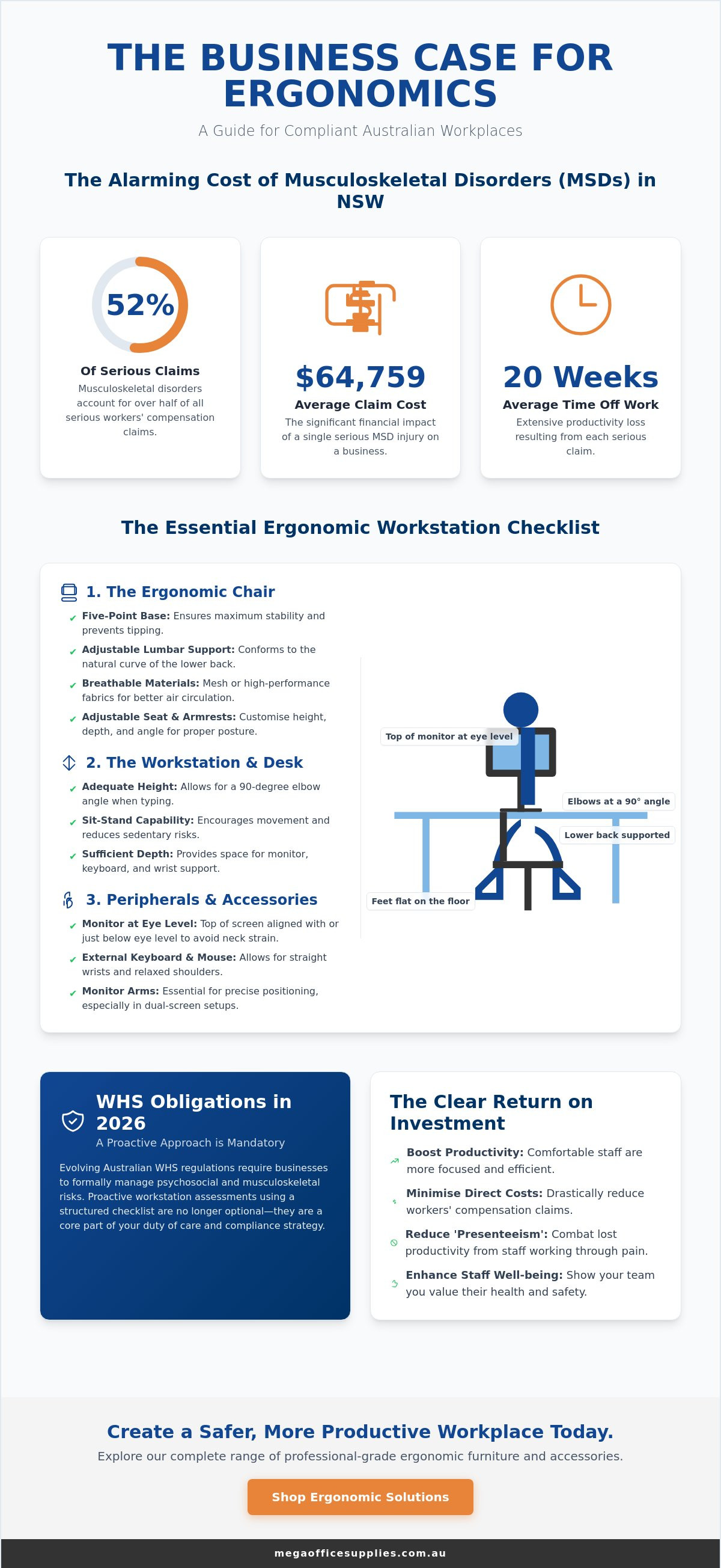
Did you know that musculoskeletal disorders (MSDs) account for 52% of all serious workers' compensation claims in New South Wales? With the average cost of a serious MSD claim reaching $64,759 and resulting in 20 weeks of lost time, a professional-grade office ergonomics checklist for Australian workplaces is a critical asset for your risk management strategy. As of 2026, the enforcement of psychosocial hazard regulations and the transition to new Workplace Exposure Limits mean that proactive workstation assessments are no longer optional for compliant organisations.
You likely understand that a well-supported team is a more efficient one, yet the challenge of sourcing high-quality furniture at scale can often lead to inconsistent safety standards across different departments. This guide will provide you with a clear, actionable framework to ensure your workplace meets the latest WHS benchmarks while protecting your staff from preventable strain.
We'll outline a comprehensive assessment process for both new and existing workstations, focusing on the procurement of reliable ergonomic office chairs, monitor arms, and sit-stand desks. You'll also learn how to align your equipment choices with the mandatory Codes of Practice taking effect across Australia throughout 2026.
Key Takeaways
- Understand your legal obligations under the Australian WHS Act and how to address the 2026 regulatory shift toward managing psychosocial and musculoskeletal risks.
- Utilise a professional-grade office ergonomics checklist for Australian workplaces to facilitate consistent workstation assessments across your entire organisation.
- Identify the technical requirements for ergonomic hardware, from the stability of five-point chair bases to the correct eye-level alignment for dual-monitor arms.
- Optimise staff productivity by implementing a movement-first philosophy using sit-stand workstations and properly configured peripheral accessories.
- Establish a scalable procurement strategy that simplifies bulk furniture audits and ensures all new equipment meets high-capacity industrial standards.
The Business Case for Ergonomics in Australian Workplaces
Ergonomics is not merely a matter of employee comfort; it's a fundamental requirement of the Australian Work Health and Safety (WHS) Act. Under this legislation, every Person Conducting a Business or Undertaking (PCBU) holds a primary duty of care to ensure the health and safety of their workers. This duty extends to the physical environment, requiring employers to manage the risks associated with musculoskeletal disorders (MSDs). By applying the principles of ergonomics, you can identify and eliminate physical stressors before they manifest as chronic injuries.
The financial implications of ignoring these standards are severe. Australian data highlights that musculoskeletal disorders (MSDs) are a significant contributor to serious workers' compensation claims across the country. Some reports indicate that MSDs can account for over half of all serious claims, with the average cost of a serious claim potentially exceeding $64,000 and leading to an average of 20 weeks of lost time per person. When an employee suffers from body stressing, the business loses more than just a team member for a few weeks. Beyond these direct costs, poor workstation design leads to hidden expenses like reduced focus and "presenteeism," where staff are at their desks but their productivity is hampered by persistent pain.
To better understand the fundamentals of a healthy setup, watch this helpful video:
Understanding Your WHS Obligations in 2026
The regulatory landscape for Work Health and Safety (WHS) is continually evolving across Australia, with a clear trend towards more stringent compliance requirements. While specific dates and enforcement might vary between jurisdictions, the overarching direction is for organisations to adhere to, or demonstrate an equivalent level of hazard management as, approved Codes of Practice. This proactive approach ensures your organisation is well-prepared for any upcoming regulatory shifts, including those anticipated around 2026. Utilising a formal office ergonomics checklist for Australian workplaces helps you maintain a verifiable record of safety. It's not a one-time task; regular reviews are essential as workplace configurations evolve and new digital work systems are integrated into your daily operations.
The ROI of a Proactive Ergonomic Strategy
Investing in professional-grade office furniture offers a clear return on investment. High-quality ergonomic chairs and height-adjustable desks are engineered for durability and long-
The Ergonomic Chair Checklist: Supporting the Lumbar
The chair serves as the primary foundation within any office ergonomics checklist for Australian workplaces. It's the point of contact where the body spends the majority of the working day, making it the most critical hardware investment for preventing musculoskeletal strain. A professional-grade ergonomic office chair must provide a stable, uncompromising base. In high-traffic professional settings, this requires a five-point base. This configuration is the industry standard for stability, ensuring the chair won't tip when a user leans back or reaches for peripheral tools. High-quality castors are equally vital, allowing for fluid movement without requiring the user to exert unnecessary force.
Material choice is another factor that directly impacts long-term focus, particularly given the Australian climate. Non-porous materials can trap heat, leading to discomfort during summer months and causing staff to shift into poor postures to find relief. Breathable mesh or high-performance fabrics facilitate airflow, maintaining a consistent temperature. By incorporating these technical specifications into your office ergonomics checklist for Australian workplaces, you ensure that the furniture supports both the physical health and the thermal comfort of your team.
Critical Adjustment Points for Daily Use
Individual workers aren't built to a single template, so a chair's adjustability is its most valuable feature. Every workstation audit should verify three key settings:
- Seat height: The pneumatic lift must allow the user's feet to rest flat on the floor with thighs positioned horizontally. If the desk is too high to allow this, a footrest should be utilised.
- Backrest tilt and tension: The mechanism should be tuned to the user's weight, allowing the chair to move with them while maintaining the natural "S" curve of the spine.
- Lumbar support: The support must be height-adjustable to sit firmly in the small of the back. This prevents the lower back from flattening against the seat, which is a primary cause of disc pressure.
Commercial Grade vs. Domestic Grade Seating
Procurement officers should distinguish between domestic furniture and commercial-grade hardware. Professional chairs utilise high-density foam that maintains its shape and support over years of eight-hour shifts, whereas budget domestic options often "bottom out" within months. Weight ratings are also a vital safety consideration for inclusive workplace design; always check that the chair's rating matches the intended use case. To protect your flooring and further improve mobility, consider adding chair mats to your equipment list. These mats reduce the rolling resistance of the castors, minimising the repetitive strain on the user's lower limbs. If you're managing a large-scale fit-out, viewing our range of office furniture can help you identify the right specifications for your team.
Desk and Workstation Configuration: Sit-Stand Dynamics
Modern Australian workplaces are moving away from the restrictive nature of static, fixed-height desks. A movement-first philosophy is now the gold standard for any office ergonomics checklist for Australian workplaces. This approach prioritises the ability to transition between sitting and standing throughout the day, which helps to neutralise the risks associated with prolonged sedentary behaviour. When selecting a desk, the surface area must be sufficient to accommodate all primary tools without creating a cramped environment. A crowded desk often forces workers into awkward reaching patterns, which can lead to shoulder and neck strain over time.
Surface finish is a technical detail that is frequently overlooked during procurement. High-gloss desk surfaces can reflect overhead lighting or sunlight, contributing significantly to ocular fatigue and headaches. Opting for matte or non-reflective finishes helps to minimise glare and protect the visual comfort of your staff. Safety is another critical component of desk configuration. Effective cable management isn't just about aesthetics; it's a vital WHS requirement to prevent tripping hazards and ensure that motorised standing desks can operate through their full range of motion without snagging wires.
Optimising the Sit-Stand Transition
To gain the full benefit of a sit-stand workstation, the height must be calibrated precisely. When standing, the desk should be adjusted so that the user's elbows are at a 90-degree angle and their wrists remain in a neutral, straight position. For those spending significant periods standing, anti-fatigue mats provide essential cushioning that reduces the pressure on the lower limbs and back. We recommend scheduling transitions every 30 to 60 minutes to prevent static posture fatigue, ensuring the body remains active and supported.
Workstation Layout and the Reach Zone
Organising a desk into reach zones is an effective way to minimise repetitive stretching. The primary zone, located within 25cm of the body, should hold items used constantly, such as the keyboard and mouse. The secondary zone, within 50cm, is for frequent items like phones or notepads. Tertiary items, such as staplers or reference files, should be placed further away, encouraging a full range of motion when accessed. Integrating these zones into your office ergonomics checklist for Australian workplaces ensures that every workstation is a model of efficiency and safety.
Peripheral Alignment: Monitors, Keyboards, and Accessories
While the chair and desk provide the structural frame of a workstation, the alignment of peripherals determines the daily impact on the neck, shoulders, and wrists. An office ergonomics checklist for Australian workplaces must prioritise the "eye-level" rule for monitor placement. This requires the top third of the screen to be level with the user's horizontal line of sight. This positioning prevents the persistent neck flexion that leads to chronic strain. For those utilising dual-monitor setups, the screens should be positioned in a slight arc to minimise excessive neck rotation. Without computer accessories such as adjustable monitor arms, achieving this precise alignment is difficult and often results in lopsided muscle fatigue.
Wrist alignment is equally critical for long-term health. The keyboard and mouse should be positioned so that the user's wrists remain in a neutral, straight angle during operation. It is vital to avoid resting the base of the palm on the desk while typing; this creates unnecessary pressure on the carpal tunnel. Instead, the mouse should be kept close to the keyboard to prevent overreaching, which can lead to shoulder impingement. Including these specific alignment points in your office ergonomics checklist for Australian workplaces ensures that your team avoids the repetitive strain injuries common in high-volume digital environments.
Monitor Placement and Visual Health
Glare from windows or harsh overhead lighting is a primary source of ocular fatigue and headaches. Position screens perpendicular to windows to reduce reflections and maintain visual clarity. To mitigate digital eye strain, we recommend the 20-20-20 rule: every 20 minutes, staff should look at an object 6 metres away for at least 20 seconds. Utilising monitor arms allows you to reclaim desk real estate while ensuring the height and tilt are perfectly calibrated for each individual user's needs.
Beyond hardware adjustments, ensuring your corrective eyewear is optimised for screen use is a vital part of visual ergonomics.
Input Devices and Wrist Support
Selecting the right input device depends on the specific task volume of the employee. High-intensity data entry roles often benefit from vertical ergonomic mice that place the hand in a natural "handshake" position. For administrative staff who frequently reference physical paperwork, document holders are essential. These tools align documents with the monitor to prevent constant neck twisting. For shorter employees working at fixed-height desks, footrests are necessary to maintain a horizontal thigh position and prevent lower back pressure. Explore our full range of computer accessories to find professional-grade hardware for your organisation.
Implementing Your Ergonomic Strategy: Procurement and Culture
Moving from individual assessments to a systemic, company-wide procurement policy is the most effective way to manage long-term WHS risks. While a single workstation check is helpful, it doesn't solve the underlying issue of inconsistent hardware across a national organisation. This structured approach simplifies the work for procurement officers, who can then focus on sourcing standardised, commercial-grade equipment that meets the specific physical demands of different roles.
Mega Office Supplies serves as a dependable partner for organisations requiring high-volume logistics and reliable fulfilment. Our experience in handling large-scale office fit out products means we understand the friction points of national rollouts. We prioritise functional clarity and logistical speed, ensuring that your procurement plan is executed without the delays often associated with fragmented supply chains. When you're managing the health and safety of hundreds of employees, you need a partner that values stability and regional expertise over flashy marketing.
A 5-Step Plan for National Office Fit-Outs
Executing a large-scale ergonomic upgrade requires a logical, tiered sequence to avoid waste and ensure compliance. Follow this structured framework for your next rollout:
- Step 1: Audit current inventory. Use your office ergonomics checklist for Australian workplaces to evaluate the condition and adjustability of all existing furniture.
- Step 2: Identify compliance gaps. Pinpoint equipment that fails to meet 2026 standards, such as non-adjustable seating or desks with reflective surfaces.
- Step 3: Consult with staff. Gather feedback on role-specific requirements. An administrator's needs for document holders differ from a developer's need for dual-monitor arms.
- Step 4: Standardise specifications. Select a range of professional-grade gear that caters to the majority of your workforce while allowing for inclusive adjustments.
- Step 5: Execute bulk procurement. Place orders through a high-capacity provider to ensure consistency in model, warranty, and support across all locations.
Maintaining an Ergonomic Culture
Hardware is only effective if your team knows how to use it. Integrating ergonomic training into the onboarding process ensures that new staff members can correctly calibrate their chairs and desks from day one. We also recommend encouraging a "clear desk" policy. Maintaining an organised workspace isn't just about aesthetics; it ensures that primary tools stay within the safe reach zones we discussed earlier. High-quality stationery supplies and desk organisers play a vital role here, helping staff keep their tertiary items out of the way. By combining the right hardware with ongoing education, you create a workplace culture that prioritises longevity and professional health.
Securing Your Workplace Productivity for 2026 and Beyond
We have detailed the critical intersection of WHS compliance, technical hardware specifications, and the necessity of a scalable procurement strategy. Effective ergonomics is a continuous process of auditing and refinement that safeguards staff health while minimising the risk of long-term injury. Implementing a professional office ergonomics checklist for Australian workplaces ensures your organisation avoids the significant costs associated with musculoskeletal claims while meeting the latest 2026 regulatory standards.
A holistic approach to workplace safety involves protecting employees from both internal physical strain and external security risks.
Mega Office Supplies brings over 20 years of combined industry experience to your procurement process. As a trusted supplier for the government and healthcare sectors, we provide the logistical scale required for seamless national delivery of bulk office fit-outs. Our team understands the practicalities of workplace maintenance and the importance of professional-grade durability. Browse our Professional Range of Ergonomic Office Furniture to secure your next workstation upgrade. Taking these proactive steps today protects your most valuable asset and builds a resilient, high-performing team for the years ahead.
Frequently Asked Questions
What are the minimum ergonomic requirements for a chair in an Australian office?
A professional-grade ergonomic chair must feature a five-point base for stability and adjustable settings for seat height, backrest tilt, and lumbar support. Breathable materials are essential for the Australian climate to maintain thermal comfort. These features ensure the chair supports the natural "S" curve of the spine during long shifts. Commercial-grade foam is preferred over domestic versions to maintain shape and density over several years of high-volume use.
How often should an ergonomic assessment be performed for employees?
Ergonomic assessments should be conducted during the onboarding of new staff and whenever a workstation configuration changes. Routine reviews every 12 to 24 months are also recommended to account for equipment wear and evolving task requirements. Regular checks using an office ergonomics checklist for Australian workplaces help identify early signs of musculoskeletal strain before they escalate into serious workers' compensation claims or result in long-term absenteeism.
Are standing desks legally required for WHS compliance in Australia?
No, standing desks aren't a specific legal requirement under Australian WHS laws, but providing a safe work environment is mandatory. Employers must manage the risks associated with sedentary work, which often involves offering sit-stand workstations or encouraging regular movement breaks. While not strictly required by name, these desks are a highly effective tool for meeting your primary duty of care and reducing the risk of body stressing injuries.
What is the correct height for a computer monitor to prevent neck pain?
The top third of your computer monitor screen should be level with your horizontal eye line. This alignment prevents you from tilting your head up or down, which reduces strain on the neck and upper back muscles. If you use dual monitors, place them in a slight arc at a consistent height. Monitor arms are the most reliable way to achieve this precision while reclaiming valuable desk space.
Can I use a laptop as my primary workstation without extra equipment?
Using a laptop as a primary workstation without extra equipment isn't recommended for long-term ergonomic health. The fixed relationship between the screen and keyboard forces users into a hunched posture. To meet the standards of an office ergonomics checklist for Australian workplaces, you should use a laptop riser or external monitor combined with a separate keyboard and mouse. This setup allows for neutral wrist angles and correct eye-level alignment.
Does the office ergonomics checklist apply to employees working from home?
Yes, the primary duty of care for an employer extends to any location where an employee is authorised to work, including home offices. WHS regulations require that remote workstations meet the same safety standards as the central office. Providing staff with a standardised assessment framework helps ensure their home setup doesn't lead to preventable musculoskeletal disorders or increased insurance premiums due to poor ergonomic configurations that lack professional-grade support.
What should I do if an employee reports discomfort despite a correct setup?
If an employee reports discomfort after a correct setup, you should investigate psychosocial hazards or individual health factors. Excessive workloads, high pressure, or lack of breaks can manifest as physical pain even with professional-grade furniture. Consult with the employee to see if they need specialised equipment, such as a vertical mouse or footrest, and ensure they are actually utilising the adjustability features of their existing hardware correctly.
How do I choose between different types of ergonomic monitor arms?
Choosing between monitor arms depends on the weight of your screens and the required range of motion. Gas-spring arms offer effortless height adjustment for users who frequently transition between sitting and standing. For static workstations, a post-mounted arm provides a stable and cost-effective solution. Ensure the arm's weight capacity matches your specific monitor model to prevent sagging and maintain the necessary eye-level alignment required for visual health.
Article by
Mega Office Supplies Team
The Mega Office Supplies Team provides practical guidance for Australian businesses, schools, government organisations, healthcare providers, hospitality venues, warehouses and home offices. Based in Tweed Heads South, Mega Office Supplies is a family-owned and operated Australian business offering office stationery, workplace furniture, technology products, labels, printers, cleaning and janitorial supplies, safety products, art materials, education resources and everyday business essentials from trusted brands.
General Information
This article is provided as general information only to help customers compare and choose office, workplace, school, cleaning, technology, furniture, safety and business supplies. Product details, specifications, compatibility, availability, pricing and suitability may vary. Always check the individual product page, manufacturer information, workplace requirements and relevant safety guidance before purchasing or using a product.


