




It's 4:45 PM during the EOFY rush, and your high-capacity shredder has just groaned to a halt with a stack of sensitive documents still protruding from the feed. We know the frustration and slight panic that sets in when a critical piece of office machinery fails right when you need it most. A shredder that refuses to shred is essentially just a very loud, very expensive paperweight. Whether it's a confusing sensor light or a complete mechanical stall, troubleshooting common paper shredder problems doesn't have to be a daunting task that risks damaging your investment.
We've seen how most workplace shredder issues are solvable with a bit of mechanical discipline. You'll learn how to resolve frustrating stalls, interpret warning sounds, and maintain your equipment for long-term reliability in a professional environment. We will also provide clear criteria for when it's time to stop DIY efforts and seek a professional repair to protect your organisation's productivity.
Key Takeaways
- Learn how to clear stubborn paper jams safely by identifying feed misalignments and using the reverse function to protect the motor.
- Simplify troubleshooting common paper shredder problems by cleaning optical sensors to resolve frustrating "bin full" false alarms.
- Understand the steps to reset your equipment's logic board if the machine becomes unresponsive or stuck in a reverse-only cycle.
- Establish a professional maintenance routine using oiling sheets and adhesive removal techniques to ensure the cutting head remains sharp and efficient.
- Identify the clear indicators of mechanical wear that signal when to seek professional repair or upgrade to a high-capacity model.
Resolving immediate operational stoppages and paper jams
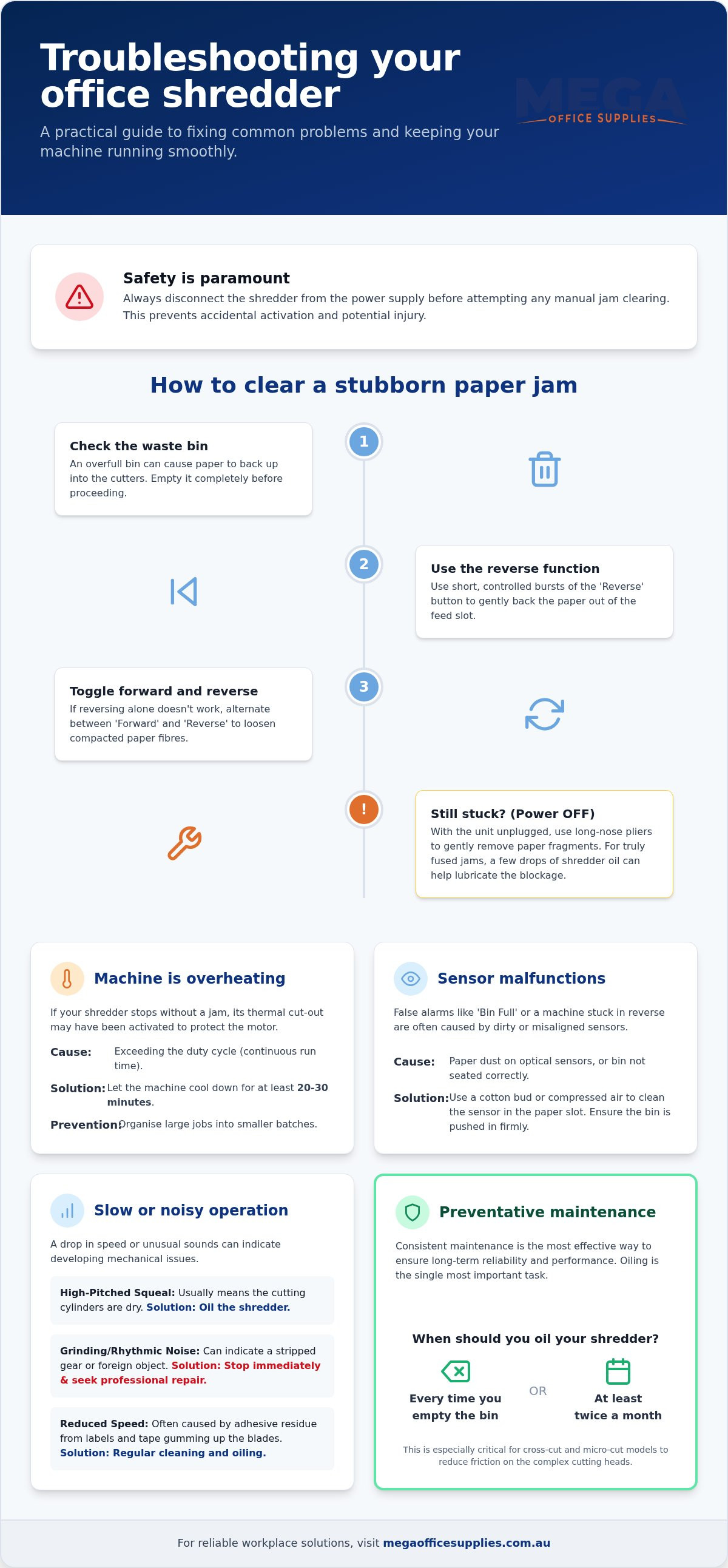
Most stoppages happen for two simple reasons: feeding too many sheets at once or inserting them at an awkward angle. When a paper shredder stops mid-cycle, the first step is to check if the waste bin is overfull, as compacted paper can back up into the cutters and cause a stall. If the bin is empty, you're likely dealing with a physical blockage in the throat. We recommend using the reverse function judiciously; holding it down for extended periods can strain the motor. Instead, use short, controlled bursts to back the paper out of the entry point.
Safety is paramount when troubleshooting common paper shredder problems. Never attempt to pull paper out with your fingers while the machine is live. Always disconnect the unit from the power supply before performing any manual debris removal. This simple precaution prevents accidental activation of the paper shredder blades, which can cause serious injury in a professional workplace. If the paper remains stuck, we've found that a bit of patience and the right tools can save a service call.
Clearing stubborn jams safely
If the reverse button fails to clear the path, try toggling between the 'Forward' and 'Reverse' settings to loosen compressed paper fibres. For visible fragments stuck deep in the cutting head, use a pair of long-nose pliers to gently extract the debris. Don't yank the paper, as this can tear the sheet and leave smaller, harder-to-reach bits behind. If the paper feels truly fused, applying a few drops of specialised shredder oil directly onto the jam can provide enough lubrication to slide the blockage out without stripping the internal gears.
Managing duty cycles and cooling periods
Many office users are surprised when their machine stops without a jam. This is often the thermal cut-out protecting the motor from damage. Personal-grade models typically have a duty cycle of 3 to 5 minutes, whereas commercial-grade machines are designed for continuous run times. To prevent interruptions, organise your shredding into smaller batches throughout the day. If the overheating light activates, give the machine at least 20 to 30 minutes to cool down completely before you attempt to resume your task.
Diagnosing performance drops and sensor errors
Electronic errors can be just as disruptive as physical jams. One of the most frequent issues we encounter when troubleshooting common paper shredder problems is the 'Bin Full' false alarm. Even when the bin is empty, accumulated paper dust and lint can coat the optical sensors, leading the machine to believe it's at capacity. This is particularly prevalent in Australian warehouses or high-volume mailrooms where ambient dust levels are higher. If your machine is stuck in a reverse-only cycle, it often indicates a sensor blockage or a logic board that needs a hard reset, usually achieved by unplugging the unit for ten minutes.
Unusual sounds are early warning signs of mechanical distress. A high-pitched squeal generally points to dry cutting cylinders, while a rhythmic grinding sound often suggests a stripped gear or a foreign object like a heavy-duty staple caught in the teeth. The weight of your paper also plays a role; while most machines handle standard 80 gsm office paper easily, feeding multiple sheets of 120 gsm speciality stock will significantly reduce shredding speed and increase motor wear. If you find your current hardware struggling with daily volumes, it might be time to browse our range of heavy-duty paper shredders designed for higher throughput.
Sensor malfunctions and optical cleaning
The 'Auto Start' sensor is usually a small infra-red eye located in the centre of the paper entry slot. Maintaining a clean sensor is a critical part of troubleshooting common paper shredder problems in busy offices. Use a dry cotton bud or a canister of compressed air to clear away any debris blocking this eye. Additionally, ensure the waste bin is pushed firmly into the cabinet. Most professional models from Rexel or GBC include a safety interlock switch that prevents operation if the bin is even slightly misaligned.
Addressing slow shredding and dull blades
A noticeable drop in speed doesn't always mean the motor is failing. Over time, adhesive residue from labels and tape can gum up the blades, creating friction that mimics dullness. In dusty environments, this residue combines with paper particles to form a thick paste that hampers internal gear lubrication. Regularly clearing these contaminants is vital for maintaining the industrial precision of your office technology supplies.
Preventative maintenance and the repair versus replace decision
Consistent maintenance is the most effective way to minimise the need for troubleshooting common paper shredder problems. For cross-cut and micro-cut machines, friction is the primary enemy of the cutting head. We recommend oiling your shredder every time you empty the waste bin or at least twice a month for moderate use. You can use specialised shredder oil or convenient lubricant sheets, which provide a mess-free alternative for busy office environments. Cleaning the cutting head is equally important; we suggest running a few plain sheets through after shredding adhesive labels to help pick up leftover glue before it hardens and attracts more dust.
The essential oiling and cleaning regime
To apply oil correctly, use the 'zig-zag' method by drizzling the fluid in a continuous 'W' pattern across a sheet of paper before feeding it into the machine. This ensures the lubricant reaches the full width of the cutters. Never use aerosol lubricants or flammable oils like WD-40. The heat generated by the motor can ignite the propellant, creating a significant fire risk in your workplace. If you prefer a simpler solution, explore our range of Fellowes paper shredders that often feature advanced self-oiling systems or jam-proof technology.
When to upgrade your office machinery
There comes a point where troubleshooting common paper shredder problems is no longer cost-effective. If you notice a permanent loss of torque, frequent overheating under light loads, or a persistent burning smell, the motor is likely reaching the end of its service life. With professional repair costs in Australia often starting at $225, smaller units are frequently beyond economical repair. Upgrading to modern micro-cut paper shredders offers a dual benefit: significantly higher security for sensitive data and improved mechanical efficiency. These newer models are designed to handle the volume required by modern budget cycles and compliance standards without the frequent downtime of older hardware.
Maintaining a secure and productive workplace
When maintenance is no longer sufficient, we are here to help. As an authorised Australian dealer for Rexel, GBC, and Fellowes, our team provides expert advice. We understand the specific demands of schools, government departments, and healthcare facilities, ensuring you receive a solution that fits both your security needs and your budget cycles.
We look forward to helping you maintain a secure and efficient office environment with hardware you can depend on every day.
Common questions about shredder maintenance
Why does my shredder keep jamming even when I feed fewer pages than the limit?
Jams at low sheet counts are typically caused by adhesive residue from labels or an accumulation of paper dust in the cutting head. This creates extra friction on the blades, forcing the motor to struggle even with light loads. We recommend running several sheets of clean 80 gsm paper through the machine to clear debris. If the problem persists, the cylinders likely require immediate oiling to restore smooth operation.
Can I use WD-40 or vegetable oil to lubricate my paper shredder blades?
You must never use aerosol lubricants or cooking oils on your equipment. WD-40 is a flammable penetrant that poses a serious fire risk due to the heat generated by the motor during use. Vegetable oil is equally problematic because it becomes sticky over time and will eventually clog the mechanism. Stick to authorised shredder oil or lubricant sheets to protect your warranty and ensure machine longevity.
What should I do if my shredder is making a loud grinding noise?
Stop the machine immediately if you hear a rhythmic grinding sound, as this often indicates a foreign object like a heavy-duty staple is caught in the teeth. It can also be a sign of a stripped gear within the drive system. Check the feed entry for visible blockages while the power is disconnected. If the sound remains after clearing the path, the internal components may have suffered permanent mechanical wear.
How do I know if my shredder is truly broken or just needs a cool-down period?
A sudden stoppage without a physical jam usually indicates the thermal protection has been triggered to prevent motor damage. Check for a red warning light or a thermometer icon on the interface. Troubleshooting common paper shredder problems frequently involves allowing the unit to sit idle for at least 30 minutes. If the machine doesn't restart after a full cooling period, the logic board or motor may have failed.

Article by
Mega Office Supplies Team
The Mega Office Supplies Team provides practical buying guides and workplace advice for Australian businesses, schools, government organisations, healthcare providers, hospitality venues, warehouses and home offices. Family owned and operated since 2008 and based in Tweed Heads South on the Gold Coast–Tweed border, Mega Office Supplies helps Australian workplaces choose the right office supplies, furniture, technology, cleaning, safety and education products — backed by genuine local service from real people.
General Information
This article is provided as general information only to help customers compare and choose office, workplace, school, cleaning, technology, furniture, safety and business supplies. Product details, specifications, compatibility, availability, pricing and suitability may vary. Always check the individual product page, manufacturer information, workplace requirements and relevant safety guidance before purchasing or using a product.


