


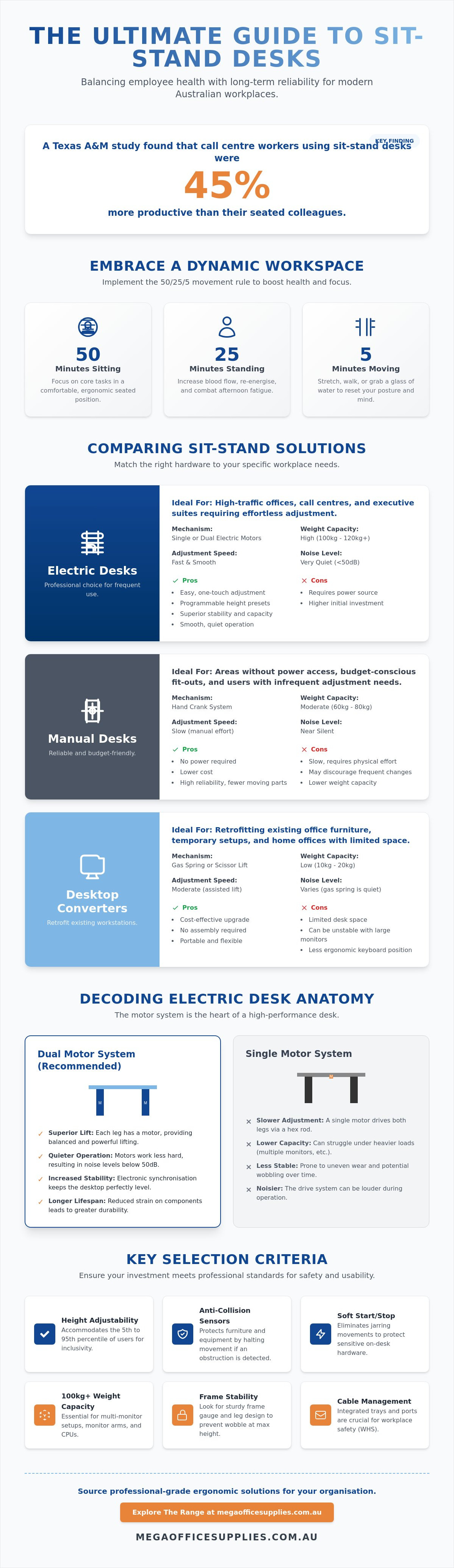
A study by Texas A&M found that call centre workers using a sit stand desk were 45% more productive than their seated colleagues. While the efficiency gains are clear, procurement officers often worry that the transition to ergonomic furniture will lead to maintenance headaches like motor failures or unstable, wobbling frames at maximum height. You need a solution that balances employee health with long-term reliability and workplace health and safety (WHS) requirements.
We understand that comparing weight capacities and motor synchronisation across different brands is often difficult and time-consuming. This guide will help you master the technical differences between electric, manual, and desktop converters so you can select a durable, professional-grade workstation for your organisation. We'll examine the specific stability factors and cable management features that separate high-capacity hardware from budget alternatives.
Key Takeaways
- Learn how to apply the 50/25/5 movement rule to transition your office from a static environment to a dynamic workspace that supports long-term employee health.
- Identify the critical technical differences between single and dual motor systems to ensure your sit stand desk remains stable and quiet at its maximum height.
- Evaluate the practical applications of electric desks, manual cranks, and desktop converters to match the right hardware to your specific user frequency and power availability.
- Understand height adjustability requirements to accommodate the 5th and 95th percentile of users while integrating effective cable management to meet workplace safety standards.
- Leverage professional-grade sourcing through a reliable Australian provider with the logistical scale to handle national delivery and high-volume procurement needs.
The Shift to Active Workspaces: Why Sit Stand Desks are Essential in 2026
Australian offices have moved away from the static, sedentary models of previous decades. Today, dynamic workspaces are the standard for organisations prioritising staff wellbeing and long-term health. While the history of the standing desk shows that movement isn't a new concept, modern technology has finally made height adjustability accessible for every workstation. This transition reflects a growing awareness that physical movement is a biological necessity rather than a workplace luxury.
To better understand how these workstations integrate into a professional environment, watch this setup tour:
A core component of this shift is the 50/25/5 rule. This guideline suggests a structured interval of 50 minutes sitting, 25 minutes standing, and 5 minutes moving or stretching. Implementing a professional sit stand desk allows employees to reach these targets without leaving their primary tasks or losing momentum. It's no longer just about personal preference; it's a fundamental part of a modern Work Health and Safety (WHS) strategy. By providing height-adjustable furniture, businesses proactively address the risks associated with prolonged sedentary behaviour and musculoskeletal strain.
Beyond Health: Productivity and Engagement
Postural changes directly impact cognitive focus and mental clarity. When we stand, blood flow increases, which helps combat the mid-afternoon fatigue often felt in traditional offices. These desks also facilitate quick collaborative sessions. In open-plan layouts, raising a desk to standing height signals a collaborative space. This makes it easier for colleagues to gather for brief, efficient huddle sessions without needing to book a formal meeting room. Reducing long-term absenteeism through these ergonomic interventions is a key goal for any forward-thinking organisation.
A holistic approach to office wellness also considers the quality of refreshments available during breaks.
The Australian Context: Standards and Expectations
Modern Australian commercial fit-outs now demand flexibility and inclusivity. A "one size fits all" approach fails because it doesn't account for the physical diversity of a local workforce. Professional procurement now focuses on desks that meet specific adjustability ranges, ensuring that every staff member can work comfortably. Meeting these expectations is vital for attracting and retaining talent in a highly competitive, health-conscious market. Businesses that invest in professional-grade hardware demonstrate a clear commitment to the evolving needs of their employees.
Decoding Desk Anatomy: Motors, Frames, and Weight Capacities
Selecting a sit stand desk for a high-traffic office requires a focus on the internal drive system rather than just the surface finish. The primary mechanical choice involves single versus dual motor configurations. Single motor models often utilise a hex-rod drive system. These are typically slower and can struggle under heavy loads or frequent use. Conversely, dual motor systems house a dedicated motor in each leg column. This design provides superior lift capacity and quieter operation.
When calculating real-world weight capacity, procurement officers must look beyond the manufacturer's headline figure. You need to account for the weight of the desktop itself, which can range from 15kg to 30kg depending on the material. Once you add multiple monitor arms, large-format screens, and CPU mounts, a budget desk can quickly approach its mechanical limit. Investing in hardware with a 100kg to 120kg lift capacity provides a necessary buffer for modern professional setups.
Maintaining accurate weight ratings is essential for safety and performance.
Motor Synchronisation and Safety Sensors
Precision is non-negotiable in a shared workspace. Dual motor systems use electronic synchronisation to keep the desktop perfectly level during every adjustment. This prevents uneven wear on the frame and protects the internal components. Modern units also feature integrated anti-collision technology. These sensors protect your commercial office furniture by halting movement if the desk encounters an obstruction like a pedestal or chair arm. Soft-start and soft-stop features further protect sensitive hardware by eliminating jarring movements when the motors engage or disengage.
Frame Construction and Stability
Frame gauge and leg design dictate lateral stability, which is often referred to as the "wobble factor" at maximum height. Professional-grade frames use heavy-duty steel and a crossbar-less design to provide maximum leg clearance without sacrificing rigidity. We recommend 3-stage telescopic legs over 2-stage versions for most corporate environments. A 3-stage column offers a broader height range and greater stability at the top of the stroke. This flexibility is essential for meeting the ergonomic guidelines for sit-stand desks across a diverse workforce. While L-shaped corner desks offer more surface area, they require careful weight distribution to avoid putting excessive strain on the corner lifting column.
Comparing Sit Stand Solutions: Electric, Manual, and Converters
Procurement decisions often hinge on the intended frequency of use and the existing office layout. While a full electric sit stand desk represents the gold standard for shared stations, other configurations like manual cranks or desktop converters serve specific niche requirements. Understanding the operational friction of each type is essential for ensuring your team actually utilises the height-adjustability features you provide. Each solution carries distinct implications for installation time, user engagement, and long-term maintenance.
Electric vs. Manual: A Functional Analysis
The primary differentiator between electric and manual systems is the transition speed and the physical effort required. High-quality electric models typically move at 30 to 40 millimetres per second (mm/s). This allows a user to move from sitting to standing in under 20 seconds. In contrast, manual crank desks require significant physical rotation, which often leads to what industry professionals call the "laziness factor." Industry observations indicate that electric desks see approximately three times more use than manual versions because the adjustment requires only a button press rather than repetitive physical exertion.
Maintenance also varies between these systems. Manual desks require periodic lubrication of the internal gears to prevent grinding or sticking. Electric motors are generally sealed units designed for years of maintenance-free operation, though they do require proximity to power outlets. For remote areas or sites with limited electrical infrastructure, the manual crank remains a reliable, fail-safe option that doesn't rely on the building's electrical grid.
Converters: When to Retrofit vs. Replace
Desktop converters allow you to add height adjustability to existing fixed furniture. This is an excellent solution for heritage buildings or offices with high-quality built-in joinery where full replacement isn't feasible. However, you must evaluate the weight limit of the underlying desk. Most standard office desks aren't designed to support a 20kg converter plus two 27-inch monitors and heavy desk accessories. If the base desk is unstable, the converter will only amplify that wobble at standing height.
There are ergonomic trade-offs to consider with converters. They often raise the minimum keyboard height, which can cause shoulder strain for shorter users when sitting. Additionally, they consume a significant amount of desk real estate, potentially creating a cluttered workspace. If your budget allows for a full replacement, a dedicated sit stand desk provides a cleaner aesthetic and a superior ergonomic range for a broader variety of body types.
For agile environments like warehouses or medical clinics, portable workstations offer a compact alternative. These units often feature lockable castors and a smaller footprint, making them ideal for "touchdown" points where workers only need a computer for short durations. They provide the same postural benefits as a full-sized desk while maintaining the mobility required in high-traffic commercial sectors.
Selection Criteria for Professional and Home Office Environments
Professional procurement requires more than just picking a surface colour. To meet Australian Work Health and Safety (WHS) requirements, a sit stand desk must accommodate the 5th to 95th percentile of your workforce. This typically requires a height range between 620mm and 1250mm. If a desk doesn't drop low enough for shorter users to sit comfortably or rise high enough for taller staff to stand without slouching, the ergonomic benefit is lost. Ensuring your hardware meets the BIFMA G1-2013 Ergonomics Guideline is a reliable way to verify these dimensions across a diverse team.
Cable management is a critical safety consideration that many buyers overlook. Exposed wires are a primary tripping hazard and can lead to equipment damage during height transitions. Look for integrated cable trays that move with the desktop or external spine organisers that keep power leads contained. These features are essential when integrating modern technology like dual-monitor setups or docking stations. For the desktop itself, commercial-grade melamine remains the industry standard for high-traffic areas due to its resistance to scratches and moisture. While bamboo and hardwood offer premium aesthetics, they require more maintenance in a busy office environment.
The Corporate Procurement Checklist
Standardising your fleet is the most efficient way to manage long-term maintenance. When you order in volume, selecting a consistent frame design allows your facilities team to stock fewer spare parts. We recommend prioritising vendors that provide local support and comprehensive warranties. Australian-based retailers offer faster turnaround times for replacement components compared to international shippers. Always ensure the frame colours coordinate with your existing furniture palettes to maintain a professional, cohesive aesthetic across the floor plate.
Optimising the Home Office Setup
Residential environments often face significant space constraints. Compact frames with a smaller footprint are ideal for study nooks where a full-sized commercial desk won't fit. Don't forget floor protection; a heavy desk and chair can quickly damage carpet or scuff hard floors. Using a chair mat is a simple way to preserve your flooring while improving mobility.
Ready to upgrade your workspace? Explore the full range of commercial-grade hardware at Mega Office Supplies to find a solution that fits your specific floor plan and WHS requirements.
Implementing Ergonomic Excellence with Mega Office Supplies
Transitioning from a static office to a dynamic, movement-based workspace requires a partner that understands the logistical complexities of Australian commercial environments. Mega Office Supplies leverages decades of combined industry experience to support your procurement of height-adjustable furniture. We focus on providing professional-grade hardware that meets the rigorous demands of government departments, educational institutions, and corporate headquarters nationwide. Our role is to ensure that your sit stand desk acquisition is efficient, transparent, and backed by regional expertise that understands the practicalities of workplace maintenance.
Selecting the right hardware is only the first step. Successful implementation involves coordinating the delivery and installation of high-capacity frames while ensuring your team has the necessary accessories to remain productive. By acting as a dependable partner in the e-commerce space, we help you avoid the pitfalls of low-quality imports that lack the lateral stability required for professional use. Our commitment to reliability means we only source workstations that can withstand the daily transitions between sitting and standing postures without mechanical fatigue.
National Logistics and Reliable Fulfilment
Managing the rollout of a high-volume commercial fit-out requires a well-oiled operation capable of handling complex delivery schedules across Australia. We function as a single-source provider, allowing your procurement team to bundle everything from general office supplies to heavy-duty ergonomic furniture in a single transaction. This consolidation reduces administrative friction and streamlines your accounts payable process. If you have specific technical queries regarding motor specifications or frame stability, our local contact line provides direct access to assistance. This direct support distinguishes us from faceless global competitors and ensures you receive the hardware that fits your specific floor plan.
To support this national delivery network, efficient international shipping is paramount.
Your Partner in Workplace Maintenance
Longevity in a high-traffic office is built on the quality of individual components. We prioritise hardware featuring manual-precision engineering and durable finishes to ensure your investment survives years of constant adjustment. For procurement officers and administrators managing large-scale upgrades, our platform offers rapid quoting options to facilitate quick budgetary approvals. This structured approach allows you to evaluate costs and quantities at scale, ensuring your facility remains compliant with modern ergonomic standards without exceeding your financial parameters. Ready to upgrade? Explore our complete range of sit stand desks today to secure stable, high-capacity workstations that support the long-term health of your workforce.
Optimising Your Workspace for the Future of Productivity
Selecting a professional-grade sit stand desk is a strategic investment in your organisation's long-term health and operational efficiency. By prioritising dual-motor synchronisation, frame stability, and integrated cable management, you ensure your workspace meets modern WHS requirements while minimising future maintenance costs. Standardising your office furniture with durable, high-capacity hardware provides a consistent experience for every team member, whether they are working in a corporate centre or a home study nook.
This focus on efficiency often extends beyond office furniture to the core operations of the business.
As a family-owned Australian private company established in 2005, Mega Office Supplies understands the specific logistical needs of local businesses and government departments. Our team brings decades of combined industry experience to every procurement project; this ensures you receive the right technical guidance for your specific environment. We provide national delivery for all commercial and home office solutions, supporting your rollout from the initial quote to the final setup. Our focus remains on functional clarity and providing hardware that withstands the rigours of daily professional use.
View the full range of professional Sit Stand Desks at Mega Office Supplies
Take the next step in creating a dynamic, resilient workspace that empowers your staff to perform at their best every day.
Frequently Asked Questions
How much weight can a standard electric sit stand desk hold?
A standard electric sit stand desk typically supports between 80kg and 120kg. This total weight capacity must account for the desktop material, multiple monitors, and heavy hardware like CPU mounts. High-capacity dual motor systems provide the most reliable lift performance for professional workstations. Always verify the individual motor rating before procurement to ensure the frame isn't operating at its mechanical limit during daily transitions.
Are electric standing desks noisy in a quiet office environment?
Professional motorised desks are designed to operate at noise levels below 50 decibels. This is roughly equivalent to a quiet conversation or background office hum, making it unobtrusive in a focused workspace. Budget models with single motors may produce higher-pitched mechanical sounds. Selecting a dual motor system ensures a smoother, quieter transition that won't disrupt colleagues in an open-plan office or a shared corporate centre.
Do I need a special chair for a standing desk?
You don't necessarily need a new chair, but it must be highly adjustable to complement the desk. A high-quality ergonomic office chair is essential for the sitting intervals of your day. If you plan on using a workstation at a higher "perch" position, consider adding a footrest or a drafting stool. These accessories help maintain proper circulation and posture when you aren't standing fully.
How often should I switch between sitting and standing?
Ergonomic experts recommend the 20-8-2 rule for optimal health and productivity. This involves sitting for 20 minutes, standing for 8 minutes, and moving or stretching for 2 minutes. Alternating your posture frequently prevents the fatigue associated with standing all day. Most users find that a sit stand desk used for four to five transitions per day provides the best balance for maintaining cognitive focus.
Is it difficult to assemble a height-adjustable desk?
Most professional desks require 30 to 60 minutes for assembly using standard tools. While the process is straightforward, the components are heavy and often require two people for safe lifting. Many organisations opt for professional assembly to ensure the frame is perfectly level and the cable management is correctly integrated. This also helps maintain the manufacturer's warranty, as improper assembly can lead to premature motor wear.
What is the ideal height for a standing desk?
The ideal height for your desk is one where your elbows remain at a 90-degree angle. Your wrists should be flat on the surface while your shoulders stay relaxed. For a diverse workforce, look for desks that adjust from at least 620mm to 1250mm. This range ensures that both the shortest and tallest employees can maintain a neutral posture, which is a core requirement for modern workplace health and safety.
Can I add a sit stand converter to a glass desk?
We generally advise against placing a heavy sit stand converter on a glass desk. Most glass surfaces aren't designed to handle the concentrated weight of a 20kg converter plus monitors and peripherals. There is a significant risk of the glass shattering under the pressure or during the adjustment process. A dedicated, full-frame adjustable desk is a much safer and more stable alternative for professional environments.
Are there Australian standards for ergonomic office furniture?
Yes, the primary standard for office desks in Australia is AS/NZS 4442:2018. This standard outlines the dimensions, strength, and stability requirements for workstations used in commercial settings. Procurement officers should also ensure furniture complies with local Work Health and Safety (WHS) regulations. Selecting hardware that meets these standards ensures your organisation provides a safe, durable, and ergonomically sound environment for all staff members.
Article by
Mega Office Supplies Team
The Mega Office Supplies Team provides practical guidance for Australian businesses, schools, government organisations, healthcare providers, hospitality venues, warehouses and home offices. Based in Tweed Heads South, Mega Office Supplies is a family-owned and operated Australian business offering office stationery, workplace furniture, technology products, labels, printers, cleaning and janitorial supplies, safety products, art materials, education resources and everyday business essentials from trusted brands.
General Information
This article is provided as general information only to help customers compare and choose office, workplace, school, cleaning, technology, furniture, safety and business supplies. Product details, specifications, compatibility, availability, pricing and suitability may vary. Always check the individual product page, manufacturer information, workplace requirements and relevant safety guidance before purchasing or using a product.


