


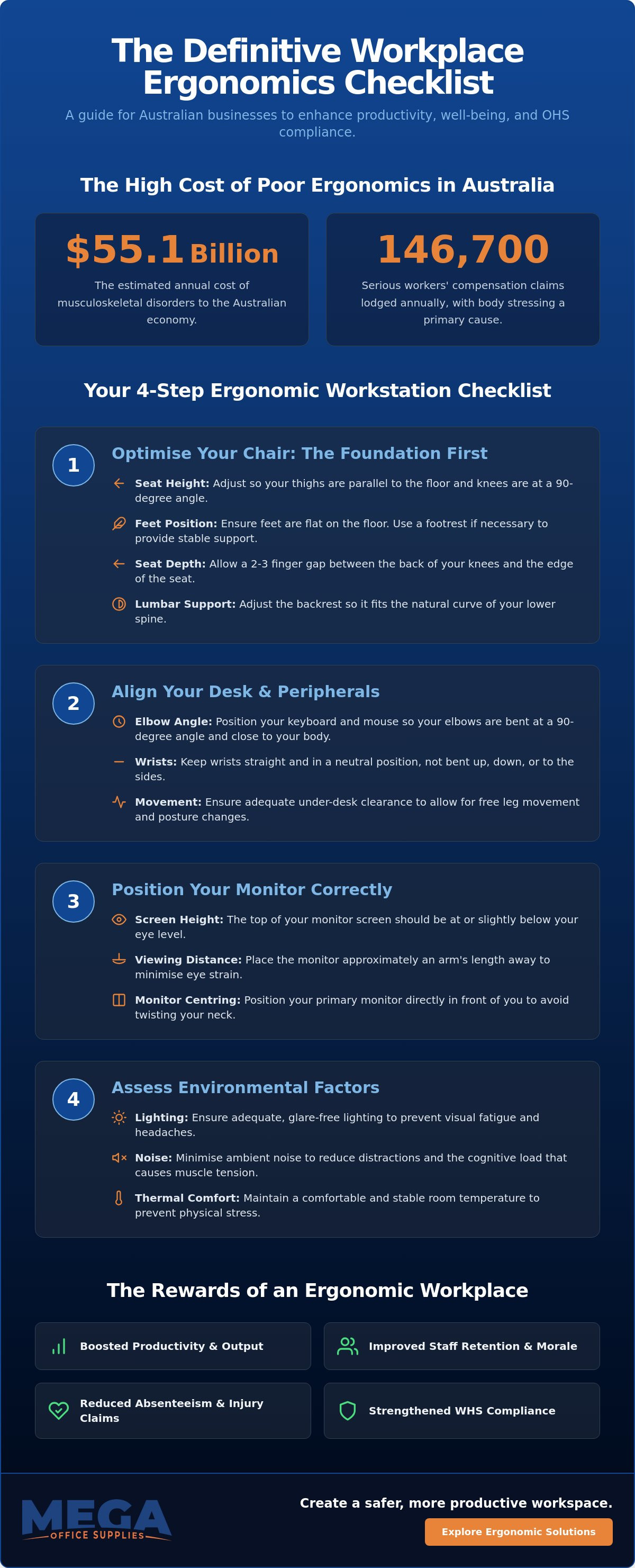
Musculoskeletal disorders are estimated to cost the Australian economy $55.1 billion annually, according to 2026 industry data. For many procurement officers and business owners, these figures represent more than just statistics; they reflect the daily reality of rising staff reports regarding back and neck strain. You likely already know that a poorly configured desk is a primary driver of absenteeism and reduced output. It's difficult to maintain focus when your workstation is working against you. This article provides a definitive workplace ergonomics checklist designed to help you audit your office environment with precision and confidence.
By following this evidence-based guide, you'll learn how to master your office setup while meeting current Australian OHS standards. We'll examine specific technical requirements for chairs and standing desks, offer clear guidance on monitor positioning, and provide actionable steps to minimise the risk of body stressing. This professional resource ensures your organisation remains compliant, comfortable, and capable of handling high-volume demands without the friction of physical fatigue.
Key Takeaways
- Understand the critical link between ergonomic design and long-term staff retention to boost overall workplace productivity.
- Adopt a "Foundation First" approach by utilising a workplace ergonomics checklist to prioritise correct chair alignment before adjusting desk height.
- Apply the "Arm’s Length" rule and precise monitor height measurements to effectively minimise eye strain and repetitive neck fatigue.
- Identify how environmental factors like ambient noise and thermal comfort directly impact muscle tension and cognitive load.
- Streamline OHS compliance by implementing a standardised ergonomic kit and bulk-ordering professional-grade furniture for consistent results across your organisation.
Understanding Modern Workplace Ergonomics in Australia
In the 2026 Australian professional landscape, workplace ergonomics has evolved from a luxury perk into a fundamental pillar of operational stability. It's the science of designing the workstation to fit the worker, rather than forcing the human body to adapt to rigid hardware. For procurement officers and administrators, the incentive is clear. Musculoskeletal disorders (MSDs) cost the national economy an estimated $55.1 billion annually. When a workspace is designed with physiological needs in mind, staff retention increases. Employees who are physically comfortable are less likely to seek roles elsewhere and more likely to maintain high output levels throughout the day.
Body stressing remains a primary concern. It contributes significantly to the 146,700 serious workers' compensation claims lodged in the 2023-24 period. A standardised workplace ergonomics checklist provides the necessary framework to ensure national OHS consistency across diverse environments. This applies whether you are managing high-rise CBD offices or regional healthcare centres. Without a repeatable audit process, businesses risk fragmented safety standards that leave both the staff and the organisation vulnerable.
The Duty of Care: Australian WHS Standards
Under Safe Work Australia frameworks, employers hold a legal responsibility to provide a safe working environment so far as is reasonably practicable. The commencement of the NSW Work Health and Safety Regulation 2025 has further sharpened this focus. It emphasises that physical workstation design directly influences psychosocial hazards like fatigue and stress. Regular ergonomic audits help minimise workers' compensation claims by identifying risks before they escalate into chronic injuries. Documenting these self-assessments is critical for maintaining compliance records and demonstrating a proactive approach to staff welfare.
Identifying Common Ergonomic Hazards
Effective risk management starts with recognising ergonomic hazards before they manifest as lost time. Early warning signs often include repetitive strain in the wrists, persistent neck stiffness, and visual fatigue from poorly positioned screens. These issues don't just cause physical discomfort; they significantly increase error rates in administrative tasks and dampen overall focus. Administrators must distinguish between environmental hazards, such as poor lighting or excessive noise, and individual setup issues like incorrect chair height. Utilising a comprehensive workplace ergonomics checklist allows teams to evaluate these factors systematically. This ensures that office furniture supplies are utilised to their full potential, providing the durability and support required for long-term health.
The Core Workstation Checklist: Seating and Desk Alignment
Effective workstation setup begins with a "Foundation First" strategy. You must never adjust your desk height before your chair is correctly configured. A comprehensive workplace ergonomics checklist should always treat the chair as the primary interface between the worker and their environment. If the seat height is incorrect, every subsequent adjustment to the monitor or keyboard will be flawed. This often leads to the body stressing issues that drive up compensation claims in Australian offices.
Critical measurements ensure the body remains in a neutral posture. Your seat height should allow your thighs to remain parallel to the floor with your knees at roughly a 90-degree angle. Seat depth is equally vital; ensure there is a two to three-finger gap between the edge of the seat and the back of your knees to prevent circulation issues. For lumbar support, the chair's curve must align with the natural inward curve of your lower spine. The Human Factors and Ergonomics Society of Australia emphasises that these individual adjustments are non-negotiable for long-term spinal health.
Feet must remain flat on the floor to distribute weight evenly. If a worker's height prevents this after the chair is adjusted to the desk, a professional-grade footrest is required. Additionally, under-desk clearance is often overlooked. Eliminating clutter like archive boxes or CPU towers from the leg well allows for free movement and frequent posture shifts. This prevents the static loading that contributes to musculoskeletal fatigue and allows for a more comfortable, productive workday.
Optimising Your Ergonomic Office Chair
Adjustable armrests are essential for preventing shoulder tension. They should be positioned so that the shoulders remain relaxed and the elbows rest lightly on the pads. Many modern ergonomic office chairs feature dynamic seating mechanisms. These allow for subtle, continuous movement, which keeps the core engaged and reduces the risks associated with prolonged sedentary work. It's a practical solution for maintaining staff comfort during high-volume administrative tasks.
Desk Height and Sit-Stand Transitions
To calculate the correct desk height, ensure your elbows are at a 90-degree angle while typing, with wrists in a neutral, straight position. For those using a standing desk, the same elbow-angle rule applies. Effective ergonomics relies on movement. We recommend the "20-8-2" rule: spend 20 minutes sitting, 8 minutes standing, and at least 2 minutes moving or stretching. This cycle helps maintain circulation and cognitive focus throughout the shift.
Fine-Tuning the Setup: Monitor, Keyboard, and Mouse Placement
Once the foundation of seating and desk height is established, the focus shifts to the interaction layer of the workstation. This is where precision placement of peripherals prevents the cumulative strain that leads to long-term injury. A robust workplace ergonomics checklist must include specific verification steps for monitors, keyboards, and mice to ensure a truly neutral posture. Precision here is just as important as the chair you sit in. Small misalignments in screen height or mouse distance quickly escalate into chronic shoulder or neck tension.
Monitor height is the primary factor in preventing neck and upper back fatigue. The top third of your screen should sit exactly at eye level. This ensures you aren't tilting your head down or straining your neck upward to view content. For distance, apply the "Arm's Length" rule. Extend your arm while seated; your middle finger should just touch the screen surface. This distance, usually between 50 and 70 centimetres, minimises eye strain while preventing the "turtle neck" posture caused by leaning forward to read small text. If you find yourself squinting, increase the font size rather than moving the screen closer.
Keyboard and mouse placement require equal attention to detail. Your keyboard should allow your wrists to remain in a neutral, floating position rather than resting heavily on the desk edge or a hard surface. Similarly, the mouse must be kept in close proximity to the keyboard. Reaching outward for the mouse is a common error that leads to rotator cuff strain and upper back tension over time. Keep your input devices within the "easy reach" zone where your elbows can stay tucked near your torso.
Visual Ergonomics and Monitor Arms
In modern Australian offices, dual-monitor setups are standard. However, without adjustable monitor arms, achieving correct alignment for two screens is nearly impossible. Monitor arms allow you to position screens side-by-side or stacked, ensuring the focal point remains central to your field of vision. You should also manage screen glare from windows or overhead fluorescent lighting. Positioning the screen perpendicular to windows helps prevent the squinting that causes headaches. For document-heavy administrative work, high-contrast screen settings are essential for maintaining visual comfort over an eight-hour shift.
Input Device Alignment: Keyboards and Mice
Wrist health depends on avoiding extension. Many users mistakenly use the integrated "feet" at the back of the keyboard to tilt it upward, but this forces the wrists into a strained angle. Keep the keyboard flat on the desk surface. It should also be centred with your body; align the centre of the spacebar with your midline to avoid lateral spinal leaning. When selecting keyboards and mice, consider the size of the device relative to the user's hand. A mouse that's too small or too large for a specific grip style can lead to unnecessary finger strain and repetitive strain injuries.
Environmental Factors and the Human Element
Environmental factors are often the missing link in a standard workplace ergonomics checklist. While physical furniture is the foundation, the surrounding atmosphere dictates how long a worker can maintain peak performance. High ambient noise levels, for instance, significantly increase cognitive load; this leads to faster mental fatigue and a higher rate of clerical errors. Conversely, a clean and organised workspace is not just about aesthetics. It's a psychological necessity that reduces stress levels and allows for sustained focus.
Thermal comfort is another critical variable. If a workspace is too cold, muscles tend to tighten. This can exacerbate existing strain or lead to poor posture as staff hunch to maintain warmth. When updating your workplace ergonomics checklist, don't overlook the impact of ambient conditions. Maintaining a consistent temperature is a simple way to prevent unnecessary muscle tension. The human element also requires the implementation of "micropauses." These are brief intervals every 30 to 60 minutes that allow soft tissues to recover from the static loading of desk work.
Lighting, Glare, and Eye Strain
Visual recovery is paramount in high-intensity digital roles. We recommend the 20-20-20 rule. Every 20 minutes, look at something 6 metres away for 20 seconds. This simple habit helps reset the eye muscles. Your audit should also balance natural light with adjustable task lighting for detailed paperwork. Poor lighting is a major contributor to eye strain. Use these points to assess overhead lighting:
- Check for flickering fluorescent tubes.
- Identify shadowed areas on desk surfaces.
- Ensure lighting is not reflecting directly off monitor screens.
Movement and the Tea Room Culture
A sedentary lifestyle is the enemy of ergonomic health. Encouraging staff to move away from their desks for hydration and mental resets is a key management responsibility. Functional break zones play a vital role here. High-quality coffee and tea supplies transform a simple staff kitchen into a destination that promotes movement. These breaks provide the perfect opportunity for simple stretching exercises. Shoulder rolls or hamstring stretches require no specialised equipment but offer significant relief from desk-bound stiffness.
To ensure your facility is fully equipped for these essential breaks, browse our range of facility supplies for comprehensive tea room solutions.
Implementing Your Ergonomics Strategy at Scale
Scaling an ergonomic strategy requires a transition from reactive, individual fixes to a proactive, organisational policy. For procurement officers managing national fit-outs, a workplace ergonomics checklist acts as a logistical blueprint. It ensures that every workstation across multiple sites meets the same high standard of support. Creating a standardised ergonomic kit for new starters is an efficient way to achieve this. This kit typically includes a high-performance chair, an adjustable monitor arm, and essential desk accessories. By providing these tools on day one, you establish a baseline of comfort that prevents the body stressing issues discussed in earlier sections.
The financial logic for bulk-ordering office furniture supplies is compelling. Uniformity simplifies the maintenance cycle and ensures that replacement parts are always compatible. It also allows for a more streamlined audit process. Beyond equipment, training staff to perform their own 5-minute daily ergonomic checks is vital. These quick self-assessments ensure that minor misalignments don't escalate into chronic injuries. However, internal checks should be supported by annual professional audits to remain ahead of evolving Australian OHS requirements and the "reasonably practicable" legal standard for risk control.
Procurement for National Office Fit-outs
Selecting durable, commercial-grade equipment is essential for long-term value. In high-volume environments like government departments or large-scale corporate centres, furniture must withstand constant use. We recommend utilising business application forms to streamline the bulk purchasing process and access professional-grade hardware efficiently. Standardising your inventory of desks and chairs reduces the complexity of facilities management. It makes it easier to manage warranties and ensures a consistent aesthetic and functional standard across the entire organisation. This approach minimises the confusion often associated with choosing between different ergonomic options.
Creating a Culture of Self-Assessment
A successful strategy depends on cultural buy-in. Developing internal "Ergonomics Champions" within different departments creates a network of direct support for staff. These individuals can assist colleagues with basic adjustments and identify when a professional review is needed. Integrating the workplace ergonomics checklist into the onboarding process for all new staff members reinforces the organisation's commitment to safety from the first hour of employment. It empowers employees to take ownership of their physical health.
A healthy workplace is a high-performing workplace. By investing in a systematic, scaled approach to ergonomics, you protect your most valuable asset: your people. This professional guide ensures your business remains a reliable, compliant, and efficient operation for years to come. Providing comfort is the most direct path to increasing productivity and maintaining a stable, hardworking workforce.
Future-Proofing Your Australian Workplace
Mastering your office setup is a continuous process of refinement rather than a one-time task. By utilising a standardised workplace ergonomics checklist, you ensure that every staff member, from the reception desk to the executive suite, operates in a neutral and supportive environment. This proactive approach directly addresses the rising reports of musculoskeletal strain while fostering a culture of health and productivity. It's about creating a system where equipment and habits work together to sustain long-term wellbeing.
Mega Office Supplies is a family-owned Australian business that has been serving the corporate and government sectors since 2005. With decades of combined industry experience and a robust national delivery network, we are equipped to support your organisation’s ergonomic transition at any scale. We provide the professional-grade hardware required to meet strict Australian OHS standards without friction. Browse our full range of ergonomic workplace solutions to find the right fit for your facility. Implementing these changes today will create a more resilient and efficient workforce for years to come.
Frequently Asked Questions
How often should a workplace ergonomics checklist be completed?
A workplace ergonomics checklist should be completed annually for all existing staff or immediately following any significant change to a workstation. This includes when a new employee is onboarded, when furniture is replaced, or if a staff member relocates to a different office area. Regular reviews ensure that settings haven't drifted over time and that the setup continues to meet the specific physical requirements of the user.
What is the most important factor in an ergonomic workstation?
Adjustability is the most critical factor in any ergonomic workstation. Because Australian workforces are diverse in body type and height, a rigid setup is ineffective for preventing injury. High-quality chairs and desks must allow for manual precision in height, depth, and angle. This flexibility ensures every individual can maintain a neutral posture, which is the primary defence against repetitive strain and body stressing.
Do standing desks really improve workplace ergonomics?
Standing desks improve ergonomics only when they are used to facilitate frequent movement throughout the workday. Standing for an entire eight-hour shift can lead to lower back pain and circulatory issues, just as prolonged sitting does. The real value lies in the transition between sitting and standing, which encourages muscle activation and reduces the risk of static loading on the spine and soft tissues.
How high should my office chair be adjusted?
Your office chair should be adjusted so that your feet rest flat on the floor with your knees at a 90-degree angle. This position ensures your thighs are parallel to the ground, which minimises pressure on the underside of your legs and promotes healthy circulation. If your desk height requires you to raise the chair further, you must use a professional-grade footrest to maintain this stable, neutral leg position.
Can proper ergonomics reduce the need for workers compensation?
Utilising a workplace ergonomics checklist can significantly reduce the frequency and severity of workers' compensation claims. By identifying and mitigating body stressing risks before they escalate, businesses can prevent the development of chronic musculoskeletal disorders. Proactive risk management is far more cost-effective than managing long-term claims, which currently represent a multi-billion dollar burden on the Australian economy each year.
What should I do if my desk cannot be adjusted for height?
If your desk is at a fixed height, you must adjust your chair to the desk first and then provide support for your feet. Raise your chair until your elbows are at a 90-degree angle for typing on the desk surface. If your feet no longer touch the floor in this position, a footrest is required to prevent leg strain. Monitor arms can then be used to bring the screen to the correct eye level.
Is a laptop riser necessary for staff who travel frequently?
A laptop riser is essential for any staff member who works from a laptop for extended periods. Laptops are designed for portability rather than ergonomics; they force the user into a hunched posture that strains the neck and upper back. Using a riser to bring the screen to eye level, combined with an external keyboard and mouse, creates a healthy workstation in temporary environments like hotels or home offices.
How do I justify the cost of ergonomic furniture to management?
Justifying the cost of ergonomic furniture requires focusing on long-term operational stability and the reduction of absenteeism. The initial procurement expense is minor compared to the cost of a single serious compensation claim or the lost productivity from a staff member struggling with chronic pain. High-quality, durable furniture is an investment in your organisation's efficiency and the retention of your most valuable personnel.
Article by
Mega Office Supplies Team
The Mega Office Supplies Team provides practical guidance for Australian businesses, schools, government organisations, healthcare providers, hospitality venues, warehouses and home offices. Based in Tweed Heads South, Mega Office Supplies is a family-owned and operated Australian business offering office stationery, workplace furniture, technology products, labels, printers, cleaning and janitorial supplies, safety products, art materials, education resources and everyday business essentials from trusted brands.
General Information
This article is provided as general information only to help customers compare and choose office, workplace, school, cleaning, technology, furniture, safety and business supplies. Product details, specifications, compatibility, availability, pricing and suitability may vary. Always check the individual product page, manufacturer information, workplace requirements and relevant safety guidance before purchasing or using a product.


