


Did you know that "body stressing" from poor workstation setups remains the leading cause of serious workplace injuries, accounting for over 33% of all Australian compensation claims? With work-related musculoskeletal disorders costing the national economy an estimated A$55 billion annually, the financial and human stakes of office ergonomics have never been higher. It's understandable if you feel overwhelmed by the shifting landscape of WHS requirements for office workstations Australia. Between the new Digital Work Systems Act in NSW and the transition to Workplace Exposure Limits starting 1 December 2026, staying compliant requires more than just a standard desk and chair.
You want to protect your team from fatigue and your business from costly litigation, but the patchwork of state-based regulations can be difficult to decode. This guide provides a clear roadmap to mastering current health and safety standards, ensuring your procurement choices meet rigorous Australian Standards. We'll preview the essential 2026 compliance updates, including mandatory audiometric testing in NSW and the critical shift toward managing psychosocial hazards with the same diligence as physical risks. By the end of this article, you'll have a practical checklist to transform your office into a high-performance environment that prioritises both legal security and staff wellbeing.
Key Takeaways
- Identify your legal obligations as a PCBU under the national framework to ensure your organisation meets the updated 2026 compliance benchmarks.
- Master the technical WHS requirements for office workstations Australia by sourcing ergonomic chairs and standing desks that prioritise durability and professional-grade support.
- Utilise spatial planning standards to calculate minimum floor areas and define movement zones, effectively preventing overcrowding and improving workplace safety.
- Implement the "90-degree rule" for joint alignment and correct monitor positioning to proactively eliminate the risk of repetitive strain and sedentary fatigue.
- Develop a structured procurement strategy focused on standardising furniture across your facilities to simplify maintenance schedules and regular ergonomic assessments.
Understanding the WHS Framework for Australian Office Environments
The Model WHS Act serves as the regulatory backbone for workplace safety across most Australian jurisdictions. By 2026, this framework has evolved to address modern risks, including psychosocial hazards and digital work systems. For any organisation, understanding WHS requirements for office workstations Australia begins with the "primary duty of care." This legal mandate falls on the PCBU, or Person Conducting a Business or Undertaking. Whether you're a sole trader, a procurement officer, or a large corporation director, you're legally obligated to provide a work environment that is without risks to health and safety as far as is reasonably practicable.
Failing to meet these standards carries a heavy price for both the business and the economy. Work-related musculoskeletal disorders alone cost Australia approximately A$55 billion every year through lost productivity and compensation claims. To mitigate these risks, businesses must adopt "Safe Design" principles during the procurement of office furniture. This involves evaluating equipment based on scientific ergonomic principles before it ever enters the office floor. Effective safety isn't a reactive fix; it's a proactive procurement strategy.
To better understand how these regulations apply to your specific workplace, watch this helpful summary of the national framework:
The 2026 landscape also introduces the Work Health and Safety Amendment (Digital Work Systems) Act in New South Wales. This legislation explicitly makes AI and algorithmic work allocation a WHS duty. If your workstation setup includes automated software that monitors output or dictates break times, you must assess how these digital systems impact staff fatigue and stress levels. WHS requirements for office workstations Australia now encompass the mental load of the environment just as much as the physical chair.
Legal Obligations Under the National WHS Act
Your primary duty of care extends to every employee, contractor, and visitor. You must eliminate risks where possible; if elimination isn't feasible, you're required to minimise them. This isn't a solo task. Effective workstation design requires active consultation with your workers. Because they use the equipment daily, their feedback on chair comfort or desk height is a legal component of your risk management process. Neglecting this consultation can lead to inadequate setups and increased injury rates.
The Role of Safe Work Australia and State Regulators
While Safe Work Australia develops national policy, enforcement is the responsibility of state bodies like SafeWork NSW or WorkSafe Victoria. In 2026, these regulators have introduced stricter benchmarks. For instance, in New South Wales, approved Codes of Practice became mandatory compliance benchmarks on 1 July 2026. You must now either follow these codes exactly or prove your methods provide an equal or higher standard of safety. Maintaining detailed records of workstation assessments and equipment maintenance is a critical defence against potential civil penalty proceedings initiated by unions or regulators.
Ergonomic Standards: Choosing Compliant Furniture and Equipment
Procuring furniture that meets WHS requirements for office workstations Australia involves more than just aesthetic choice; it's a technical assessment of industrial durability and user support. To ensure legal compliance, equipment should ideally align with Australian Standards, specifically AS/NZS 4438 for height-adjustable swivel chairs and AS/NZS 4443 for office desks. These benchmarks guarantee that the hardware can withstand the rigours of a commercial environment while providing the necessary manual precision for individual adjustments. When you prioritise professional-grade equipment, you're investing in a stable infrastructure that minimises the risk of musculoskeletal injuries and long-term workers' compensation liabilities.
Effective office layout and design relies on the compatibility of various hardware components. A compliant workstation isn't a single item but a collective system where the chair, desk, and monitor peripherals work in unison. For procurement officers, this means verifying technical specifications such as weight capacities and adjustment ranges before finalising a bulk order. Choosing standardised, high-capacity solutions ensures that your fleet of furniture remains functional and safe across diverse staff demographics.
Essential Features of WHS-Compliant Office Chairs
A compliant chair must offer a minimum of three independent adjustment points: seat height, back tilt, and lumbar support. These features allow the user to maintain a neutral spine position throughout the workday. It's also vital to select the correct castors for your flooring. Hard floor castors provide necessary friction on timber or tile, while standard carpet castors ensure smooth movement on textile surfaces. For a deeper dive into technical specs, see The Professional Buying Guide to Ergonomic Office Chairs in Australia (2026).
Selecting Desks and Sit-Stand Workstations
Modern WHS requirements for office workstations Australia increasingly favour sit-stand desks to combat sedentary behaviour. When selecting these, ensure the motor system provides a smooth transition and the frame remains stable at maximum height. You must also ensure that under-desk areas remain clear of obstructions like large CPU holders or storage pedestals to provide sufficient legroom for the user to change positions without restriction.
To complete the ergonomic circuit, integrate monitor arms and document holders into your setup. These tools are critical for neck health as they allow the screen to be positioned at eye level, preventing the chin-to-chest posture that leads to strain. When selecting ergonomic office furniture, prioritising certified durability ensures long-term compliance and reduces the frequency of replacement cycles. By sourcing equipment that meets these rigorous standards, you provide your team with the stability they need to remain productive and injury-free.
Office Layout and Spatial Requirements for Safety
Compliance with WHS requirements for office workstations Australia extends beyond the hardware on the desk to the physical footprint of the office itself. Effective spatial planning categorises the work environment into primary, secondary, and tertiary zones. Primary space refers to the immediate workstation area, while secondary space includes surrounding storage like filing cabinets. Tertiary space is the most critical for safety; it represents the circulation paths and walkways that allow for unhindered movement and emergency egress. According to Comcare workstation safety guidelines, failing to account for these zones increases the risk of collisions and musculoskeletal strain from restricted movement.
A safe layout must also account for the logistical realities of a busy office. Cabling should be managed through integrated desk channels or floor-mounted covers to eliminate trip hazards. Walkway widths must be maintained to allow two people to pass comfortably, ensuring that emergency exits are never obstructed by mobile pedestals or overflow storage.
Calculating Tertiary Space and Floor Area
Industry standards generally dictate a minimum of 6 square metres of tertiary space per person. This figure is a safety benchmark designed to prevent overcrowding and allow for full chair movement without hitting walls or entering walkways. In modern open-plan offices, managing the risks of "hot-desking" is a significant challenge. Shared workstations must still provide the same spatial allowance as dedicated desks to ensure user safety. If your office layout is too dense, you risk creating hazards from bags and personal items spilling into transit zones. Maintenance staff also require clear access to power points and data ports under desks to perform regular safety audits without physical restriction.
Lighting and Environmental Hazards
Proper illumination is essential for preventing eye strain and maintaining focus throughout the workday.
Environmental factors like lighting and noise are fundamental to WHS requirements for office workstations Australia. Poor desk orientation often leads to glare on screens, causing eye strain and "turtling" as workers lean forward to see clearly. Position workstations perpendicular to windows where possible to balance natural light with screen visibility. Thermal comfort and ventilation also play a role in staff fatigue; high-occupancy areas require consistent airflow to maintain a healthy environment. Hygiene is equally vital in shared spaces. Implementing a strict protocol using professional-grade cleaning chemicals ensures that shared surfaces in hot-desking zones remain sanitary. This proactive approach to environmental maintenance reduces absenteeism and supports long-term staff wellbeing.
The Ergonomic Setup: Practical Implementation and 'Turtling' Prevention
Mastering the physical configuration of a workspace is the final step in meeting WHS requirements for office workstations Australia. While procurement ensures you have the right hardware, practical implementation determines whether that equipment actually prevents injury. A systematic approach to workstation adjustment allows each user to customise their environment to their specific biomechanics. This process should always begin with the chair, as it forms the foundation of the user's posture. Once the seat is stabilised, you can then align the desk and peripherals to match the user's seated height.
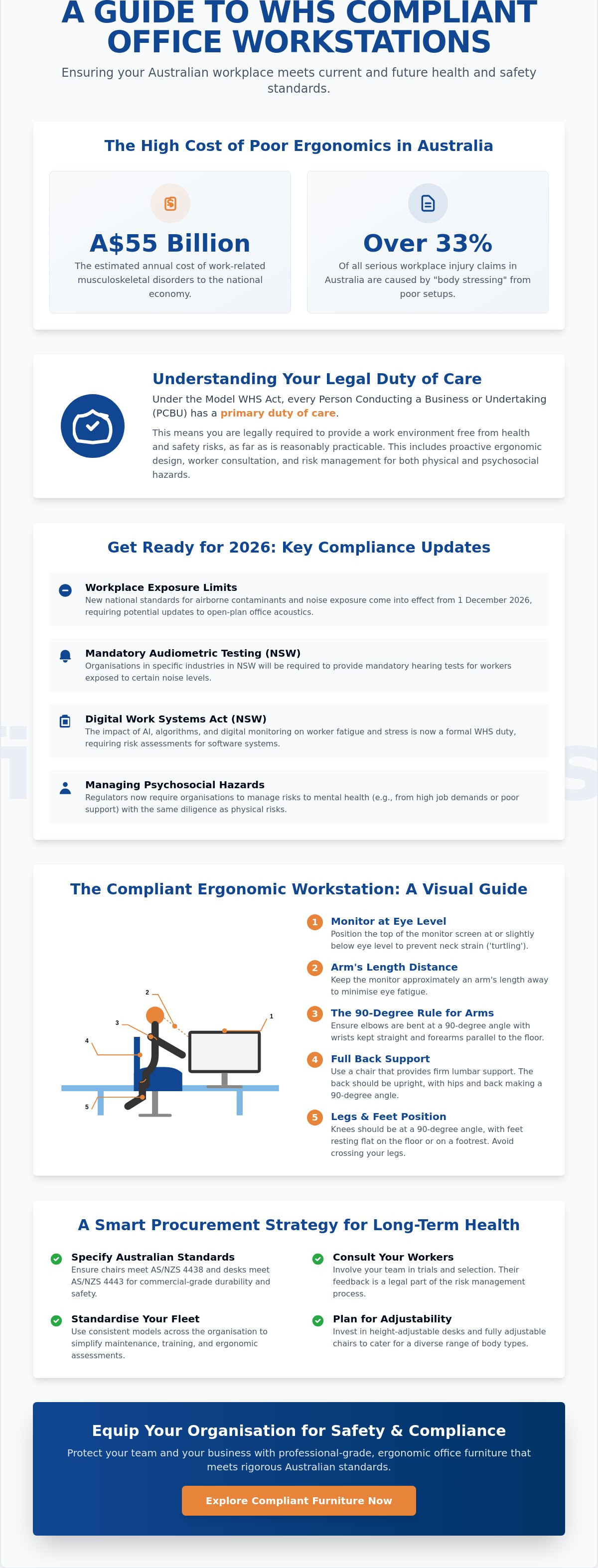
The "90-degree rule" remains the industry standard for musculoskeletal safety. To achieve this, adjust the chair height so the user's feet sit flat on the floor with knees at a 90-degree angle. Hips should also maintain a 90 to 100-degree angle, supported firmly by the chair's lumbar curve. Finally, the desk height or chair armrests should be positioned so the elbows rest at 90 degrees while typing. If the desk is too high and cannot be lowered, you must raise the chair and provide a footrest to ensure the user's legs remain supported. This geometric alignment reduces the static load on joints and minimises the risk of long-term "body stressing" injuries.
Monitor, Keyboard, and Mouse Positioning
Incorrect peripheral placement is the primary cause of "turtling," where a worker leans forward and protrudes their chin toward the screen. To prevent this, position the top of the monitor at eye level and approximately an arm's length away. If the screen is too low, the user will naturally hunch, leading to significant neck fatigue and upper back pain. Keep the keyboard and mouse on the same level, roughly 10 to 15cm from the desk edge. This gap provides enough space to support the forearms during pauses in typing. For users with shorter stature, integrating technology accessories like adjustable footrests or monitor risers is essential to maintain this posture throughout the shift.
Managing Laptops and Mobile Computing
WHS requirements for office workstations Australia apply equally to mobile devices, yet laptops are frequently overlooked in safety audits. Because the keyboard and screen are joined, it is physically impossible to achieve an ergonomic setup using a laptop alone. For any session exceeding one hour, laptops should be docked with an external monitor, keyboard, and mouse. If a worker is mobile, they must use a portable laptop stand to raise the screen to eye level. Prolonged use of a laptop on a flat desk forces a "hunched" posture that triples the pressure on the cervical spine. Standardising the use of docking stations across your organisation ensures that mobile staff remain protected from repetitive strain.
Ensuring your team has the right tools to maintain these standards is a critical management duty. You can source professional-grade ergonomic workstation equipment to ensure every desk in your facility meets these rigorous 2026 compliance benchmarks.
Procurement Strategy: Investing in Long-Term Workplace Health
A strategic procurement approach is the most effective way to manage WHS requirements for office workstations Australia at scale. For organisations with multiple branches, decentralised purchasing often leads to a fragmented inventory of furniture that varies in quality and compliance. By centralising your furniture selection, you ensure that every employee, regardless of their location, has access to the same professional-grade ergonomic support. This consistency is not just about aesthetics; it's a risk management protocol that ensures your primary duty of care is met universally across the organisation.
Investing in high-capacity, durable hardware reduces the friction of long-term maintenance. When you prioritise technical specifications and manual precision in your initial purchase, you decrease the frequency of replacement cycles. This stability is particularly valued by procurement officers who must handle high-volume demands without compromising on safety standards. Quality gear acts as a cornerstone for a reliable workplace, providing peace of mind for both the employer and the staff.
Standardising Equipment for National Fit-outs
Selecting a core range of WHS-compliant desks and chairs simplifies the assessment process for health and safety officers. When you standardise your office furniture, your internal training for workstation setup becomes much more efficient. Staff only need to learn one set of adjustment mechanisms, which increases the likelihood that they'll actually self-adjust their gear correctly. Bulk procurement also offers significant logistical advantages. It allows for faster fulfilment from high-capacity providers and ensures that replacement parts, such as castors or gas lifts, are uniform across your entire facility network.
Maintenance and Incident Prevention
Compliance doesn't end once the furniture is installed. You must implement a regular maintenance schedule to inspect the mechanical integrity of your workstations. Over time, chair castors can accumulate debris or wear down, particularly on hard floors, which can lead to sudden movements and subsequent strain. Regular audits should also confirm that first aid kits are visible and accessible within every workstation zone. This is a critical requirement under the broader WHS framework, ensuring that minor incidents can be managed immediately.
Encouraging postural variety is another essential administrative control. Even the most expensive ergonomic setup cannot offset the risks of static posturing for eight hours a day. Training your team to take "micro-breaks" every 30 minutes to stand, stretch, or shift their focal distance is a low-cost, high-impact strategy for reducing fatigue. When you combine high-quality hardware with these proactive habits, you create a workplace culture that values longevity. From a financial perspective, this rigorous adherence to WHS requirements for office workstations Australia is often reflected in lower workers' compensation premiums. Insurance providers recognise that businesses with documented ergonomic reviews and high-standard equipment are statistically less likely to experience the body stressing claims that currently cost the Australian economy billions annually.
Securing Your Workplace Compliance and Staff Wellbeing
Achieving full adherence to WHS requirements for office workstations Australia is a continuous process that integrates technical procurement with practical workplace habits. By prioritising "Safe Design" during your initial equipment selection and maintaining rigorous spatial standards, you create a foundation of stability for your organisation. The most advanced ergonomic chair is only effective when paired with correct user adjustment and a proactive maintenance schedule that addresses mechanical wear before it becomes a hazard.
While ergonomic setups protect staff from physical strain, comprehensive site safety also involves managing external security risks.
As a family-owned Australian company operating since 2005, we understand the logistical complexities of national corporate and government fit-outs. Our team brings combined decades of industry experience to every project, ensuring your furniture solutions meet the highest benchmarks for durability and professional-grade support. We provide national delivery to help you organise and standardise safety across every branch of your business.
Take the next step in protecting your team and your reputation. Browse our range of WHS-compliant Ergonomic Office Furniture to find the right hardware for your facility. With the right equipment and a commitment to safety, you can build a productive environment where your staff truly thrive.
Frequently Asked Questions
What is the minimum floor space per person in an Australian office?
Australian safety benchmarks generally require a minimum of 6 square metres of tertiary space per person to ensure unhindered movement. This calculation accounts for the workstation itself, the range of chair movement, and clear access to walkways. Maintaining this floor area prevents overcrowding and ensures that maintenance staff or emergency responders can navigate the office floor without restriction.
Are standing desks a legal requirement for WHS compliance?
Standing desks are not a specific legal mandate, but employers are required to manage the risks associated with sedentary work and static posturing. Sit-stand workstations are a highly effective engineering control used to meet WHS requirements for office workstations Australia. They allow workers to alternate between sitting and standing, which significantly reduces the risk of musculoskeletal disorders caused by prolonged inactivity.
How often should ergonomic workstation assessments be conducted?
Workstation assessments should be performed whenever a new employee starts, when new furniture is procured, or if a worker reports physical discomfort. It's also best practice to conduct regular reviews every 12 to 24 months to ensure equipment remains in good mechanical order. Consistent monitoring helps identify wear in chair castors or desk mechanisms before they lead to a workplace injury claim.
Does WHS law apply to employees working from home in Australia?
Yes, the Model WHS Act applies to any location where work is performed, including a home office. The PCBU maintains a primary duty of care to ensure the home environment is safe and ergonomically sound. Employers should provide remote staff with clear workstation setup checklists or conduct virtual assessments to verify that home desks and chairs meet professional-grade safety standards.
What are the specific Australian Standards for office chairs?
The primary benchmark for commercial-grade seating is AS/NZS 4438, which covers height-adjustable swivel chairs. To satisfy the technical WHS requirements for office workstations Australia, a chair must offer independent adjustments for seat height, back tilt, and lumbar support. Choosing chairs that meet these standards ensures the hardware is durable enough for long-term industrial use in a professional setting.
What is "turtling" and how can my office setup prevent it?
"Turtling" refers to the habit of protruding the chin and leaning forward because a monitor is positioned too low or too far away. You can prevent this by ensuring the top of the screen is at eye level and approximately an arm's length from the user. Using monitor arms or risers allows for manual precision in height adjustment, keeping the user's neck in a neutral, relaxed position.
Can I use a laptop as my primary workstation without external equipment?
Laptops should never be used as a primary workstation for prolonged periods without an external monitor, keyboard, and mouse. Because the screen and keyboard are joined, it's impossible to achieve a neutral neck and wrist posture simultaneously. For long-term sessions, docking the laptop ensures the screen can be raised to eye level while the keyboard remains at a comfortable height for the forearms.
Who is responsible for the cost of ergonomic workstation adjustments?
The PCBU is legally responsible for all costs associated with providing a safe work environment and compliant equipment. This includes the procurement of ergonomic chairs, height-adjustable desks, and necessary accessories like footrests or monitor arms. Under Australian law, workers cannot be charged for the tools or assessments required to meet statutory health and safety obligations.
Article by
Mega Office Supplies Team
The Mega Office Supplies Team provides practical guidance for Australian businesses, schools, government organisations, healthcare providers, hospitality venues, warehouses and home offices. Based in Tweed Heads South, Mega Office Supplies is a family-owned and operated Australian business offering office stationery, workplace furniture, technology products, labels, printers, cleaning and janitorial supplies, safety products, art materials, education resources and everyday business essentials from trusted brands.
General Information
This article is provided as general information only to help customers compare and choose office, workplace, school, cleaning, technology, furniture, safety and business supplies. Product details, specifications, compatibility, availability, pricing and suitability may vary. Always check the individual product page, manufacturer information, workplace requirements and relevant safety guidance before purchasing or using a product.


