

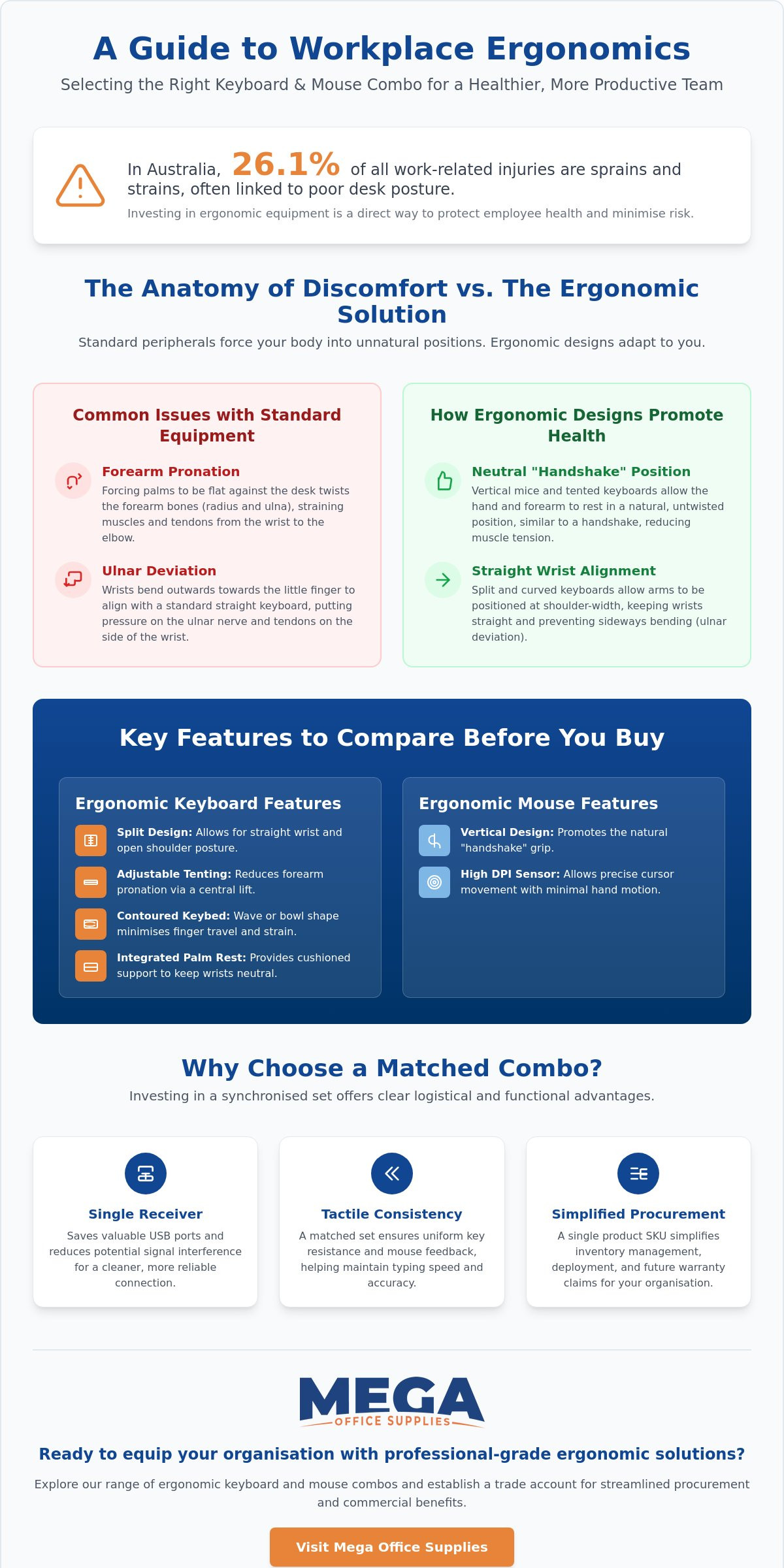
In 2021-22, sprains, strains, and dislocations accounted for 26.1% of all work-related injuries in Australia, highlighting a significant risk for desk-based employees. You likely recognise the physical toll that repetitive typing and poor posture take on your team, often leading to reduced output and costly health and safety claims. Selecting a high-quality ergonomic keyboard and mouse combo is a practical step toward minimising these risks while ensuring your hardware stands up to the rigorous demands of a busy professional environment.
This guide provides the technical clarity needed to identify peripherals that offer both long-term durability and precise anatomical support. Drawing on our team's extensive history in the industry, we will show you how to evaluate specifications like tactile feedback, wireless connectivity, and palm support to ensure seamless integration with your current office equipment. We will outline the essential features that distinguish professional-grade hardware from low-cost alternatives, helping you make a reliable investment for your workplace. From corporate suites to home offices, these insights will help you choose a solution that improves typing speed and overall employee comfort.
Key Takeaways
- Understand the importance of neutral posture and how specific design features reduce pronation and ulnar deviation to protect employee health.
- Identify critical hardware specifications, such as adjustable tenting and integrated palm rests, when selecting an ergonomic keyboard and mouse combo for your workstation.
- Evaluate technical connectivity options, including the reliability of 2.4GHz USB receivers versus the flexibility of multi-device Bluetooth pairing for hybrid work.
- Learn how to match peripheral durability and functionality to specific Australian workplace environments, from high-impact school settings to hygienic healthcare clinics.
- Discover how to streamline your organisation's procurement and access commercial benefits through professional trade accounts and local industry expertise.
What is an Ergonomic Keyboard and Mouse Combo?
An ergonomic keyboard and mouse combo is a precision-engineered input system designed to facilitate a neutral physiological state during extended computing tasks. Unlike standard peripherals that force the body to adapt to the hardware, these sets are built to accommodate the natural resting position of the human hand and forearm. By purchasing these as a matched pair, organisations ensure the user's entire input experience is balanced. This reduces the risk of repetitive strain injuries that often arise from using mismatched equipment with varying heights and angles.
Central to this design is the concept of neutral posture. Standard flat keyboards often lead to forearm pronation, where the palm is forced parallel to the desk, and ulnar deviation, which occurs when the wrists bend outward toward the pinky fingers. High-quality ergonomic sets mitigate these issues through angled and curved geometries. For those seeking a deeper technical understanding of these hardware evolutions, researching what is an ergonomic keyboard? provides valuable context on how design principles have shifted from traditional rectangular layouts to body-centric configurations.
The Core Components of Ergonomic Design
Professional grade hardware focuses on manual precision and durability. Split keyboards are a primary feature; they divide the key set into two distinct sections to allow the user to keep their shoulders open and wrists straight. Contoured keybeds often accompany this layout, featuring a wave or bowl shape that minimises the distance fingers must travel to reach specific keys. This reduces tendon strain significantly over a shift. Vertical or semi-vertical mice are also included to shift the hand into a handshake position. This orientation prevents the forearm from twisting and relieves pressure on the carpal tunnel area.
Why Combos Outperform Individual Peripherals
Investing in a synchronised ergonomic keyboard and mouse combo offers logistical and functional advantages that individual components cannot match. Most professional sets utilise a single 2.4GHz USB receiver to connect both devices, which preserves limited port space on modern laptops and docking stations. This creates a cleaner workspace and reduces the likelihood of signal interference between different brands. Tactile consistency is another major benefit. When the keyboard and mouse share the same manufacturing standards, the user experiences uniform resistance and feedback, which helps maintain typing speed and accuracy.
For Australian procurement officers and facility managers, the economic benefit is clear. Sourcing a single SKU simplifies inventory management, deployment, and future warranty claims. It ensures a standardised aesthetic and performance level across the entire office fit-out. To facilitate high-volume demands and streamlined ordering, businesses can use our Business Application Form to establish trade accounts, ensuring a reliable supply of professional grade workplace ergonomics.
Key Features to Compare Before You Buy
When evaluating a professional ergonomic keyboard and mouse combo, the technical specifications often dictate the long-term health outcomes for the user. Customisation is the primary factor here. Every Australian workplace, from high-density call centres to home offices, presents different physical requirements. You must look beyond basic aesthetics and focus on features that allow the hardware to adapt to the individual's anatomy rather than forcing the user to conform to a rigid design.
Wrist and palm rests are essential for maintaining a neutral position. Integrated cushioned rests provide immediate, stable support, while detachable options offer greater flexibility for shallow desks or varied arm lengths. This adjustability extends to tenting and tilt features. Tenting refers to the vertical angle of the keyboard; increasing this angle reduces forearm twisting. As highlighted in a detailed CNET ergonomic keyboard review, these design shifts are critical for improving posture and developing better typing habits over time.
Precision sensors in the mouse component also play a vital role in injury prevention. High DPI (dots per inch) settings allow for greater cursor movement with minimal physical effort. This reduces the total range of motion required from the shoulder and elbow, which is where many chronic strain issues originate. For organisations managing high-volume hardware fleets, battery management is a key logistical consideration. Rechargeable internal batteries reduce long-term waste, whereas replaceable battery models may be more practical for remote field offices where charging infrastructure is limited.
Keyboard Layouts and Switch Types
Layout choice should reflect the specific job function. Finance and administrative roles generally require full-size layouts with dedicated number pads for data entry. Conversely, Tenkeyless (TKL) designs are becoming popular in smaller workstations because they allow the mouse to be positioned closer to the body, reducing shoulder reach. You should also consider switch types. Membrane switches provide the quiet operation required for open-plan offices, while mechanical switches offer the tactile feedback preferred by high-speed typists who value manual precision.
Mouse Ergonomics: Size and Grip Style
Selecting the correct mouse size is non-negotiable to avoid hand cramping. Users with larger hands require a higher arch to support a palm grip, while those with smaller hands may prefer a more compact frame suited to fingertip or claw styles. Integrated thumb rests and programmable buttons are also valuable. These features allow users to map frequent commands to simple thumb clicks, significantly reducing the repetitive motion involved in complex software navigation. For those outfitting a complete workspace, browsing our range of office technology supplies can help you find the right technical specifications for your team.
Connectivity and Technical Compatibility
Selecting an ergonomic keyboard and mouse combo requires a thorough evaluation of technical integration. Reliability is paramount in professional settings; a peripheral that loses connection during a critical task is a liability. You must choose between the widespread flexibility of Bluetooth and the dedicated stability of 2.4GHz USB receivers. While Bluetooth is excellent for mobile setups, proprietary 2.4GHz connections generally offer lower latency and a more robust link in environments crowded with wireless signals. Modern professional sets often feature multi-device pairing, allowing users to toggle between a primary PC, a tablet, and a mobile phone with a single button press.
Security protocols have become a non-negotiable requirement for many Australian organisations. Professional grade combos often utilise encrypted wireless standards to protect keystroke data from interception. This is especially critical in healthcare and financial sectors where data privacy is a legal mandate. You should also verify operating system support across your entire fleet. While most hardware is advertised as "plug and play", full functionality of specialised shortcut keys and gesture controls often requires specific driver support for macOS or ChromeOS to ensure a seamless user experience.
Managing Wireless Interference
Dense office environments in Australian CBDs often suffer from signal congestion due to the sheer volume of active devices. In these scenarios, proprietary 2.4GHz dongles are superior because they bypass the standard Bluetooth pairing process, significantly reducing lag and potential dropouts. However, wireless is not always the appropriate choice for every sector. For high-security environments, such as Australian government departments, wired combos remain the standard. They eliminate the risk of signal interference and remove the possibility of wireless data breaches entirely, providing peace of mind for sensitive operations.
Software and Customisation
Professional hardware typically includes centralised software designed for deep customisation. This allows users or IT managers to remap keys for specific workflows or adjust mouse sensitivity to suit precision needs. For those managing large hardware deployments, software that provides battery level notifications and firmware updates is invaluable. It facilitates proactive maintenance, ensuring that an ergonomic keyboard and mouse combo doesn't fail during a critical shift. You can also create application-specific profiles; the hardware can automatically switch its button mappings when the user moves from a spreadsheet to a presentation tool, which maximises efficiency across different software applications.
Choosing the Right Combo for Your Environment
The operational utility of an ergonomic keyboard and mouse combo is defined by its specific work context. A device suited for a quiet corporate suite will often fail in the demanding environment of an Australian warehouse or a high-traffic clinical setting. Procurement officers must match technical specifications to the physical realities of the workplace to ensure equipment longevity and user comfort. When you align hardware durability with the intended sector, you reduce the frequency of replacement cycles and technical downtime.
In healthcare and clinical environments, hygiene and noise control are the primary drivers. Peripherals for patient areas should feature easy-to-clean, non-porous surfaces that withstand frequent sanitisation with hospital-grade chemicals. Silent-click buttons are also essential to maintain a calm atmosphere in recovery wards and consultation rooms. Conversely, schools and universities require hardware built from high-impact ABS plastics. These components must endure the heavy, often careless use typical of student computer labs while providing the ergonomic support needed for developing bodies.
Logistics and distribution centres present unique challenges such as airborne dust and long-range connectivity requirements. Here, dust-resistant designs and high-strength 2.4GHz wireless receivers are prioritised to allow staff to move between packing stations and terminals without signal dropout. For the modern corporate environment, hardware selection should be part of a holistic strategy. This involves matching your input devices with professional ergonomic office chairs and height-adjustable standing desks to meet local Work Health and Safety (WHS) obligations and minimise musculoskeletal risks.
The Home Office Setup
Home workstations often require a balance between professional performance and aesthetic integration. In smaller Australian apartment nooks, desk space is a premium. Selecting compact, Tenkeyless (TKL) combos allows you to free up real estate for other essential tasks. Integrating these peripherals with monitor arms further optimises the workspace; this ensures that the screen height and keyboard angle are perfectly aligned with the user's seated or standing position, preventing neck strain in multi-purpose home environments.
High-Volume Commercial Fit-outs
For large-scale organisations, standardising your equipment is a strategic move to minimise IT support tickets. When every workstation features the same hardware, training is simplified and troubleshooting becomes a predictable process. We understand the importance of bulk availability and consistent supply for growing businesses. To complete your workstation upgrade, browse our comprehensive range of office furniture supplies to find durable, commercial-grade solutions for your entire facility.
Procuring Your Ergonomic Solution from Mega Office Supplies
Procuring professional grade hardware requires a partner with the logistical capacity to manage high volume demands without friction. Mega Office Supplies positions itself as a dependable industry veteran, leveraging decades of combined experience to support Australian procurement officers and business owners. When you source an ergonomic keyboard and mouse combo through our platform, you are engaging with a well oiled operation that prioritises functional clarity and regional expertise. We understand the specific workflows of professional buyers who need to evaluate costs and quantities quickly to maintain workplace efficiency.
We provide several dedicated pathways to simplify the acquisition of workplace technology. For organisations requiring ongoing supply and credit facilities, our Business Application Form allows you to establish a trade account for rapid quoting and ordering. Additionally, we facilitate a transparent procurement process for the public sector by accepting Australian Government Official Purchase Orders. Our national delivery capabilities ensure that your office technology and facility supplies are dispatched efficiently to any location across the country, from metropolitan centres to regional hubs.
Why Choose an Australian Retailer?
Selecting a local partner provides security and peace of mind that overseas marketplaces cannot replicate. You gain direct access to local support and expert advice for complex procurement needs, ensuring that the hardware you acquire is fit for purpose in your specific sector. This regional presence also means faster resolution for warranty claims and product returns, minimising downtime for your staff. By partnering with us, you support a business that's been family owned and operated since 2008 and is deeply knowledgeable about the practicalities of domestic workplace maintenance and WHS compliance.
Next Steps for Your Workplace Health
Improving employee comfort and reducing injury claims starts with a proactive hardware strategy. We recommend reviewing your current Work Health and Safety (WHS) audit to identify high risk workstations that require immediate attention. Once these areas are identified, you can consult with our team for a tailored quote on bulk ergonomic equipment to standardise your facility. For larger deployments, we encourage a trial period for different ergonomic keyboard and mouse combo styles. This approach ensures high staff adoption rates and confirms that the selected hardware meets the manual precision requirements of your team before you commit to a full commercial fit out.
Optimising Your Team's Productivity and Health
Choosing a professional ergonomic keyboard and mouse combo is a long-term investment in your organisation's operational health. By prioritising anatomical alignment and neutral posture, you directly address the risks of workplace injury while improving the daily typing experience for your staff. We've explored how technical compatibility and environment-specific features, such as silent switches for clinics or high-impact plastics for schools, ensure your hardware stands up to the demands of any Australian workplace.
Beyond hardware, a truly healthy workplace is one that is kept professionally clean.
Mega Office Supplies has been family owned and operated since 2008, providing the regional expertise and logistical scale needed to support high-volume procurement. We accept official Australian Government purchase orders and offer national delivery on all office technology essentials, ensuring your team has the tools they need regardless of their location. Our team is ready to assist with tailored quotes and expert advice to help you standardise your workstations with confidence.
Browse our full range of Ergonomic Keyboards and Mice to find the ideal solution for your team's comfort and productivity today.
Frequently Asked Questions
Is an ergonomic keyboard and mouse combo worth the extra cost?
Yes, investing in a professional ergonomic keyboard and mouse combo is a cost-effective measure for reducing workplace injury claims. While initial procurement costs are higher than standard peripherals, the long-term savings from reduced absenteeism and improved typing speed are substantial. It's a strategic choice for businesses looking to meet their duty of care under Australian WHS regulations while maintaining a productive workforce over several years of intensive use.
How long does it take to get used to a split ergonomic keyboard?
Most users successfully adapt to a split ergonomic layout within one to two weeks of consistent use. While the initial few days may see a temporary dip in typing speed, your muscle memory develops quickly as your hands adjust to the more natural, neutral posture. We recommend starting with shorter sessions to allow your fingers to familiarise themselves with the angled keys without causing unnecessary frustration or mental fatigue during the transition.
Do I need a special desk to use an ergonomic keyboard and mouse?
You don't need a specialised desk to use ergonomic peripherals, but having sufficient desk depth is highly beneficial. Many ergonomic designs feature integrated palm rests that require more space than traditional flat keyboards. Ensuring your desk allows your elbows to remain at a 90 degree angle is the priority. Pairing these devices with a height adjustable standing desk can further optimise your workstation for maximum comfort and long term physical health.
Can I use a wireless ergonomic combo in a high-security government office?
Wireless peripherals are often restricted in high-security Australian government environments unless they meet specific encryption standards. While proprietary encrypted protocols like Logi Bolt provide a secure link, many departments still mandate wired connections to eliminate the risk of signal interception entirely. Always consult your internal IT security policy before procuring wireless hardware for sensitive areas to ensure the equipment complies with your organisation's data protection requirements.
What is the best ergonomic mouse for small hands?
The best ergonomic mouse for smaller hand dimensions is a compact vertical or semi-vertical model that allows for a natural handshake grip. You should look for a device with a lower arch and easily accessible buttons that don't require excessive finger stretching. Choosing a mouse that matches the user's grip style prevents the hand cramping often associated with oversized hardware, ensuring that the manual precision required for professional tasks remains comfortable.
Do ergonomic keyboards help with Carpal Tunnel Syndrome?
Ergonomic keyboards are specifically designed to alleviate the physical stressors that contribute to Carpal Tunnel Syndrome. By promoting a neutral wrist position and reducing ulnar deviation, these layouts minimise the pressure on the median nerve. While they aren't a medical cure, they are a vital preventative tool in a professional workstation kit, helping to manage existing discomfort and prevent the onset of chronic musculoskeletal disorders during long shifts.
How do I know if a keyboard and mouse combo is compatible with my Mac?
You can verify Mac compatibility by checking the technical specifications for native macOS support. While most modern USB and Bluetooth peripherals will perform basic functions on a Mac, specialised shortcut keys and gesture controls often require specific software drivers. Selecting an ergonomic keyboard and mouse combo that is explicitly designed for multi-OS environments ensures that you can utilise the full range of customisable features without facing technical friction or connectivity issues.
Should I choose a rechargeable or battery-operated ergonomic combo?
Choosing between rechargeable and battery-operated models depends on your specific workplace logistics. Rechargeable units are generally superior for permanent office fit-outs as they reduce environmental waste and eliminate the need to stock replacement cells. However, battery-operated models can be more practical for remote field offices or warehouses where charging infrastructure is limited. Both options provide professional grade performance, so your decision should focus on your facility's maintenance workflow and user convenience.
Article by
Mega Office Supplies Team
The Mega Office Supplies Team provides practical guidance for Australian businesses, schools, government organisations, healthcare providers, hospitality venues, warehouses and home offices. Based in Tweed Heads South, Mega Office Supplies is an Australian business, family owned and operated since 2008, offering office stationery, workplace furniture, technology products, labels, printers, cleaning and janitorial supplies, safety products, art materials, education resources and everyday business essentials from trusted brands.
General Information
This article is provided as general information only to help customers compare and choose office, workplace, school, cleaning, technology, furniture, safety and business supplies. Product details, specifications, compatibility, availability, pricing and suitability may vary. Always check the individual product page, manufacturer information, workplace requirements and relevant safety guidance before purchasing or using a product.


