




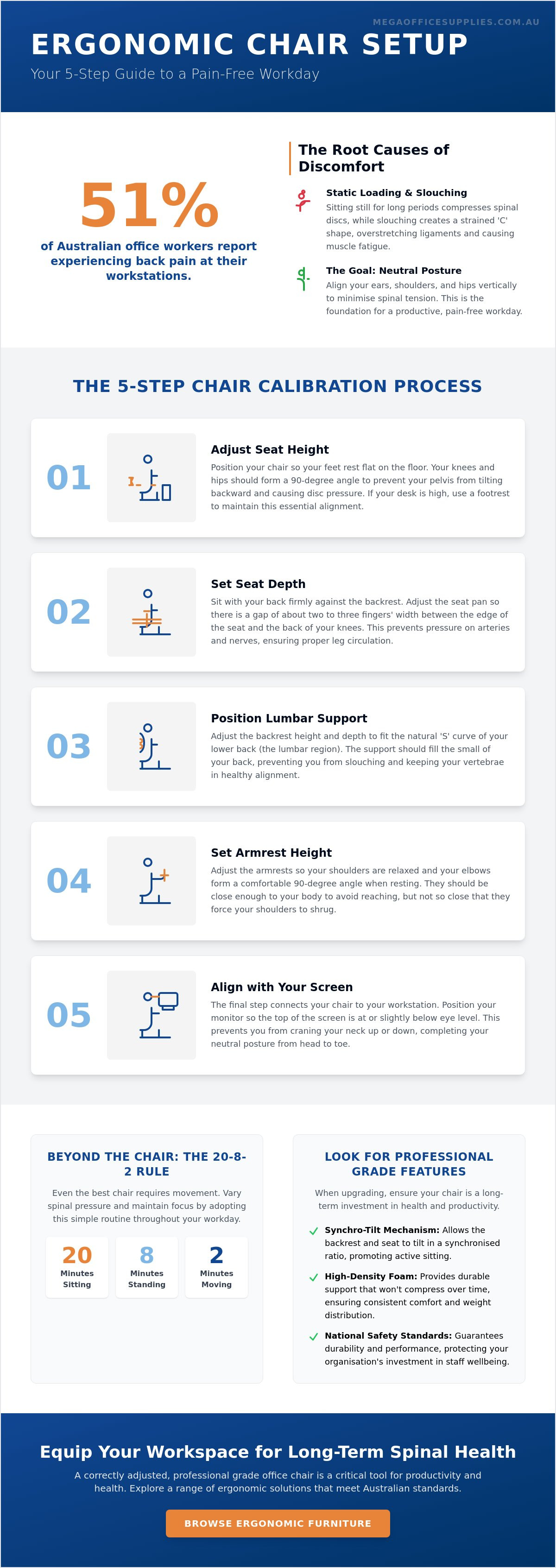
Did you know that 51% of office workers report experiencing back pain while at their workstations? It's a staggering figure that highlights a widespread failure in workplace ergonomics. For many Australian professionals, a standard workday often results in debilitating lower back ache and shoulder tension that makes focusing on complex tasks nearly impossible. If you've found yourself constantly shifting in your seat to find relief, you're already aware that preventing back pain from office chair use is essential for maintaining long-term health and productivity.
We believe that your seating is a critical piece of hardware that must support your body's specific requirements. This guide provides the exact steps to adjust your workspace for a neutral posture and eliminate physical strain. You'll learn clear instructions for chair setup and the technical specifications to look for in professional grade furniture. This ensures your next acquisition meets the latest Australian and international safety standards for durability, giving you the confidence to create a truly pain-free work environment.
Key Takeaways
- Identify how static loading and slouching affect spinal discs to address the root causes of workplace fatigue and physical discomfort.
- Master a precise 5-step configuration process for seat height and depth, which is essential for preventing back pain from office chair use.
- Compare technical specifications such as synchro-tilt mechanisms and high-density foam to ensure your furniture acquisitions provide professional grade support.
- Adopt the '20-8-2' movement routine and utilise sit-stand workstations to vary spinal pressure and maintain peak concentration levels throughout the day.
- Recognise the long-term value of selecting ergonomic equipment that adheres to national standards for durability and consistent staff wellbeing across your organisation.
Understanding Why Your Office Chair Causes Back Pain
Sitting is not a passive activity. It is a mechanical load on the body. Static loading occurs when your muscles remain in a constant state of tension without the relief of movement. When you sit for an eight-hour shift, your spinal discs endure continuous compression. This lack of movement prevents the natural pumping action that delivers essential nutrients to the discs. Over time, this leads to premature wear and persistent stiffness that hinders your daily performance.
Slouching over a workstation forces the spine into a strained "C" shape. This position overstretches the posterior spinal ligaments, which are not designed to bear weight for extended periods. The resulting mechanical strain causes long-term fatigue as your muscles work overtime to compensate for a lack of structural support. Successfully preventing back pain from office chair setups requires a technical understanding of how these ligaments respond to prolonged stress.
To better understand how your desk configuration impacts your body, watch this helpful video:
A healthy spine maintains a natural "S" curve. When a chair lacks adequate lumbar support, the lower back flattens out, pushing the vertebrae out of alignment. This loss of the inward curve puts immense pressure on the lumbar region, often resulting in the sharp or dull lower back aches common in Australian offices. Poorly designed seat pans also create contact stress by pressing against the soft tissues of the thighs. High-quality ergonomic office chairs are engineered to distribute weight evenly, avoiding these pressure points that restrict circulation and cause leg numbness.
The True Cost of Workplace Back Pain
Physical discomfort is a direct drain on professional efficiency. When a staff member is distracted by persistent ache, their capacity for complex decision-making and high-level concentration drops significantly. Chronic pain often erodes workplace morale and increases absenteeism. Investing in professional grade office furniture is a strategic move to protect your organisation's most valuable assets: the health and focus of your team.
Neutral Posture: The Goal of Every Ergonomic Setup
Neutral posture is the alignment where joints are naturally buffered. This position ensures the spine is under minimal tension by vertically aligning the ears, shoulders, and hips. Achieving this state is the primary objective when preventing back pain from office chair use. When your joints are in a neutral position, the surrounding muscles don't have to work as hard, which reduces fatigue and allows for a more productive, pain-free workday in any professional environment.
The 5-Step Guide to Adjusting Your Chair for Maximum Support
Adjusting your workspace is a technical requirement for long-term health. A poorly configured chair undermines even the most expensive ergonomic features. By following a structured calibration process, you can transform your seat into a precision tool for preventing back pain from office chair use. This isn't just about comfort; it's about ensuring your skeletal structure is supported throughout the entire workday.
Step 1 & 2: Height and Seat Depth Precision
Seat height is the foundation of your setup. Adjust the pneumatic cylinder until your feet rest flat on the floor with your knees and hips at a 90-degree angle. This alignment prevents the pelvis from tilting backward, which is a primary cause of disc pressure. If your desk height requires a higher seat, always utilise a professional footrest to maintain this critical geometry and avoid dangling legs that restrict blood flow.
Seat depth is equally vital for leg circulation. You should be able to sit with your back firmly against the backrest while maintaining a "two-finger" gap between the edge of the seat and the back of your knees. This prevents the seat pan from pressing against the popliteal artery. If the seat is too deep, you'll likely pull your back away from the lumbar support to find relief, defeating the purpose of an ergonomic chair. If it's too shallow, your thighs won't be properly supported, increasing pressure on your sit-bones.
Step 3 & 4: Lumbar and Armrest Configuration
The lumbar support must be positioned precisely in the "sweet spot" of the small of your back. This maintains the natural S-curve of the spine and prevents the flattening of the lower back. According to Mayo Clinic's guide to office ergonomics, proper support reduces the load on your spinal ligaments and prevents the slouching that leads to chronic fatigue. If your chair doesn't have built-in adjustment, a separate lumbar cushion can provide the necessary manual precision.
Armrests should be adjusted so your shoulders remain relaxed and level. If they're too high, you'll find yourself shrugging, which creates tension in the neck and upper back. Set them so your elbows rest at a 90 to 100-degree angle. Ensure your chair is close enough to the desk to reach your keyboard without leaning forward. Avoiding "keyboard reach" is essential, as overextending your arms is a common catalyst for mid-back strain and shoulder tension.
Finally, adjust the backrest tilt tension to allow for dynamic movement. While it's tempting to lock the chair in a rigid upright position, allowing for slight movement is better for the spine. A flexible backrest encourages micro-movements that keep the spinal discs hydrated and reduces the stiffness associated with static loading. If you're looking to upgrade your current setup, browsing our range of ergonomic office chairs can help you find a model with the manual precision required for these specific adjustments.
Key Ergonomic Features to Consider Before Upgrading
Selecting professional grade hardware requires a technical understanding of the components that facilitate preventing back pain from office chair use over the long term. For Australian procurement officers and business owners, the priority is often balancing initial cost with the durability required for high-volume commercial environments. A chair is a mechanical assembly; its effectiveness depends entirely on the precision of its internal mechanisms and the quality of its contact materials.
Choosing the Right Mechanism for Your Work Style
The mechanism is the engine of the chair. A synchro-tilt mechanism is often the preferred choice for modern professionals because it allows the backrest and seat to tilt in a fixed ratio, usually 2:1. This promotes dynamic seating, where the chair moves with your body to maintain support as you shift positions. This movement is vital for spinal disc hydration and reducing the static loading discussed in earlier sections.
Independent back and seat adjustment offers manual precision for users with specific postural requirements. This allows you to lock the seat pan and backrest at distinct angles. In shared Australian office environments, multi-function mechanisms are essential. They provide the adjustability needed to suit various body types, ensuring that every staff member can achieve a neutral posture. When evaluating ergonomic office chairs, check for AFRDI Level 6 certification. This Australian standard confirms the chair is fit for heavy-duty commercial use and can withstand the rigours of a full-time work schedule.
The physical shape of the seat pan is another critical factor. A waterfall seat edge, which curves downwards at the front, is designed to reduce pressure on the back of the thighs. This feature is a technical requirement for maintaining healthy circulation in the lower legs and preventing the numbness often associated with standard, flat-edged seating.
Material Matters: Durability and Comfort
Material choice impacts both thermal comfort and structural longevity. Breathable mesh backrests are highly effective for temperature regulation in Australian climates, as they allow for consistent airflow. However, the seat pan requires high-density moulded foam to provide lasting support. Unlike budget-grade cut foam, moulded foam maintains its shape over years of use, preventing the "bottoming out" effect where the user eventually feels the hard plastic or metal base beneath the cushion.
Upholstery should be rated for high-volume usage. Commercial-grade fabrics or heavy-duty leathers are tested for abrasion resistance, ensuring the furniture remains professional in appearance and function. Investing in these higher specifications is a reliable strategy for organisations looking to minimise long-term replacement costs while prioritising staff spinal health.
Beyond the Chair: Posture Habits and Movement Strategies
Even the most advanced seating cannot counteract the effects of a completely sedentary day. Movement is a technical requirement for spinal health. The '20-8-2' rule is a proven framework for managing spinal loading. It dictates 20 minutes of sitting, followed by 8 minutes of standing, and 2 minutes of active movement. This rhythm ensures the body doesn't settle into the static loading patterns that cause long-term disc strain. Adhering to this cycle is a practical strategy for preventing back pain from office chair use throughout a standard eight-hour shift.
Integrating Standing Desks into Your Routine
High-quality standing desks complement ergonomic seating by allowing for height transitions without interrupting the workflow. However, standing isn't a "set and forget" solution. Static standing can be as taxing as static sitting if you remain rigid. You've got to shift your weight frequently to engage different muscle groups. For those transitioning to a sit-stand routine, anti-fatigue mats are essential. They provide a cushioned surface that encourages micro-movements in the feet and legs, which reduces the pressure on the lower back and improves circulation.
Essential Desk Accessories for Spinal Health
Desk organisation directly impacts your posture. High-use items like phones, pens, and stationery should be placed within the 'easy reach' zone to prevent repetitive overreaching. This zone is the area your forearms can reach while your elbows remain comfortably at your side. Monitor height is another critical factor for preventing back pain from office chair setups. Use adjustable monitor arms to ensure the top third of your screen sits at eye level. This configuration prevents "tech neck," where the head tilts forward and places excessive weight on the cervical spine.
For shorter users at fixed-height desks, a footrest is a non-negotiable accessory. It ensures the feet are supported, which maintains the 90-degree knee angle required for a neutral pelvis. Additionally, document holders prevent the neck twisting associated with looking down at papers on the desk surface. By aligning your tools with your natural line of sight, you minimise the mechanical strain on your neck and shoulders. If you're ready to optimise your workspace for better health, you can view our range of ergonomic desk accessories to find the right hardware for your professional setup.
Equipping Your Workspace for Long-Term Spinal Health
Professional grade furniture is a long-term investment in the operational efficiency of your organisation. While budget alternatives might seem cost-effective initially, they often lack the structural integrity required for preventing back pain from office chair use in high-volume commercial environments. A comprehensive office fit-out that prioritises musculoskeletal health reduces the risk of workplace injuries and supports a culture of wellbeing. By selecting hardware designed for durability and manual precision, business owners and procurement officers can ensure their teams remain productive and focused.
Selecting Commercial Chairs for National Fit-outs
Large organisations, including government departments and healthcare providers, benefit significantly from standardising their ergonomic office chairs across all locations. Standardisation ensures a consistent level of support for every staff member and simplifies maintenance and procurement workflows. It's essential to verify that all seating meets Australian standards for safety and durability, such as AFRDI Level 6, which is specifically designed for severe commercial use.
Mega Office Supplies leverages decades of combined industry experience to support Australian businesses with tailored workplace solutions. We understand the logistical requirements of national distribution and the technical specifications needed for diverse environments, from corporate boardrooms to school staffrooms. Our expertise helps you navigate complex procurement decisions, ensuring that your furniture acquisitions align with national workplace health and safety (WHS) regulations.
Your Next Steps for a Pain-Free Office
Improving your workspace starts with a basic ergonomic audit of your current workstation. Check that your setup follows the neutral posture principles discussed in this guide, ensuring your joints are naturally buffered and your spine is supported. If you or your staff continue to experience persistent discomfort despite making manual adjustments, it may be time to consult a professional for a specialised ergonomic assessment. These evaluations provide a deeper analysis of individual postural habits and can identify specific hardware requirements.
While ergonomic changes are vital, persistent pain may also require medical consultation.
Beyond professional medical advice, staying physically active is a great way to build the strength necessary to maintain a neutral posture.
Don't wait for minor aches to become chronic conditions. Taking proactive steps today is the most effective method for preventing back pain from office chair setups. You can explore our full range of professional office furniture to find the ergonomic solutions required to upgrade your workspace and protect your long-term spinal health.
Securing Your Professional Wellbeing
Achieving a pain-free workday is a technical process that requires both the right hardware and a commitment to neutral posture. By applying the 5-step adjustment guide and integrating the '20-8-2' movement rule, you've taken the first steps toward long-term musculoskeletal health. Preventing back pain from office chair use isn't just about immediate comfort; it's a strategic investment in your professional longevity and daily focus. When your workspace is calibrated to your body's specific requirements, you eliminate the physical distractions that hinder high-level performance.
Mega Office Supplies brings over 20 years of industry experience to help you navigate these equipment choices. We provide professional, commercial-grade furniture with reliable national delivery across Australia, ensuring your organisation meets the highest ergonomic standards. Whether you're outfitting a home office or a large corporate headquarters, we've got the logistical scale and technical expertise to support your needs. Don't let physical strain compromise your output when the solution is a matter of precise configuration and quality hardware.
Upgrade your workplace with our range of Ergonomic Office Chairs and experience the difference that precision-engineered support makes to your daily productivity. It's time to prioritise a setup that works as hard as you do.
Frequently Asked Questions
How do I know if my office chair is causing my back pain?
Your chair is likely the cause if your discomfort increases as the workday progresses but subsides during weekends or extended breaks. Physical signs include a seat pan that has lost its cushioning or a backrest that doesn't stay locked in position. If you can't adjust the chair to support your natural spinal curve, it's failing to provide the mechanical support required for a professional environment.
What is the best sitting position for lower back pain?
A slightly reclined posture of 100 to 110 degrees is generally more effective for reducing disc pressure than sitting perfectly upright. This position allows the backrest to take more of your body weight, which offloads the lower spine. You must ensure your bottom is pressed against the back of the chair to maintain the lumbar curve while keeping your feet flat on the floor.
Should I use a lumbar support pillow with my office chair?
A lumbar pillow is a useful supplementary tool if your current chair lacks integrated, adjustable support. It helps fill the gap between your lower spine and the backrest, which prevents slouching. While it's a helpful temporary fix, it doesn't replace the manual precision and structural stability found in professional grade ergonomic seating designed for long-term musculoskeletal health.
How often should I get up from my desk to prevent back stiffness?
You should aim to change your position or stand up every 30 minutes at a minimum to maintain healthy circulation. Even a brief 60-second stretch helps counteract the effects of static loading on your spinal discs. Constant movement is a primary factor in preventing back pain from office chair use, as it ensures your muscles don't become locked in a fatigued state from prolonged sitting.
Are standing desks better than ergonomic chairs for back pain?
Standing desks and ergonomic chairs serve different functions and work best when used as complementary tools. A standing desk provides the opportunity to vary your spinal load, but standing for too long can lead to leg fatigue and joint strain. The most effective strategy involves alternating between a high-quality chair and a standing position throughout the day to keep your body in a dynamic state.
What features should I look for in a chair if I have a herniated disc?
Prioritise a chair with a synchro-tilt mechanism and highly adjustable lumbar support. These features allow you to fine-tune the angle of your pelvis and the support for your lower back, which is critical for reducing pressure on sensitive discs. Ensure the chair has a high-density foam seat to prevent bottoming out, as this avoids direct contact stress on the tailbone and spine.
Can a footrest really help with lower back pain while sitting?
A footrest provides a stable base that prevents you from sliding forward in your seat, which is a key component in preventing back pain from office chair use. This stability keeps your lower back firmly against the lumbar support, which is essential for maintaining a healthy, neutral posture. It's a non-negotiable accessory if your feet don't sit flat on the floor once your seat height is aligned with your desk.
How high should my armrests be to avoid shoulder and back strain?
Armrests should be positioned so your elbows rest at a 90-degree angle while your shoulders remain completely relaxed and level with the floor. If they're too high, you'll shrug your shoulders, which creates tension in the neck. Correct height ensures your upper body weight is supported, which reduces the overall load on your middle and lower back during complex tasks.

Article by
Mega Office Supplies Team
The Mega Office Supplies Team provides practical guidance for Australian businesses, schools, government organisations, healthcare providers, hospitality venues, warehouses and home offices. Based in Tweed Heads South, Mega Office Supplies has been family owned and operated since 2008, offering office stationery, workplace furniture, technology products, labels, printers, cleaning and janitorial supplies, safety products, art materials, education resources and everyday business essentials from trusted brands.
General Information
This article is provided as general information only to help customers compare and choose office, workplace, school, cleaning, technology, furniture, safety and business supplies. Product details, specifications, compatibility, availability, pricing and suitability may vary. Always check the individual product page, manufacturer information, workplace requirements and relevant safety guidance before purchasing or using a product.


