


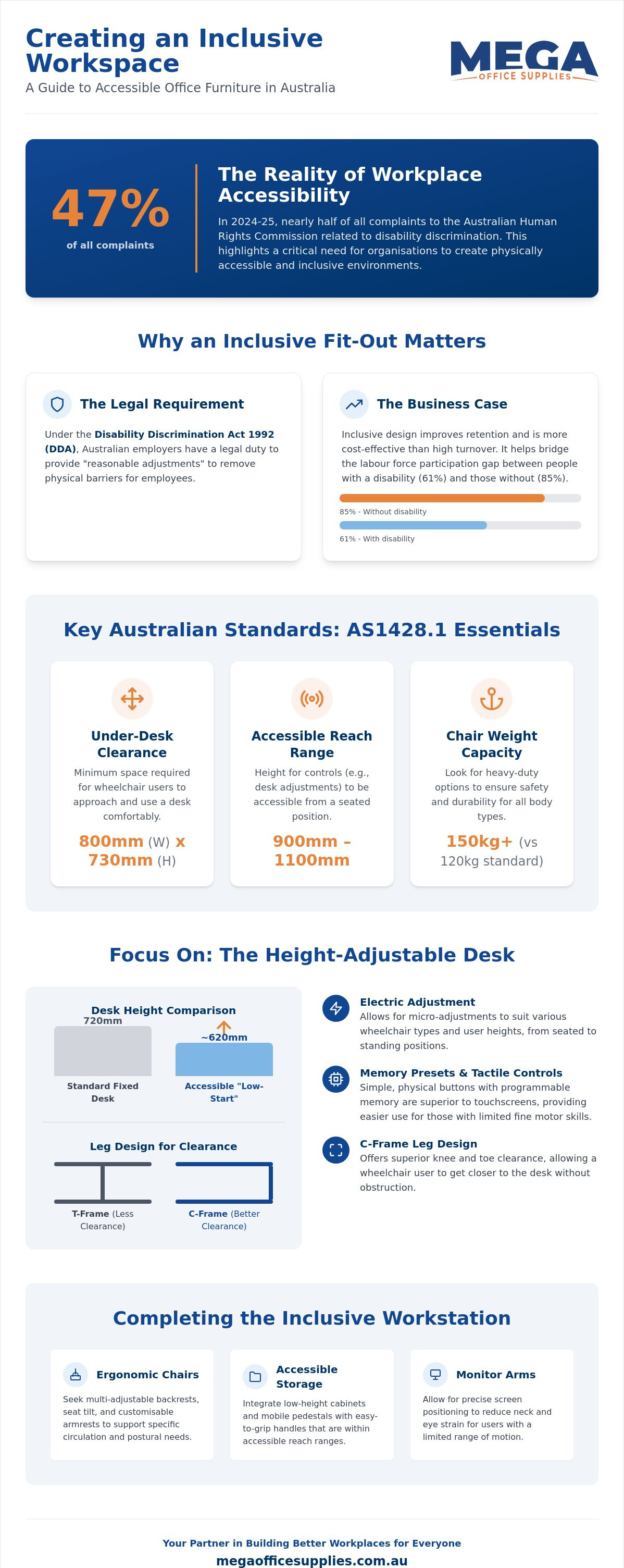
In 2024-25, 47% of all complaints made to the Australian Human Rights Commission related to disability discrimination. This statistic highlights a significant gap in how many local organisations approach physical accessibility and inclusion. You likely understand the value of a diverse team, yet the technicalities of AS1428.1 compliance and the fear of investing in expensive, ineffective equipment can make procurement feel like a financial risk. Selecting the correct office furniture for employees with disabilities shouldn't be a source of confusion or a compromise on your office's professional aesthetic.
We'll show you how to identify furniture that's both highly adjustable and fully compliant with current Australian standards. By following this guide, you'll gain the confidence to create a supportive environment that improves employee retention and comfort. We will examine the latest ergonomic requirements for 2026, explain how to access the Employment Assistance Fund for workplace modifications, and provide a functional checklist for your next office fit-out.
Key Takeaways
- Navigate Australian compliance requirements, including the Disability Discrimination Act and AS1428.1, to ensure your office layout supports full mobility.
- Identify the critical dimensions and adjustment ranges necessary when selecting office furniture for employees with disabilities, focusing on wheelchair-accessible height-adjustable desks.
- Look beyond basic lumbar support to find ergonomic chairs with multi-adjustable backrests and seat tilt features that cater to specific circulation needs.
- Optimise the entire workspace by integrating accessible storage solutions and monitor arms that reduce strain for users with limited range of motion.
- Follow a structured procurement guide to conduct effective workplace audits and secure equipment that offers durability and long-term value.
Understanding Accessibility: Office Furniture and Australian Standards
Under the Disability Discrimination Act 1992 (DDA), Australian organisations have a clear mandate to provide "reasonable adjustments" for their workforce. This legal framework ensures that physical barriers don't prevent a person from performing their job effectively. When you select office furniture for employees with disabilities, you aren't just buying a desk or a chair; you're fulfiling a statutory obligation to provide an equitable environment. While general ergonomic furniture aims to reduce strain for the average user, specialised solutions often incorporate adaptive equipment designed for specific functional requirements.
Universal design is the benchmark for Australian fit-outs in 2026. This approach ensures that a workstation is usable by the broadest range of people without the need for additional modification. By prioritising highly adjustable, standard-compliant pieces, you create a workspace that accommodates everyone from the outset. This reduces the need for reactive, one-off purchases that can disrupt office aesthetics and lead to higher long-term costs. It's a shift toward integrated solutions that don't isolate the user or highlight their differences.
The Legal and Ethical Case for Inclusive Design
Australian workplace health and safety laws require a proactive duty of care. Providing inclusive furniture is a critical component of this responsibility. Beyond compliance, the business case is strong. Data from 2022 indicates that the labour force participation rate for people with a disability was 61%, significantly lower than the 85% for those without. Bridging this gap through better equipment directly improves employee retention. It's often more cost-effective to invest in high-quality, inclusive office furniture than to manage the high turnover costs associated with an unsupportive work environment.
Key Technical Standards to Know Before Buying
AS1428.1 (Design for access and mobility) provides the technical blueprint for accessibility in Australia. While it primarily governs building work, its specifications are vital when planning furniture layouts. You must consider several key metrics:
- Reach Ranges: Controls for height-adjustable desks or filing cabinets must be accessible from a seated position, typically between 900mm and 1100mm from the floor.
- Clear Floor Space: A minimum clearance of 800mm in width and 730mm in height is usually required beneath desks to accommodate wheelchair users comfortably.
- Weight Capacity: Standard office chairs often have a limit of 120kg. For inclusive environments, look for heavy-duty ratings of 150kg or more to ensure safety and durability for all body types.
Ensuring these dimensions are met during the procurement phase prevents costly layout errors and ensures that your office remains a truly inclusive space. By focusing on these technical benchmarks, you can build a more resilient and versatile workspace.
Selecting Height-Adjustable Desks for Wheelchair Access and Mobility
While the spatial standards discussed previously provide the framework for a compliant office, the desk itself must bridge the gap between the floor and the user's specific functional reach. Electric sit-stand desks are a critical component of office furniture for employees with disabilities. Unlike fixed-height options, these units allow for micro-adjustments that accommodate various wheelchair types, from compact manual chairs to larger motorised models with higher armrests. A "low-start" height is often vital. Standard desks often start at 720mm, but many wheelchair users require a starting point closer to 620mm to ensure their armrests clear the underside while maintaining an ergonomic typing position.
Manoeuvrability depends heavily on the desk's leg design. C-frame legs, which place the vertical supports toward the back of the worksurface, offer superior knee and toe clearance compared to T-frame designs. This allows a wheelchair user to pull in closer to the desk without their footplates striking the frame. Control panel accessibility is another key factor. Simple, tactile interfaces with programmable memory are superior to touchscreens, as they provide physical feedback for users with limited fine motor control or visual impairments.
Electric vs. Manual: Which is Better for Accessibility?
Manual crank desks require significant upper-body strength and a wide range of motion. This physical demand may exclude employees with limited mobility or chronic pain. Electric motors remove this barrier entirely. Modern electric units also feature anti-collision sensors. These are essential for users who might have reduced sensory feedback, as the sensors prevent the desk from pinning legs or crushing equipment during height adjustments. Memory presets enable a user to save their exact ergonomic height, allowing them to return to a perfect setup with a single touch. For organisations planning an inclusive fit-out, exploring a range of standing desks with wide height ranges is a practical first step.
Worksurface Considerations: Material and Colour
The worksurface finish impacts visual accessibility. High-gloss tops create glare that can be disorienting for employees with vision impairments. Opt for low-sheen or matte laminates to minimise reflections. High-contrast edging, such as a dark edge on a light desk, helps define the workspace boundaries for those with low vision. Clear the floor area using integrated cable trays; a clutter-free path is mandatory for safe wheelchair movement. Proper cable management ensures that mobility aids don't become entangled in loose wiring, maintaining both safety and independence in the workspace.
Ergonomic Chairs: Customising Support for Employees with Disabilities
Standard lumbar support is often insufficient when selecting office furniture for employees with disabilities. True inclusivity requires multi-adjustable backrests that can be locked at various angles or adjusted for height to support specific spinal alignments. Seat tilt and depth adjustments are equally vital; they manage pelvic positioning and lower-limb circulation, which is critical for users who spend extended periods seated. These features allow the chair to be tailored to the individual's unique proportions, ensuring that the seat pan doesn't cut off circulation behind the knees or leave the lower back unsupported.
Armrest customisation is another area where standard chairs often fall short. 4D armrests provide adjustment in height, width, depth, and pivot. This level of control supports employees with limited upper body strength or those who require specific arm positioning to use adaptive keyboards. For long-term comfort, look for pressure-relieving materials like high-density memory foam or gel inserts. These materials distribute weight more evenly than standard foam, reducing the risk of discomfort and skin breakdown for users with limited mobility.
Specialised Seating Features to Compare
Bariatric chairs are a necessary consideration for many organisations. These models offer reinforced frames and high weight capacities, often exceeding 150kg, without compromising on ergonomic adjustability. For employees with specific physical conditions, specialised seat pans with coccyx cut-outs can alleviate pain in the tailbone area. Stability is another safety concern; braking systems such as "sit-lock" castors, which lock when the user sits, or "stand-lock" castors, which lock when the user stands, provide essential stability during transfers between a mobility aid and the office chair.
The Importance of Custom Fitting
A "one size fits all" approach fails in a truly inclusive office. Every individual has unique physiological needs that standard office furniture may not meet. We recommend working closely with occupational therapists to ensure a precise fit when selecting an ergonomic office chair. These professionals can identify specific features required for a user's condition, such as specific seat widths or backrest tensions. Trial periods are also a non-negotiable part of the procurement process. An employee should test the chair in their actual work environment for several days to ensure the configuration provides the necessary support throughout a full shift. This practical testing phase confirms that the investment solves the employee's needs before a final purchase is made.
Beyond the Desk: Storage and Accessory Solutions for Inclusive Workspaces
While the desk and chair form the core of a workstation, the surrounding environment determines daily efficiency. When procuring office furniture for employees with disabilities, storage units and accessories must be evaluated for their physical accessibility. Standard filing cabinets often feature recessed handles that are difficult for users with limited grip strength to operate. Instead, specify units with large D-style drawer pulls and precision ball-bearing tracks that allow drawers to glide open with minimal force. These small mechanical advantages significantly reduce the daily physical toll on the user.
The "Reach Range" rule is a fundamental concept in inclusive design. It dictates that frequently used items should be placed within the "primary reach zone", which is the area reachable without leaning or stretching. For a seated user, this is typically a horizontal arc within 300mm to 400mm of the body. Organising stationery and essential files within this radius prevents repetitive strain and maintains user independence. Document holders and adjustable task lamps further support this by bringing work materials into the user's optimal visual field. This is especially beneficial for those with vision impairments or limited neck mobility who cannot easily adjust their posture to see fixed documents.
Organising the Accessible Workstation
Effective organisation involves choosing storage media that accommodates functional needs. For example, using lever arch files with easy-grip finger pulls allows users to retrieve documents from shelving with a single finger. Desktop organisers should be used to maximise vertical space without creating obstacles. For users with visual impairments, tactile labelling on storage bins and filing systems provides a non-visual way to identify contents quickly, ensuring the workspace remains navigable and efficient. This level of detail ensures that every team member can manage their workload without external assistance.
Technology Accessories and Cable Safety
Technology integration can often create physical barriers if not managed correctly. Monitor arms with gas-spring adjustment are essential; they allow for effortless positioning of screens to suit specific sightlines or glare reduction needs. Pair these with large-format keyboards and ergonomic mice to support users with fine motor challenges. To maintain a safe environment, use wireless charging pads to reduce the need for fiddly cables that can be difficult to plug in. Keeping the worksurface clear of tangled wires also prevents accidental snags for those using mobility aids, which is a critical safety consideration in any professional fit-out.
To ensure your workspace is fully equipped for every team member, browse our range of office technology supplies designed for professional environments.
The Procurement Guide: Implementing Inclusive Office Furniture Solutions
Budgeting for inclusivity is an investment in your organisation's human capital. While specialised equipment can carry a higher upfront cost, the long-term value is found in reduced turnover and improved productivity. In Australia, financial barriers are often mitigated by the Employment Assistance Fund (EAF). As of 2025-26, the EAF provides up to $67,339.10 for workplace modifications and equipment for eligible employees. Establishing a clear internal "reasonable adjustment" request process allows staff to communicate their needs without friction, ensuring that the solutions provided are effective and targeted.
Partnering with a national supplier is vital for maintaining standardisation across multiple locations. This ensures that an employee in a Sydney branch receives the same high-quality, compliant support as a colleague in Perth. It also simplifies the maintenance and replacement cycle, as your procurement team can rely on a consistent catalogue of professional-grade hardware.
What to Consider Before Buying
Before finalising any order, evaluate the compatibility of new items with your existing office fit-out. If you are integrating a new standing desk into a shared space, ensure the power requirements and footprint don't obstruct current mobility paths. Warranty and local support are non-negotiable; ensure all equipment is protected by Australian consumer law and that the supplier offers domestic assistance. Finally, account for lead times. Specialised ergonomic chairs or custom-built storage units may take longer to fulfil than standard stationery orders.
Final Checklist for Inclusive Procurement
Use this technical checklist to verify that your chosen solutions meet the necessary standards for a diverse workforce:
- Weight Capacities: Confirm that chairs and stools are rated for at least 150kg to ensure safety for all users.
- Height Ranges: Verify that desks have a "low-start" height (ideally 620mm) to accommodate various wheelchair armrest heights.
- Maintenance: Ensure materials are durable and easy to sanitise using standard facility supplies to maintain workplace hygiene.
- Visual Standards: Check that worksurfaces have a matte or low-sheen finish to prevent glare and that edging provides sufficient visual contrast.
By following this structured approach, you can build a workplace that is not only compliant but genuinely supportive of every team member's professional success.
Building a Future-Proof and Inclusive Workplace
Creating a professional environment that supports every team member is a cornerstone of modern Australian business. By prioritising AS1428.1 compliance and selecting highly adjustable equipment, you fulfil legal obligations while fostering a culture of genuine belonging. The right office furniture for employees with disabilities reduces physical barriers and demonstrates a commitment to long-term employee wellbeing. Investing in these solutions today ensures a more resilient and versatile workspace for years to come.
As a reliable partner with over 20 years of combined industry experience, Mega Office Supplies understands the technical requirements of large-scale fit-outs. We provide national Australian delivery and support to ensure your organisation remains compliant regardless of location. We are also an official supplier for Australian Government purchase orders, offering the stability and transparency required by professional buyers.
Browse our full range of ergonomic office furniture and inclusive solutions
Taking the steps to audit your current environment and implement these changes will lead to a more comfortable and productive team for the future.
Frequently Asked Questions
Does the Australian Disability Discrimination Act (DDA) require specific office furniture?
The DDA does not mandate specific furniture models, but it requires employers to make "reasonable adjustments" to prevent workplace discrimination. Providing office furniture for employees with disabilities is a common way to meet this legal obligation. If a specific desk or chair is necessary for an employee to perform their role safely and effectively, the organisation is generally required to provide it unless it causes "unjustifiable hardship."
What is the standard desk height for a wheelchair user in Australia?
According to AS 1428.1, an accessible workstation requires a minimum knee clearance of 730mm in height and 800mm in width. To ensure a perfect functional fit, many wheelchair users prefer desks with an adjustable range starting as low as 620mm. This lower starting point allows the user to maintain an ergonomic typing position while ensuring the armrests of their mobility aid clear the underside of the worksurface.
Are height-adjustable desks considered a tax deduction for employees with disabilities?
Employees may be able to claim a tax deduction if they purchased the desk themselves to manage a disability and it is directly related to their income-earning activities. However, most Australian businesses utilise the Employment Assistance Fund (EAF) to cover these costs. The EAF provides significant funding for workplace modifications, including sit-stand workstations and specialised seating, which removes the financial burden from both the employee and the employer.
How much weight should an inclusive office chair be able to support?
An inclusive office chair should have a minimum weight rating of 150kg to safely accommodate a diverse workforce. While standard commercial chairs are typically rated for 120kg, heavy-duty models offer the reinforced structural integrity required for long-term safety. Always verify the manufacturer's specification sheet to ensure the gas lift and base are built for professional-grade use before making a procurement decision.
What are the best flooring surfaces for office chairs and mobility aids?
Hard surfaces or low-pile commercial carpets are the most effective options for mobility aids and office chairs. High-pile or plush residential carpets create significant rolling resistance, which can make it difficult for wheelchair users to navigate the office independently. If your current flooring is unsuitable, installing a heavy-duty chair mat provides a stable, low-friction surface that improves manoeuvrability without requiring a full floor renovation.
Can I modify existing office furniture to be more accessible?
You can improve accessibility by adding modular accessories such as monitor arms, document holders, or keyboard trays. However, structurally modifying a fixed-height desk is rarely as effective or safe as installing a purpose-built height-adjustable unit. Integrated office furniture for employees with disabilities provides superior stability and ensures the workstation remains compliant with Australian standards without the risks associated with aftermarket modifications.
What is the difference between ergonomic and accessible furniture?
Ergonomic furniture focuses on general comfort and reducing strain for the average user through standard adjustments like lumbar support. Accessible furniture goes further by meeting specific functional requirements defined in AS 1428.1. This includes ensuring sufficient clearance for wheelchairs, providing tactile controls for users with visual impairments, and offering higher weight capacities, making the workspace usable for everyone regardless of their physical ability.
How do I know if a chair is compliant with Australian standards for disability?
Look for chairs that meet AS/NZS 4438 and carry an independent certification from organisations like AFRDI. While there is no single "disability" sticker, compliance with the recommendations in AS 1428.2 (enhanced requirements) indicates the product meets higher accessibility benchmarks. Always request a full technical specification from your supplier to verify that the adjustment ranges and weight limits meet the specific needs identified in your workplace audit.
Article by
Mega Office Supplies Team
The Mega Office Supplies Team provides practical guidance for Australian businesses, schools, government organisations, healthcare providers, hospitality venues, warehouses and home offices. Based in Tweed Heads South, Mega Office Supplies is a family-owned and operated Australian business offering office stationery, workplace furniture, technology products, labels, printers, cleaning and janitorial supplies, safety products, art materials, education resources and everyday business essentials from trusted brands.
General Information
This article is provided as general information only to help customers compare and choose office, workplace, school, cleaning, technology, furniture, safety and business supplies. Product details, specifications, compatibility, availability, pricing and suitability may vary. Always check the individual product page, manufacturer information, workplace requirements and relevant safety guidance before purchasing or using a product.


