

Choosing the thickest laminating pouch available isn't just overkill; it's a fast way to jam your machine and ruin a critical document. Most office managers and school administrators have felt that split second of panic when a pouch comes out cloudy or, worse, wrapped around the internal rollers. It's frustrating when technical terms like microns and "per side" thickness aren't immediately clear. This laminating pouch thickness guide strips away the jargon to help you master the relationship between heat settings and film weight.
We provide the clarity you need to protect everything from high-traffic menus in a staff kitchen to archival classroom resources. You'll learn exactly how to calculate total thickness and which micron ratings suit specific workplace tasks across your organisation. By the end of this guide, you'll have the confidence to select the right supplies for your specific machine. This ensures every document has a professional finish while protecting your hardware from the damage caused by incorrect settings. We'll help you get it right the first time, every time.
Key Takeaways
- Understand that micron ratings (µm) typically refer to the thickness per side, meaning an 80-micron pouch adds a total of 160 microns of protection to your document.
- Use this laminating pouch thickness guide to match the correct film weight to your specific project, from flexible 80-micron office notices to rigid 250-micron signage.
- Select the appropriate durability by assessing how often a document is handled and whether it will be stored in a binder or displayed in a high-traffic area.
- Ensure your laminating machine is compatible with your chosen pouch thickness to avoid internal jams, adhesive bubbling, or poor-quality finishes.
- Streamline your workplace procurement by sourcing bulk supplies from an established Australian provider, ensuring consistent professional results for schools and government departments.
Understanding Laminating Pouch Thickness: What are Microns?
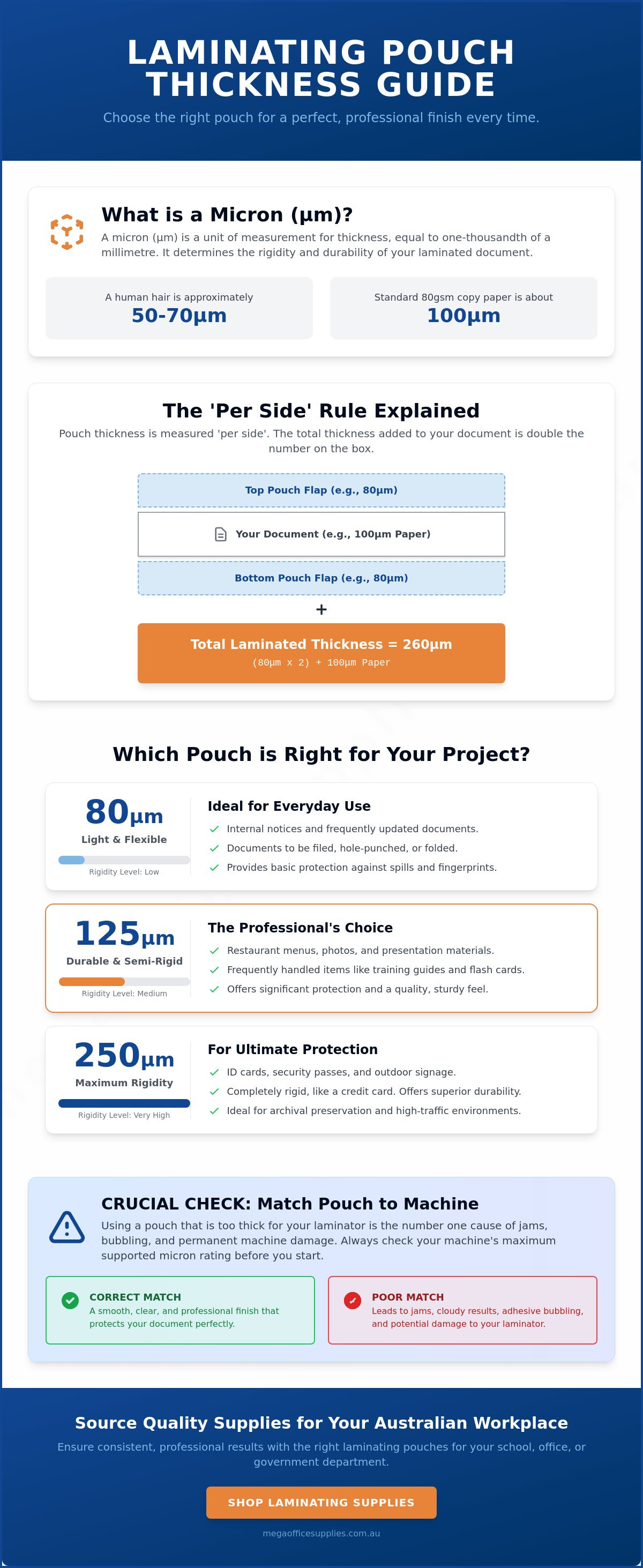
In the technical world of workplace supplies, the term 'micron' (symbolised as µm) is the universal unit of measurement for film thickness. A single micron represents one-thousandth of a millimetre. To put this into perspective for a busy office or school environment, a standard sheet of 80gsm copy paper is roughly 100 microns thick. Lamination as a concept involves bonding layers to create a stronger composite material; in document protection, the micron rating determines exactly how much structural integrity you're adding to your page.
To better understand how these technical specifications translate to real-world efficiency in a classroom or office, watch this helpful video:
Manufacturers and retailers in the Australian market almost always list thickness as a 'per side' measurement. If you purchase a pack of 100-micron pouches, each of the two plastic flaps is 100 microns thick. This distinction is vital for anyone using this laminating pouch thickness guide to ensure their equipment can handle the intended load. Choosing a pouch that is too thick for your specific machine can lead to motor strain or permanent damage to the heating elements.
The Per-Side vs. Total Thickness Calculation
It's a common mistake to assume the number on the box is the final thickness of the laminated document. You're actually creating a sandwich of materials. To calculate the total finished result, use this simple formula: (Pouch Micron x 2) + Paper Thickness = Total Rigidity. For example, using 125-micron pouches on standard paper results in a finished product of at least 350 microns. This total weight affects how a document feels in the hand and whether it will stand upright on a display stand. You'll also find varying labelling conventions across different brands, so always verify if the micron count refers to a single flap or the combined pair.
Why Micron Accuracy Matters for Professional Results
Precision in film thickness directly impacts the visual quality of your work. If the film is inconsistent, you'll often see 'silvering', which is the appearance of tiny unbonded air bubbles that cloud the document. Thicker pouches provide a more robust barrier against moisture and UV light, which is essential for outdoor signage or warehouse safety notices. The polyester base provides the strength, while the heat-activated adhesive layer ensures a permanent seal. Using the right settings on your laminating machines ensures these layers fuse perfectly without warping the plastic. This laminating pouch thickness guide helps you avoid these common pitfalls by explaining the science behind the seal.
Comparing Common Micron Levels: From 80 to 250 Microns
Selecting the appropriate film weight is a balance of cost, protection, and functionality. In most Australian workplaces, the sheer variety of options can be overwhelming if you don't have a clear framework for decision-making. This laminating pouch thickness guide categorises the most common micron levels into performance tiers to help you match the right product to your specific workplace application.
Light to Medium Protection (80 - 125 Microns)
The 80-micron pouch is the industry standard for high-volume, everyday office tasks. It provides a reliable barrier against dust, fingerprints, and light moisture while remaining flexible. These pouches are ideal for documents that need to be filed in ring binders or stored in document wallets, as they don't add excessive bulk to your filing system. If you need to fold a document after lamination, such as a temporary desk sign or a brochure, 80 microns is the most suitable choice.
Stepping up to 125 microns provides a distinct increase in durability and what professionals often call 'snap'. This thickness is the preferred choice for teaching aids, reusable checklists, and frequently handled notices. It offers enough rigidity to prevent the paper from dog-earing or creasing under regular use. For organisations looking to streamline their procurement of stationery supplies Australia wide, maintaining a stock of 125-micron pouches ensures a professional finish for almost any internal communication.
Heavy-Duty and Industrial Protection (175 - 250 Microns)
When a document must withstand harsh conditions or stand upright without support, heavy-duty microns are required. 175-micron pouches provide significant structural integrity, making them the standard for outdoor signage, safety procedures in warehouses, or recipe cards in staff kitchens. The thicker polyester base acts as a robust shield against UV exposure and constant handling in high-moisture environments. It's thick enough to feel substantial but still retains a degree of flexibility for larger formats.
At the top end of the scale, 250-micron pouches offer maximum protection. Once processed, the document takes on a stiffness similar to a credit card. This level is typically reserved for ID cards, permanent luggage tags, or premium point-of-sale displays. You should be cautious when using 250-micron film for A3 documents; the combined weight of the plastic and the paper becomes quite heavy. This can make wall mounting difficult if you're only using standard adhesives. Always check that your machine can reach the high temperatures required to melt the thick adhesive layer of a 250-micron pouch.
Reviewing your current inventory of office supplies can help you determine if your team is using the most efficient micron level for their daily tasks.
How to Choose the Right Thickness for Your Project
Choosing the correct film weight requires more than just picking a number from a box. You must evaluate the lifecycle of the document, including how often it's handled and the environment where it will reside. A laminating pouch thickness guide serves as a strategic tool for procurement officers and office managers to balance durability with cost efficiency. If a notice is destined for a static display on a noticeboard, an 80-micron pouch is sufficient. However, if that same document is a daily reference sheet used on a factory floor, you'll need to move up the micron scale to prevent premature wear.
The original paper weight, measured in grams per square metre (GSM), also dictates your choice. Combining heavy 300gsm cardstock with a 250-micron pouch creates a finished product that is nearly a millimetre thick. Many standard office machines aren't designed to process this combined depth. Always ensure the total thickness of the paper and the plastic doesn't exceed your laminator's maximum entry gap. For permanent certificates or high-value documents, a thicker pouch provides better long-term protection against UV fading and moisture ingress.
Educational and Classroom Applications
Teachers and school administrators frequently deal with high-traffic materials that must survive the school year. For reusable worksheets and classroom displays, we recommend 100 to 125 microns. This provides enough rigidity to withstand constant student handling without becoming too heavy to pin to a corkboard. If you're archiving large volumes of student records or reports, 80 microns is the logical choice. These thinner pouches protect the paper while allowing you to fit more documents into lever arch files without overfilling the rings. In brightly lit classrooms, consider using matte pouches to minimise glare and improve readability for students at the back of the room.
Hospitality, Retail, and Industrial Uses
In environments where hygiene and durability are paramount, heavier microns are essential. Cafe and restaurant menus should be laminated in 175-micron film or higher. This ensures they remain perfectly flat on tables and can be wiped down with cleaning chemicals multiple times a day without the edges peeling. For safety signage in warehouses or near first aid stations, maximum thickness is required to ensure the signs remain legible in industrial conditions. If you're processing high volumes of retail signage, look for "long-edge" pouches. These are sealed along the wider side of the page, which speeds up the lamination process and reduces the risk of document skewing in the machine.
Reviewing these factors before you start a project ensures you don't waste supplies or damage your equipment. Matching the micron level to the specific demands of your Australian workplace keeps your documentation professional and your costs under control.
Compatibility and Machine Settings: Avoiding Jams and Bubbles
Understanding the technical specifications found in a laminating pouch thickness guide is only half the battle. To achieve a professional finish, you must calibrate your hardware to match the specific micron rating of your film. Entry-level laminating machines often have a fixed temperature setting designed exclusively for 80-micron pouches. Attempting to run a 125-micron pouch through these basic models usually results in cloudiness because the heaters cannot provide enough thermal energy to melt the thicker adhesive layer. Conversely, professional-grade machines offer variable temperature and speed controls to accommodate the entire spectrum of film weights.
Adjusting Heat and Speed for Different Microns
The higher the micron count, the greater the thermal energy required to penetrate the polyester layers and activate the adhesive core. If your document emerges with a milky or cloudy appearance, it's under-heated. This indicates the adhesive hasn't fully liquefied and bonded with the paper fibres. You can often fix this by running the document through the machine a second time or increasing the temperature setting. If the finished page is warped, rippled, or shows heat bubbles, the setting is too high for that specific micron level. For heat-sensitive items like thermal receipts or old photographs, you should bypass the heating elements entirely and use "cold lamination" pouches which rely on pressure-sensitive adhesives.
Preventing Jams and Adhesive Build-up
Thicker pouches are inherently more rigid, which makes them prone to jamming if they aren't fed perfectly straight into the entry slot. Misalignment causes the pouch to hit the internal side walls, leading to a "concertina" jam that can permanently damage the rollers. You must always insert the sealed edge of the pouch into the machine first. Feeding the open end first allows air to be trapped inside, causing bubbles and potentially forcing adhesive to ooze out onto the rollers. This build-up of sticky residue is a primary cause of future jams and document staining.
To maintain your equipment, use a cleaning sheet or a plain piece of cardboard after every high-micron laminating session. This simple step picks up excess adhesive while the rollers are still warm. If your machine model specifies the use of a carrier sheet, don't ignore this requirement. Carriers provide the necessary tension and protection to ensure heavy-duty pouches pass through the heating centre without sticking. Following these maintenance protocols will extend the life of your office hardware and ensure consistent results across all your projects. For a complete range of professional-grade hardware and supplies, browse the selection of laminating machines and pouches at Mega Office Supplies.
- Cloudy finish: Increase heat or decrease throughput speed.
- Warped or rippled plastic: Decrease heat setting immediately.
- Bubbles in the centre: Ensure the document is flat and check for moisture in the paper.
- Adhesive on edges: Use a carrier sheet or clean your rollers.
Sourcing Quality Laminating Supplies for Australian Workplaces
Finding a dependable source for your workplace consumables is as critical as the hardware itself. While this laminating pouch thickness guide has outlined the technical requirements for different projects, the actual performance of the film depends on the quality of the polyester and adhesive used during manufacturing. Sourcing from an established Australian provider ensures that you receive professional-grade supplies that meet the rigorous demands of high-volume environments like government departments and healthcare facilities. We focus on providing consistent, reliable stock that prevents the common issues of delamination or adhesive seepage found in inferior products.
Our inventory covers the full spectrum of organisational needs, with sizes ranging from small ID card formats and A5 pouches to large A2 sheets for workplace safety posters. Each size is available across multiple micron levels, allowing you to tailor your protection precisely. If you're managing a school or a large-scale commercial operation, bulk purchasing offers significant logistical advantages and ensures you always have the right film weight on hand for urgent tasks. Our team draws on decades of combined industry experience to help you navigate these choices, ensuring your procurement process is efficient and cost-effective.
The Mega Office Supplies Advantage
Maintaining a consistent workflow requires a supply chain that can handle high-volume orders with speed and precision. Our extensive range of office supplies is available for national delivery, reaching regional centres and metropolitan hubs alike. We prioritise professional-grade quality, ensuring that every batch of pouches meets the manual precision required for heavy-duty use. Procurement officers can manage their accounts through our structured online platform, which provides immediate access to technical specifications and volume-based options. This transparency is a cornerstone of our service, helping you maintain stability in your workplace maintenance programmes.
Next Steps for Your Procurement
We recommend a thorough review of your current laminating needs based on the handling frequency and environmental factors discussed in this guide. If your existing notices are showing signs of wear, it's a clear indicator that a higher micron rating is required. You might consider trialling a variety of thicknesses for new projects to find the optimal balance between document rigidity and material cost. This hands-on approach allows you to verify the results on your specific hardware before committing to a large-scale rollout.
If you're unsure which pouch is compatible with your machine's thermal capacity, our domestic support team is available to provide direct assistance. We can help you match the correct film to your equipment to prevent jams and ensure a perfect finish every time. Explore our full range of professional laminating pouches and machines to secure the protection your workplace documentation deserves.
Achieve Professional Results with Precision Lamination
Mastering the technicalities of film weight is a simple way to increase the longevity of your workplace documentation and protect your office hardware. This laminating pouch thickness guide has highlighted the importance of calculating total finished depth and selecting the right micron level for your specific environment. Whether you're protecting high-traffic cafe menus or archiving student records, the right choice ensures a professional finish without the risk of machine jams. Precise settings and quality materials are the keys to avoiding cloudiness and ensuring every document remains perfectly sealed.
Mega Office Supplies has been family owned and operated since 2008. We understand the specific logistical needs of schools and government departments, providing reliable national delivery for all our professional-grade consumables. Our team is ready to assist you in selecting the perfect match for your existing equipment to ensure stability in your daily operations.
View our comprehensive range of laminating pouches and machines to upgrade your document protection strategy today. With the right supplies and settings, you can produce durable, high-quality documents that represent your organisation with clarity and authority.
Frequently Asked Questions
What is the most common laminating pouch thickness for office use?
The 80-micron pouch is the industry standard for general office tasks. It offers a reliable balance of basic protection and flexibility for documents that don't require heavy handling. For items like internal memos or reports stored in files, this thickness provides a cost-effective solution without adding excessive bulk to your storage systems.
Can I use 250-micron pouches in any laminating machine?
No, 250-micron pouches require a professional-grade laminator capable of reaching higher temperatures and maintaining slower throughput speeds. Entry-level machines are typically limited to 80 or 125 microns. Attempting to use ultra-thick film in a basic machine will result in a failed seal or a permanent jam that could damage the internal rollers.
Is 125 microns the same as 250 microns total?
Yes, because manufacturers measure thickness per side, a 125-micron pouch consists of two flaps that create a 250-micron total plastic thickness. This laminating pouch thickness guide emphasises that you must always account for both layers plus the paper itself when calculating the final rigidity. Always verify the box labelling to ensure you aren't exceeding your machine's maximum capacity.
What happens if I use a pouch that is too thick for my laminator?
Using a pouch that exceeds your machine's rating will likely cause the motor to stall or the plastic to wrap around the rollers. Because the heating elements cannot penetrate the heavy film, the adhesive won't melt properly. This leads to cloudy finishes or documents that peel apart immediately, potentially leaving sticky residue inside your equipment.
Does pouch thickness affect the clarity of the laminated document?
Thicker pouches do not inherently reduce clarity, but they do require precise heat settings to remain transparent. If the machine isn't hot enough, the heavy adhesive layer stays milky or cloudy. High-quality professional-grade pouches are designed to maintain crystal-clear visibility even at 250 microns when processed at the correct temperature for that specific micron level.
Should I choose a matte or glossy finish for thicker pouches?
Glossy finishes are the standard choice for heavy-duty pouches as they enhance colour and provide a wipe-clean surface for industrial signage. However, if the document will be used under bright overhead lights in a classroom or warehouse, a matte finish is better for reducing glare. Both options provide excellent structural integrity at higher micron levels.
How do I know if my laminator is hot enough for a 175-micron pouch?
Most modern machines have a ready light that indicates when the rollers have reached the required temperature for specific settings. If your document emerges with cloudy patches, the rollers haven't transferred enough heat to the 175-micron film. You may need to decrease the throughput speed or run the pouch through a second time to complete the bond.
Can I laminate multiple thin sheets in one thick pouch?
You should never attempt to laminate multiple separate sheets in a single pouch as they will shift and create air pockets. This often leads to the plastic curling or jamming the machine. For a professional result, always use one pouch per document to ensure a complete perimeter seal that protects the paper from moisture and dirt.
Article by
Mega Office Supplies Team
The Mega Office Supplies Team provides practical guidance for Australian businesses, schools, government organisations, healthcare providers, hospitality venues, warehouses and home offices. Based in Tweed Heads South, Mega Office Supplies is an Australian business, family owned and operated since 2008, offering office stationery, workplace furniture, technology products, labels, printers, cleaning and janitorial supplies, safety products, art materials, education resources and everyday business essentials from trusted brands.
General Information
This article is provided as general information only to help customers compare and choose office, workplace, school, cleaning, technology, furniture, safety and business supplies. Product details, specifications, compatibility, availability, pricing and suitability may vary. Always check the individual product page, manufacturer information, workplace requirements and relevant safety guidance before purchasing or using a product.


