



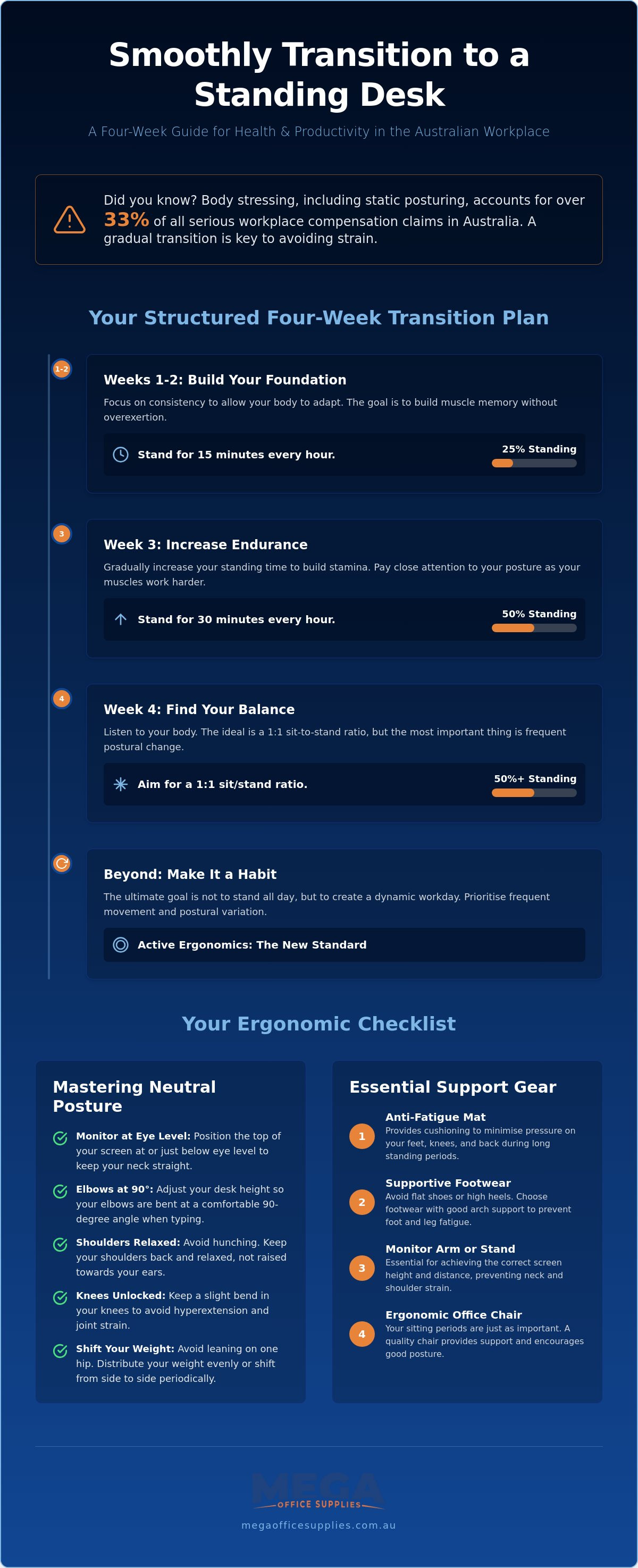
Did you know that body stressing, which includes static posturing and repetitive strain, currently accounts for over 33% of all serious workplace compensation claims in Australia? While many organisations are investing in active workstations to combat these risks, simply switching from a chair to a standing position overnight often leads to muscle soreness and a sudden drop in focus. Learning how to transition to a standing desk smoothly is essential for maintaining your productivity while meeting the primary duty of care standards expected in a professional Australian workplace.
It's common to feel frustrated when your new ergonomic setup results in aching calves or a stiff lower back. You've made an investment in your long-term health, so you deserve a transition that feels sustainable rather than physically draining. This guide provides a structured framework to help you master the move from a sedentary workstation to a high-performance sit-stand environment without fatigue. We'll examine the precise ergonomic heights your equipment requires, the necessity of supportive footwear, and a graduated schedule designed to build your physical stamina without interrupting your daily workflow.
Key Takeaways
- Understand the physiological necessity of a gradual shift and why avoiding a "cold turkey" approach is critical for long-term musculoskeletal health.
- Follow a professional four-week schedule on how to transition to a standing desk smoothly, starting with manageable 15-minute intervals to build physical endurance.
- Identify essential ergonomic accessories, such as anti-fatigue mats and monitor arms, that minimise joint pressure and maintain neutral alignment.
- Master the "Neutral Spine" checklist to correct common postural mistakes like hip leaning or locking your knees during the workday.
- Evaluate the practical requirements of electric versus manual workstations to ensure a successful rollout across commercial or educational environments.
What is a Sit-Stand Transition and Why Does It Matter?
A sit-stand transition represents a deliberate, structured shift from a sedentary work pattern to an active one. For many Australian professionals, the initial excitement of acquiring a new Standing desk often leads to a "cold turkey" approach. Attempting to stand for an entire eight-hour shift on the first day is a common mistake that typically results in significant musculoskeletal strain. Your body requires time to condition the muscles in your core, legs, and feet to handle the increased static loading. Without a measured approach, you risk developing avoidable issues like lower limb oedema or acute heel pain.
To better understand this concept, watch this helpful video:
The primary goal of this shift is to harness physiological benefits such as improved circulation and a naturally higher metabolic rate. In the context of Australian Work Health and Safety (WHS) standards, this is often referred to as "active ergonomics." This foundation for a successful transition moves away from the idea of a single "perfect" posture. Instead, it prioritises frequent movement and postural variation. By understanding how to transition to a standing desk smoothly, you ensure that your body remains dynamic throughout the day, which helps to keep your energy levels consistent and your joints lubricated.
The Health Implications of Prolonged Sitting
Prolonged sitting is a significant risk factor in modern Australian offices, often linked to chronic lower back compression and reduced hip mobility. When you sit for extended periods, the discs in your spine endure uneven pressure, which can lead to long-term discomfort. While a sit-stand desk is a powerful tool, it works best when paired with high-quality ergonomic office chairs. This hybrid approach ensures that during your sitting intervals, your body remains fully supported in a neutral position, preventing the slouching that often occurs as fatigue sets in.
Why a "Smooth" Transition is Critical for Productivity
Physical discomfort is the enemy of cognitive focus. If your calves are throbbing or your lower back is pinching, your brain cannot dedicate full resources to complex tasks. Every individual has a unique "fatigue threshold," the point where standing becomes a distraction rather than a benefit. Pushing past this limit too early in your journey usually results in poor form and decreased output. View this process as a marathon, not a sprint. By learning how to transition to a standing desk smoothly, you protect your productivity and ensure that your new equipment becomes a permanent part of your professional toolkit rather than an expensive paperweight.
A Structured Four-Week Plan for a Smooth Transition
Adopting an active workstation requires a disciplined approach to avoid the common pitfalls of overexertion. To understand how to transition to a standing desk smoothly, you must view the first month as a conditioning phase. This timeline ensures your body adapts to the new postural demands while maintaining your professional output. It's recommended to gradually increase your standing time to allow your musculoskeletal system to adapt without injury. Following a tiered programme prevents the sudden onset of fatigue that often discourages new users.
Week 1 to 2: Building Muscle Memory
Consistency is the primary objective during the initial fortnight. You should establish a baseline by standing for 15 minutes during every hour of work. Use a digital timer or a desktop application to ensure you don't stay in one position for too long. These reminders are essential for breaking the habit of static sitting. During these early stages, footwear is a critical factor in your comfort levels. You should avoid wearing high heels or completely flat dress shoes that offer no arch support. Beginners should aim for no more than 15 minutes of standing per hour to prevent excessive calf strain and lower back stiffness. By the second week, you can begin to increase the frequency of these blocks, focusing heavily on the precise height calibration of your desk surface.
Week 3 to 4: Optimising the Active Workflow
Once your body is accustomed to short bursts of standing, you can begin to integrate more active movement. This is the ideal time to introduce anti-fatigue support to reduce pressure on your heels and knees. You'll also need to start categorising your daily tasks based on the required level of cognitive focus. Standing is often most effective for transactional tasks, such as responding to emails, participating in brief phone calls, or reviewing printed documents. Conversely, tasks requiring deep concentration or creative writing are often better suited to a seated position. If you're looking to upgrade your current setup, exploring professional sit-stand workstations can provide the durability needed for this active routine.
The final goal is to reach the "Golden Ratio" of movement, often defined by the 20-8-2 rule. This involves 20 minutes of sitting, followed by 8 minutes of standing, and concluding with 2 minutes of gentle movement or stretching. This cycle ensures that your metabolic rate remains elevated while preventing the static loading associated with standing for too long. You can adjust this ratio based on your personal comfort levels and the specific requirements of your workplace. By the end of the fourth week, the transition should feel natural, allowing you to move between positions without interrupting your workflow or experiencing physical distress.
Essential Ergonomic Accessories to Support Your New Workflow
Understanding how to transition to a standing desk smoothly requires more than just a schedule; it demands the right supporting hardware to manage the physical load. While the desk itself provides the platform, secondary accessories determine whether your workstation remains a productive asset or becomes a source of strain. Professional buyers must consider the entire ecosystem of the workstation to ensure long-term sustainability and compliance with workplace safety standards. These tools are designed to neutralise the specific stresses placed on the body during the shift from sitting to standing.
Anti-Fatigue Mats and Footwear
Standing on a hard, unyielding floor for extended periods leads to significant pressure on the heels, knees, and lower back. High-quality anti-fatigue mats are engineered to encourage subtle micro-movements in the leg muscles. These contractions act as a pump to improve venous return, which prevents blood pooling and reduces overall fatigue. Selecting mats that suit commercial office furniture and standing desk solutions ensures the material can withstand high-traffic use while providing consistent cushioning. The floor surface also plays a role. Hard floors like concrete or tile require a denser, high-rebound mat, whereas carpeted areas may need a mat with a non-slip backing to prevent shifting during use.
Monitor Arms and Keyboard Trays
One of the most frequent mistakes during a transition is failing to adjust monitor height. Your eye level relative to the screen changes when you move from a seated to a standing position. Integrating expert tips for transitioning to a standing desk into your setup helps prevent "Tech Neck" by keeping the top third of your screen at eye level. Adjusting the screen height independently of the desk surface is only possible with professional-grade monitor arms. This flexibility allows you to maintain a neutral neck position throughout the day. Similarly, your keyboard and mouse must be positioned to allow for a 90-degree elbow angle. This alignment is critical for preventing repetitive strain injuries (RSI) in the wrists and forearms, particularly as you build up your standing endurance.
To further refine the active workflow, footrests should be utilised during seated intervals. These tools encourage frequent weight shifting and better spinal alignment when you aren't standing. Finally, cable management is a practical necessity for any height-adjustable setup. Without proper routing, power and data cables can become tangled or strained as the desk moves. Using flexible cable spines or under-desk trays ensures the logistical flow of your workstation remains uninterrupted and safe. By investing in these professional accessories, you create a workplace environment that supports a healthy, active, and pain-free transition.
Maintaining Proper Posture and Avoiding Common Transition Pitfalls
Simply standing up is not a universal remedy for workplace fatigue. If your form is poor, you are merely swapping one set of musculoskeletal issues for another. To understand how to transition to a standing desk smoothly, you must move beyond the "statue" phase. Standing still is just as taxing as sitting still. True active ergonomics involves constant, subtle adjustments to your weight and alignment. This dynamic approach prevents the static loading that leads to joint stiffness and muscle exhaustion.
The Correct Standing Posture
A "Neutral Spine" is your primary objective. Your ears should align with your shoulders, and your shoulders should sit directly over your hips. Check your weight distribution regularly; it should be spread evenly across the balls and heels of both feet. Many users tend to shift all their weight to their heels, which can lead to plantar fasciitis over time. Keep a slight bend in your knees to prevent locking the joints. Your pelvis should be slightly tucked to engage your core muscles, providing a stable base for your lower back. If you find your shoulders shrugging toward your ears, your desk is likely set too high. Lower the surface until your forearms rest at a 90-degree angle to the floor, ensuring your wrists remain in a neutral, flat position while typing.
Identifying and Fixing "Transition Fatigue"
It's vital to recognise the signs that you've stood for too long. If you feel the urge to lean heavily on the desk or shift constantly, your fatigue threshold has been reached. You must sit down before the pain becomes acute. Pushing through significant discomfort leads to poor posture and reinforces negative associations with your new setup. For those looking to complete their ergonomic environment, you can browse professional standing desk solutions and workstations to ensure your hardware supports these postural requirements. Maintaining this discipline ensures your transition remains a positive contribution to your long-term health and daily productivity.
Scaling Standing Desk Solutions for Commercial and Educational Environments
Implementing active workstations across a large organisation requires a strategic approach that goes beyond individual preference. For procurement officers and facility managers, the challenge lies in selecting hardware that accommodates a diverse workforce while maintaining operational efficiency. Understanding how to transition to a standing desk smoothly at an enterprise level involves standardised equipment, clear internal policies, and professional logistical support. This structured rollout ensures that physical health initiatives are integrated into the workplace without disrupting daily output.
Choosing the Right Desk for Your Organisation
Selecting the appropriate hardware is the first step in a successful rollout. Electric standing desks are generally preferred in shared office environments due to their ease of adjustment and programmable height presets. These features are critical for hot-desking scenarios where multiple users occupy the same workstation throughout the week. You must evaluate the decibel rating of the motors; quiet operation is essential for maintaining focus in open-plan layouts. Manual wind-up desks may be suitable for fixed-location workstations with lower adjustment frequency, but they often lack the rapid transition speed required for modern dynamic workflows. For detailed technical specifications, you can consult our professional guide to standing desks, which covers the essential features for workplace productivity.
Diversity in the workforce means your desks must support a wide range of height profiles and equipment weights. Ensure the selected models meet Australian standards for stability at full extension. A desk that wobbles when elevated to 120cm will discourage use and may pose a safety risk. In educational settings, such as Australian classrooms, height-adjustable desks have been shown to improve student engagement by allowing for natural movement during lessons. This flexibility supports various learning styles and helps to manage the physical restlessness often associated with long periods of sedentary study.
Streamlining the Procurement Process
Managing a national office upgrade or a large-scale school fit-out requires a reliable partner with significant logistical prowess. Standardising your ergonomic equipment simplifies long-term maintenance and ensures that internal support teams are familiar with the hardware. When coordinating bulk orders, look for providers that offer transparent pricing and efficient fulfilment schedules. We encourage procurement officers to utilise our business account application to streamline the quoting and ordering process for high-volume requirements. This direct channel facilitates rapid evaluations of costs and quantities, which is vital for staying within budget while meeting WHS obligations.
To ensure the best outcomes, organise a professional ergonomic assessment for any large-scale fit-out. These assessments provide tailored advice on how to transition to a standing desk smoothly for groups of employees with different physical needs. A qualified assessor will verify that monitor arms, chairs, and desk heights are correctly calibrated for each individual. This proactive step reduces the risk of workplace injuries and ensures that your investment in active furniture yields a high return in both employee health and overall productivity.
Building a Sustainable Active Workstation
Transitioning to an active workstation is a strategic investment in your long-term health and professional efficiency. By following a structured four-week plan and integrating essential accessories like anti-fatigue mats, you can avoid the common pitfalls of musculoskeletal strain. Success depends on maintaining a neutral spine and recognising when your body requires a seated break. It's essential to listen to physical cues before discomfort becomes a distraction.
Explore our range of professional standing desks and ergonomic solutions to find the right fit for your organisation. Take the first step toward a more dynamic, productive, and pain-free workday with confidence.
Frequently Asked Questions
How long should I stand at my desk when I first start?
Beginners should aim for 15-minute standing blocks once every hour during the first week. This gradual approach allows your musculoskeletal system to adapt without the sudden onset of fatigue. You can slowly increase this duration as your core strength improves, eventually reaching a balance that suits your personal comfort and professional tasks. Building endurance is a slow process that shouldn't be rushed to avoid injury.
Will using a standing desk help with my back pain?
A sit-stand workstation can significantly reduce lower back compression by encouraging postural variation throughout the workday. However, it isn't a guaranteed cure for chronic pain; you must maintain a neutral spine and avoid common mistakes like leaning on one hip. Combining standing intervals with a high-quality ergonomic chair ensures your spine remains supported during both active and sedentary periods. Proper form is the deciding factor in pain relief.
Do I need special shoes to use a standing desk in an office?
You don't necessarily need specialised footwear, but supportive shoes are critical for a pain-free experience. Avoid high heels or completely flat dress shoes that lack arch support. In professional Australian environments, choosing footwear with adequate cushioning helps absorb impact and reduces the strain on your lower limbs during standing blocks. If your workplace requires formal shoes, consider adding supportive insoles to improve your overall comfort.
What is the correct height for a standing desk?
Your desk should be adjusted so your elbows are bent at approximately 90 degrees while your forearms rest parallel to the floor. Your wrists should remain in a neutral position without tilting up or down while typing. To prevent neck strain, the top third of your monitor should be at eye level. This often requires the use of a professional monitor arm to ensure the screen height is independent of the desk surface.
Can I use a standing desk if I have a pre-existing knee injury?
Individuals with pre-existing knee injuries can often use standing desks, but a cautious approach is required. It's vital to consult with a healthcare professional or physiotherapist before starting. Focus on keeping your knees slightly bent to avoid locking the joints and use an anti-fatigue mat to minimise impact on the affected area. Always prioritise sitting down immediately if you feel any sharp pain or increased swelling in the joint.
Is it better to stand all day or alternate between sitting and standing?
It's much better to alternate between positions rather than standing all day. Static standing for eight hours can lead to issues like varicose veins and lower limb swelling. Following a structured movement cycle, such as 20 minutes sitting followed by 8 minutes standing, is the most effective way to manage your physical load. This variety keeps your metabolic rate elevated while preventing the fatigue associated with any single static posture.
How do I stop my feet from hurting when using a standing desk?
To reduce foot pain, use a high-quality anti-fatigue mat to encourage micro-movements in your leg muscles. These subtle movements prevent blood pooling and alleviate pressure on the soles of your feet. Regularly shifting your weight between both legs and taking brief movement breaks also helps to keep your circulation active. Ensuring you have a professional-grade mat is one of the best ways to manage how to transition to a standing desk smoothly.
What accessories are essential for a new standing desk setup?
The three most essential accessories include an anti-fatigue mat, an adjustable monitor arm, and a cable management tray. These tools address the physical and logistical challenges of a height-adjustable workstation. Without a monitor arm, you'll likely struggle with neck alignment when moving between positions. Cable management is equally vital to prevent power leads from straining or tangling as the desk moves, ensuring your setup remains safe and functional.

Article by
Mega Office Supplies Team
The Mega Office Supplies Team provides practical guidance for Australian businesses, schools, government organisations, healthcare providers, hospitality venues, warehouses and home offices. Based in Tweed Heads South, Mega Office Supplies is an Australian business, family owned and operated since 2008, offering office stationery, workplace furniture, technology products, labels, printers, cleaning and janitorial supplies, safety products, art materials, education resources and everyday business essentials from trusted brands.
General Information
This article is provided as general information only to help customers compare and choose office, workplace, school, cleaning, technology, furniture, safety and business supplies. Product details, specifications, compatibility, availability, pricing and suitability may vary. Always check the individual product page, manufacturer information, workplace requirements and relevant safety guidance before purchasing or using a product.


