



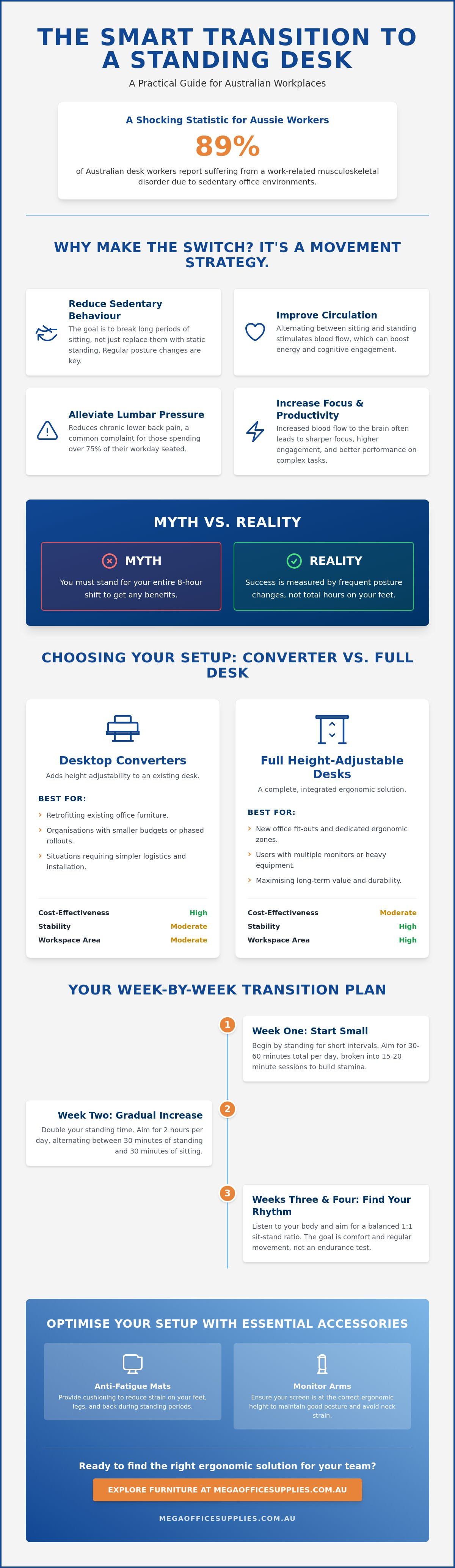
89% of Australian desk workers report suffering from a work-related musculoskeletal disorder, a figure that highlights the long term physical cost of a sedentary office environment. You likely recognise that your current setup is contributing to lower back pain, yet the prospect of standing for an entire shift feels daunting or even counterproductive. It is common to feel confused by the choice between a full motorised desk and a converter, or to worry that you will simply stop using the new hardware once the novelty wears off.
A successful transition from a sitting desk to a standing desk is a 50/50 split between choosing the right hardware and following a structured physical adaptation phase. This guide provides the exact steps to convert your workstation and master the movement without experiencing workplace fatigue. We will outline how to select durable equipment, set your desk to the correct ergonomic height, and implement a gradual standing schedule that ensures your investment leads to a healthier, more productive office routine.
Key Takeaways
- Learn why the transition from a sitting desk to a standing desk is a dynamic movement strategy designed to reduce sedentary behaviour and improve circulation.
- Compare the functional benefits and cost-effectiveness of desktop converters versus full height-adjustable desks for various workplace environments.
- Prepare your workspace by conducting stability checks and calculating the total weight of your monitors and stationery to ensure equipment safety.
- Implement a phased transition schedule that gradually increases standing intervals to build physical stamina without causing muscle strain.
Understanding the Move from a Sitting Desk to a Standing Desk
Transitioning from a sitting desk to a standing desk represents more than a simple equipment swap; it is a fundamental shift in how you manage your physical health during the workday. Many professionals mistakenly view standing desks as a static replacement for a chair, but the most effective approach treats them as a dynamic movement strategy. The primary objective is to minimise sedentary behaviour, which is known to impede circulation and compromise spinal alignment over time.
When researching the history and types of standing desks, it becomes clear that these tools are designed to facilitate regular posture changes. Rather than standing still for hours, the goal is to alternate between positions to keep the cardiovascular system engaged and the musculoskeletal structure supported. This movement-centric philosophy is what separates a successful workstation upgrade from a temporary trend.
To better understand this concept, watch this helpful video:
Achieving this balance requires high-quality ergonomic furniture that can withstand frequent adjustments without losing stability. In a modern Australian office, durability and ease of use are paramount for maintaining long term compliance with health and safety guidelines. Investing in professional-grade hardware ensures that the transition is smooth and that the equipment remains a functional part of your office layout for years to come.
The Health and Productivity Benefits
Switching from a sitting desk to a standing desk helps alleviate chronic lumbar pressure, a common complaint for those spending 76% of their day seated. Increased movement also stimulates blood flow, which often results in higher cognitive engagement and sharper focus during complex tasks. This aligns with the trend towards activity-based working, where the environment adapts to the user's specific tasks and physical needs throughout the day.
Beyond physical workstation changes, managing your overall wellbeing is essential for long-term productivity.
Common Misconceptions About Standing Desks
A prevalent myth is that you must stand for your entire eight-hour shift to see results. In reality, attempting a "cold turkey" transition often leads to foot and leg fatigue that discourages further use. A standing desk is a specialised tool for varied movement, not a cure-all for poor posture. It is a piece of hardware that works best when integrated into a structured routine of sitting, standing, and walking. Success is measured by the frequency of your posture changes, not the total number of hours spent on your feet.
Choosing Your Method: Converters vs. Full Height-Adjustable Desks
Selecting the right hardware for your transition from a sitting desk to a standing desk is a decision that impacts both your budget and your daily workflow. For procurement officers and office managers, the primary question is whether to retrofit existing furniture or invest in a total replacement. Converters, or desktop risers, provide a practical way to add height adjustability to current workstations. They are particularly effective for organisations that have recently invested in high-quality fixed desks but want to address employee health concerns. Conversely, a full electric desk offers a more permanent and robust solution for dedicated ergonomic zones.
Cost-effectiveness for national office fit-outs often hinges on logistics. Shipping a desktop converter is simpler than transporting a full desk frame and tabletop, which can reduce initial rollout costs. However, full desks typically offer better long term value due to their superior durability and integrated features. In typical Australian floor plans, spatial constraints play a significant role. Converters require a sturdy base with enough depth to remain stable when extended, whereas full desks allow for more customisation in width and depth to suit narrow home offices or large open-plan corporate environments.
Stability and weight capacity are paramount when your setup involves heavy technology, such as multiple monitors, printers, or specialised hardware. While converters have improved in strength, they often have lower weight limits compared to motorised desk frames. You can view a comprehensive range of sit stand workstations to find the right balance between capacity and footprint for your specific sector.
When to Choose a Standing Desk Converter
A converter is the ideal choice for built-in desks or cabinetry that cannot be easily removed. It's a "zero-assembly" solution that functions immediately out of the box, making it perfect for rapid deployment in schools or healthcare settings. If your home office space is limited and you don't have the room to swap out an entire desk, a converter allows you to keep your current storage while adding the flexibility to stand.
When a Full Height-Adjustable Desk is Better
A full height-adjustable desk is recommended for new office fit-outs or when your existing furniture shows signs of wear. These units are superior for users with complex desktop setups, as they provide a consistent, flat surface across the entire workspace. They also offer a cleaner aesthetic with sophisticated cable management systems that minimise clutter. For anyone planning to use their desk for several hours of standing each day, the increased legroom and stability of a full frame are often worth the additional investment.
Investing in a high-quality workspace is a form of self-care that improves your professional life. Similarly, choosing pieces that make you feel confident and comfortable in your own skin can enhance your daily outlook.
How to Prepare Your Existing Workspace for the Transition
Preparing for the move from a sitting desk to a standing desk requires a thorough assessment of your current furniture's structural integrity. Many users assume any standard desk can support a heavy converter, but this oversight can lead to equipment damage or workplace injury. Before you install any new hardware, perform a stability check. Lean firmly on the front edge of your desk to ensure it doesn't wobble or lift at the back. If the desk feels light or unstable, it may require additional weighting or a more permanent mounting solution to stay secure.
Accurately calculating the load is the next critical step. Sum the weight of your monitors, laptop, and essential stationery. Professional converters have specific lift capacities, often between 15kg and 20kg. Exceeding this limit can strain the internal gas struts or motorised mechanisms, making height adjustments difficult or unsafe. Review your cable management as well. Power leads and data cables that reach comfortably while you're seated may become taut or unplugged when the desk is raised. Ensure you have sufficient slack or invest in longer cables to prevent port damage during the lift.
Finally, clear the swing zone. Many converters move outwards towards the user as they rise, rather than moving in a strictly vertical line. Check that there is enough clearance from overhead shelves, walls, or office partitions to avoid collisions that could dislodge your equipment.
Beyond physical space, consider how light affects your ergonomics.
The Desk Readiness Checklist
- Verify the desktop thickness is sufficient for clamp-on pedestal models; most require at least 20mm of solid material to grip safely.
- Ensure the desk surface is level and non-slip for weighted tabletop units to prevent shifting during height changes.
- Check for under-desk obstructions like modesty panels, support beams, or drawers that might block the path of mounting clamps.
Organising Your New Layout
A functional layout keeps frequently used items like pens and calculators within the primary reach zone. This prevents unnecessary overreaching, which can strain the shoulders more significantly when you are in a standing position. Your lever arch files should be organised so they remain accessible regardless of the desk's height. Most importantly, plan your monitor height. The top third of your screen should be at eye level in both positions to avoid neck craning and maintain a neutral spine throughout your shift.
The Step-by-Step Guide to Transitioning Safely
Adapting your body to the move from a sitting desk to a standing desk is a gradual process that requires a disciplined schedule. Many users experience early fatigue or muscle soreness because they attempt a "cold turkey" approach, standing for their entire shift on the first day. This often leads to leg fatigue and lower back strain that could have been avoided with a phased adaptation programme. A structured timeline allows your muscles, joints, and cardiovascular system to adjust to the new postural demands without causing injury.
Phase 1 covers the first three days of your transition. During this period, you should stand for only 15 to 20 minutes every hour. This keeps your body active without overtaxing your calves or feet. By Phase 2, which spans days four to seven, you can increase these intervals to 30 minutes of standing, scheduled twice during the morning and twice in the afternoon. This builds the necessary stamina for longer sessions.
Once you reach the second week, aim for the "Golden Ratio" of workplace movement. This involves a cycle of 20 minutes sitting, followed by 8 minutes standing, and concluding with 2 minutes of active movement or stretching. Always listen to your body; if you feel a dull ache in your lower back or heels, it is time to return to a seated position. Consistency is more valuable than endurance during this initial adaptation phase.
For those ready to upgrade their workplace health, you can buy standing desks and ergonomic accessories to complete your professional workstation setup.
Correct Standing Posture and Ergonomics
Maintaining a neutral spine is essential for long term comfort. Your elbows should remain at a 90-degree angle, level with the keyboard tray or desk surface, to prevent shoulder shrugging and neck tension. Ensure your wrists are neutral and flat, rather than tilted up or down, to minimise the risk of repetitive strain injuries. Your monitor should be positioned roughly an arm’s length away from your face, with the top of the screen at eye level to keep your neck in a relaxed position.
Footwear and Surface Considerations
The floor surface significantly impacts your comfort levels when working. Standing on polished concrete or thin carpet tiles for extended periods can lead to joint pain and heel pressure. Distribute your weight evenly across both feet and avoid the common habit of "hip-hanging" on one side, which misaligns the pelvis. Your choice of footwear is equally important; avoid high heels or completely flat, unsupportive shoes that offer no arch support. Proper footwear provides the foundation needed to sustain a standing routine throughout the day.
Beyond supportive footwear, feeling comfortable and confident in your attire is a key part of your daily routine.
Essential Accessories to Optimise Your New Standing Setup
Optimising your transition from a sitting desk to a standing desk involves more than just the primary hardware. Professional accessories provide the necessary ergonomic support to ensure your new routine is sustainable and safe for long term use. Anti-fatigue mats are essential for anyone working on hard surfaces like polished concrete or commercial tiles. These mats are engineered to encourage subtle, constant contractions in the calf muscles. This improves blood flow and reduces the risk of lower limb swelling during your standing intervals.
Monitor arms allow you to maintain the correct focal distance as you shift between sitting and standing heights. Without them, you may find yourself leaning forward or straining your eyes when the desk reaches its peak. Similarly, cable management spines are a critical safety feature for any motorised workstation. They protect your hardware by preventing cable tension as the desk moves. A spine ensures that your power leads and data cables move in a controlled, flexible path, eliminating the risk of ports being damaged at the highest setting.
When configuring the electrical components of your motorised workstation, it is vital to use reliable connectivity solutions.
Even during the sitting portions of your day, ergonomics remain a priority. A professional footrest allows you to maintain a 90-degree angle at the knees and hips. This is particularly important if your chair needs to be raised slightly to match the minimum height of your new desk converter. Proper foot support prevents pressure on the underside of the thighs and maintains healthy circulation.
To further personalise your workstation or discover unique items for your home office, you can learn more about the wide range of giftware and consumer products available from Geanos Giftware & Novelties.
Reducing Physical Fatigue
Anti-fatigue mats work by creating a slightly unstable surface that forces micro-movements. These movements are key to preventing the static load that leads to workplace strain. Incorporating these tools into your office layout is a proactive step in first aid and injury prevention. Complement your setup with a regular stretching routine to keep your hip flexors and hamstrings limber during the initial weeks of your transition.
Final Checklist Before You Start
Conduct a final equipment audit before you begin your new routine. Confirm all technology is securely fastened to the desk surface and that every cable has enough slack to reach the full standing height. Check that your ergonomic office chair is properly adjusted for the sitting intervals to maintain consistent spinal support. For organisations planning a large scale rollout, contact the Mega Office Supplies team for a bulk quote on national office upgrades and professional-grade furniture solutions.
Start Your Workplace Health Transformation Today
Transitioning from a sitting desk to a standing desk is a practical investment in your long-term physical health and daily productivity. By following a structured, phased adaptation programme and ensuring your workspace is structurally prepared for the new load, you can eliminate the fatigue often associated with sedentary work. Success depends on choosing professional-grade equipment that fits your specific environment; whether that is a high-capacity electric desk or a rapid-deployment converter.
Mega Office Supplies has been family owned and operated since 2008, providing durable workplace solutions. We offer national delivery for all office furniture, ensuring your team has access to reliable ergonomic tools regardless of your location. Our catalogue is curated to meet the rigorous demands of the government, education, and healthcare sectors.
View our full range of standing desks and converters at Mega Office Supplies
Take the first step towards a more dynamic and comfortable workday. Your body will thank you for the increased movement and improved posture.
When you feel physically supported and comfortable in your workspace, it naturally boosts your overall confidence.
Frequently Asked Questions
Is it better to buy a standing desk or a converter?
The choice between a full standing desk and a converter depends on your current office infrastructure and long term requirements. Converters are ideal for retrofitting built-in cabinetry or fixed-height desks where a total replacement is impractical. However, a full height-adjustable desk offers superior stability and a larger, unified workspace. This makes it the preferred option for new office fit-outs or for users managing multiple large monitors and heavy desktop equipment.
How long should I stand at my desk each day when starting out?
You should begin with short intervals of 15 to 20 minutes of standing every hour during your first few days. This gradual approach allows your musculoskeletal system to adapt without causing undue fatigue or strain. As your stamina increases, you can transition to longer periods, eventually aiming for a balance where you change postures every 30 to 45 minutes. Listening to your body's signals is essential to prevent lower back discomfort.
Can any regular desk be turned into a standing desk?
Most standard desks can be adapted using a desktop converter, provided the existing surface is structurally sound and stable. You must verify that the desktop thickness can accommodate mounting clamps and that the base is heavy enough to prevent tipping when the unit is fully extended. For built-in workstations in schools or healthcare facilities, a converter is often the most efficient way to achieve a sitting desk to standing desk transition without major construction.
Do standing desks actually help with back pain?
Standing desks help manage back pain by reducing the prolonged lumbar pressure associated with sedentary work. According to Safe Work Australia, the primary health benefit comes from the regular change in posture rather than just standing still. By alternating between sitting and standing, you engage different muscle groups and improve circulation. This movement strategy helps minimise the risk of work-related musculoskeletal disorders, which affect 89% of Australian desk workers.
What is the correct height for a standing desk?
The correct height for a standing desk is level with your elbows when they are bent at a 90-degree angle. This position ensures your forearms remain parallel to the desk surface, which reduces strain on the shoulders and wrists. Additionally, your monitor should be positioned so the top third of the screen is at eye level. This setup promotes a neutral spine and prevents the neck craning that often occurs during a long shift.
Do I need special shoes to use a standing desk at work?
While specialised footwear isn't mandatory, you should wear supportive shoes that offer adequate arch support and cushioning. Avoid standing for long periods in high heels or completely flat, unsupportive shoes, as these can lead to foot fatigue and joint pain. In environments with hard floors, like warehouses or healthcare centres, pairing supportive footwear with a professional anti-fatigue mat is the most effective way to maintain comfort throughout the day.
Are electric standing desks better than manual ones?
Electric standing desks are generally superior for professional environments due to their ease of adjustment and higher weight capacities. The motorised mechanism allows for precise height settings at the touch of a button, which encourages more frequent posture changes compared to manual crank models. For businesses managing high-volume demands, electric desks provide a more efficient and user-friendly experience, especially when the workstation is shared by multiple staff members of varying heights.
Can I use two monitors on a standing desk converter?
Most professional-grade converters can support dual monitors, provided you stay within the unit's specified weight limit. You should calculate the combined weight of your screens and any monitor arms before installation to ensure the lift mechanism isn't overtaxed. When making the move from a sitting desk to a standing desk with two monitors, ensure the converter's top tier is wide enough to accommodate both screens without them overhanging the edges.

Article by
Mega Office Supplies Team
The Mega Office Supplies Team provides practical guidance for Australian businesses, schools, government organisations, healthcare providers, hospitality venues, warehouses and home offices. Based in Tweed Heads South, Mega Office Supplies has been family owned and operated since 2008, offering office stationery, workplace furniture, technology products, labels, printers, cleaning and janitorial supplies, safety products, art materials, education resources and everyday business essentials from trusted brands.
General Information
This article is provided as general information only to help customers compare and choose office, workplace, school, cleaning, technology, furniture, safety and business supplies. Product details, specifications, compatibility, availability, pricing and suitability may vary. Always check the individual product page, manufacturer information, workplace requirements and relevant safety guidance before purchasing or using a product.


