





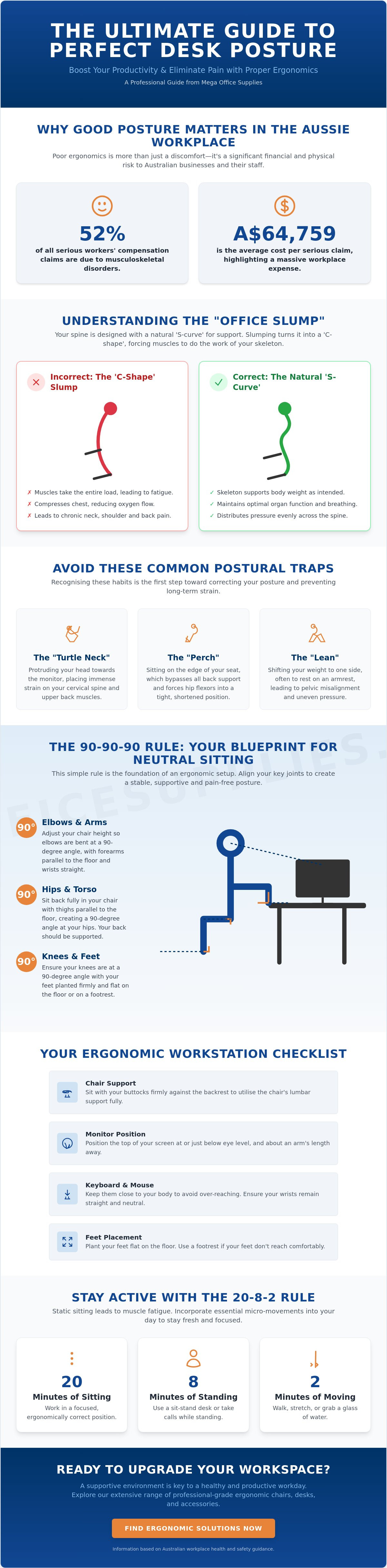
Across Australia, musculoskeletal disorders represent 52% of all serious workers' compensation claims, costing an average of A$64,759 per instance. This staggering figure highlights that poor ergonomics is not just a personal discomfort; it's a significant workplace risk. You've likely experienced that familiar mid-afternoon fatigue or the sharp tension in your neck that signals a poorly configured workstation. Learning how to improve posture while sitting at a desk is the most effective way to address these issues before they lead to long-term physical strain.
We understand that navigating complex ergonomic settings can be frustrating when you simply want to work without pain. This professional guide from Mega Office Supplies promises to simplify the science of sitting, helping you organise your environment to boost productivity and eliminate chronic tension. We'll provide a clear checklist for your workstation setup, covering everything from chair calibration to monitor alignment, ensuring your office meets current Australian safety standards and supports your long-term health.
Key Takeaways
- Understand the mechanics of the spinal S-curve to identify and correct the physiological triggers behind the common "office slump."
- Master the 90-90-90 rule to discover exactly how to improve posture while sitting at a desk by aligning your hips, knees, and elbows for neutral support.
- Calibrate your workstation by synchronising your ergonomic chair settings with your desk height to maintain level forearms and a neutral neck position.
- Implement the 20-8-2 rule to incorporate essential micro-movements, ensuring that static sitting does not lead to muscle fatigue or stiffness.
- Utilise professional-grade tools such as monitor arms and footrests to customise your environment to your specific body dimensions and workspace requirements.
Understanding the Anatomy of the "Office Slump"
The human spine is designed as a dynamic, shock-absorbing structure. Its strength and stability rely on the "S-curve", a sequence of natural arches in the cervical, thoracic, and lumbar regions that distribute the weight of the torso and head. When you're investigating how to improve posture while sitting at a desk, you're essentially looking for ways to preserve these arches against the constant pull of gravity. Slumping isn't just a bad habit; it's a mechanical failure where the skeletal system stops supporting the body, forcing your muscles to take the entire load.
This shift in responsibility leads to rapid muscle fatigue. While bone is perfectly evolved for weight-bearing, muscles are meant for movement and intermittent effort. When they're forced into a static holding pattern to prevent you from toppling forward, they become tight, sore, and oxygen-deprived. Applying the principles of ergonomics helps to realign these structures, ensuring your chair and desk provide the necessary support so your soft tissues don't have to.
To better understand this concept, watch this helpful video:
The Impact of Prolonged Sitting on Workplace Health
An eight-hour shift is a long time to fight gravity. As the day progresses, fatigue sets in and the torso naturally begins to collapse into a C-shape. This slouching compresses the chest cavity, which can actually decrease cognitive focus by limiting deep breathing and reducing oxygen flow to the brain. Standard office furniture that lacks adjustable lumbar support often exacerbates this issue, as it fails to fill the gap in the lower back where the spine should naturally curve inward. Over time, this lack of support contributes to hyperkyphosis, a permanent rounding of the upper back that causes chronic tension.
Identifying Common Postural Mistakes
Most Australian office workers fall into three distinct traps. The "Turtle Neck" occurs when you protrude your head toward the monitor, placing immense strain on the cervical spine. For every few centimetres your head moves forward, you're adding significant weight for the neck muscles to support. The "Perch" involves sitting on the very edge of your seat, which completely bypasses any back support and forces the hip flexors to stay in a shortened, tight position. Finally, the "Lean" happens when you shift weight to one side to rest on an armrest or reach for a mouse. These habits lead to long-term issues like anterior pelvic tilt, where the pelvis rotates forward and causes chronic lower back pain. Recognising these patterns is the first step in learning how to improve posture while sitting at a desk.
The 90-90-90 Rule: Achieving a Neutral Sitting Position
Achieving a neutral sitting position is the most effective way to address the mechanics of body stressing injuries. The 90-90-90 rule provides a clear framework for this alignment. Your feet must remain flat on the floor or a footrest; this creates a 90-degree angle at the knees. This foundation prevents you from crossing your legs. Crossing legs often leads to pelvic misalignment and uneven weight distribution across your sitz bones. When you're learning how to improve posture while sitting at a desk, the next critical angle is at the hips. Your thighs should be parallel to the floor. This forms another 90-degree bend.
You will need to adjust the seat height of your chair to achieve this. If the chair is too high, your feet dangle and pull on the lower back. If it's too low, your knees rise above your hips. This flattens the lumbar curve. Maintaining a vertical stack of ears, shoulders, and hips ensures the spine stays in its natural S-curve. This ergonomic workstation setup is vital for long-term spinal health and workplace comfort.
Calibrating Your Pelvis and Lower Back
Sit all the way back in your chair. Your buttocks should be firmly against the backrest. This allows you to take full advantage of the chair's built-in support. A common mistake is perching on the edge. This creates a hollow space in the lumbar region and causes muscle fatigue. Finding a neutral pelvic tilt is essential. You shouldn't be slumped forward or arched excessively backward. Ensure the lumbar support fills the gap in the small of your back. If your chair lacks this, a lumbar roll or cushion can provide the necessary active support.
Aligning the Upper Body and Shoulders
The final 90-degree angle occurs at the elbows. Refining your upper body alignment is a key part of how to improve posture while sitting at a desk. Relax your shoulders. Let your upper arms hang naturally. Your forearms should be parallel to the floor as they rest on the desk or armrests. This prevents the "shrugged" shoulder position that leads to tension headaches. Keep your elbows close to your body to minimise reaching for your keyboard or mouse. Reaching forward pulls the shoulder blades apart. This creates strain across the upper back. Ensure your head is positioned so your ears are directly above your shoulders. This alignment reduces the weight the neck muscles must support throughout the shift. If your current setup doesn't allow for these specific adjustments, consider upgrading to more versatile ergonomic furniture designed for professional environments.
Ergonomic Workstation Setup: Beyond Just the Chair
While the previously discussed 90-90-90 rule provides the skeletal framework for health, your physical environment must be calibrated to support these angles. A high-quality chair is a critical component, but it cannot compensate for a desk that is too high or a monitor positioned at an incorrect distance. Understanding how to improve posture while sitting at a desk requires a holistic look at the entire workstation. This includes the desk surface, the layout of your tools, and even the ambient lighting in your office.
Desk height should be adjusted so your forearms are parallel to the floor when your hands are on the keyboard. If the desk is too high, your shoulders will naturally shrug to compensate; if it's too low, you'll find yourself leaning forward. Organising your "Primary Reach Zone" is another essential step in preventing repetitive strain. This zone includes the area you can reach comfortably with your elbows at your sides. Frequently used office supplies like pens, calculators, and your mouse should live within this arc to prevent over-reaching.
Lighting also plays a silent but significant role in postural failure. Glare on a screen often causes workers to tilt their heads or lean into awkward positions to see clearly. Ensure your primary light source is at a right angle to the monitor to minimise reflections. This comprehensive approach to an ergonomic workstation setup ensures that your professional equipment works with your body's natural mechanics rather than against them.
Selecting and Adjusting Your Ergonomic Office Chair
An effective setup begins with the right hardware. High-performance ergonomic office chairs offer adjustable seat pan depth, which is vital for supporting the thighs without putting pressure on the back of the knees. Armrest height should be set so your shoulders remain relaxed and your elbows are supported at 90 degrees. Additionally, tilt tension should be calibrated to your body weight, allowing for controlled movement. Breathable mesh or contoured fabric options from our office furniture range help regulate temperature and maintain comfort during long shifts.
Optimising Monitor Height and Desk Reach
Monitor placement is a frequent point of failure in office ergonomics. Position your screen at approximately an arm's length away. This distance prevents you from leaning forward to read text, which is a major factor in how to improve posture while sitting at a desk. The top third of the screen should align with your eye level, ensuring your neck stays in a neutral position. Keyboard and mouse placement should keep wrists straight and flat. Avoid using keyboard "feet" that angle the keys upward, as this often leads to wrist strain over time.
Active Sitting and the Importance of Micro-Movement
While the previous sections focused on calibrating your physical environment, posture is not a static position you hold for eight hours straight. Holding even the most ergonomically sound pose for too long creates a static load on your muscles. This leads to reduced blood flow and increased stiffness. Understanding how to improve posture while sitting at a desk requires shifting your perspective from "holding a pose" to "managing a movement cycle." Dynamic sitting, which involves subtle weight shifts and position changes, is essential for maintaining spinal health throughout the workday.
The 20-8-2 Rule is a highly effective framework for Australian professionals. For every 30-minute block, aim for 20 minutes of sitting in a neutral position, 8 minutes of standing, and 2 minutes of active movement or stretching. These frequent micro-breaks reset the nervous system and prevent the buildup of muscle tension. By alternating your physical state, you reduce the risk of body stressing injuries and maintain higher levels of cognitive focus. This rhythmic approach ensures that no single muscle group is overworked for an extended period.
Implementing Movement Intervals in the Workplace
Successful implementation of these intervals requires a structured approach. Use silent timers or desktop apps to trigger a posture check every 30 minutes. These prompts serve as a reminder to stand up or adjust your seating. You can also utilise specific tasks as movement triggers. Take phone calls or read long documents while standing. High-quality standing desks facilitate these transitions seamlessly, allowing you to move between sitting and standing without interrupting your workflow. This is a practical strategy for anyone learning how to improve posture while sitting at a desk.
Simple Desk Stretches to Relieve Tension
Incorporate these targeted movements to counteract the physical toll of sedentary work. The "Chest Opener" is particularly effective; interlace your fingers behind your back and gently pull your shoulders back. This counteracts the rounded shoulders common in the "office slump." Seated spinal twists are also beneficial. While sitting, place one hand on the opposite knee and gently rotate your torso. This maintains vertebral mobility and relieves lower back pressure. Finally, neck glides help reduce strain from monitor focal points. Slowly draw your head back without tilting your chin up or down to reset your cervical alignment.
If you're ready to upgrade your workstation to support a more dynamic workflow, explore our range of ergonomic office furniture today.
Essential Ergonomic Tools for Posture Maintenance
While habit and alignment form the foundation of workplace health, professional-grade hardware acts as the structural support for these efforts. Learning how to improve posture while sitting at a desk often requires specific tools to bridge the gap between your unique body dimensions and standard office furniture. These tools aren't mere luxuries; they are functional necessities that ensure your skeletal system remains supported throughout the duration of your shift. By investing in the right equipment, you remove the physical obstacles that lead to slouching and fatigue.
Footrests and Monitor Arms: The Unsung Heroes
A footrest is a critical intervention for users whose feet don't rest flat on the floor when the chair is at the correct height for the desk. Without this support, the 90-90-90 rule is impossible to maintain. The weight of your legs pulls on the lower back, leading to premature fatigue and poor pelvic tilt. Similarly, monitor arms provide the focal alignment necessary for neck health. They allow you to clear valuable desk space while ensuring the screen is at the precise height and tilt required to prevent the "turtle neck" slouching discussed earlier. High-quality monitor arms offer the flexibility to adjust your screen as you shift positions, maintaining a neutral gaze at all times.
Document holders are another essential tool, especially for those referencing paper files or notebooks. Placing documents flat on the desk forces you to crane your neck downward repeatedly. By using a holder that positions paper at eye level, you maintain a neutral cervical spine. You should also consider how your stationery and desk organisers are arranged. Keeping pens, staplers, and notepads in a dedicated organiser within your primary reach zone reduces the need for repetitive over-reaching. This small change protects the shoulder joints from the strain of unnecessary extension.
Transitioning Between Sitting and Standing
Sit-stand workstations encourage natural postural variety, which is the most effective way to prevent the stiffness associated with static sitting. When you transition to standing, the use of anti-fatigue mats is highly recommended. These mats provide a cushioned surface that encourages micro-movements in the legs, improving circulation and reducing pressure on the heels and lower back. It's also important to wear supportive footwear during these standing intervals. Flat, unsupportive shoes can lead to foot pain that quickly compromises your standing posture and causes you to lean unevenly on the desk.
Finally, integrating specific technology accessories can further refine your setup for long-term comfort. Vertical mice and ergonomic keyboards keep your wrists in a neutral, handshake position. This prevents the forearm twisting and wrist extension that often accompanies standard peripherals. By combining these professional tools with the movement habits and alignment principles outlined in this guide, you create a comprehensive system for workplace health. This integrated approach is the final step in mastering how to improve posture while sitting at a desk.
Optimising Your Long-Term Workplace Health
Mastering the mechanics of your workstation is a continuous process of calibration rather than a one-time adjustment. By implementing the 90-90-90 rule and adopting dynamic movement cycles like the 20-8-2 framework, you can effectively mitigate the risks of musculoskeletal disorders. You've learned that understanding how to improve posture while sitting at a desk involves more than just sitting up straight; it requires a professional-grade environment that supports your natural spinal S-curve through every shift.
Mega Office Supplies is a trusted supplier to the Australian government and schools, offering the reliability and scale needed to support diverse professional environments. Our comprehensive national delivery across Australia ensures that high-quality ergonomic tools are accessible to every office, from metropolitan centres to regional hubs. We're committed to helping you build a safer, more productive workspace through durable and precise equipment.
Explore our full range of Ergonomic Workplace Solutions and take the first step toward a pain-free workday. Your long-term physical health is an investment that pays dividends in focus and energy.
Frequently Asked Questions
What is the single most important factor for good posture at a desk?
The single most important factor for maintaining health is regular movement rather than holding a fixed "perfect" position. Even an ergonomically sound pose becomes a physical strain if it's held for several hours without interruption. Adopting a dynamic approach allows your muscles to stay oxygenated and prevents the static loading that leads to chronic pain. Practical variety through small shifts ensures your body remains resilient throughout the workday.
How high should my office chair be for proper posture?
Your office chair should be set at a height that allows your feet to rest flat on the floor while your forearms remain parallel to the desk. This adjustment ensures your knees and hips are both at approximately 90-degree angles. If you find your shoulders shrugging to reach the keyboard, your chair is likely too low. Conversely, if your feet dangle, the chair is too high and requires a footrest to maintain stability.
Can I improve my posture without buying a new ergonomic chair?
You don't always need new furniture to enhance your workstation health. Small adjustments like using a lumbar roll or a cushion can provide the necessary support for your lower back's natural curve. You can also improve your monitor alignment by using a monitor arm or even sturdy reams of A4 copy paper to bring the screen to eye level. These simple changes are effective ways to learn how to improve posture while sitting at a desk.
Why does my back still hurt even when I try to sit up straight?
Pain often continues because "sitting up straight" can lead to excessive muscle tension and a rigid spine. A healthy posture is neutral and relaxed, not stiff and forced. If you're actively pulling your shoulders back with force, you're likely overworking your muscles. The goal is to let the chair's backrest and lumbar support do the work so your body can remain in a natural, supported S-curve without constant effort.
Is it better to sit or stand while working at a computer?
A combination of both sitting and standing is the most effective way to manage workplace health. Neither position is ideal when held for an entire eight-hour shift. Standing too long can cause leg fatigue and joint pressure, while sitting too long leads to metabolic issues and back strain. Using a sit-stand workstation allows you to rotate between positions, which keeps your circulation active and reduces the risk of body stressing injuries.
How often should I take a break from sitting at my desk?
You should aim to take a short movement break every 30 minutes to reset your physical alignment. These intervals don't need to be long; even two minutes of standing or walking is enough to reduce muscle stiffness and improve focus. Setting a silent timer on your phone or computer is a practical way to ensure you don't stay in a static position for too long during busy periods of the day.
Does using a footrest actually help with back pain?
A footrest is a vital tool for stabilising the pelvis and preventing lower back strain, especially for shorter users. It provides a firm foundation that allows you to sit all the way back in your chair, ensuring the lumbar support is effective. Without a footrest, you might find yourself sliding forward or crossing your legs. Both of these habits lead to pelvic misalignment and uneven weight distribution across your sitz bones.
What are the best stretches to do while sitting at a desk?
The best stretches for desk workers focus on opening the chest and lengthening the hip flexors. Performing a "chest opener" by interlacing your fingers behind your back helps counteract the rounded shoulders caused by typing. Seated spinal twists are also beneficial for maintaining vertebral mobility. These simple movements are key components of how to improve posture while sitting at a desk by addressing the areas that tighten most during computer use.

Article by
Mega Office Supplies Team
The Mega Office Supplies Team provides practical guidance for Australian businesses, schools, government organisations, healthcare providers, hospitality venues, warehouses and home offices. Based in Tweed Heads South, Mega Office Supplies has been family owned and operated since 2008, offering office stationery, workplace furniture, technology products, labels, printers, cleaning and janitorial supplies, safety products, art materials, education resources and everyday business essentials from trusted brands.
General Information
This article is provided as general information only to help customers compare and choose office, workplace, school, cleaning, technology, furniture, safety and business supplies. Product details, specifications, compatibility, availability, pricing and suitability may vary. Always check the individual product page, manufacturer information, workplace requirements and relevant safety guidance before purchasing or using a product.


