


Did you know that body stressing now accounts for 34.5% of all serious workers' compensation claims across Australia? For many procurement officers and business owners, managing a team means constantly balancing high-volume output with the physical reality of musculoskeletal strain. You likely already recognise that a persistent neck ache or lower back injury isn't just a minor complaint; it's a logistical bottleneck that leads to high absenteeism and rising insurance premiums.
This guide provides a professional-grade workplace ergonomics checklist designed to align with the latest 2026 WHS compliance standards. We've built this framework to help you identify and resolve ergonomic risks with manual precision, ensuring your staff remain comfortable and productive. You'll gain a clear understanding of how to configure ergonomic office chairs and standing desks to meet regional requirements, while also addressing new regulations regarding psychosocial hazards and digital work systems. By the end of this guide, you'll have the actionable tools needed to maintain a stable, efficient, and injury-free office environment.
Key Takeaways
- Understand the 2026 Australian WHS landscape and the regulatory shift towards mandatory hazard management for both physical and psychosocial risks.
- Deploy a standardised workplace ergonomics checklist to ensure every workstation meets professional standards for lumbar support and desk height.
- Apply the "top-third" rule for monitor alignment and neutral wrist positioning to minimise repetitive strain injuries and eye fatigue.
- Identify environmental triggers, such as poor lighting or thermal discomfort, that lead to increased muscle tension and lost productivity.
- Establish a clear reporting framework and train internal staff to conduct peer reviews, creating a reliable system for long-term workplace wellness.
The Importance of Ergonomic Assessments in the Australian Workplace
Ergonomics is the science of designing the work environment to fit the person, rather than forcing the human body to adapt to the equipment. This approach is vital for managing ergonomic hazards, which remain the leading cause of musculoskeletal disorders (MSDs) across Australian industries. By using a structured workplace ergonomics checklist, organisations can identify risks before they manifest as chronic pain or permanent injury.
As of 2026, the Australian regulatory environment has shifted toward a proactive, enforceable model. Safe Work Australia and various state bodies now treat psychosocial hazards with the same weight as physical safety. With workers' compensation claims for body stressing accounting for 34.5% of all serious claims in the 2023-24 period, the financial burden on businesses is undeniable. Poorly configured workstations contribute to presenteeism, where employees are physically present but their productivity is hampered by persistent discomfort and fatigue.
To better understand how to set up a healthy workstation, watch this helpful video:
The rise of hybrid work models means that a "duty of care" now extends beyond the corporate headquarters. Employers are responsible for ensuring that home offices meet the same safety benchmarks as the central office. This requires a consistent workplace ergonomics checklist that staff can use to audit their remote setups. Ensuring that remote workers aren't operating from dining chairs or low-height kitchen benches is a critical step in reducing long-term injury claims and maintaining a professional standard of care.
The Business Case for Ergonomic Investment
Investing in professional-grade ergonomic office chairs and standing desks is a logistical necessity for any high-capacity operation. Physical ease directly correlates with cognitive performance. When a worker isn't distracted by lower back tension, their focus remains sharp and their error rate drops. According to 2026 industry benchmarks, every A$1 invested in ergonomic interventions typically yields a return through reduced absenteeism and improved task accuracy.
Regulatory Standards and Duty of Care
Safe Work Australia provides the model framework for managing hazardous manual tasks. Under these guidelines, the Person Conducting a Business or Undertaking (PCBU) must ensure a safe work environment. Implementing a workplace ergonomics checklist helps satisfy this legal obligation. This process often involves appointing a "competent person" to oversee internal reviews. While a self-assessment is a useful starting point for identifying obvious issues, a professional clinical review may be required if an employee reports persistent symptoms or if the workstation configuration is complex.
The Essential Desk and Chair Assessment Checklist
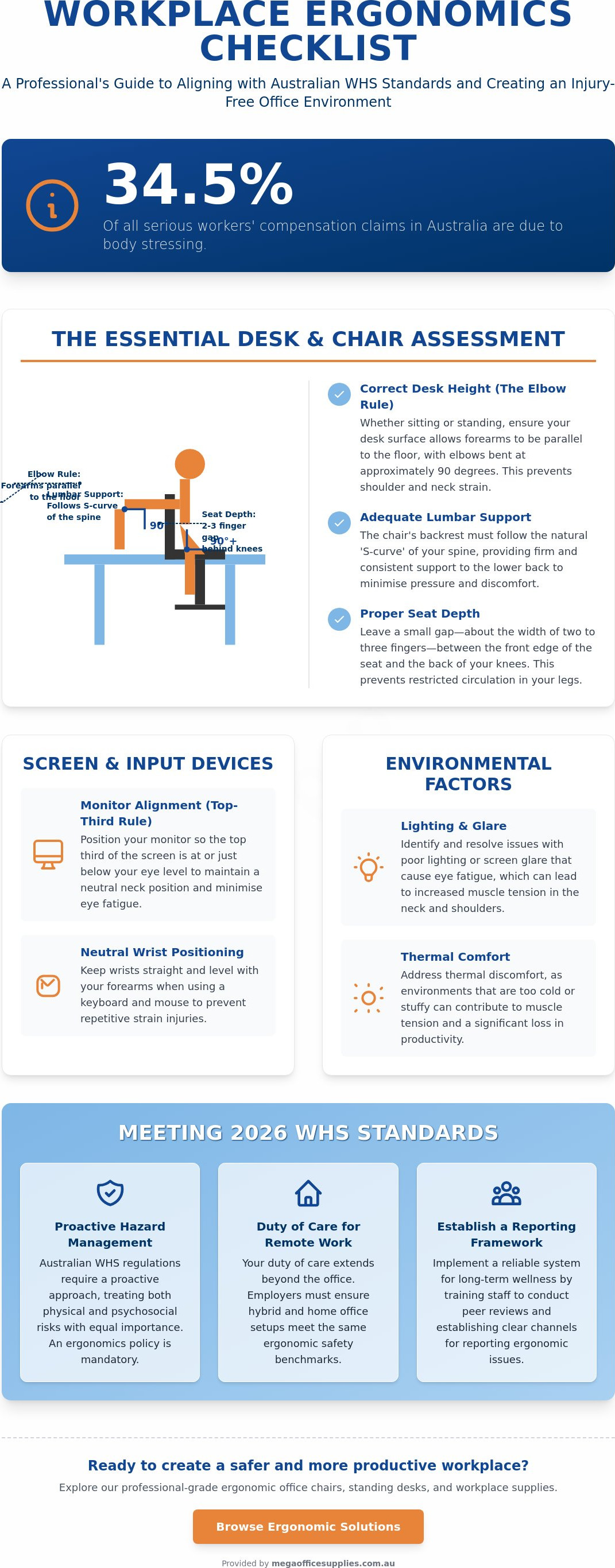
The chair and desk serve as the primary interface between the worker and their tasks. A robust workplace ergonomics checklist starts here, focusing on the hardware that supports the body for eight hours a day. First, assess the ergonomic office chair for adequate lumbar support. The backrest should follow the natural S-curve of the spine, providing firm pressure against the lower back. Seat depth is equally critical; there should be a small gap, roughly the width of two to three fingers, between the edge of the seat and the back of the knees. This prevents pressure on the popliteal fossa, which can restrict circulation and lead to discomfort.
Next, apply the Elbow Rule for desk height. Whether sitting or standing, the desk surface should allow the forearms to remain parallel to the floor with elbows bent at approximately 90 degrees. This alignment reduces strain on the trapezius muscles and prevents shoulder elevation. According to Mayo Clinic's office ergonomics guide, maintaining this neutral position is essential for preventing long-term wrist and shoulder issues. If a desk is too high and cannot be adjusted, the chair must be raised, and a footrest should be provided to ensure the feet remain flat and stable.
Clearance and stability are often overlooked but are essential components of a physical audit. Obstructions under the desk force users into awkward, asymmetrical postures. Perform a quick check of the following:
- Leg Room: Ensure there is enough room for knees and thighs to move freely without hitting drawers or supports.
- Stability Test: Confirm the desk doesn't wobble during intensive typing, as micro-vibrations can lead to muscle fatigue.
- Under-Desk Storage: Remove any items that prevent the chair from tucking in fully to the workstation.
Chair Adjustments for Long-Term Support
Adjust the backrest tilt to support an upright or slightly reclined posture, which helps distribute body weight through the chair rather than the spine. Adjustable armrests are a logistical necessity; they should support the weight of the arms without forcing the shoulders to shrug. In a diverse Australian workforce, "one size fits all" solutions often fail. Standardising these adjustments within your workplace ergonomics checklist ensures every employee, regardless of height or build, receives the same level of protection.
Desk Configuration: Fixed vs. Standing
Fixed desks can be problematic for staff at either end of the height spectrum. If the desk height is non-adjustable, using a footrest is the most efficient way to maintain correct pelvic tilt. Conversely, standing desks offer a dynamic solution to reduce sedentary behaviour. Alternating between sitting and standing encourages movement and helps manage muscle fatigue throughout the shift. If your current fit-out lacks this flexibility, exploring commercial-grade office furniture can provide the necessary upgrades to meet modern WHS standards.
The Peripheral Checklist: Screens, Input Devices, and Stationery
A comprehensive workplace ergonomics checklist must extend beyond the chair and desk to the peripherals that occupy the immediate reach zone. Monitor alignment is a primary concern for preventing cervical spine strain. Position your screen so the top third of the display is at eye level, ensuring the head remains neutral rather than tilting forward. The screen should be approximately one arm's length away; if you find yourself leaning in to read small text, increase the font size rather than compromising your posture.
Input devices require a similar focus on neutral positioning. Your keyboard and mouse should be placed so the wrists remain straight, avoiding the extension that leads to carpal tunnel issues. For those using a mouse frequently, a vertical or contoured design can help maintain a natural "handshake" position. When reference materials are required, don't leave them flat on the desk surface. Propping documents against lever arch files or using a dedicated copy holder keeps the information within your line of sight, which eliminates the repetitive neck twisting that causes upper back tension.
Even the smallest tools in the office have an ergonomic impact. For high-volume note-takers in healthcare or administration, the diameter and weight of your pens are functional considerations. A wider barrel with a rubberised grip reduces the "pinch force" required to hold the pen, which significantly minimises hand fatigue during long shifts. These small adjustments are often the difference between a fluid workflow and a day interrupted by micro-strains.
Visual Ergonomics and Monitor Arms
Visual fatigue is a logistical bottleneck that reduces accuracy over time. Position monitors perpendicular to windows to reduce glare, or use adjustable monitor arms to fine-tune the angle against overhead lighting. If you use dual monitors, ensure they are placed at an equal height and distance to maintain a central posture. To protect visual health, follow the 20-20-20 rule by looking at an object six metres away for 20 seconds every 20 minutes.
Optimising the Reach Zone
Organise your workspace into three distinct zones based on frequency of use. The Primary Zone is for your keyboard and mouse; the Secondary Zone holds frequently used items like calculators or notebooks. Tertiary items, such as binding machines or heavy archive boxes, should be kept out of the immediate reach area. Using a dedicated standing station for binding or laminating tasks encourages movement and prevents the strain associated with repetitive reaching across a seated desk.
Environmental Factors: Lighting, Air, and Breakroom Wellness
Environmental factors act as the silent architects of employee posture and fatigue. While a chair provides support, the surrounding atmosphere dictates how long that support remains effective. Insufficient ambient lighting often results in squinting or leaning toward a display, which negates the neutral neck position established in your workplace ergonomics checklist. Physical audits should include the following environmental checks:
- Thermal Consistency: Ensure temperatures remain stable to prevent muscle tension caused by cold drafts.
- Acoustic Control: Minimise high-decibel distractions that lead to shoulder shrugging and stress-related tension.
- Air Quality: Monitor ventilation to meet the new national Workplace Exposure Limits (WEL) effective from December 2026.
Beyond the immediate workspace, your facilities and breakroom areas must be designed to encourage active recovery. This means providing standing-height benches for socialising and ensuring that hydration stations are easily accessible. A well-stocked supply of coffee and tea helps maintain focus, but the journey to the breakroom itself serves as a necessary postural reset. Encouraging staff to leave their desks for lunch isn't just a cultural preference; it's a physiological requirement to reduce sedentary strain.
Lighting Design for Focus
Effective lighting requires a balance between natural light and high-quality task lighting. While windows provide essential external views, they can create glare that forces awkward head tilts. Task lighting should be used for detailed paperwork to prevent eye strain. Additionally, monitor the condition of older fluorescent tubes. Subtle flicker, often imperceptible, is a common source of headaches and visual fatigue. Utilising whiteboards for collaborative sessions is an excellent way to move staff away from screens, encouraging a change in focal distance and a more dynamic standing posture.
Psychological Ergonomics and Organisation
A cluttered workspace is a logistical hazard that breeds micro-frustrations and stress. Streamlining document flow using A4 copy paper and professional filing systems keeps the desk surface clear for essential tasks. This organisation extends to safety equipment. Ensure that first aid kits are stored at an ergonomically accessible height. Placing heavy medical supplies on high shelves creates a reaching hazard that can lead to shoulder strain during an emergency. Maintaining a tidy, well-organised environment is a fundamental part of a hardworking, efficient office.
To ensure your team has the right tools for a healthy environment, browse our full range of commercial facilities and breakroom supplies.
Implementing Your Ergonomic Policy: From Assessment to Action
An audit is only as effective as the actions it triggers. Once you've completed the workplace ergonomics checklist, the resulting data must be integrated into a formal, standardised reporting system. This allows employees to flag discomfort or equipment failure before it escalates into a serious injury. To maintain a high standard of safety, train "Ergo Champions" within your organisation. These individuals act as first-line peer reviewers, helping colleagues fine-tune their setups and ensuring compliance without requiring a full clinical review for every minor adjustment. This internal expertise builds a culture of reliability and shared responsibility.
Procurement officers should view ergonomics as a volume-based strategy rather than a series of one-off purchases. Bulk ordering ergonomic essentials ensures equity across the team, providing every staff member with the same professional-grade support regardless of their department. It also streamlines the logistical flow of the distribution and setup process. Assessments shouldn't be a one-off event. Repeat the review every 12 months or whenever new hardware is introduced to the workflow. This consistency reinforces a commitment to durability and long-term employee health, especially in high-intensity environments like government departments or large-scale healthcare facilities.
Sourcing Professional-Grade Solutions
When selecting office furniture, prioritise durability and manual precision over the lowest initial price point. Cheap alternatives often lack the necessary adjustment ranges, leading to premature replacement and a higher total cost of ownership. Partnering with a national supplier ensures a consistent fit-out across multiple regional sites, which simplifies maintenance and stock management. For schools and universities, it's effective to integrate ergonomic requirements into the annual educational supplies budget to ensure classrooms and staffrooms remain WHS-compliant and fit for purpose.
The Human Element: Habits and Movement
Hardware alone cannot solve sedentary strain. Design your office layout to encourage "incidental movement" by placing communal printers or central filing systems in locations that require a short walk. Set digital reminders for staff to perform postural resets and basic desk stretches every hour. Closing the loop on your ergonomic policy means turning checklist findings into a prioritised procurement list. This direct link between assessment and action ensures that identified hazards are resolved with logistical efficiency. By following this structured approach, you protect both the physical wellbeing of your workforce and the organisation's financial stability.
Securing Your Team’s Long-Term Productivity
Implementing a structured workplace ergonomics checklist is more than a compliance exercise; it's a strategic investment in your organisation's operational stability. By addressing the physical configuration of workstations alongside environmental factors like lighting and air quality, you effectively mitigate the risk of serious compensation claims. This proactive approach ensures that your staff remain focused and productive, free from the distractions of chronic physical strain and the logistical delays caused by absenteeism.
As a family-owned Australian business since 2005, Mega Office Supplies understands the specific requirements of large-scale corporate and educational fit-outs. We provide a comprehensive range of WHS-compliant office furniture designed for durability and manual precision. Whether you require a single ergonomic chair or national delivery for a high-volume facility upgrade, our team offers the regional expertise and reliable support you need to maintain a professional environment.
Take the next step in your safety strategy and browse the complete range of Ergonomic Workplace Solutions at Mega Office Supplies. Investing in the right hardware today provides the security and peace of mind your business needs for a hardworking, injury-free future.
Frequently Asked Questions
How often should an ergonomic assessment be conducted for employees?
Assessments should be conducted every 12 months as a standard preventative measure. You should also trigger a review whenever an employee changes workstations, if new office furniture is introduced, or if a staff member reports any physical discomfort. Using a consistent workplace ergonomics checklist ensures that these reviews remain thorough and satisfy your WHS duty of care obligations.
What is the correct height for a computer monitor in a professional setting?
The correct height for a computer monitor is reached when the top third of the screen is at eye level. This positioning ensures that the neck remains in a neutral, upright position rather than tilting forward or backward. The screen should also be positioned approximately an arm's length away to prevent eye strain and the tendency to lean forward.
Are standing desks better than ergonomic chairs for back pain?
Neither solution is a total fix on its own; the most effective strategy is alternating between sitting and standing throughout the day. Standing desks help reduce sedentary behaviour, while ergonomic chairs provide the necessary lumbar support for focused, seated tasks. Switching positions every 30 to 60 minutes helps manage muscle fatigue and significantly reduces the risk of chronic lower back pain.
Do I need a professional to perform an ergonomic assessment?
You do not always need a professional healthcare provider to conduct an initial review. A competent person within your organisation can use a workplace ergonomics checklist to identify and resolve standard risks such as incorrect desk height or poor monitor placement. However, if an employee has a pre-existing injury or reports persistent pain that does not improve after internal adjustments, a professional clinical assessment is recommended.
What are the most common ergonomic risks in an Australian office?
The most common risks include body stressing from repetitive tasks, awkward or sustained postures, and sedentary work patterns. According to 2023-24 data, body stressing remains the leading cause of serious workers' compensation claims in Australia. Poorly configured chairs, monitors at the wrong height, and cluttered reach zones are the primary physical hazards found in most modern office environments.
Can poor ergonomics lead to permanent injuries?
Poor ergonomics can certainly lead to permanent musculoskeletal disorders if hazards are left unaddressed over long periods. Chronic conditions such as carpal tunnel syndrome, tendonitis, and permanent spinal misalignment often stem from repetitive strain and poor posture. Early intervention through regular assessments is the most effective way to prevent these long-term health complications and maintain a productive workforce.
How much should a business budget for ergonomic office upgrades?
Budgeting for upgrades should focus on the durability and adjustment range of the equipment rather than the lowest initial cost. Procurement officers should evaluate the total cost of ownership, as professional-grade furniture typically has a longer lifespan and lower replacement frequency. Investing in high-quality ergonomic essentials is a logistical strategy that reduces the long-term financial burden of injury claims and absenteeism.
What is the "neutral posture" and why is it the goal of ergonomics?
Neutral posture is the position where the body is aligned and balanced, placing the least amount of strain on the muscles, tendons, and skeletal system. This usually involves keeping the spine in its natural S-curve, elbows at 90 degrees, and feet flat on the floor. Achieving this state is the primary goal of ergonomics because it maximises physical comfort and cognitive focus during high-volume work shifts.
Article by
Mega Office Supplies Team
The Mega Office Supplies Team provides practical guidance for Australian businesses, schools, government organisations, healthcare providers, hospitality venues, warehouses and home offices. Based in Tweed Heads South, Mega Office Supplies is a family-owned and operated Australian business offering office stationery, workplace furniture, technology products, labels, printers, cleaning and janitorial supplies, safety products, art materials, education resources and everyday business essentials from trusted brands.
General Information
This article is provided as general information only to help customers compare and choose office, workplace, school, cleaning, technology, furniture, safety and business supplies. Product details, specifications, compatibility, availability, pricing and suitability may vary. Always check the individual product page, manufacturer information, workplace requirements and relevant safety guidance before purchasing or using a product.


