




Almost half of all Australians now describe their typical workday as "mostly sitting", according to the 2022 National Health Survey. You likely invested in a height-adjustable workstation to combat this sedentary trend and protect your long-term health. It's a logical step, yet many professionals find themselves dealing with persistent lower back pain or leg fatigue despite making the switch. If your legs feel heavy or your focus drops while standing, you're likely encountering the common mistakes when using a standing desk that hinder even the best professional-grade equipment.
Mastering your sit-stand workstation requires more than just pushing a button; it demands a total ecosystem approach to your environment. We'll help you avoid the ergonomic blunders that lead to unnecessary strain and physical fatigue. This guide provides practical advice on monitor alignment, supportive footwear, and the specific postural changes recommended by Australian safety authorities to ensure your workstation remains a productive asset. By the end, you'll be equipped to organise a workspace that supports your health and maintains your efficiency throughout the day.
Key Takeaways
- Learn why standing for the entire workday is just as detrimental as sitting and how to implement the 30-minute posture rotation recommended by Australian safety authorities.
- Identify common mistakes when using a standing desk such as incorrect elbow angles and monitor heights that lead to neck strain and repetitive stress injuries.
- Discover why professional-grade footwear and anti-fatigue mats are essential foundations for preventing lower limb swelling and fatigue on hard office floors.
- Understand the critical importance of cable management and workstation organisation to ensure your technology moves safely and efficiently between heights.
- Master the "movement-first" approach to ergonomics to ensure your sit-stand workstation facilitates active posture changes rather than static standing.
The All-or-Nothing Approach: Why Standing Too Long is a Mistake
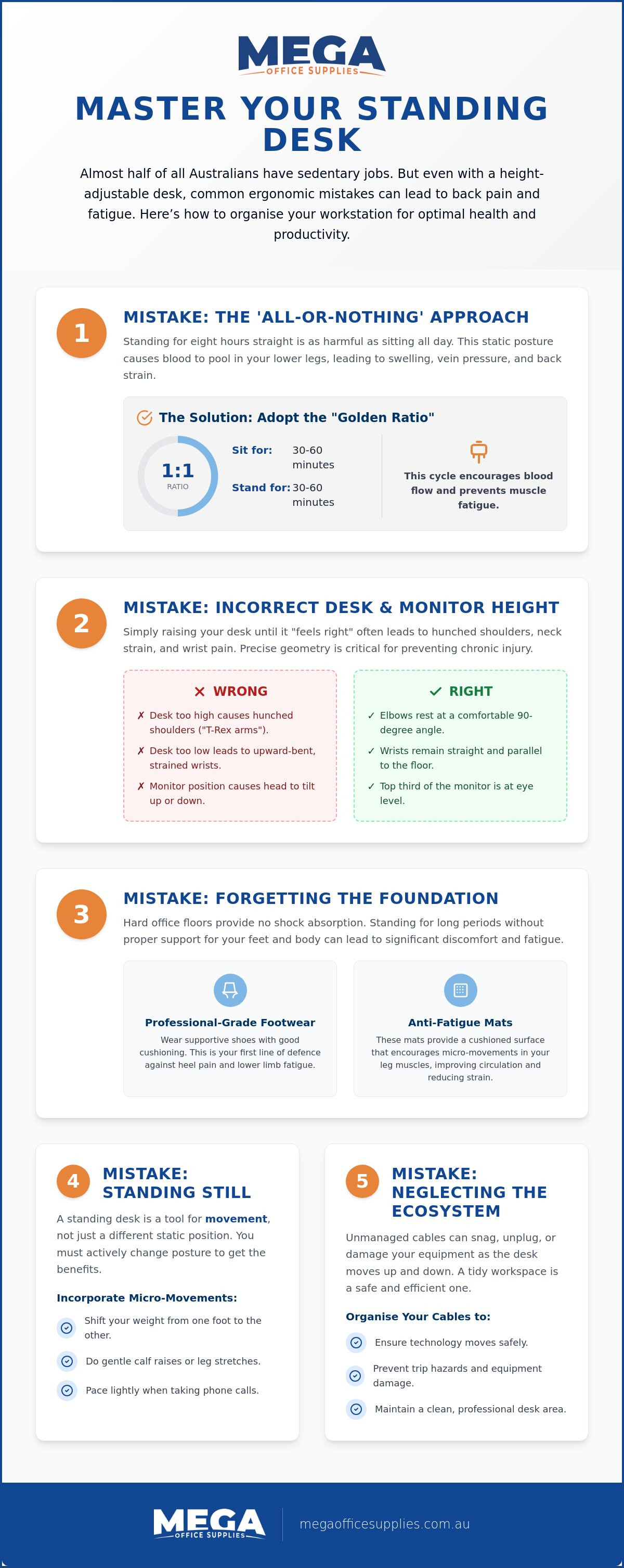
Many professionals assume that standing for the entire eight-hour workday is the ultimate health goal. This is one of the most significant common mistakes when using a standing desk. Research indicates that prolonged static standing is just as harmful as prolonged sitting. When you stand without moving, gravity causes blood to pool in your lower extremities. This leads to lower limb swelling, increased pressure on your veins, and eventual lower back strain. A standing desk is a tool for movement, not a replacement for a chair.
To better understand this concept, watch this helpful video:
Effective ergonomics is about movement, not just a different static position. Experts recommend a "Golden Ratio" where you alternate between sitting and standing every 30 to 60 minutes. This cycle encourages blood flow and prevents the "standing fatigue" that often results in a midday productivity slump. Watch for early warning signs like a dull ache in your heels or the urge to lean heavily on your desk. These signals indicate your muscles are over-exerted and it is time to change your posture.
The First 30 Days: A Gradual Transition Schedule
Building the endurance for a sit-stand routine takes time. During your first week, start with short standing intervals of just 15 minutes. Use a digital timer or "interruption cues" like phone calls or checking emails to trigger a height adjustment. Listen to your body’s biofeedback. If you feel discomfort, lower the desk immediately. Over four weeks, gradually increase your standing duration until you reach a comfortable balance that works for your specific role and physical capacity.
The Sitting Side of the Equation
Your time spent sitting remains a critical part of your health strategy. You still require a high-quality ergonomic office chair for your "sit" intervals. Ensure the chair provides lumbar support and is correctly adjusted so your feet are flat on the floor when the desk is at its lowest setting. Avoid using "perch" stools as permanent sitting solutions. They often lack the back support needed for deep focus work, which is another of the common mistakes when using a standing desk.
Geometric Blunders: Incorrect Height and Monitor Alignment
Achieving the correct physical geometry is the difference between a healthy workstation and a source of chronic pain. Many users simply raise their desk until it "feels right", which is one of the most frequent common mistakes when using a standing desk. Without precise measurements, you risk developing shoulder tension or wrist strain. Following the principles of proper office ergonomics ensures your joints remain in a neutral position throughout the day.
The "Elbow Rule" is your primary guide. Your desk surface should be at a height that allows your elbows to maintain a 90-degree angle with your forearms parallel to the floor. If the desk is too high, you'll likely experience "T-Rex arms", where your shoulders hunch toward your ears to compensate. Conversely, a desk that is too low leads to "cocked wrists", forcing your hands into an upward extension that can trigger carpal tunnel symptoms over time. Maintaining a neutral wrist position is essential for long-term health in any high-volume typing environment, whether you are in a warehouse office or a corporate centre.
Setting the Perfect Standing Height
Follow these steps to calibrate your workstation accurately:
- Step 1: Stand in the shoes you typically wear for work and relax your shoulders completely.
- Step 2: Bend your elbows at a 90-degree angle and measure the distance from the underside of your elbow to the floor.
- Step 3: Align your desk surface to just below this measured forearm level.
- Step 4: Position your monitor so the top third of the screen is at eye level, ensuring you don't have to tilt your head up or down.
The Critical Role of Monitor Arms
Standard fixed monitor stands are often insufficient in a sit-stand environment. The focal distance and viewing angle your eyes require when standing often differ slightly from when you are seated. Failing to account for these height differences is among the most frequent common mistakes when using a standing desk. Using gas-lift monitor arms allows for the independent movement of your screen, ensuring your neck remains in a neutral position regardless of desk height. This is particularly vital for dual-monitor setups, where improper alignment frequently causes repetitive neck rotation strain.
Correcting these geometric errors creates a more comfortable and sustainable workspace. If you're looking to upgrade your current setup, exploring professional-grade workplace ergonomics solutions can help you maintain the right alignment every day.
Forgetting the Foundation: Footwear and Surface Support
The quality of the surface beneath your feet is just as vital as the quality of the desk itself. In many Australian workplaces, from city high-rises to regional warehouses, flooring is often comprised of concrete topped with thin, industrial-grade carpet. This lack of support contributes directly to lower back pain and leg fatigue, often undermining the health benefits you sought by switching to a sit-stand workstation.
Static standing frequently leads to a "locked knee" habit, where users shift their weight and stiffen their joints to maintain balance. This posture places immense strain on the knee joints and limits blood circulation. To combat this, you need a foundation that encourages micro-movements. These tiny muscular adjustments keep your legs active and your circulation flowing, preventing the heavy, swollen feeling that many users experience by mid-afternoon. Identifying these common mistakes when using a standing desk is the first step toward a sustainable, pain-free routine.
Choosing an Anti-Fatigue Mat for the Australian Office
A professional-grade anti-fatigue mat is a non-negotiable component of a height-adjustable setup. While flat mats provide basic cushioning, topographical mats with calculated terrains are increasingly preferred in modern offices. These mats feature varying heights and textures that naturally encourage you to shift your weight and stretch your calves. When selecting from office furniture supplies, prioritise high-density polyurethane over cheap foam alternatives; polyurethane maintains its structural integrity and "bounce" over years of heavy use. Ensure the product features bevelled edges to minimise trip hazards, particularly in high-traffic areas like reception centres or staff kitchens.
The Footwear Factor
With the rise of hybrid work, many Australians have fallen into the trap of standing barefoot or in socks at their home office. This lack of support can lead to plantar fasciitis and other repetitive strain issues. The ideal shoe for a standing desk provides firm arch support and a cushioned sole to absorb vibration. Avoid unsupportive flat pumps or high heels, as these misalign the spine and increase pressure on the balls of your feet. Many successful professionals keep a dedicated pair of "standing shoes" or professional-grade sneakers under their desk. Swapping out of formal footwear during your standing intervals will maximise comfort and productivity throughout the workday.
The Static Standing Mistake: Why You Still Need to Move
Standing at your workstation is not a substitute for physical exercise. A frequent misconception among office professionals is that standing alone burns significant calories. In reality, the metabolic difference between sitting and standing is minimal, often amounting to fewer than ten extra calories per hour. The true value of a sit-stand desk lies in postural variation and improved circulation, not weight loss. Remaining perfectly still while standing is one of the most frequent common mistakes when using a standing desk. Static standing leads to joint stiffness and muscle fatigue, which eventually triggers the "Leaner’s Trap".
The Leaner’s Trap occurs when a user becomes tired and begins to shift all their weight onto one hip or leans their elbows heavily on the desk edge. This posture creates a lateral tilt in the pelvis and significant spinal misalignment. To prevent this, you must treat standing as a dynamic activity. Incorporate "Micro-Breaks" using the 20-20-20 rule. Every 20 minutes, look at something 20 feet away for 20 seconds, and use that time to stretch your limbs. Integrating a footrest into your setup also allows you to shift your weight safely by elevating one foot at a time, which relieves pressure on the lumbar spine.
Active Standing Techniques
Maintaining a "soft" knee position is essential for healthy standing. Never lock your joints. Instead, engage in a rhythmic side-to-side sway to keep your core muscles active. You can also implement a "Calf Raise" routine during phone calls or while reading documents. This movement engages the "muscle pump" in your lower legs, which is critical for returning blood to the heart and preventing the swelling discussed in previous sections. Simple glute activation exercises also help prevent the anterior pelvic tilt that often causes lower back pain during long standing intervals.
Integrating Movement into the Workflow
Success with a height-adjustable desk requires strategic task management. Categorise your daily responsibilities into "Standing Tasks" and "Sitting Tasks". Routine activities like checking emails, taking phone calls, or short administrative bursts are ideal for standing. Conversely, tasks requiring deep focus, such as complex writing or financial analysis, are often better suited to a seated position. Use your standing desk as a launchpad for movement. If a call lasts longer than ten minutes, take it as a cue to pace around the room. The right desk accessories, such as document holders and cable organisers, ensure your workspace remains functional while you move.
Integrating movement into your day is a great habit, much like ensuring your pets get the activity and care they need while you work.
Optimise your professional environment by choosing high-capacity workplace supplies that support a dynamic and healthy workflow.
Neglecting the Ecosystem: Organisation and Cable Management
A height-adjustable workstation isn't merely a flat surface; it's a moving piece of industrial equipment that functions as part of a larger technical ecosystem. One of the most significant common mistakes when using a standing desk is failing to account for the physical movement of the desk's periphery. When you transition from a seated to a standing position, every connected cable and piece of office supplies must accommodate that change in elevation. Neglecting this logistical reality often results in the "Cable Tug" disaster, where insufficient lead length causes hardware to be pulled toward the floor or sensitive ports to be damaged.
Beyond technical connectivity, the physical load on the desk surface is a critical consideration for durability. Electric motors are engineered with specific weight capacities. Overloading your workstation with stacks of heavy files, industrial-grade printers, or excessive equipment can lead to uneven lifting and premature motor failure. You should maintain a balanced load to ensure the longevity of your investment. Properly managing your workspace organisation ensures that the transition between heights is seamless and safe for both the user and the hardware.
Cable Management for Sit-Stand Desks
Effective cable management is essential for a functional sit-stand environment. Utilise professional-grade cable snakes or under-desk trays to organise power leads and data cables into a single, protected stream. Always perform the "Slack Test" by raising the desk to its maximum height before finalising your setup. This ensures that every monitor, keyboard, and peripheral has enough slack to rise without tension. Protecting your hardware from port strain is a fundamental step in workplace maintenance that prevents costly downtime and equipment replacement.
Organising Your Standing Surface
The layout of your desktop should change to suit your standing posture. When standing, your "Reach Zone" becomes more restricted than when you're seated. Keep frequently used items like pens, notebooks, and calculators within an inner circle to avoid overextending your reach. Reaching for office supplies at the back of a deep desk while standing can cause unnecessary strain on the lower back and shoulders. Using under-desk drawers or side storage keeps the primary surface clear for movement and prevents clutter from interfering with height adjustments.
Lighting also requires careful calibration to maintain manual precision. A desk lamp that provides perfect illumination while you're seated may create significant glare or shadows once the desk is raised. Use adjustable lighting solutions that can be repositioned to maintain visibility and reduce eye strain across all working heights. By treating your workstation as a complete ecosystem, you maximise the health benefits of your professional furniture while protecting your valuable technology.
Optimising Your Sit-Stand Workflow for Long-Term Health
Transitioning to a height-adjustable workstation is a proactive step toward a healthier workday. Real success depends on moving beyond static postures and ensuring your environment supports dynamic activity. By avoiding the common mistakes when using a standing desk, such as improper monitor alignment or unsupportive footwear, you'll transform your desk from a simple piece of furniture into a professional-grade ergonomic tool. It's about creating a workspace that adapts to your needs rather than forcing your body to adapt to the furniture.
Mega Office Supplies has been family owned and operated since 2008. We're a trusted supplier to government and educational sectors, offering reliable national Australian shipping for all office furniture requirements. Explore our range of professional Standing Desks and Sit-Stand Workstations to upgrade your office today. With the right setup and a commitment to regular movement, you can maintain peak productivity while protecting your long-term health.
Frequently Asked Questions
How long should I stand at my desk each day as a beginner?
Beginners should start with short standing intervals of approximately 15 minutes every hour. You can gradually increase this duration as your core endurance improves, aiming for a total of two to four hours of standing spread across the entire workday. One of the common mistakes when using a standing desk is attempting to stand for several hours on the first day, which often leads to significant muscle fatigue and lower back strain.
Will using a standing desk help with my lower back pain?
A standing desk can help alleviate lower back pain by reducing the pressure caused by prolonged sitting, provided you maintain correct posture. You must keep your spine in a neutral position and avoid locking your knees or leaning on one hip. If you stand statically for too long without moving, you may actually increase the strain on your lumbar region. Frequent movement between sitting and standing is the most effective strategy for pain management.
Do I really need an anti-fatigue mat for my standing desk?
An anti-fatigue mat is highly recommended if your office has hard flooring such as concrete or thin industrial carpet. These mats provide essential cushioning and encourage subtle contractions in your leg muscles, which improves blood circulation and reduces joint pressure. High-density polyurethane mats are the preferred choice for Australian professional environments due to their superior durability and ability to maintain their shape over years of consistent use.
What is the correct height for a standing desk?
The correct height is achieved when your desk surface aligns with your elbows at a 90-degree angle while your shoulders are relaxed. Your forearms should remain parallel to the floor during typing and mouse use. If the desk is too high, you will experience shoulder tension; if it is too low, you will likely hunch forward. Always calibrate the height while wearing your typical work shoes to ensure accuracy.
Can I use a laptop on a standing desk without accessories?
You should avoid using a laptop directly on the desk surface without a separate keyboard and mouse. Laptops create an ergonomic conflict because the screen and keyboard are attached, forcing you to either hunch your shoulders or strain your neck. To maintain health, place the laptop on a riser or use an external monitor so the top of the screen is at eye level, then use external peripherals at elbow height.
What kind of shoes are best for standing desks?
Supportive shoes with firm arch support and cushioned soles are the best option for sit-stand workstations. Avoid wearing high heels, completely flat pumps, or standing barefoot, as these choices do not provide the necessary shock absorption for your heels and arches. Many Australians keep a pair of professional-grade sneakers or dedicated walking shoes at their workstation to ensure they have the correct foundation during their standing intervals.
Should I stand while doing deep-focus work or creative tasks?
Most professionals find that standing is ideal for routine administrative tasks, emails, and phone calls, while sitting is better for deep-focus work. Complex analytical tasks often require the physical stability of a seated position to maintain high levels of concentration. You should categorise your daily workflow and use standing periods for active tasks, then return to a high-quality ergonomic chair for assignments that require intense mental focus.
How do I manage my cables so they do not pull when the desk rises?
Use a cable tray or a flexible cable snake to bundle all your power and data leads together. It is vital to perform a "slack test" by raising the desk to its maximum height before you finish your organisation. This ensures every cable has enough length to move freely without putting tension on your computer ports. Managing these leads correctly is a simple way to avoid common mistakes when using a standing desk and protects your technology from damage.

Article by
Mega Office Supplies Team
The Mega Office Supplies Team provides practical guidance for Australian businesses, schools, government organisations, healthcare providers, hospitality venues, warehouses and home offices. Based in Tweed Heads South, Mega Office Supplies is an Australian business, family owned and operated since 2008, offering office stationery, workplace furniture, technology products, labels, printers, cleaning and janitorial supplies, safety products, art materials, education resources and everyday business essentials from trusted brands.
General Information
This article is provided as general information only to help customers compare and choose office, workplace, school, cleaning, technology, furniture, safety and business supplies. Product details, specifications, compatibility, availability, pricing and suitability may vary. Always check the individual product page, manufacturer information, workplace requirements and relevant safety guidance before purchasing or using a product.


