

What if those stacks of misfolded letters and the constant frustration of clearing paper jams aren't just minor annoyances, but a significant drain on your office's bottom line? It's a common sight in busy Australian workplaces where the pressure to meet deadlines often leads to rushed setups and costly errors. Most administrators agree that while these tools are built for speed, a single incorrect manual plate adjustment can quickly turn a high-volume task into a bin full of wasted A4 paper. Understanding exactly how to use a paper folding machine is the difference between achieving professional-grade results and wasting valuable stationery on trial and error.
Our team relies on decades of combined industry experience to provide the functional clarity you need to master these essential workplace tools. You'll learn the precise mechanics of plate alignment and the routine maintenance required to keep your hardware in peak condition. This guide covers everything from initial setup to troubleshooting feed issues, ensuring you can maintain a high-capacity workflow while maximising productivity without the downtime caused by avoidable errors. We'll walk you through the technical specifications and operational steps that transform a complex task into a reliable, repeatable process for your entire organisation.
Key Takeaways
- Identify essential hardware components like feed trays and fold plates to ensure precise mechanical alignment from the first sheet.
- Master the professional process of how to use a paper folding machine to eliminate manual labour and improve document consistency across your organisation.
- Learn to configure specific settings for various fold types, including standard letter C-folds and professional Z-folds, for different paper stocks.
- Implement routine maintenance and troubleshooting techniques to clear paper jams safely and keep internal rollers free of dust and ink buildup.
- Optimise your workplace mailing system by integrating mechanical folding solutions that significantly reduce operational downtime and costs.
Understanding Your Paper Folding Machine Components
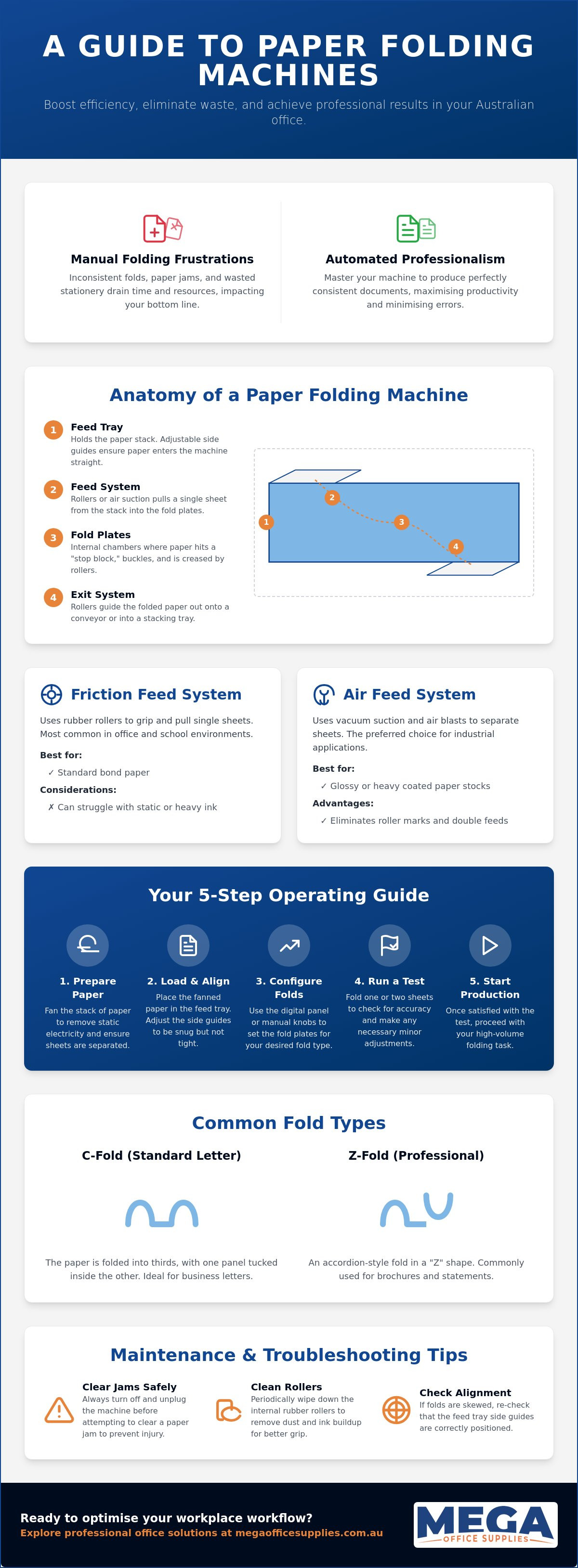
Mastering the mechanical anatomy of your hardware is the first step toward professional document production. Before learning how to use a paper folding machine, you must identify the key structural elements that facilitate the process. Most desktop units consist of a feed tray, internal fold plates, and an exit system. Each part must be perfectly aligned to ensure the final output meets professional standards without wasting expensive stationery. Understanding these components allows you to troubleshoot issues quickly and maintain a consistent workflow.
The primary feed tray is the starting point where you load your unstacked A4 paper. It features adjustable side guides that must be set to a snug fit to prevent the paper from skewing as it enters the machine. Modern office technology supplies often include sensors in this tray to detect paper size automatically. Once the paper leaves the tray, it enters the fold plates, which are the internal chambers where the folding occurs. There are various types of paper folding machines, but most office models use a buckle fold system where these plates determine the length and style of the fold.
To better understand this concept, watch this helpful video showing a common desktop model in action:
Following the folding process, the exit rollers pull the finished document into the stacking tray. This tray often uses a conveyor style or a simple catch bin to keep the completed work organised. Depending on your machine's age, you'll either use manual adjustment knobs to move the stop blocks within the fold plates or a digital control panel. Digital panels are significantly faster for switching between fold types, as they move the internal components with motorised precision at the touch of a button.
Friction Feed vs. Air Feed Systems
Friction feed systems are the most common in Australian offices and schools. They utilise rubber rollers to grip and pull a single sheet from the stack. While reliable for standard bond paper, they can sometimes struggle with static or ink-heavy documents. Air feed systems are the industrial alternative. These use vacuum suction and air blasts to lift and separate sheets. They're the preferred choice for glossy or heavy-coated stocks, as they eliminate the risk of the rollers marking the printed surface or pulling multiple sheets at once. Identifying which system your organisation utilises helps you select the correct paper stock for your machine.
The Anatomy of a Fold Plate
A fold plate is the mechanical guide that dictates the exact fold point. Inside the plate, the paper travels until it hits a stop block. Because the paper cannot move forward any further, it buckles at the entrance of the plate and is pulled through a set of rollers to create a crisp crease. The stop block's position determines the symmetry of your fold. If you are producing a standard letter fold, the first plate is usually set to two-thirds of the paper length, while the second plate handles the final third. Precision here is essential for professional correspondence.
Step-by-Step Guide to Operating Your Folding Machine
Operating professional document equipment requires a systematic approach to ensure longevity and precision. Once you've identified the components, the actual process of how to use a paper folding machine begins with careful physical preparation. Skipping these initial steps often leads to the very jams and misfeeds that disrupt a productive morning. By following a standardised sequence, you can maintain high-volume output while protecting your investment in quality office supplies and stationery.
Preparing the Paper Stack for Loading
The most critical step before engaging the motor is fanning the paper. Static electricity, especially in climate-controlled Australian offices, causes sheets to cling together. Grip the stack firmly and flex it back and forth to introduce air between each page. This simple action significantly reduces double-feeds. Ensure the stack is perfectly square against the backboard of the feed tray. While standard 80GSM copy paper is the workplace norm, heavier stocks up to 120GSM require a smaller stack height to prevent the friction rollers from straining under the weight.
After loading the paper, adjust the side guides on the feed tray. These guides should be snug against the stack but not so tight that they cause the paper to bow. If there's too much play, the paper will enter the rollers at an angle, resulting in a crooked fold. Next, set your fold plates. Most machines feature a scale or a digital preset for common Australian fold types like the standard Letter (C-fold) or the Z-fold used for marketing brochures. For specific technical settings on high-capacity models, consulting a resource like the Martin Yale 1217A AutoFolder Manual can provide precise millimetre measurements for custom jobs.
The Importance of the Test Run
Never begin a bulk job without a manual test run. Process a single sheet and inspect it immediately for "skew" or crooked edges. If the fold isn't perfectly horizontal, use the micro-adjustment knobs to fine-tune the stop block position. This is also the time to verify address window alignment. If you're folding invoices, ensure the recipient's details sit centrally within the envelope window to avoid postage delays. A few seconds of finessing at this stage prevents the frustration of reprinting an entire mail-out.
Once you're satisfied with the test sheet, engage the power and monitor the exit tray. Consistent stacking is a sign of a well-calibrated machine. If the documents begin to pile haphazardly, check the exit roller tension or the angle of the catch tray. Maintaining a steady rhythm ensures your mailroom or reception area remains organised and efficient throughout the day. If you find your current equipment is struggling with increased volumes, it might be time to explore professional-grade folding solutions designed for high-capacity workplace demands.
Adjusting Settings for Different Fold Types and Paper Stocks
Precision in document finishing depends on the synergy between mechanical settings and paper physics. When learning how to use a paper folding machine for diverse office tasks, you must move beyond basic operation and master the calibration required for different fold geometries. Standard bond paper behaves differently under roller pressure than heavy cardstock or coated marketing materials. Adjusting your machine's internal plates and roller gaps ensures that every document remains crisp and professional regardless of the material thickness or fold complexity.
Common Office Fold Configurations
The most frequent requirement in a professional environment is the A4 tri-fold, commonly known as the C-Fold. For a standard 297mm A4 sheet, both fold plates are engaged, typically set to approximately 99mm each to create three equal panels that fit perfectly into a DL envelope. Conversely, a Z-Fold uses similar measurements but reverses the direction of the second fold, making it the preferred choice for brochures that need to open like an accordion. For simpler tasks like greeting cards or internal booklets, a Half-Fold involves bypassing the second plate entirely and setting the first plate to 148.5mm.
High-volume mailouts often require a Double Parallel fold, where the paper is folded in half and then in half again in the same direction. This is essential for large documents that must fit into small, square envelopes. To achieve consistent results during these long runs, ensure you view our range of A4 copy paper specifically designed for high-speed mechanical processing. Using the correct paper weight prevents the machine from struggling with the increased thickness of multiple folds passing through the final rollers simultaneously.
Handling Specialty and Heavy Paper
Glossy paper and heavy-coated stocks present a unique challenge because their smooth surfaces offer less grip for standard friction rollers. If you find the paper slipping, you must increase the roller pressure or use specialised rubber rollers designed for high-sheen finishes. When working with cardstock above 120GSM, you should widen the "gap" between the rollers to accommodate the extra thickness. Failure to do so can result in "crunching" the lead edge of the paper or causing the motor to stall.
Perforated paper requires even more manual precision. If the fold point sits too close to a perforation line, the machine may tear the sheet instead of creasing it. In these instances, fine-tuning how to use a paper folding machine involves shifting the fold point by 1 or 2 millimetres to provide the rollers with a solid surface to grip. By managing these technical nuances, you can avoid the downtime associated with misfeeds and ensure your organisation's correspondence always reflects a high standard of professional care.
Troubleshooting Common Issues and Routine Maintenance
Maintaining your hardware is just as vital as knowing how to use a paper folding machine correctly. A well-oiled operation relies on the consistent performance of friction rollers and the clear passage of paper through internal plates. Neglecting routine care leads to mechanical fatigue and degraded document quality. By implementing a structured maintenance regime, you ensure that your investment continues to deliver professional results for years. Reliability in a high-volume mailroom isn't accidental; it's the result of disciplined technical oversight.
Resolving Frequent Paper Jams
When a stoppage occurs, adopt a "Three-Point Check" to locate the obstruction. Start at the feed tray to ensure no sheets have buckled before entry. Move to the fold plates, which can be removed on most professional models to reveal the internal path. Finally, inspect the exit rollers for any trailing edges. Most jams are caused by misaligned side guides or static. If you encounter frequent misfeeds, re-examine the side guide tension discussed in previous sections. A gap that is too wide allows the paper to skew, while a gap that is too tight causes the lead edge to crumple.
In dry Australian office environments, static electricity is a recurring culprit. It causes sheets to stick together, overwhelming the friction feed system. If fanning the paper doesn't resolve the issue, consider using anti-static sprays or humidifiers to stabilise the environment. When clearing a jam, always pull the paper in the direction of the natural path. This avoids damaging the delicate timing belts or tearing the rubber on the rollers. Forceful removal in the wrong direction can misalign the fold plates permanently.
Routine Cleaning Schedule
High-volume environments require a daily wipe-down of the external trays to prevent dust from entering the internal mechanism. On a weekly basis, you should explore our facility supplies for high-purity isopropyl alcohol and lint-free cloths. Cleaning the friction rollers is essential. Over time, paper dust and ink buildup create a glazed surface that loses its grip. Applying a small amount of alcohol to the rollers restores the "tackiness" required to pull single sheets effectively.
Check for signs of worn rollers during your monthly inspection. If the rubber appears cracked, smooth, or unevenly worn, it's time for a professional replacement. While you can oil some moving parts to ensure smooth operation, you must be precise. Excess lubricant can easily contaminate your paper stock, ruining entire batches of correspondence. Effective maintenance ensures your workflow remains uninterrupted and your documents stay crisp. If your current machine is consistently failing despite regular maintenance, upgrade to a professional-grade paper folding machine to restore efficiency to your workplace.
Maximising Workplace Productivity with Professional Folding Solutions
Implementing professional hardware is about more than just mechanical proficiency; it's about strategic output. Mastering how to use a paper folding machine allows an organisation to reallocate hundreds of labour hours annually. Manual folding is a slow, error-prone process that drains staff morale and office resources. In contrast, even a basic tabletop unit can process thousands of sheets per hour with millimetre precision. Reliability is the cornerstone of any well-oiled operation, and a calibrated machine ensures your documents always reflect a high standard of professional care.
Integrating these machines into a streamlined mailing system is essential for high-volume environments. Don't underestimate the impact of physical placement. Position your folder in a central workplace hub, ideally adjacent to your primary printer or multifunction device. This reduces the logistical steps between printing and dispatch, creating a rhythmic "problem-solution-action" flow. For schools, this setup facilitates the rapid production of newsletters and report cards. In government and healthcare sectors, it ensures monthly invoicing remains on schedule without requiring additional temporary staff or overtime.
Workflow Integration for Schools and Businesses
In a classroom or school administrative office, the demand for printed communication is constant. Using folding machines for weekly newsletters or event flyers ensures that information reaches parents quickly and professionally. Similarly, healthcare facilities can automate the folding of appointment reminders and billing statements. Document security remains a priority throughout this process. To stay informed on the latest workplace efficiency strategies, you can explore our latest news and guides to ensure your organisation stays ahead of modern document management requirements.
Choosing the Right Equipment for Your Volume
Selecting the right capacity is a logistical decision based on your specific monthly volume. Tabletop models are excellent for batches of 500 to 2,000 sheets. However, if your organisation consistently processes over 10,000 documents a month, a floor-standing unit with high-capacity feed trays is required. Automated "one-touch" systems are particularly beneficial in multi-user offices. These allow any staff member to select a preset fold type without needing to manually adjust the plates each time. This accessibility ensures that knowing how to use a paper folding machine isn't restricted to a single technician but is a skill shared across the team.
Efficiency comes from having the right tools for the task at hand. If you need assistance selecting hardware that matches your specific volume requirements, contact our expert team for a tailored quote on office technology. Our decades of collective experience ensure you receive a solution that minimises downtime and maximises professional precision in every document you produce.
Streamline Your Office Mailroom with Expert Precision
Mastering how to use a paper folding machine is a significant step toward achieving professional document standards while reducing operational downtime. By understanding the mechanical components, such as fold plates and friction rollers, you ensure every letter or brochure is crisp and perfectly aligned. Implementing a regular maintenance schedule further protects your equipment, preventing the common jams and misfeeds that often disrupt a busy Australian workday.
Mega Office Supplies understands the specific requirements of schools, government departments, and private businesses across the country. Our team provides national Australian delivery for all office equipment; we also proudly accept official government purchase orders to simplify your procurement process.
Browse our Professional Paper Folding Machines and Office Technology to find the ideal solution for your organisation. With the right hardware and operational knowledge, you can transform your mailing tasks into a model of efficiency and professional precision.
Frequently Asked Questions
Can a paper folding machine handle stapled documents?
Standard buckle-fold machines cannot process stapled documents because the metal can puncture the rubber rollers and scratch the internal fold plates. Attempting to feed stapled sets will likely cause an immediate jam and potentially lead to costly mechanical repairs. If you need to fold stapled sets, you must use a specialised knife folder or a high-end booklet maker specifically designed for that purpose. For most office units, ensure all staples are removed before loading the feed tray.
What is the best paper weight (GSM) for a standard office folding machine?
The ideal paper weight for most standard office folding machines is between 80GSM and 100GSM. This weight provides enough structural integrity to buckle correctly within the plates without being so thick that it strains the motor. While many machines can handle up to 120GSM cardstock, you'll need to reduce the stack height and adjust the roller pressure. Using standard A4 copy paper within this range ensures the most consistent results for high-volume mailouts and professional correspondence.
How do I stop my folding machine from wrinkling the paper?
Wrinkling is usually a sign of uneven pressure or misaligned side guides on the feed tray. If the guides are too tight, the paper bows before entering the rollers, leading to creases. Alternatively, check for ink or adhesive buildup on the rollers, which causes one side of the sheet to pull faster than the other. Cleaning the rollers with isopropyl alcohol and ensuring the paper is loaded square against the backboard will usually resolve most wrinkling issues.
Is it possible to fold glossy paper in a standard friction-feed machine?
You can fold glossy paper in a friction-feed machine, but it requires careful monitoring to prevent slipping. Glossy stocks have a smooth surface that provides less traction for standard rubber rollers. To succeed, load smaller stacks to reduce weight and ensure you fan the sheets thoroughly to break any static bonds. If you frequently process high-sheen marketing materials, upgrading to an air-feed system is recommended to avoid marking the printed surface.
How often should I clean the rollers on my paper folder?
You should clean your rollers weekly if the machine is used moderately, or daily during high-volume production runs. Paper dust and toner residue accumulate quickly, creating a glazed surface that leads to misfeeds. Learning how to use a paper folding machine effectively includes this routine maintenance. Use a lint-free cloth and a dedicated roller cleaner to maintain the necessary tackiness, which ensures the friction system pulls only one sheet at a time.
Can I use a paper folding machine for envelopes or cardstock?
Most machines can handle cardstock up to a certain thickness, typically around 150GSM, provided you adjust the roller gap and bypass the second fold plate for a simple half-fold. However, standard folding machines are not designed to process envelopes. The uneven thickness of an envelope's seams and flaps will cause immediate jams or damage the rollers. Always check your specific model's technical specifications for maximum paper thickness before attempting to fold heavier stocks.
What should I do if the machine is pulling multiple sheets at once?
If your machine is pulling multiple sheets, the most likely cause is static electricity or a worn separation pad. Start by fanning the paper stack to introduce air between the sheets. If the problem persists, inspect the rubber separation pad located at the entrance of the feed system. If this pad is worn down, it can't provide the resistance needed to hold back the rest of the stack, requiring a professional replacement to restore proper function.
How do I adjust the machine for a custom fold length?
To create a custom fold, you must manually move the stop blocks within the fold plates. Most machines have a millimetre scale along the side of the plate. Loosen the adjustment knobs and slide the block to your desired measurement, then tighten it securely. This process is essential when learning how to use a paper folding machine for non-standard documents. Always perform a single-sheet test run to verify the fold point before starting a bulk job.
Article by
Mega Office Supplies Team
The Mega Office Supplies Team provides practical guidance for Australian businesses, schools, government organisations, healthcare providers, hospitality venues, warehouses and home offices. Based in Tweed Heads South, Mega Office Supplies is an Australian business, family owned and operated since 2008, offering office stationery, workplace furniture, technology products, labels, printers, cleaning and janitorial supplies, safety products, art materials, education resources and everyday business essentials from trusted brands.
General Information
This article is provided as general information only to help customers compare and choose office, workplace, school, cleaning, technology, furniture, safety and business supplies. Product details, specifications, compatibility, availability, pricing and suitability may vary. Always check the individual product page, manufacturer information, workplace requirements and relevant safety guidance before purchasing or using a product.


