


What if the label maker you purchased to save money is actually costing your organisation hundreds of dollars in wasted tape and unreadable, faded assets? Most procurement officers know the frustration of retrieving a folder only to find the text has vanished under the fluorescent lights of a standard Australian office. When deciding on a Brother vs Dymo label maker for office use, the choice involves much more than the upfront cost of the hardware.
We understand that you need reliability and clarity when managing a national workforce or a busy warehouse. This guide offers a professional comparison of both brands to help you identify the most durable and cost-effective solution for your specific filing or shipping requirements. You will gain a clear understanding of tape longevity, the impact of the latest Brother P-touch Editor 6.x and Dymo Connect v1.6 software, and how to maintain compliance with upcoming 2026 labelling regulations across various sectors.
Key Takeaways
- Learn the fundamental differences between Brother’s laminated TZe technology and Dymo’s direct thermal printing to select the correct durability level for your workplace environment.
- Match hardware to your specific requirements, whether you need high-volume shipping labels for reception or permanent asset tagging for warehouse equipment.
- Evaluate the total cost of ownership for a Brother vs Dymo label maker for office use by comparing initial hardware investment against long-term tape and consumable expenditure.
- Understand how to navigate the latest 2026 software updates and Australian workplace standards to ensure your labelling organisation remains compliant.
- Discover the logistical advantages of sourcing professional-grade labelling solutions from a local partner with decades of industry experience.
Brother vs Dymo: Navigating the Labelling Standards in Australian Offices
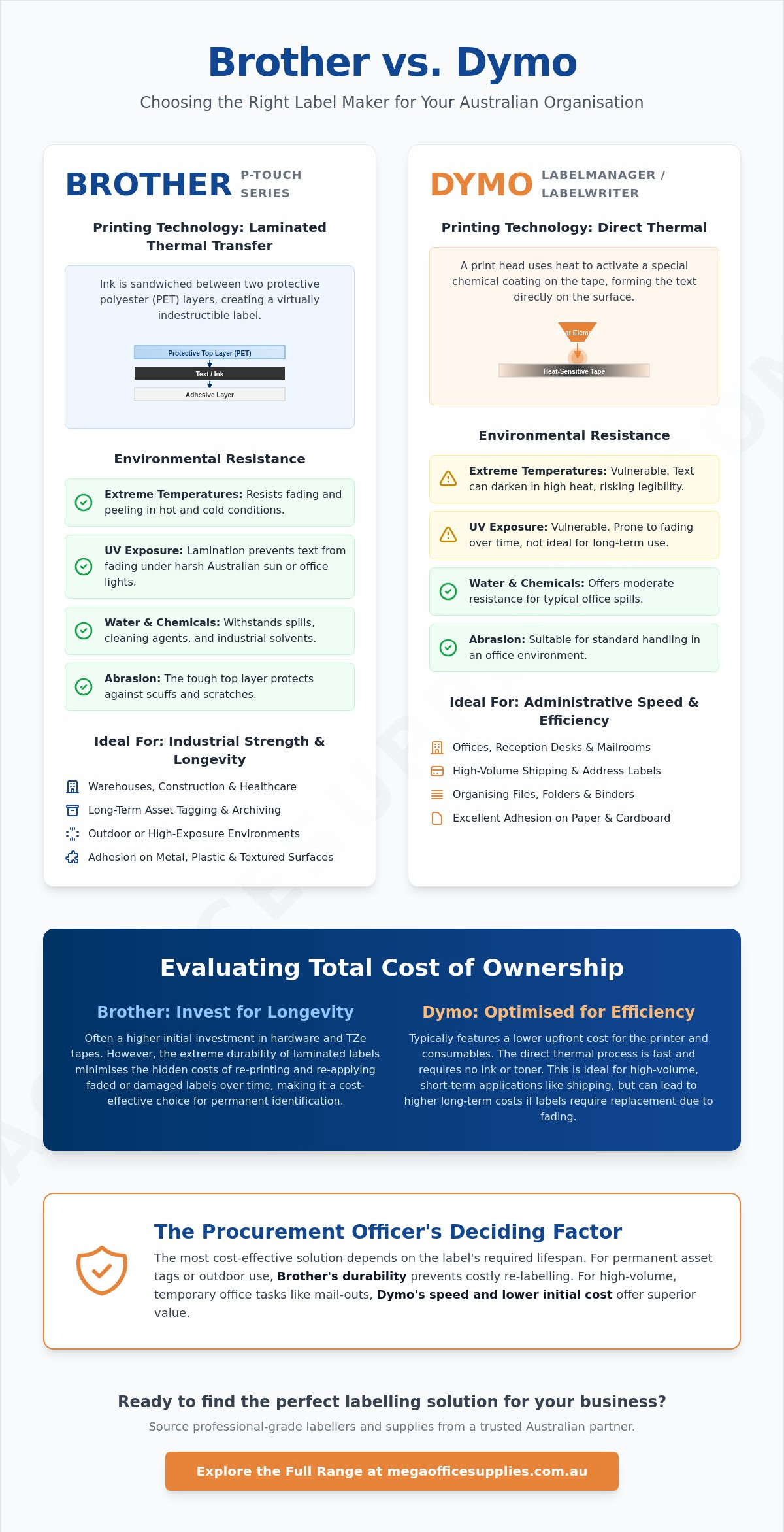
Brother and Dymo stand as the primary choices for Australian organisations seeking reliable identification solutions. Selecting a Brother vs Dymo label maker for office use is more than a simple brand preference; it's a choice between two distinct engineering philosophies. Brother focuses on industrial-strength durability, while Dymo prioritises administrative speed and ease of use. This decision impacts long-term budgets, as selecting the wrong ecosystem leads to wasted expenditure on incompatible consumables that don't suit your specific environment.
Professional labelling plays a critical role in inventory management and workplace safety. Clear, legible tags ensure that equipment is easily tracked and that safety warnings remain visible over time. Whether you are labelling cables in a server room or organising office supplies in a staff kitchen, the quality of the adhesive and the clarity of the print are paramount. These brands utilise different printing technologies to meet these varying demands, ranging from laminated thermal transfer to direct thermal printing.
To better understand the practical differences between these two leaders, watch this helpful comparison:
The Brother P-Touch Ecosystem
The P-Touch range has earned a reputation for ruggedness across Australian industries. Brother specialises in versatile handheld and desktop hybrid models that cater to demanding environments. Construction sites, healthcare facilities, and education centres frequently rely on Brother because of the laminated TZe tape system. These labels resist water, chemicals, and extreme temperatures. For procurement officers, the Brother system offers a reliable level of performance for asset tagging and long-term archiving.
The Dymo LabelManager and LabelWriter Series
Dymo directs its focus toward administrative efficiency and high-speed desktop printing. The range is split between the portable LabelManager series and the stationary LabelWriter series. While the LabelManager is excellent for quick tasks around the office, the LabelWriter is the recognised standard for Australian mailrooms and reception desks. It excels at producing shipping labels and visitor badges in seconds. Choosing a Brother vs Dymo label maker for office use often comes down to this balance between Dymo's administrative speed and Brother's environmental resistance.
Comparing Printing Technologies: Laminated Tapes vs Direct Thermal Labels
The physical resilience of your labels depends entirely on the underlying print technology. When evaluating a Brother vs Dymo label maker for office use, you must look beyond the plastic casing. Brother’s TZe technology uses a thermal transfer process where ink is sandwiched between two protective layers of PET (polyester film). This lamination guards against chemicals, UV rays, and heavy abrasion. It's the standard for equipment that might be wiped down with industrial cleaners or exposed to the afternoon sun in a Perth or Brisbane warehouse.
Dymo takes a different route with direct thermal printing. This method uses heat-sensitive, chemically treated tape that changes colour when it passes over the print head. It's efficient because it eliminates the need for ink ribbons or toner. However, this chemistry makes the labels vulnerable to high-heat environments. In the Australian climate, a direct thermal label left on a shipping container in the sun or inside a hot vehicle can darken or fade significantly within weeks.
Adhesion quality also varies by brand. Brother tapes are engineered for high-energy surfaces like metal shelving and plastic bins. Dymo D1 tapes provide excellent grip on textured paper and lever arch files commonly found in administrative centres. If you need to secure your inventory, you can browse our full range of labelling technology to find the right match for your specific surface requirements.
Durability and Archival Quality
Brother remains the preferred choice for long-term archiving in government and legal sectors. Their laminated labels are designed to last for decades without peeling or yellowing. Standard Dymo labels are perfectly adequate for air-conditioned office environments where folders are stored in cabinets. Results from PCMag's 2026 label maker tests indicate that while both brands handle indoor use well, Brother's laminated tapes survive harsh scrubbing and chemical exposure far better than unlaminated alternatives.
Visual Customisation and Colour Options
Both manufacturers offer a broad spectrum of tape colours and widths. Brother provides a slightly larger catalogue of specialty tapes, including industrial heat-shrink tubes for electrical work. Dymo focuses on durable plastic and metallic finishes that look professional on reception desks. While both brands offer high-resolution printing for logos, Brother’s thermal transfer often produces sharper edges on small graphics. This precision is vital for creating readable QR codes or complex organisational icons.
Practical Applications: Choosing a Device for Shipping, Filing, or Asset Tagging
Selecting the right hardware requires an assessment of your daily output and specific environmental demands. A handheld unit is often the logical choice for a warehouse floor where mobility is essential, whereas a desktop-bound printer serves a busy reception desk more effectively. Integrating these devices with your existing office supplies creates a cohesive organisational system that reduces retrieval times and minimises lost assets. The debate over a Brother vs Dymo label maker for office use often settles when you identify whether your primary bottleneck is high-speed shipping or long-term durability.
Efficiency in the mailroom is another critical factor. Dymo's LabelWriter series dominates shipping and mailing tasks because of its high-speed output and seamless integration with common courier software. For asset management, Brother remains the industrial standard. Using Brother for permanent equipment tagging and safety signage ensures that barcodes and warnings remain legible despite heavy handling or exposure to cleaning chemicals. This distinction ensures your procurement strategy aligns with the specific functional needs of each department.
Filing and Administrative Organisation
Administrative efficiency hinges on clear, consistent identification. Standardising labels across lever arch files and archive boxes ensures any staff member can navigate the company records with ease. Handheld devices are particularly useful for maintaining order in staff kitchens or labelling expiration dates on first aid supplies. This level of detail is vital for workplace compliance, ensuring that safety equipment is always identifiable and up to date according to Australian safety standards. Small, portable units allow staff to label items at the point of use, reducing the likelihood of items being misplaced or misidentified.
Logistics and High-Volume Printing
In high-volume distribution centres, Dymo's bulk label rolls provide a significant advantage. These rolls allow for hundreds of continuous prints, which is essential for e-commerce operations that cannot afford frequent downtime for consumable changes. Brother offers PC-connectable models that excel in complex, data-driven runs. These devices are ideal for printing sequential barcodes or pulling information directly from a spreadsheet for mass asset tagging across a national workforce.
Software ease of use is the final consideration for your team. Dymo Connect for Desktop v1.6 provides a streamlined, intuitive interface that suits fast-paced administrative tasks. Brother P-touch Editor 6.x offers deeper customisation, allowing for more intricate designs and database integration. Both platforms have evolved to meet the needs of a modern office, yet they cater to different operational rhythms. Choosing a Brother vs Dymo label maker for office use ultimately depends on whether your team values the "plug-and-play" simplicity of Dymo or the technical depth of the Brother ecosystem.
Evaluating Total Cost of Ownership: Tapes, Maintenance, and Software
The sticker price on a new device is often a distraction from the true financial impact on your budget. When assessing a Brother vs Dymo label maker for office use, procurement officers must look at the three to five year lifecycle of the hardware. This industry operates on a traditional "razor and blade" business model. While entry-level handhelds are affordable, the recurring cost of tape cartridges represents the bulk of your expenditure. In a high-volume environment, the cost of consumables will likely exceed the initial hardware investment within the first six months of operation.
Power management is another hidden variable in the cost equation. Many portable units rely on AA batteries, which create ongoing costs and environmental waste. Transitioning to professional models with rechargeable lithium-ion packs is a logical step for organisations looking to minimise long-term overheads. You must also ensure your technology stack is compatible with the latest software drivers. Both Brother P-touch Editor 6.x and Dymo Connect v1.6 require specific operating system versions to function correctly, so verifying your fleet's compatibility is essential before a bulk rollout.
Genuine vs Compatible Tape Cartridges
The choice between genuine and non-genuine tapes involves a balance of risk and reward. Non-genuine cartridges offer lower upfront costs but can lead to adhesive buildup on the thermal print head. This buildup often results in streaky prints and can eventually lead to mechanical failure. Brother machines are known for having slightly larger tape margins, which can result in more waste unless you utilise "chain printing" features. Dymo models generally offer tighter edge-to-edge printing on standard address labels, which can reduce tape consumption over thousands of individual prints.
Maintenance and Hardware Longevity
Maintaining professional print quality requires minimal but consistent effort. Periodically cleaning the thermal print head with a specialised cleaning card or an isopropyl alcohol swab prevents debris from interfering with the heat transfer process. Both brands provide reliable warranty support within Australia, ensuring that your investment is protected. Brother is frequently cited as the more durable "buy it for life" option due to its industrial heritage and robust internal components. If you are ready to equip your team with reliable hardware, view our professional labelling solutions to find the right balance of performance and value.
Expert Procurement: Why Sourcing Your Labelling Solutions Locally Matters
Reliability in your supply chain is the foundation of an efficient workplace. Ensuring that your team has immediate access to genuine TZe tapes or D1 cartridges prevents operational downtime during critical reporting periods or high-volume shipping cycles. When you source your labelling hardware and consumables from a local partner, you gain the security of consistent stock levels and predictable delivery times. This logistical stability is vital for procurement officers managing multiple sites across Australia.
Consolidating your labelling requirements with other essential categories, such as office furniture and stationery, streamlines your administrative workflow. It reduces the number of invoices your accounts department must process and often qualifies your organisation for better bulk rates. Our team leverages decades of combined industry experience to help you kit out entire departments with a unified system. This historical depth ensures that the advice you receive is grounded in the practicalities of long-term workplace maintenance.
The final verdict for standardising your fleet in 2026 depends on your primary operational goal. Brother wins the comparison for organisations that require industrial durability, chemical resistance, and archival longevity. Standardise on Brother for asset tagging, safety signage, and permanent records. Dymo remains the superior choice for administrative speed and mailroom utility. Choose Dymo for reception desks, visitor management, and high-frequency shipping where labels are temporary but speed is paramount.
The Mega Office Advantage
We provide a comprehensive inventory designed for rapid national delivery. As a family-owned operation, we prioritise reliability and direct support for our business-to-business accounts. This personal accountability distinguishes us from faceless global competitors. We specialise in supporting schools, government departments, and healthcare providers with expert advice that accounts for specific Australian standards. Whether you need to meet the new 2026 workplace exposure limits or updated allergen labelling requirements, our team understands the hardware necessary for compliance.
Next Steps for Your Workplace
Audit your current labelling needs before you commit to a bulk procurement order. Identify which departments require the ruggedness of Brother and which would benefit from the administrative speed of Dymo. Our specialists are available to help you design a tailored office fit-out solution that integrates your technology and stationery needs into one efficient package. You can view our complete range of Brother and Dymo label makers to compare specific model features and technical specifications for your 2026 rollout.
Standardising Your 2026 Labelling Strategy
Selecting the right hardware depends on whether your team prioritises the laminated durability of Brother for long-term asset tagging or the high-speed administrative utility of Dymo for shipping and reception. This decision shapes your organisational efficiency and impacts your total cost of ownership over the next several years. When you compare a Brother vs Dymo label maker for office use, the goal is to align the specific print technology with your daily operational volume and environmental conditions.
Mega Office Supplies is a family-owned Australian private company that has supported local businesses, schools, and government departments since 2005. We maintain a comprehensive inventory of Brother and Dymo consumables to ensure your supply chain remains uninterrupted. Our team draws on decades of combined industry experience to provide professional procurement advice tailored to the unique demands of the Australian workplace.
Browse Professional Label Makers at Mega Office Supplies
We are ready to assist you in selecting a reliable labelling solution that enhances your office organisation and productivity.
Frequently Asked Questions
Which label maker has the most durable tapes for outdoor use?
Brother is the superior choice for outdoor durability. Their TZe laminated tapes are engineered to withstand UV exposure, moisture, and extreme temperatures. This makes them ideal for labelling external electrical boxes or warehouse equipment in the harsh Australian climate. While Dymo offers durable plastic labels, they lack the protective top layer found in Brother's thermal transfer system.
Can I use Dymo tapes in a Brother label maker?
You cannot use Dymo tapes in a Brother label maker. Each manufacturer designs proprietary cartridges that are physically incompatible with the other's hardware. Beyond the shape, the printing technologies differ significantly. Using the wrong tape can damage the thermal print head and will void your warranty. Always ensure you purchase the specific tape series, such as TZe for Brother or D1 for Dymo.
Do Brother and Dymo label makers require ink or toner?
Neither brand requires traditional ink or toner cartridges. These devices use thermal printing technology to create images. Brother uses a thermal transfer process that involves an ink ribbon contained within the tape cassette. Dymo typically uses direct thermal printing, where the print head applies heat directly to chemically treated, heat-sensitive labels. This eliminates the need for messy refills and simplifies office maintenance.
Which brand is better for printing Australian shipping labels?
Dymo is generally preferred for high-volume Australian shipping labels. The Dymo LabelWriter series is designed specifically for desktop use and handles large rolls of address and shipping labels efficiently. It integrates seamlessly with local courier software and e-commerce platforms. While Brother offers shipping label printers, Dymo’s administrative focus and rapid output make it the standard for most mailrooms and reception desks.
How do I reduce tape waste when using a Brother P-Touch?
You can reduce tape waste by using the chain print feature on many Brother P-Touch models. This setting allows you to print multiple labels in a single run without the machine feeding an extra 25mm of tape between each one. You should also adjust your margin settings to narrow within the software or device menu. These small adjustments help minimise the amount of unused tape that ends up in the bin.
Is it worth buying a PC-connectable label maker for a small office?
Investing in a PC-connectable device is highly beneficial for small offices. Connecting to a computer allows you to print complex logos, QR codes, and data from Excel spreadsheets. This is much faster than typing individual labels on a small handheld keyboard. When evaluating a Brother vs Dymo label maker for office use, consider that PC connectivity allows you to use professional fonts that match your brand identity.
What is the difference between Brother TZe and Dymo D1 tapes?
The primary difference is the protective lamination found on Brother TZe tapes. TZe labels consist of six layers of material, with the text printed on the underside of a clear film. This makes them resistant to chemicals and scrubbing. Dymo D1 tapes are high-quality unlaminated plastic labels. They are excellent for indoor filing and organisation but don't offer the same level of industrial protection as the Brother system.
Are there rechargeable options for handheld label makers?
Both brands offer models with rechargeable lithium-ion battery packs. Professional handheld units often include these packs to eliminate the ongoing cost of AA batteries. Popular examples include the Brother PT-P710BT and Dymo LabelManager 280. Choosing a rechargeable Brother vs Dymo label maker for office use reduces environmental waste and ensures your device is always ready for high-volume tasks without needing a power outlet.
Article by
Mega Office Supplies Team
The Mega Office Supplies Team provides practical guidance for Australian businesses, schools, government organisations, healthcare providers, hospitality venues, warehouses and home offices. Based in Tweed Heads South, Mega Office Supplies is a family-owned and operated Australian business offering office stationery, workplace furniture, technology products, labels, printers, cleaning and janitorial supplies, safety products, art materials, education resources and everyday business essentials from trusted brands.
General Information
This article is provided as general information only to help customers compare and choose office, workplace, school, cleaning, technology, furniture, safety and business supplies. Product details, specifications, compatibility, availability, pricing and suitability may vary. Always check the individual product page, manufacturer information, workplace requirements and relevant safety guidance before purchasing or using a product.


