

The biggest threat to workplace productivity isn't a mechanical breakdown; it's the sudden halt of an empty cartridge during a critical print run. You already know that keeping an administrative team productive requires dependable hardware that won't inflate ongoing running costs. If you're assessing whether the Brother MFC-J5110DW fits your organisation's workload, looking purely at machine speed only tells half the story.
True office printing reliability hinges on proactive consumable lifecycle management rather than standalone hardware specs. In this guide, you'll discover how the Brother MFC-J5110DW performs across commercial environments and how structured procurement channels prevent expensive downtime. We examine its daily operational capabilities, ongoing maintenance requirements, and dependable restocking strategies to keep your workplace running without disruption.
Key Takeaways
- Understand how the space-saving landscape design and duplex capabilities of the Brother MFC-J5110DW handle demanding commercial printing schedules.
- Discover how a four-cartridge ink configuration minimises running costs by replacing only depleted colours during heavy text printing.
- Learn practical consumable scheduling habits that protect your office from unexpected downtime during time-critical administrative cycles.
- Explore straightforward procurement pathways, including dedicated trade accounts and official Australian Government purchase orders, to simplify recurring orders.
Evaluating the Brother MFC-J5110DW for commercial and administrative workloads
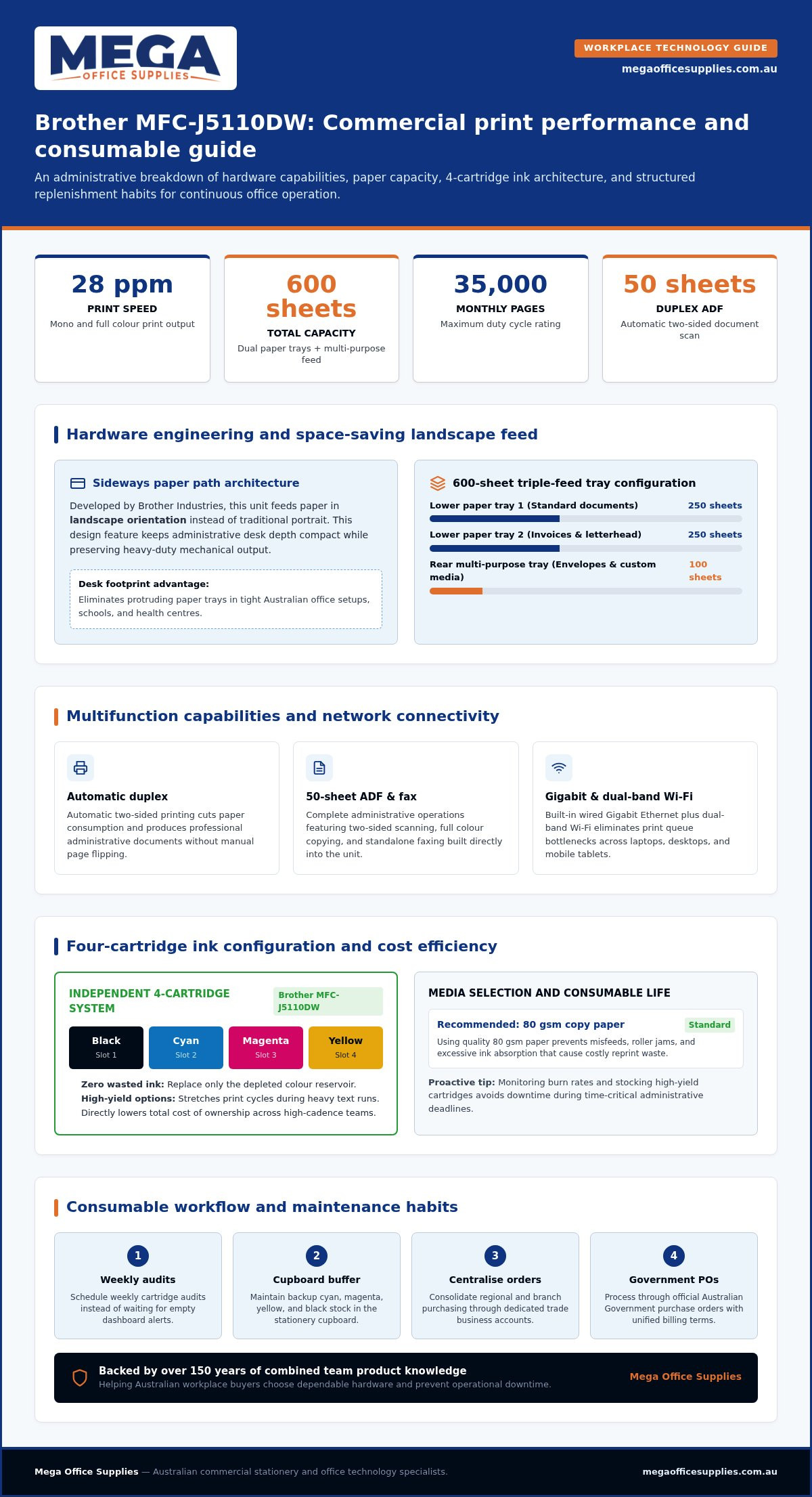
Workplace desks rarely offer excess space, making hardware dimensions just as critical as mechanical output. Developed by Brother Industries, the brother mfc-j5110dw feeds paper in landscape orientation rather than traditional portrait. This sideways paper path keeps desk depth remarkably shallow without sacrificing output durability. Alongside everyday printing, the unit handles complete administrative operations with automatic duplex printing, full colour copying, standalone faxing, and two-sided scanning via a 50-sheet automatic document feeder.
To view the hardware design and initial setup steps, watch this helpful walkthrough:
Matching multifunction performance to daily workplace output demands
High-volume office administration demands flexible media handling so staff don't spend half their day refilling paper trays. The unit incorporates two 250-sheet paper trays and a 100-sheet multi-purpose tray, providing a generous 600-sheet total capacity suitable for separating standard documents, invoices, and envelopes. Rated for duty cycles reaching 35,000 pages monthly, it easily shoulders the demands of expanding commercial departments.
Modern shared work areas also require stable connectivity across laptops, desktops, and mobile tablets. Built-in Gigabit Ethernet alongside dual-band Wi-Fi keeps network traffic stable when multiple operators send simultaneous print jobs. Delivering up to 28 pages per minute in mono and colour, the Brother MFC-J5110DW eliminates queue bottlenecks and keeps administrative teams operating at peak efficiency. When evaluating essential office technology supplies, balancing this processing throughput against space requirements guarantees long-term workplace productivity.
Consumable planning and ink cartridge efficiency for continuous printing
Managing running expenses comes down to cartridge architecture. The Brother MFC-J5110DW utilises a four-cartridge ink system with separate black, cyan, magenta, and yellow units, ensuring you only replace the specific reservoir that has run dry. Unlike tri-colour blocks that force offices to discard usable ink prematurely, independent slots cut unnecessary overhead during everyday document generation. Opting for high-yield cartridges further stretches print cycles between changes. When evaluating all-in-one printers for high-cadence commercial settings, cartridge configuration directly influences your ongoing total cost of ownership.
Practical strategies to reduce ink wastage and prevent workflow downtime
Nothing derails an executive meeting quite like a printer that proudly announces it is out of cyan when someone simply needs a monochrome agenda printed. To prevent sudden work stoppages during critical deadlines, office managers should establish a scheduled weekly consumable audit rather than waiting for dashboard warning alerts.
Media selection also plays a significant role in cartridge conservation. Using dependable 80 gsm copy paper prevents misfeeds, roller jams, and excessive ink absorption that lead to reprint waste. Tracking consumable burn rates allows administrative teams to maintain a buffer supply in the stationery cupboard. You can plan scheduled replenishment by sourcing your required ink and toner cartridges well before print volumes surge.
Streamlining printer procurement and replenishment through dedicated business accounts
Fragmented purchasing across multiple office locations quickly creates administrative clutter and inconsistent consumable stocking. Setting up a dedicated business account centralises ordering, allowing regional coordinators to secure hardware like the Brother MFC-J5110DW alongside recurring ink supplies under unified billing terms. We help workplace buyers select the right multifunction devices and schedule recurring orders to eliminate operational bottlenecks.
Institutional purchasers operate under distinct procurement frameworks. Public schools, healthcare facilities, and departments can process orders directly through official Australian Government purchase orders, ensuring full compliance with mandated accounting standards without credit card bottlenecks or complex reimbursement paperwork.
Managing institutional budgets and tax-deductible operating expenses
Procurement goals differ significantly depending on your organisational structure:
- Commercial enterprises: Routine replenishment of ink cartridges, paper, and desktop peripherals functions as tax-deductible operating expenditure, offering clear cash-flow advantages before financial year-end.
- Government, healthcare, and education: Acquisitions must satisfy pre-approved annual funding allowances, strict auditing guidelines, and milestone delivery schedules.
Consolidating your printing hardware, paper reams, and genuine cartridges into a single scheduled dispatch lowers administrative overhead and guarantees uninterrupted printing across every department.
Equipping your workplace for dependable, long-term printing
Choosing the Brother MFC-J5110DW gives your workplace a compact, dependable multifunction solution designed for heavy administrative output and versatile document handling. Getting the most out of your investment requires disciplined consumable management and individual cartridge replacement, ensuring your team never faces preventable project interruptions. We guide Australian workplaces toward the right balance of hardware and continuous supplies. We also accept official Australian Government purchase orders to keep institutional ordering straightforward and compliant with budgetary requirements.
Request a quote or browse our technology range
Our dedicated Australian support team is available weekdays 8-6 AEST to help establish reliable supply lines for your office.
Frequently asked questions
Does the Brother MFC-J5110DW support automatic double-sided printing?
Yes, the Brother MFC-J5110DW features built-in automatic duplex printing as standard. It also supports two-sided copying and scanning using its 50-sheet automatic document feeder. This setup allows busy administrative teams to digitise multi-page contracts, produce double-sided reports quickly, and cut paper consumption in half without having to flip sheets manually.
Can I replace individual ink colours separately in the Brother MFC-J5110DW?
Yes, the machine uses four separate cartridges for black, cyan, magenta, and yellow. You only replace the specific colour reservoir that runs out, which eliminates the ink waste common to combined cartridges. Both standard and high-yield black cartridges can be swapped independently, allowing offices with heavy text workloads to maintain productivity cost-effectively.
What paper types and sizes work reliably with this multifunction device?
Standard A4 copy paper works reliably across both main paper trays, with 80 gsm stock providing the best balance of feed reliability and print finish. For heavier media, including presentation cardstock, envelopes, and adhesive labels, the 100-sheet multi-purpose tray accommodates varied media weights up to 220 gsm without risking roller misfeeds.
How do Australian businesses and schools order replacement supplies on account?
Organisations can set up a trade account through Mega Office Supplies to access streamlined purchasing and unified billing. Educational institutions, public healthcare facilities, and government departments can submit official Australian Government purchase orders directly for prompt processing. Our team assists with tailored quotes and scheduled consumable replenishments.
Article by
Mega Office Supplies Team
The Mega Office Supplies Team provides practical buying guides and workplace advice for Australian businesses, schools, government organisations, healthcare providers, hospitality venues, warehouses and home offices. Family owned and operated since 2008 and based in Tweed Heads South on the Gold Coast–Tweed border, Mega Office Supplies helps Australian workplaces choose the right office supplies, furniture, technology, cleaning, safety and education products — backed by genuine local service from real people.
General Information
This article is provided as general information only to help customers compare and choose office, workplace, school, cleaning, technology, furniture, safety and business supplies. Product details, specifications, compatibility, availability, pricing and suitability may vary. Always check the individual product page, manufacturer information, workplace requirements and relevant safety guidance before purchasing or using a product.


