

Open-plan office desk organisation is arranging everyday supplies, paperwork and personal items so shared workstations stay usable between tasks and users. Choose desk organisers for open-plan offices around how your team works: assigned desks need accessible storage, while hot desks need portable kits and a clear handover routine.
- Choose desk organisers for open-plan offices by task, desk space and whether staff change seats.
- Use document trays for active paperwork and portable storage for hot-desking supplies.
- Move shared stationery and archived files off individual desks before adding containers.
- Mega Office Supplies serves Australian businesses buying office supplies and stationery.
Why desk organisation matters for open-plan offices
An open-plan desk is part of a shared workspace, not an isolated storage area. Paper piles, spare stationery and personal containers compete with monitors, keyboards and the next person's working space.
Give every item a destination before buying another organiser. A container solves a storage problem only when its contents belong at that workstation; otherwise, it simply gives surplus supplies a permanent home.
Paper-heavy teams need an obvious route from incoming documents to completed work. Start with the document trays buying guide if paperwork is the main source of clutter, rather than choosing a general-purpose organiser with compartments you will not use.
Hot-desking adds a different constraint: anything left behind becomes something the next user must move. Plan personal storage, shared supplies and end-of-day clearing together, rather than treating desktop storage as a separate purchase.
How to organise an open-plan workstation
Separate personal and shared supplies
Empty the desktop, then sort its contents into personal daily tools, shared supplies, active paperwork and items that belong elsewhere.
Keep shared stock at a team supply point rather than dividing it into permanent piles on every desk. Personal pens and notebooks can stay with their owner, while communal staplers and replacement stationery need an agreed return location.
For an assigned desk, a small daily-use collection is practical. For a hot desk, use a portable collection that leaves with the person. Do not make the desktop responsible for storing everything a staff member owns.
- Keep current-task items within the working area.
- Move spare supplies to a shared cupboard or shelf.
- Return completed files to the filing system.
- Remove containers with no clear purpose.
- Agree who checks the shared supply point.
Measure the space left after equipment
Measure the usable desktop with the monitor, keyboard, mouse and other required equipment in their normal positions. The desk's overall dimensions do not tell you how much room remains for an organiser.
Use scrap paper or an existing box to mark a proposed footprint before shopping. Test the layout while typing, opening a notebook and handling the documents your role actually uses. Include access to drawers and cable connections in the check.
Standard A4 paper measures 210 × 297 mm. A tray intended for A4 documents still needs its own external dimensions checked: the paper size is not the tray footprint.
- Record available width and depth in millimetres.
- Check clearance beneath monitor shelves or desk screens.
- Leave space to open folders and notebooks.
- Test drawer movement with the proposed layout.
- Check the organiser's published external dimensions.
Match storage to the task
Choose the type around what you handle: upright storage such as the Marbig Enviro Magazine Holder for files, a drawer tidy for small stationery, a document tray for loose paperwork, and a mesh zip case for changing desks.
Match the organiser to the object, not the other way round. A pen compartment does not solve a loose-paper problem, and a large tray is an awkward place to search for clips or erasers.
Avoid filling every available compartment simply because it exists. An empty section is not a problem; forcing seldom-used items onto the desk is. Buy only after you can describe what each section will hold.
- Use upright storage for folders you consult regularly.
- Use a shallow tray for small daily tools.
- Use document trays for loose active paperwork.
- Use portable storage for personal hot-desking supplies.
- Keep bulk replacements away from the workstation.
Design the handover for shared desks
Build a portable kit around a zip case such as the Osmer A4 Mesh Case Clear Blue Zip – $4.35 or the smaller Osmer A5 Mesh Case Clear Blue Zip – $3.60. It should hold the personal supplies needed for work without becoming a second filing cabinet.
Set a clear departure routine: take personal items, return shared supplies and remove paperwork. Keep the hot desk ready for the next user rather than leaving a personalised arrangement that others must dismantle.
Assigned desks and shared desks should not automatically receive identical organisers. The home-based business desk organisation guide addresses a different setting; use a separate storage plan when a workstation has a permanent user.
- Pack personal stationery into a portable kit.
- Give kits a storage location away from hot desks.
- Return communal tools to their shared home.
- Remove personal documents before leaving.
- Keep only agreed communal items on the desktop.
Give paperwork a route off the desk
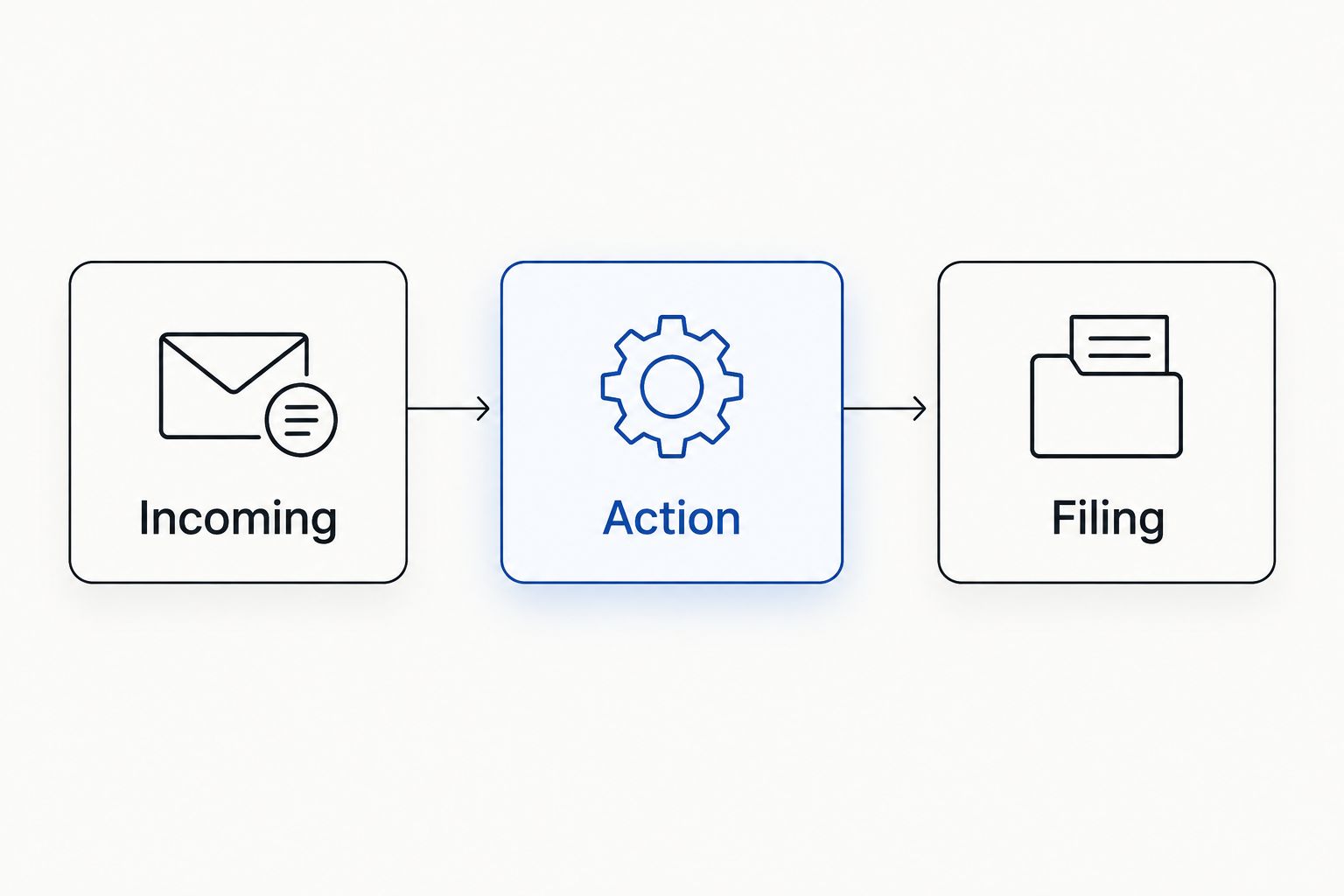
Create a paper workflow using document trays for each stage. Use clear destinations such as Incoming, Action and Filing, with a named owner responsible for moving documents through them.
A tray is a temporary working location, not an archive. If completed paperwork remains there indefinitely, the problem is the filing routine rather than the tray capacity.
Do not use an open tray as the default home for confidential documents. Follow your workplace's document-handling rules and move those records to the storage specified by that policy. An organiser is not a substitute for access controls.
- Label Incoming, Action and Filing destinations.
- Assign an owner to shared incoming paperwork.
- Separate active documents from completed records.
- Move confidential records to policy-approved storage.
- Clear completed work instead of adding another tray.
A simple sequence makes the paper route visible. Keep the same destination names across the team so a document does not change meaning when it moves between desks.
Keep cables and containers accessible
Use the existing cable route first, then position storage around it. Check that a tray or file holder does not cover a connection staff need to reach when they arrive at a shared desk.
Choose containers whose contents are visible and easy to retrieve. Deep compartments hide small items, while tall storage can make frequently handled objects awkward to reach. Test access from the seated working position rather than judging the layout while standing beside it.
Keep cleaning access in the plan too. An arrangement that requires dismantling a stack of containers just to wipe the desktop is unnecessarily difficult to maintain.
- Keep connection points accessible.
- Route leads separately from loose stationery.
- Check access to every compartment while seated.
- Leave room to lift trays without moving equipment.
- Choose a layout you can clear for cleaning.
A useful layout leaves a working area in front of the user, with a small daily-use container and active paperwork beside it. Shared replacement supplies belong elsewhere, not underneath the keyboard or behind the monitor.
Trial the setup before repeating it
Run a 5-working-day trial at a representative workstation before copying the arrangement across the office. This is a suggested test period, not a claim about how quickly a team will change its habits.
Ask the users what they moved, could not find or left outside the organiser. Inspect the actual contents as well: a tidy-looking container can still hold items nobody uses.
Set a 2-minute end-of-day reset as a practical target, then check whether your team can meet it. If clearing the desk is complicated, simplify the storage or handover routine before ordering more units.
- Test the layout during normal work.
- Record items that repeatedly sit outside storage.
- Check whether staff can find shared supplies.
- Ask users what makes packing up difficult.
- Remove unused compartments or unnecessary containers.
- Repeat the successful layout only where tasks match.
Compare organiser types by workplace need
Choose the storage type after identifying the problem.
| Option | Suited to | Mega products (inc GST) | Dimensions | Key limitation |
|---|---|---|---|---|
| Desktop stationery tray | Assigned desks with small daily tools | Esselte Desk Organiser Metal Mesh Black – $23.98; Italplast Fruit Desk Organiser Mandarin – $10.12 | See product page | Takes desktop space and does not organise documents |
| Upright file holder | Teams consulting active folders | Marbig Magazine File PVC A4 Black – $15.51 | Sized for A4 | Needs height clearance and does not suit loose small items |
| Document trays | Roles handling loose paperwork | Italplast Slimline Document Tray A4 Grape – $7.59 | 40mm high | Becomes a backlog without a clearing routine |
| Drawer organiser | Assigned desks with usable drawers | Metro 3440 Drawer Organiser Black – $28.49 | See product page | Depends on drawer access and internal dimensions |
| Portable pouch or container | Hot-desking staff | Osmer A5 Mesh Case Clear Blue Zip – $3.60 | 260 x 200mm | Must be unpacked and stored between visits |
| Shared supply rack | Teams using communal stationery | Marbig Magazine Rack 3 Section Black – $38.17 | See product page | Needs ownership and a return routine |
Use the smallest arrangement that handles the work. A paperwork role might need document trays and a small stationery container; a mostly digital hot-desking role might need only a portable kit.
Drawer storage reduces visible desktop clutter, but it is useful only if the user has access to that drawer. Portable storage supports changing desks, but it still needs a destination when the user leaves. Every option needs a routine as well as a container.
Check these details before ordering
Write a short buying brief for each workstation type. Include what needs storing, where it will sit and who uses it; this is more useful than requesting matching organisers for the whole office.
For physical fit, compare the published external dimensions with your measured space. For drawers, check internal dimensions and opening clearance. For portable storage, check that the user's actual supplies fit without forcing documents to bend.
Treat desk screens as a separate purchase decision. A screen does not provide stationery compartments, a document workflow or a place for a personal kit. Do not assume it supports accessories unless the relevant product information confirms that use.
- Record the items the organiser must hold.
- Check external and compartment dimensions where published.
- Confirm how the organiser opens or is accessed.
- Check material and care instructions on the listing.
- Avoid assuming mounting or accessory compatibility.
Common mistakes in open-plan desk organisation
Copying an assigned-desk setup onto hot desks
Permanent pen pots, files and personal trays make sense only when someone is responsible for them. At a shared workstation, decide which items are communal and which leave with the user. Make portability part of the setup, not an afterthought.
Treating a desk screen as storage
A screen and an organiser serve different purposes. Plan the usable desktop around the screen, but do not expect it to hold files or accessories without confirmed support. Keep storage decisions tied to the objects you need to contain.
Duplicating shared supplies at every seat
Giving every desk its own replacement stock creates more places to check and refill. Keep daily-use tools where needed, then use an agreed shared location for replacements. Assign responsibility so the central supply point does not become an unattended pile.
Adding trays instead of clearing paperwork
More trays do not fix an undefined document workflow. Decide who handles incoming papers, where action items belong and when completed records leave the desk. Increase capacity only after confirming the current trays hold active work.
Choosing appearance before fit
Matching organisers can still obstruct notebooks, drawer access or connections. Test the footprint with the equipment in place before choosing a consistent finish. Different roles can need different storage while following the same clearing rules.
FAQ
What desk organisers suit an open-plan office?
Choose desk organisers around the task and whether the desk is assigned or shared. Document trays suit active paperwork, small trays suit daily stationery, and portable storage suits staff who change desks.
Should every desk have the same organiser?
No, organisers should match the work performed at each desk. Use consistent labels and clearing rules, but allow different storage for paper-heavy roles and hot-desking users.
Are portable organisers useful for hot-desking?
Portable organisers keep personal supplies together when staff change seats. They also need an agreed storage location away from shared desktops when the user leaves.
How do I choose a document tray size?
Check the tray's published external dimensions against the usable desktop space. A4 paper measures 210 × 297 mm, but an A4 tray's external footprint is larger than the paper it holds.
Is drawer storage better than desktop storage?
Drawer storage keeps small items off the desktop when the user has an accessible drawer. Desktop storage provides visible access, but it takes working space and needs a clearing routine.
Can a desk screen replace a desk organiser?
No, a desk screen does not replace compartments, document trays or portable storage. Only attach accessories when the relevant product information confirms support.
How do we stop document trays becoming paper piles?
Give each tray a defined purpose and assign responsibility for clearing it. Separate Incoming, Action and Filing documents, then move completed records out of the active workspace.
How should we test an organiser before a larger order?
Trial the proposed layout at a representative workstation during normal work. Check fit, access, paperwork handling and the departure routine before repeating the setup elsewhere.
One last thing
Photograph the agreed layout without documents or personal information visible. Keep the image in your team's desk-use instructions so staff can see what belongs at the workstation and what should leave with them.
Use that layout as the buying brief, rather than shopping for containers first. Check the relevant listing's dimensions and intended use before choosing an item. Mega Office Supplies has been a family business since 2008.


