


Your desk is not just a piece of furniture; it's the most critical piece of hardware in your professional toolkit. Most procurement officers and home office workers have experienced the frustration of a workstation that wobbles or causes persistent neck strain after just a few hours of use. It's easy to feel overwhelmed by the sheer volume of options, especially when you're trying to decipher Australian commercial standards like AS/NZS 4442:2018. You want a solution that lasts years, not months, while keeping your team productive and pain-free.
This guide will help you identify a desk that offers genuine ergonomic support and industrial-grade longevity. We'll examine everything from versatile sit-stand models that encourage active movement to heavy-duty commercial workstations designed for high-traffic environments. By the end of this article, you'll have the technical knowledge required to select furniture that meets Australian workplace safety expectations and provides a high return on your investment. We prioritise functional clarity to ensure your workspace remains a reliable asset for your organisation.
Key Takeaways
- Identify the specific workspace configurations, such as straight or L-shaped designs, that best suit your floor plan and workflow requirements.
- Learn how to apply professional benchmarks for desk width and depth to ensure your equipment and documentation fit comfortably within your reach.
- Understand the critical role of AFRDI standards and commercial-grade construction in ensuring long-term durability and workplace safety compliance.
- Discover how to standardise furniture across diverse settings, from high-traffic classrooms to corporate headquarters, to maintain a cohesive professional environment.
- Implement practical solutions for cable management and integrated storage to minimise clutter and improve daily employee efficiency.
Choosing Your Ideal Desk: A Roundup of Modern Workspace Styles
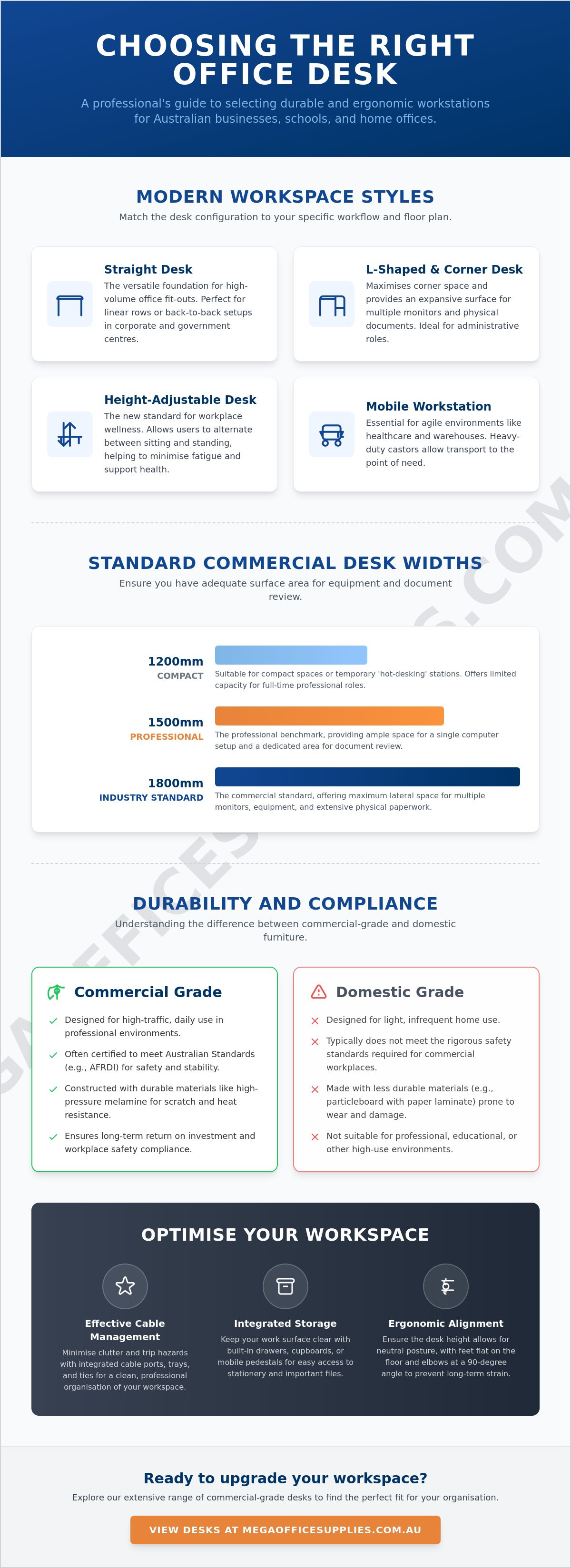
Selecting the right desk requires a deep understanding of your team's specific workflow and the physical constraints of your floor plan. Straight desks remain the most versatile foundation for high-volume office fit-outs across Australia. Their rectangular footprint allows for efficient linear rows or back-to-back configurations, making them a staple in government and corporate centres. For staff requiring expansive primary work surfaces, corner and L-shaped desks provide the necessary depth to manage multiple monitors and physical documentation simultaneously while utilising often-wasted corner space. These larger units are particularly effective in administrative roles where high-volume paperwork is standard.
When evaluating furniture for leadership suites or open-plan areas, the choice of material and configuration signals the intended use of the space. An executive desk prioritises a commanding presence through premium finishes and thicker worktops, often featuring integrated returns for additional meeting space. Conversely, collaborative workstations are designed to encourage interaction in professional hubs; they often feature shared leg systems and integrated privacy screens to balance communication with focus. Reviewing different types of desks can help procurement officers distinguish between these specialised forms to ensure each department receives the hardware it needs.
To better understand how to select the right configuration for your specific space, watch this helpful video:
The Rise of the Height-Adjustable Workspace
Electric sit-stand models have transitioned from a luxury addition to a national standard for workplace wellness. These units allow users to alternate between sitting and standing positions throughout the day, which helps minimise fatigue and supports long-term musculoskeletal health. While manual wind-up models offer a budget-friendly entry point for smaller operations, electric adjustment provides the speed and convenience necessary for high-intent users who change positions frequently. Most commercial-grade electric models now include memory presets for multiple users, making them ideal for hot-desking environments. For a deeper dive into these ergonomic solutions, consult our Professional Guide to Standing Desks.
Compact and Mobile Solutions
Not every workspace is permanent. Folding desks are essential for multi-purpose rooms and temporary training centres where rapid reconfiguration is required. These units usually feature locking mechanisms and durable laminate surfaces to withstand frequent handling. In agile environments like warehouses and healthcare clinics, mobile workstations on heavy-duty castors allow staff to transport their equipment directly to the point of need. For small home offices where floor space is limited, wall-mounted options provide a functional surface without a traditional footprint. These solutions ensure that even the most constrained environments can maintain a professional standard of organisation with the right office supplies and furniture.
Essential Selection Criteria: Size, Shape, and Ergonomic Alignment
Selecting a professional desk involves more than measuring a corner of the room. In Australian commercial environments, widths of 1500mm and 1800mm are established benchmarks. These dimensions provide enough lateral space for a computer setup alongside dedicated areas for physical document review. While a 1200mm width might suffice for a temporary station, it often lacks the capacity required for a full-time professional role. Surface finish also dictates longevity; high-pressure melamine is the industrial standard for its resistance to scratches and heat, while timber veneers are reserved for executive spaces where aesthetics are paramount.
Depth is often overlooked but remains critical for maintaining proper focal distance from monitors. A depth of 750mm to 800mm is necessary to prevent eye strain and allow room for a keyboard and mouse without crowding the user. Height clearance is equally vital to ensure compatibility with high-quality ergonomic office chairs. Without sufficient legroom, users cannot pull their chairs in close enough to maintain a healthy posture, leading to long-term back fatigue.
Calculating Your Footprint Requirements
When planning an office layout, distinguish between the desk's physical size and the "user zone" required for movement. A standard workstation needs at least 1000mm of clearance behind the desk to allow for chair swivelling and safe egress. For those using dual-monitor setups, an 800mm depth is non-negotiable to maintain the correct focal length and prevent neck rotation issues. Additionally, consider weight capacity; technical workstations supporting heavy printers or multiple monitor arms require reinforced steel frames rather than lightweight domestic alternatives.
Ergonomic Alignment and Health
Adhering to proper office ergonomics is essential for preventing workplace injuries. The 90-degree rule suggests that your elbows should rest at a right angle to the desk surface, with wrists in a neutral position. Many modern designs now incorporate scalloped edges or integrated cable ports to keep the primary workspace clear of clutter, which can otherwise interfere with natural arm movement. For specific height metrics suited to your body type, refer to our sit stand desk comparison guide. If you're ready to upgrade your facility, you can explore our full range of commercial-grade office furniture to find a solution that meets these rigorous standards.
Adapting Desks to Diverse Environments: From Home Offices to Classrooms
A professional desk serves as the primary infrastructure for productivity, yet its design must pivot based on the specific operational environment. In corporate headquarters, procurement officers often prioritise standardisation. Choosing a uniform range of workstations across multiple departments creates a cohesive professional brand and simplifies future facility maintenance. This consistency allows for easier reconfiguration as teams grow or move between different office sectors. Function must come first when managing large scale operations.
In healthcare clinics and laboratory settings, the focus shifts to sanitation and hygiene. These environments require non-porous surfaces, such as high-pressure laminates, that are easy to disinfect without degrading the material over time. Hygiene is the priority. Similarly, warehouse administrative hubs need robust steel-framed units that can withstand the physical demands of an industrial setting. Durability in these sectors is not just about longevity; it's about maintaining a safe and sterile workspace for all staff members.
Desks for the Modern Australian Classroom
Integrating high-quality educational supplies into student workspaces requires a focus on both resilience and ergonomics. Australian schools require equipment that can endure high-intensity use while supporting the physical development of students. Modern classrooms often utilise adjustable student desks that accommodate the physical growth of children, helping to prevent early postural issues. Collaborative pod desks are also essential for STEM activities, allowing students to cluster for group projects while maintaining a stable work surface. These heavy-duty surfaces are designed to withstand the daily wear typical of a busy learning centre.
The Professional Home Office Transition
The shift toward remote work has highlighted the inadequacy of kitchen tables for full-time professional tasks. Moving to a dedicated desk is a critical step for long-term health and productivity at home. Many professionals are now learning how to transition from a sitting desk to a standing desk to improve their daily energy levels and minimise the risks of a sedentary lifestyle. When selecting finishes, look for colours like oak, beech, or white that complement residential interiors. This allows you to maintain a professional standard of utility without the workstation feeling out of place in a domestic setting.
Commercial Grade vs. Domestic Furniture: Understanding Durability and Standards
Choosing a commercial-grade desk is a strategic investment in business continuity. Unlike domestic alternatives, professional workstations are tested against rigorous benchmarks set by the Australasian Furnishing Research and Development Institute (AFRDI). This certification ensures that the furniture can withstand the mechanical stress of an 8-hour workday, five days a week, for many years. When a product is AFRDI-certified, it has undergone testing for stability, strength, and safety, providing procurement officers with the security that their investment won't fail prematurely or create a workplace hazard.
Frame construction is the primary differentiator between these categories. Commercial desks utilise heavy-duty powder-coated steel frames, which offer superior rigidity compared to the lightweight alloys found in home-focused retail. To protect the work surface from moisture and physical impact, professional tops feature 2mm ABS edge banding. This high-impact plastic border is machine-bonded to the board, preventing the peeling and chipping common in high-traffic administrative hubs. These construction details are what separate a long-term asset from a disposable piece of furniture.
Warranty periods serve as a clear indicator of build quality and intended use. While domestic furniture often carries a standard 12-month guarantee, commercial-grade equipment is typically backed by 5-year or 10-year warranties. This reflects the manufacturer's confidence in the hardware's durability under intense professional use. When evaluating the total cost of ownership, these extended warranties provide peace of mind for administrators managing large-scale facility budgets.
The True Cost of Cheap Furniture
The replacement cycle of domestic-grade desks in a 24/7 environment is significantly shorter than their commercial counterparts. While "flat-pack" is often associated with lower quality, this is a misconception when the hardware is commercial grade. Professional flat-pack units use high-tensile cam-locks and steel-to-steel connections, requiring manual precision during assembly to ensure structural integrity. Investing in quality office furniture reduces the long-term logistical burden of frequent repairs and disposal, which is often an overlooked expense in procurement planning.
Material Science for Longevity
Longevity is rooted in material selection. High-density moisture-resistant (HDMR) board is the professional standard, offering far greater structural stability than standard particle board. This is paired with scratch-resistant melamine finishes that can withstand the friction of high-volume documentation centres. For organisations prioritising indoor air quality, E0 emissions ratings are essential, ensuring that the furniture does not release harmful levels of formaldehyde into the office environment. Browse our complete range of AFRDI-tested commercial office furniture to secure a durable solution for your workplace.
Optimising Your Desk Setup for Maximum Productivity
A high-quality desk provides the structural foundation, but the final configuration determines daily output. Effective cable management is the first step in creating a professional environment. Using under-desk baskets and integrated cable ports eliminates the "spaghetti" of wires that often clutters administrative hubs. This doesn't just improve aesthetics; it reduces tripping hazards and facilitates easier cleaning by janitorial staff. Proper technology integration, including the use of monitor arms and tech accessories, ensures that screens are at the correct eye level, which directly reduces neck strain.
Storage should be integrated seamlessly to maintain a clear primary work zone. Mobile pedestals and hutch units allow for the organised storage of office supplies, keeping essential items within reach without occupying valuable surface area. Lighting placement is equally critical. Position your workstation perpendicular to windows to minimise screen glare and reduce eye fatigue throughout the shift. This simple adjustment can significantly improve comfort during long documentation tasks.
The Foundation of the Ergonomic Zone
Positioning your keyboard and mouse is vital for preventing repetitive strain injuries (RSI). Your arms should remain parallel to the floor, with the desk height adjusted to support a neutral wrist position. It's a common mistake to choose storage first; instead, your specific workflow should dictate your storage strategy. In industrial or warehouse settings, safety is paramount. Integrating first aid kits and safety gear within the immediate reach of the workstation ensures compliance with Australian workplace health and safety standards.
Organising for Efficiency
Using desk mats can protect the surface from daily wear while defining the primary "focus zone" for the user. Effective use of drawers keeps high-frequency items close but out of sight, reducing visual clutter that can distract from complex tasks. Before a new installation is considered complete, perform a final checklist for a professional handover. This should include:
- Verifying the stability of all frame connections and leg levellers.
- Ensuring all cable routes are secure and clear of footwells.
- Confirming that all integrated storage units and drawer runners operate smoothly.
- Checking that monitor arms are tensioned correctly for the screen weight.
Securing Your Long-Term Workplace Infrastructure
Selecting a professional workstation is a foundational decision that impacts both staff health and operational efficiency. By prioritising AFRDI-certified frames and adhering to established ergonomic benchmarks, you ensure your facility meets Australian safety standards while minimising the need for frequent replacements. Whether you're standardising a corporate headquarters or optimising a home office, the right desk serves as a durable asset rather than a temporary expense.
In addition to ergonomic furniture, managing the ambient environment is key to productivity.
Mega Office Supplies serves Australian businesses with reliable hardware solutions. We provide national delivery across Australia for all commercial furniture orders, ensuring your team has access to the equipment they need regardless of location. If you require direct assistance with your floor plan or bulk requirements, our expert local support is available via our regional contact line to provide technical guidance.
Explore the Full Range of Professional Desks at Mega Office Supplies and build a workspace that supports your team's long-term success.
Frequently Asked Questions
What is the standard height for a desk in Australia?
The recommended height range for a fixed-height office desk in Australia is between 710mm and 770mm according to AS/NZS 4442:2018. This range accommodates the majority of adult users while in a seated position. For those using height-adjustable models, the range usually extends from 620mm to 1250mm to allow for various seated and standing postures. Ensuring your chair and workstation work together is essential for maintaining neutral ergonomic alignment.
How much weight can a standard commercial desk hold?
A standard commercial-grade workstation typically supports a static load between 80kg and 100kg. Heavy-duty units featuring reinforced steel frames can often handle 150kg or more without structural compromise. It's vital to check the specific weight rating if you intend to mount multiple monitor arms or heavy technical equipment. Exceeding these limits can lead to surface bowing or permanent structural failure of the frame over time.
Should I choose an L-shaped desk or a straight desk for a small office?
A straight desk is generally the better choice for very small offices because it has a smaller physical footprint and offers greater layout flexibility. However, an L-shaped model can maximise utility if you have an unused corner. It provides a larger primary work surface without encroaching into the centre of the room. Always measure your "user zone" to ensure there's enough space for your chair to move freely.
What is the difference between a sit-stand desk and a standing desk?
A sit-stand desk is a height-adjustable workstation that allows you to alternate between sitting and standing throughout the day. In contrast, a standing desk is often a fixed-height unit set at a high level, requiring a drafting stool if you wish to sit. Sit-stand models are the preferred professional standard in Australia. They offer the versatility needed to reduce sedentary behaviour without forcing a permanent standing position.
Do I need a special desk for dual monitor setups?
You don't necessarily need a specialised unit, but your workstation must have a minimum width of 1500mm and a depth of 750mm to accommodate dual monitors comfortably. This depth ensures you can maintain the correct focal distance to prevent eye strain. If you're using monitor arms, ensure the desktop is made of a high-density material like HDMR to support the concentrated weight of the clamp system.
How do I clean and maintain a melamine desk surface?
Melamine surfaces are highly durable and should be cleaned with a soft, damp cloth and a mild, non-abrasive detergent. Avoid using harsh chemicals or scouring pads, as these can scratch the protective layer and lead to moisture ingress. For stubborn marks, a specialised laminate cleaner is effective. Regular dusting and immediate removal of spills will prevent staining and maintain the professional appearance of your office furniture.
Are commercial desks difficult to assemble compared to retail versions?
Commercial desks aren't necessarily more difficult to assemble, but they're often heavier due to the use of high-density boards and steel frames. They typically use high-tensile cam-locks and steel-to-steel connections which provide superior structural integrity compared to basic retail versions. While many units are supplied as flat-pack, the precision of the pre-drilled holes and the quality of the hardware usually make the process straightforward for two people.
What Australian standards should I look for when buying office furniture?
You should prioritise products that comply with AS/NZS 4442:2018 for a professional desk or workstation. This standard covers safety, strength, durability, and stability requirements. Additionally, look for AFRDI certification, which indicates the furniture has been independently tested for high-volume commercial use. These standards ensure the hardware is fit for purpose in professional environments and complies with Australian workplace health and safety expectations.
Article by
Mega Office Supplies Team
The Mega Office Supplies Team provides practical guidance for Australian businesses, schools, government organisations, healthcare providers, hospitality venues, warehouses and home offices. Based in Tweed Heads South, Mega Office Supplies has been family owned and operated since 2008, offering office stationery, workplace furniture, technology products, labels, printers, cleaning and janitorial supplies, safety products, art materials, education resources and everyday business essentials from trusted brands.
General Information
This article is provided as general information only to help customers compare and choose office, workplace, school, cleaning, technology, furniture, safety and business supplies. Product details, specifications, compatibility, availability, pricing and suitability may vary. Always check the individual product page, manufacturer information, workplace requirements and relevant safety guidance before purchasing or using a product.


