


What if the biggest threat to your office productivity isn't a slow internet connection, but the tangled "rat's nest" of wiring hiding beneath your workstations? Most procurement officers and facility managers agree that while technology evolves rapidly, the physical infrastructure supporting it often remains an afterthought. Tangled wires create genuine trip hazards, restrict the movement of standing desks, and present an unprofessional image to clients and staff alike. Implementing effective cable management solutions for desks is no longer just about aesthetics; it's a critical component of workplace safety and operational efficiency.
This guide will help you master your workspace infrastructure by providing a professional framework for selecting, auditing, and installing desk cable management that scales. You'll learn how to achieve a clean, professional look while ensuring full compliance with Australian WHS standards and maintaining easy access for IT maintenance. We'll examine heat-resistant trays, standing desk configurations, and the specific hardware needed to ensure your organisation remains safe, tidy, and fully functional.
Key Takeaways
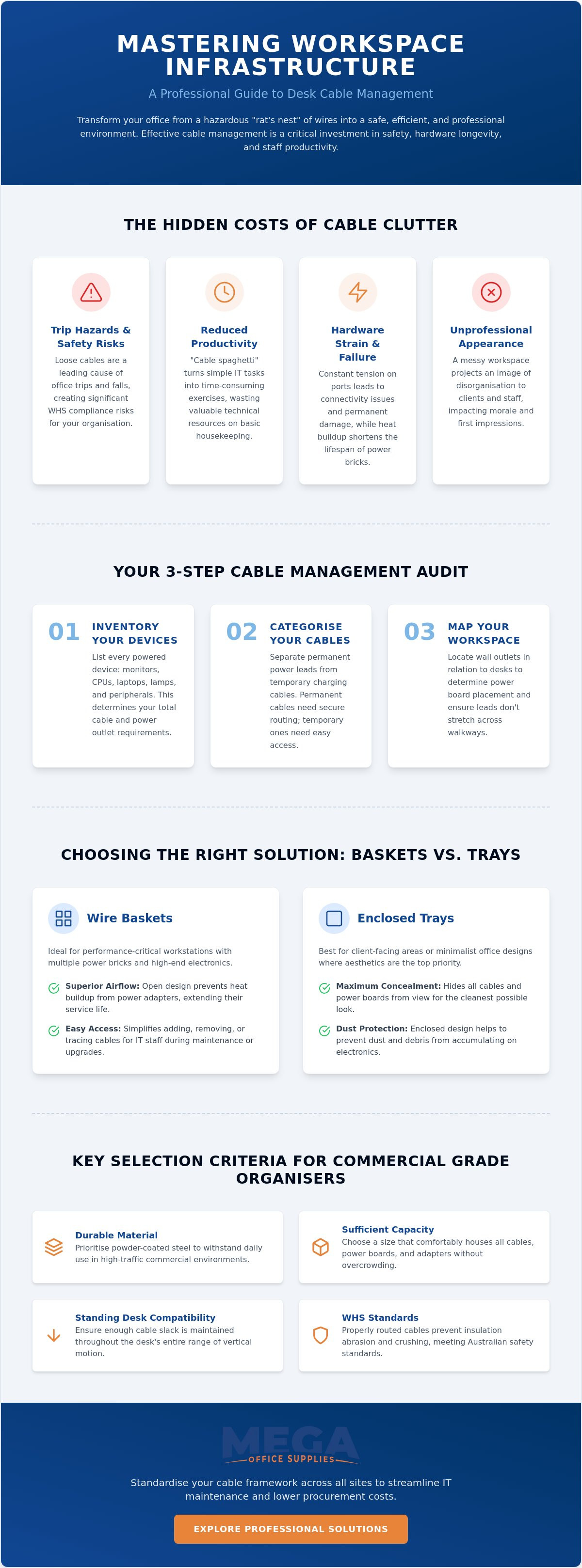
- Learn how a structured approach to cable management protects hardware by reducing port tension and preventing heat buildup.
- Discover the essential audit steps for height-adjustable setups to ensure adequate cable slack throughout the entire range of motion.
- Compare professional cable management solutions for desks to determine whether under-desk baskets or enclosed trays best suit your airflow and accessibility requirements.
- Identify the critical durability markers for organisers, prioritising powder-coated steel to withstand the demands of high-traffic commercial environments.
- Understand how standardising your cable framework across multiple sites can streamline IT maintenance and lower procurement costs for large-scale fit-outs.
Understanding Cable Management Solutions for Desks as a Workplace Investment
Professional Cable management is often mistaken for a purely cosmetic choice. In reality, it's a foundational infrastructure system. It involves a coordinated framework of powder-coated steel trays, wire baskets, and modular organisers designed to route power and data safely across a workstation. By implementing professional cable management solutions for desks, procurement officers protect the company's investment in high-end hardware. It's about building a reliable environment where technology can perform without interference or physical strain.
The link between organised cabling and equipment longevity is direct and measurable. Constant tension on monitor ports, USB-C docking stations, and CPU inputs leads to intermittent connectivity issues or permanent hardware failure. A secure management system provides essential strain relief. This ensures that cables remain seated correctly even when desks are adjusted or moved. Additionally, heat dissipation is a major factor that many cheaper alternatives overlook. Enclosed plastic boxes can trap heat, leading to thermal throttling in power bricks. Professional-grade wire baskets facilitate natural convection, keeping sensitive electronics within safe operating temperatures and extending their service life.
The Impact of Cable Clutter on Productivity and Safety
"Cable spaghetti" is an IT department's nightmare. It turns a simple hardware swap or a routine upgrade into a multi-hour audit of tangled leads. This inefficiency adds up across a large organisation, wasting valuable technical resources on basic housekeeping. Beyond the digital impact, trip hazards are a serious physical concern. In Australian commercial settings, slips, trips, and falls remain a leading cause of office-based injury claims. Loose cables snaking across the floor or dangling from the rear of a desk are primary offenders. There's also a psychological component to consider. A tidy, well-organised workspace reduces visual noise, allowing staff to maintain focus and professional pride in their environment.
Compliance and Standards for Australian Offices
Electrical safety in commercial environments requires more than just hiding wires from view. Cables must be organised to prevent insulation abrasion and to ensure that power leads aren't crushed by furniture. Keeping cables off the floor is also a requirement for basic hygiene and facility maintenance. It allows cleaning crews to access the area thoroughly, preventing the buildup of dust and allergens that thrive in tangled wires. For businesses managing national office supplies and fit-outs, standardised cable management solutions for desks ensure consistency across every branch. This structured approach simplifies procurement and ensures that every workstation, from the reception desk to the warehouse office, meets the same high standard of safety and accessibility.
Auditing Your Workspace: How to Assess Your Cable Management Requirements
Before purchasing any hardware, conduct a thorough audit of the workstation. A haphazard approach leads to insufficient capacity and wasted budget. Start by listing every powered device at the desk. This includes monitors, CPUs, laptops, desk lamps, and all peripherals like keyboards or webcams. Categorise these into permanent power leads and temporary charging cables. This distinction is vital; permanent cables require secure, fixed routing, while charging cables for devices like phones or tablets need accessible entry and exit points that allow for frequent movement.
Map the physical layout of the office. Locate wall outlets relative to the desk position. This determines the required length of your primary power leads and the placement of your power boards. For procurement officers using an office safety checklist to maintain WHS compliance, this step is non-negotiable. It ensures that cables aren't stretched across walkways or pulled taut, which are primary causes of workplace accidents and equipment damage. If you are upgrading an existing fit-out, reviewing our range of office furniture accessories can help you find the right aftermarket mounting solution for your specific layout.
Calculating Capacity: How Much Space Do You Really Need?
Avoid the mistake of buying only for today's requirements. Always select cable management solutions for desks that offer at least 30% more capacity than your current audit suggests. IT upgrades are inevitable. A single-monitor setup may only need a slim profile tray, but a high-performance workstation with dual monitors and external storage requires heavy-duty wire baskets. As a rule of thumb, ensure the tray depth is at least twice the height of your largest power board. This allows for easy cable looping and prevents overcrowding, which can lead to restricted airflow and heat buildup.
Evaluating Desk Compatibility and Mounting Options
Mounting hardware must match the desk material to ensure longevity. Timber or MDF tops allow for secure, drill-in mounts that offer the highest stability for heavy cable loads. However, glass or thin laminate surfaces require non-invasive clamp-on solutions to avoid structural damage. Managing cables on standing desks presents a specific challenge: the travel distance. You must measure the desk's full range of motion. Ensure sufficient slack is maintained in the cabling to prevent plugs from being ripped out of sockets when the desk reaches its maximum height.
Comparing Primary Cable Management Solutions for Modern Desks
Selecting the right hardware requires a balance between capacity and accessibility. While a basic audit identifies the volume of cables, the physical environment determines which cable management solutions for desks will perform best over the long term. Professional environments typically require a combination of horizontal containment, vertical routing, and desktop access points to create a truly seamless infrastructure.
Under-Desk Trays and Baskets: The Heavy Lifters
The choice between solid metal trays and wire mesh baskets often comes down to the specific hardware in use. Solid trays offer a clean, hidden appearance and are excellent for concealing bulky power bricks. However, they can trap heat. Wire mesh baskets are the preferred choice for high-performance setups because they allow for maximum airflow and easy visibility during IT troubleshooting. Professional fit-outs often utilise "dual-tier" baskets. These systems physically separate high-voltage power leads from sensitive data cables, which helps prevent electromagnetic interference and maintains signal integrity for high-speed networking.
| Solution Type | Airflow | Capacity | Installation Difficulty |
|---|---|---|---|
| Solid Metal Tray | Low | High | Moderate (Drill-in) |
| Wire Mesh Basket | High | Very High | Moderate (Drill-in) |
| Dual-Tier System | High | Maximum | High (Technical) |
Vertical Solutions: Umbilicals and Spines
Vertical management is critical when desks are positioned away from walls or in height-adjustable configurations. Umbilical cable snakes provide a flexible, segmented conduit that protects wires as they transition from the floor to the desktop. These are essential for sit-stand workstations, as they expand and contract without tangling. For fixed-height desks in open-plan offices, a rigid cable spine offers a more structured look. Both solutions should feature a weighted base to ensure the organiser remains stationary, preventing the "pendulum effect" that can strain ports when the desk moves or is bumped by staff.
Desktop Organisers: Clips, Sleeves, and Ties
The final layer of a professional system addresses the cables that sit on top of the work surface. Cable clips are invaluable for keeping frequently used chargers from sliding behind the desk when disconnected. For grouping multiple monitor or peripheral leads into a single, clean "trunk", neoprene sleeves offer a flexible and aesthetically pleasing solution. When securing these bundles, we recommend reusable hook-and-loop ties over traditional plastic zip ties. Velcro allows for "easy re-entry", meaning IT staff can add or remove a single cable in seconds without needing tools or risking damage to the cable insulation. These small office supplies are often the difference between a tidy desk and a cluttered one.
Key Selection Criteria for Professional-Grade Cable Organisers
Professional grade hardware is distinguished by its construction and long-term utility. When evaluating cable management solutions for desks, you must look beyond the initial purchase price to consider the total cost of ownership. This includes the time required for installation, the durability of the materials under heavy loads, and how easily your IT team can perform maintenance. Selecting the wrong organiser often leads to sagging trays, snapped plastic clips, or restricted access that complicates future tech upgrades.
Integrated power options are another critical factor for modern workstations. A superior solution doesn't just hide wires; it houses the power infrastructure itself. Look for trays or baskets designed to securely mount power boards, keeping them off the floor and away from dust. This setup ensures that your office furniture supplies work together as a cohesive system rather than a collection of mismatched parts. Choosing a finish and colour that matches your existing desk frames also maintains a high-end, professional appearance in client-facing areas.
Material and Build Quality for Long-Term Use
Durability is the primary differentiator in commercial environments. While lightweight plastics may suffice for a basic home office, high-density power environments require powder-coated steel. Steel organisers offer the rigidity needed to support heavy-duty power bricks and multiple monitor adapters without bending. Fire-retardant materials are also essential for safety compliance in large-scale office fit-outs. For businesses operating in leased spaces, "no-drill" solutions are a vital consideration. These clamp-on systems provide the stability of a fixed mount without violating lease agreements or damaging the underside of expensive work surfaces.
Accessibility and Maintenance Efficiency
Re-entry refers to the efficiency with which IT personnel can add, remove, or re-route individual cables within an existing management framework. In a dynamic office where staff move frequently, ease of re-entry is a major productivity factor. Tool-free adjustments allow for rapid changes without the need for a technician to bring a full toolkit to the desk. "Drop-down" trays are particularly effective for this purpose. They allow the entire cable basket to swing open, providing full visibility and two-handed access without the technician having to crawl into cramped spaces under the furniture. This accessibility minimises downtime during hardware replacements or office reshuffles.
If you are planning a comprehensive workspace upgrade, you can view our full range of commercial office furniture supplies to find the perfect match for your infrastructure requirements.
Scaling Your Solution: From Home Offices to National Commercial Fit-outs
Scaling cable management solutions for desks requires a shift from individual workstation organisation to a broad infrastructure strategy. Small home offices benefit from the same high-quality hardware used in corporate fit-outs, but for national organisations, the primary challenge is consistency. Standardising your hardware across multiple sites reduces the complexity of IT rollouts. It ensures that every employee, regardless of their location, operates in a safe and compliant environment. This structured approach allows procurement officers to maintain a clear audit trail of workplace safety and equipment standards.
Bulk procurement is a vital tool for managing project budgets. By consolidating the purchase of technical hardware with general office supplies and furniture, organisations can significantly reduce administrative overhead and logistical costs. A reliable Australian partner provides the stability needed for these large-scale operations, ensuring that replenishment and support remain consistent over the years. This longevity is essential for maintaining workstations as technology cycles inevitably move forward.
Standardising Your Workspace Infrastructure
Implementing a uniform cable management strategy simplifies the logistical demands placed on IT departments. When every workstation features the same scalable baskets and trays, technical staff can prepare standardised "cable maps" for rapid installation. This future-proofing approach ensures that as your technology requirements grow, your physical infrastructure is already equipped to handle the increased load. Managing these high-volume requirements is straightforward for professional buyers. Procurement officers can streamline the ordering process by completing our business application form, which provides access to streamlined account features designed for multi-site commercial demands.
The Mega Office Supplies Advantage
Mega Office Supplies brings decades of combined industry experience to every project. We understand the specific demands of the Australian corporate, government, and educational sectors. Our national delivery capabilities ensure that whether you are fitting out a single reception area or a multi-storey head office, your hardware arrives on time and according to specification. We operate as a high-capacity provider capable of handling the logistical flow of large distribution demands without friction.
The breadth of our catalogue allows for a truly integrated procurement strategy. You can source everything from professional cable management solutions for desks to ergonomic office chairs from a single, reliable partner. This consolidation lowers overall project costs through bulk procurement efficiencies and simplified invoicing. As a family-owned Australian business, we prioritise direct, accessible support. You won't be navigating a faceless global helpdesk; our team is available via a local telephone line to provide technical guidance and logistical assistance whenever it's needed. We value stability and regional expertise, positioning ourselves as a consistent partner for the long term.
Securing Your Workspace Infrastructure for the Future
Effective workspace management is a continuous process of auditing, selecting, and standardising. By transitioning from a reactive approach to a structured framework, you protect your technical hardware and ensure a safer environment for your staff. The foundation of any scalable setup starts with a thorough audit of your powered devices and the selection of high-capacity, durable hardware. Prioritising professional-grade materials ensures your organisation meets WHS standards while maintaining the flexibility needed for future IT upgrades.
Mega Office Supplies has been a family-owned Australian private company since 2005. We offer decades of combined industry expertise to help you select the right cable management solutions for desks for any environment, from home offices to national commercial fit-outs. To support our public sector partners, official Australian Government purchase orders are accepted through our streamlined procurement system. We provide the logistical scale and regional support necessary to handle high-volume demands without friction.
Browse our full range of professional cable management solutions and build a workspace that is as efficient as it is organised. Our team is ready to help you establish a reliable, professional framework that supports your people and your technology for years to come.
Frequently Asked Questions
Do I need to drill into my desk to install cable management?
You don't always need to drill into your work surface to install management hardware. Clamp-on trays and baskets provide a secure, non-invasive mounting option for glass or thin laminate desks. These are ideal for leased office spaces where permanent modifications are prohibited. If you have a solid timber desk, drill-in mounts offer the highest weight capacity for heavy power bricks and multiple adapters.
Can cable management solutions be used with standing desks?
Yes, cable management solutions for desks are essential for height-adjustable workstations. You must ensure there is enough slack in the cabling to allow the desk to reach its maximum height without pulling on wall sockets. Using an umbilical snake or a flexible cable spine protects the wires from stretching or tangling during the desk's travel range.
What is the best way to hide a bulky power board under a desk?
The most efficient way to conceal a bulky power board is by using a deep under-desk wire basket or a solid metal tray. These organisers are designed to house the entire board and its associated plugs, keeping them off the floor. Wire baskets are particularly effective as they allow you to use hook-and-loop ties to secure the board directly to the mesh for stability.
How do I prevent my cables from overheating in a tray?
Airflow is the primary factor in preventing heat buildup. Choose wire mesh baskets instead of enclosed plastic or solid metal boxes to facilitate natural convection. This is critical for power adapters and docking stations that generate significant heat. Avoid overcrowding the tray; maintaining a 30% capacity buffer ensures enough space for air to circulate around high-voltage components.
Are these solutions compatible with all types of office furniture?
Most professional cable organisers are compatible with standard office furniture, but you must match the mounting style to your desk material. Clamp-on systems fit most tops between 15mm and 50mm thick. For desks with integrated privacy screens or unusual frame designs, you may need a specific vertical spine or a desktop-mounted power rail to ensure a clean fit without interference.
What is an umbilical cable manager and do I need one?
An umbilical cable manager is a segmented, flexible conduit that routes cables from the floor to the desktop. You need one if your desk is positioned away from a wall or if you use a sit-stand workstation. It prevents cables from dangling loosely, which protects them from being crushed by chair wheels or becoming a trip hazard in open-plan offices.
How do I manage cables for a multi-monitor setup?
Multi-monitor setups require a combination of monitor arms with integrated cable channels and high-capacity under-desk baskets. Route the monitor leads down the arm into the basket to keep the desktop clear. Use neoprene sleeves to group the various display and power cables into a single "trunk" before they enter the horizontal tray to minimise visual clutter.
Is cable management a legal requirement for Australian offices?
While no single law mandates a specific cable tray, Australian WHS standards require employers to provide a safe working environment. This includes identifying and minimising trip hazards caused by loose wiring. Managing cables is also necessary for electrical safety compliance, ensuring that leads aren't damaged by furniture or foot traffic, which could lead to electrical fires or equipment failure.

Article by
Mega Office Supplies Team
The Mega Office Supplies Team provides practical guidance for Australian businesses, schools, government organisations, healthcare providers, hospitality venues, warehouses and home offices. Based in Tweed Heads South, Mega Office Supplies is a family-owned and operated Australian business offering office stationery, workplace furniture, technology products, labels, printers, cleaning and janitorial supplies, safety products, art materials, education resources and everyday business essentials from trusted brands.
General Information
This article is provided as general information only to help customers compare and choose office, workplace, school, cleaning, technology, furniture, safety and business supplies. Product details, specifications, compatibility, availability, pricing and suitability may vary. Always check the individual product page, manufacturer information, workplace requirements and relevant safety guidance before purchasing or using a product.


