




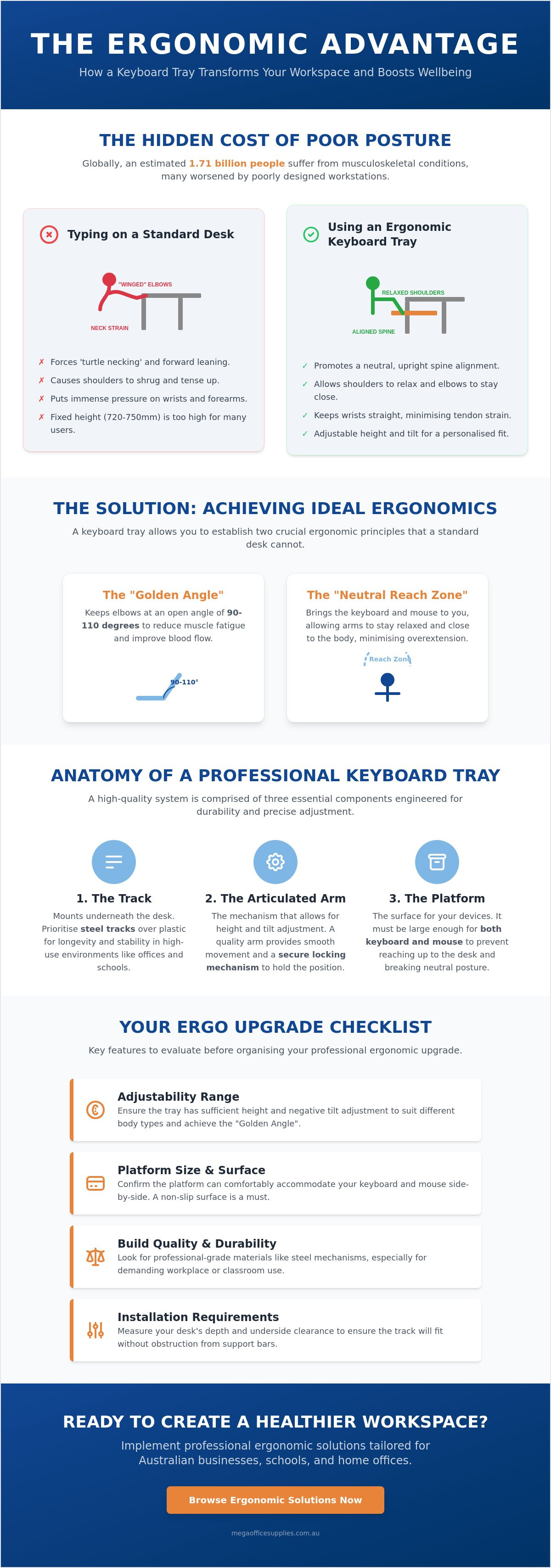
Did you know that an estimated 1.71 billion people worldwide currently suffer from musculoskeletal conditions, many of which are exacerbated by poorly configured workstations? If you find yourself battling chronic neck tension or wrist fatigue by the middle of the afternoon, you're dealing with a common industrial health challenge. Most standard desks are built to a height that forces the body out of alignment, leading to physical strain and reduced output.
We recognise that a cramped desk and physical discomfort aren't just minor annoyances. They're obstacles to efficient professional performance. By focusing on the specific keyboard tray benefits for desk posture, you can achieve a neutral reach zone that's often impossible on a flat desk surface. This guide explains how high-quality ergonomic hardware can transform your workspace, eliminate strain, and help you reclaim your desk centre for better organisation. We'll examine the technical specifications of professional-grade trays and provide the practical criteria you need to select durable, reliable equipment for your office or school environment.
Key Takeaways
- Learn how to establish a "Neutral Reach Zone" to minimise physical overextension and improve your overall typing precision.
- Understand the primary keyboard tray benefits for desk posture, specifically how achieving the "Golden Angle" at the elbows reduces chronic upper-body tension.
- Compare the adjustability of articulated trays against standard desk surfaces to determine the most effective setup for your specific height and workflow.
- Master the technical requirements for a successful installation, from measuring desk depth to choosing between different height-adjustment locking mechanisms.
- Discover how to source durable, professional-grade ergonomic solutions tailored for the unique requirements of Australian workplaces and schools.
Understanding Keyboard Trays and Their Role in Workplace Ergonomics
An ergonomic keyboard tray is far more than a simple sliding shelf. It is a precision-engineered under-desk mounting system designed to bring your primary input devices to you, rather than forcing your body to adapt to the constraints of a rigid desk. This distinction is critical for professional efficiency and long-term health. By creating a "Neutral Reach Zone," these systems allow users to maintain a relaxed, natural posture where the arms remain close to the sides and the wrists stay straight. Understanding the specific keyboard tray benefits for desk posture is the first step toward reducing the risk of chronic musculoskeletal strain in the workplace.
To better understand how these tools impact your daily comfort, watch this helpful video:
While many associate a keyboard tray with saving space, its primary role is addressing the mechanical mismatch between human anatomy and industrial furniture standards. Most fixed-height desks in Australia are manufactured to a height of 720mm to 750mm. For a significant portion of the population, this surface is simply too high for comfortable typing. When the desk surface is the only available work area, the body often compensates through "turtle necking," which is leaning the head forward, or shrugging the shoulders to reach the keys. By evaluating the keyboard tray benefits for desk posture, businesses can implement professional office furniture solutions that support diverse body types without the need to replace entire desk suites.
The Problem with Standard Desk Surface Typing
High desk surfaces frequently force the elbows into a "winged" position, where they flare out away from the torso. This posture places immense pressure on the trapezius muscles and the neck. In a standardised office environment, a fixed desk height fails to accommodate the diverse physical needs of staff. Shorter individuals may find themselves reaching upward, while taller users often hunch over to align their line of sight with their monitors. These repetitive misalignments are major contributors to workplace fatigue and reduced concentration levels.
The Anatomy of a Professional Keyboard Mechanism
A professional-grade system consists of three main components: the track, the articulated arm, and the platform. High-capacity environments should prioritise steel tracks over plastic alternatives to ensure longevity under heavy daily use. The platform itself must be large enough to house both the keyboard and the mouse on the same level. This design follows established ergonomic keyboard principles, ensuring that users don't have to reach up to the desk surface for their mouse. This prevents the frequent breaking of neutral posture that causes shoulder fatigue. By integrating these components, a well-configured tray provides a level of manual precision that fixed furniture cannot match.
Core Posture Benefits: Protecting Your Wrists, Shoulders, and Neck
The physical advantages of integrating professional-grade hardware into a workspace are immediate. One of the primary keyboard tray benefits for desk posture is the ability to achieve the "Golden Angle," which refers to keeping the elbows at a 90 to 110-degree open bend. This specific range is the industrial standard for reducing muscle fatigue. When typing on a standard desk surface, users often have to lift their forearms, creating a closed angle less than 90 degrees. This constricts blood flow and places unnecessary stress on the tendons over time.
A properly installed tray lowers the work centre to a natural lap height. This adjustment allows the user to sit back fully into their ergonomic office chair, utilising the lumbar support as intended. Without a tray, many professionals find themselves "perching" on the edge of their seat to reach their equipment. This forward lean disrupts the alignment of the cervical spine, often leading to the persistent neck pain seen in high-volume administrative or data-entry roles. By bringing the keyboard closer to the body, you eliminate the need to reach, which is a fundamental requirement for a sustainable workspace.
The Science of Negative Tilt
Most users are accustomed to positive tilt, where the back of the keyboard is propped up by small plastic feet. However, ergonomic research indicates that a negative tilt, angling the front of the keyboard upwards and the back downwards, is far superior for long-term health. This configuration helps maintain a neutral wrist posture by aligning the hands with the natural downward slope of the forearms. Negative tilt prevents carpal tunnel syndrome by minimising the compression of the median nerve within the wrist. Adopting this professional standard is a critical step in preventing repetitive strain injuries during intensive work periods.
Eliminating Shoulder and Upper Back Strain
High desk surfaces are a primary cause of the "hunch" seen in modern office environments. When the keyboard is positioned too high, the body instinctively shrugs the shoulders to compensate. A keyboard tray allows the shoulder blades to remain retracted and relaxed in their natural resting position. This is particularly beneficial for long-duration typing sessions in professional environments where consistency and precision are required. Maintaining this relaxed state prevents the buildup of tension in the upper back and trapezius muscles. If you're looking to upgrade your current setup, exploring our range of ergonomic furniture options is a practical starting point for improving workplace health.
Keyboard Tray vs. Desk Surface: A Comparative Analysis for Health
Standard office desks are fundamentally static platforms. While they provide a sturdy surface for monitors and heavy equipment, they offer zero vertical adjustability for input devices. This rigidity is the primary driver of the postural issues discussed in previous sections. In contrast, an articulated mechanism introduces a dynamic range of motion that a fixed desk surface cannot match. One of the most significant keyboard tray benefits for desk posture is the ability to decouple the height of your keyboard from the height of your primary work surface. This allows for a precision setup where the monitor remains at eye level while the hands rest at a natural lap height.
Organisational efficiency also sees a measurable improvement when moving peripherals off the desk. By clearing the "real estate" on the desk surface, professionals gain more room for essential tasks, such as reviewing physical documents or organising office stationery. A cramped workspace often leads to cluttered thinking and restricted movement. Transitioning the keyboard and mouse to an under-desk system creates a dedicated zone for typing, leaving the main surface free for high-priority administrative work. This separation of tasks is a hallmark of a well-maintained, professional workspace.
Stability is a common concern when comparing these two options. Low-quality, budget-tier drawers often suffer from a frustrating "bounce" or vibration during intensive typing sessions. However, professional-grade mechanisms utilise heavy-duty steel tracks and locking arms to eliminate this movement entirely. For businesses, the cost-to-benefit ratio of investing in high-quality hardware is clear. By proactively addressing ergonomic risks, organisations can significantly reduce the likelihood of Work Health and Safety (WHS) claims related to repetitive strain. Providing reliable, stable equipment is a practical investment in the long-term health of the workforce.
Adjustability and Flexibility
A standard desk remains at its set height regardless of the user's needs. An articulated tray, however, allows for subtle adjustments throughout the day. Some models even provide enough height range to facilitate sit-to-stand transitions on a fixed-height desk. The inclusion of a 360-degree swivelling function is also vital for collaborative environments or varied seating positions. It allows the user to push the tray completely out of the way when not in use, protecting the hardware and further maximising available space.
Impact on Daily Productivity and Comfort
Physical comfort is directly correlated to cognitive endurance. When a user is not distracted by sore wrists or shoulder tension, they can maintain focus for longer periods. Reducing the frequency of "micro-breaks" needed to stretch out discomfort leads to a more consistent workflow. To achieve a complete ergonomic loop, a high-quality tray should be paired with a professional ergonomic office chair. This combination ensures that the entire body is supported in a neutral position, from the lumbar spine to the fingertips, allowing for a truly pain-free typing experience.
Key Features to Evaluate Before Organising Your Ergo Upgrade
Selecting the right hardware requires a technical assessment of your current workstation. Before you can realise the keyboard tray benefits for desk posture, you must measure the underside of your desk for depth and potential obstructions. Many commercial desks in Australia feature a central support beam or cable management tray that can interfere with the installation of a sliding track. If the track is too long for the available depth, it may protrude from the front, creating a safety hazard and preventing the unit from retracting fully when not in use.
Professional buyers should also distinguish between "lift and lock" mechanisms and knob-adjusted systems. Lift and lock models allow for rapid, one-handed height changes without the need for manual tightening. This is ideal for shared workstations or hot-desking environments where multiple users need to adjust the height quickly. Knob-adjusted versions offer manual precision but require more effort to secure. Regardless of the locking type, the build quality must be industrial grade. Prioritise steel components over plastic to ensure the system can withstand the weight of heavy typing and the occasional pressure of leaning forearms during long shifts.
The configuration of the mouse platform is equally critical. Avoid "tiered" mouse platforms that sit higher than the keyboard level. These designs force the shoulder into an abducted position, which causes reaching and negates many of the ergonomic gains. A single, wide platform ensures the mouse remains on the same plane as the keys, keeping your movements within the neutral reach zone. This setup is a fundamental requirement for maintaining a sustainable and pain-free typing experience throughout the work day.
Solving the Knee Clearance Dilemma
Vertical space is a finite resource under any desk. You must measure the "drop" of the mechanism to ensure the platform doesn't rest on your thighs, which can lead to circulation issues or restricted movement. Choosing thin-profile platforms, such as those made from phenolic resin or high-density thin wood, helps maximise this clearance. Taller users need to be extra cautious. A thick track or a bulky arm can significantly reduce leg room, leading to a cramped seating position that disrupts your overall alignment.
Installation Considerations for Australian Offices
Compatibility depends heavily on your desk material. Solid timber and high-density MDF are the standard for screw-in tracks, providing the necessary grip for a stable mount. For glass surfaces or leased offices where permanent modifications are restricted, a "no-drill" clamp-on alternative is a practical choice. These systems are also highly compatible with a standing desk or sit-stand converter, providing an extra layer of adjustability to your existing setup. To find the right hardware for your specific workplace needs, browse our range of commercial office furniture and ergonomic accessories today.
Implementing Professional Ergonomic Solutions with Mega Office Supplies
Mega Office Supplies functions as a dependable partner for Australian businesses, schools, and government departments seeking high-capacity ergonomic solutions. As a family owned and operated retailer since 2008, we understand the logistical requirements of modern office maintenance. Maximising the keyboard tray benefits for desk posture requires more than an ad-hoc purchase; it demands a strategic approach to procurement that aligns with Australian Work Health and Safety (WHS) standards. Our national delivery network ensures that even large-scale office fit-outs receive the hardware they need without friction or delay.
Achieving a truly neutral workspace often involves more than a single accessory. Integrating a professional tray with other furniture, such as height-adjustable desks or specialised task seating, creates a comprehensive ergonomic loop. This holistic view is essential for procurement officers and administrators who value stability and regional expertise. By sourcing professional-grade equipment, organisations can provide their teams with the security and peace of mind that comes from a well-configured work centre. Understanding the keyboard tray benefits for desk posture is a critical step toward a healthier, more productive office environment.
Why Quality Matters in Ergonomic Hardware
Low-cost alternatives often suffer from a persistent "wobble" that disrupts focus and reduces typing precision. Investing in heavy-duty steel tracks and reinforced mounting arms pays off through increased user satisfaction and reduced replacement cycles. These products are engineered for the rigours of 40+ hour work weeks in high-intensity environments like healthcare reception areas or busy administrative hubs. It's vital to select a tray with a platform wide enough to accommodate full-sized keyboards and professional ergonomic mice on the same horizontal plane. This prevents the reaching and shoulder shrugging that occurs when peripherals are split across different heights.
Next Steps for Your Workplace Ergonomics
Improving office health starts with a basic desk audit to identify existing posture pain points. Look for signs of wrist extension, shoulder shrugging, or forward leaning among staff. Identifying these issues early allows for targeted interventions that prevent long-term musculoskeletal conditions. Consulting with procurement for bulk upgrades is an efficient way to minimise team-wide strain and ensure equipment consistency across the organisation. For direct assistance with your workplace requirements, our local support team is available to help you evaluate costs and quantities quickly.
Explore our full range of ergonomic furniture and accessories today.
Optimising Your Professional Workspace for Long-Term Health
Establishing a neutral reach zone is a fundamental requirement for any high-functioning workstation. By implementing the technical principles of negative tilt and decoupling your input device height from your desk surface, you can effectively eliminate the persistent strain associated with modern office work. Understanding the keyboard tray benefits for desk posture allows you to make an informed decision that protects your physical health while maximising your daily output.
Mega Office Supplies provides reliable, professional-grade hardware with the logistical support of national Australian delivery. Whether you're managing a home office or coordinating a large-scale fit-out for government, schools, or healthcare sectors, our team is equipped to handle your volume demands without friction. We focus on providing durable, industrial-quality equipment that stands up to the rigours of the modern Australian workplace.
View our range of professional ergonomic furniture and accessories to begin your workstation upgrade. Taking proactive steps today ensures a more comfortable and sustainable professional future.
Frequently Asked Questions
Do keyboard trays really help with wrist pain?
Yes, they are highly effective for managing wrist pain by allowing for a negative tilt. This specific adjustment aligns the hands with the forearms, reducing pressure on the carpal tunnel. One of the primary keyboard tray benefits for desk posture is the ability to maintain this neutral alignment throughout the day. It prevents the wrist extension that often occurs when typing on a high, flat desk surface.
Can I install a keyboard tray on a standing desk?
You can install a keyboard tray on many standing desks, but you must check for under-desk obstructions. Many electric height-adjustable desks have a central crossbar or motor housing that limits the available depth for the sliding track. Always measure the clear space between the front edge and any internal frame components before attempting an installation on a sit-stand workstation to ensure the track fits properly.
Will a keyboard tray hit my knees when I sit down?
A tray will not hit your knees if you select a thin-profile platform and correctly adjust your chair height. Phenolic or high-density thin wood platforms are designed to maximise vertical leg room. If your desk is particularly low, you may need to raise your chair and use a footrest to ensure your thighs have adequate clearance from the underside of the mechanism during normal use.
What is the best angle for a keyboard tray for neutral posture?
The optimal configuration for neutral posture is a slight negative tilt, where the back of the keyboard is lower than the front. This angle follows the natural downward slope of your forearms when your shoulders are relaxed. Most professional-grade articulated arms allow for an adjustment range of at least 15 degrees to achieve this specific ergonomic standard, protecting the wrists from repetitive strain.
Are clamp-on keyboard trays as stable as screw-in models?
Clamp-on models are stable for standard administrative tasks but typically lack the heavy-duty weight capacity of screw-in tracks. Screw-in mechanisms remain the preferred choice for permanent office fit-outs and high-volume commercial use due to their superior stability. However, industrial-grade clamps provide a reliable alternative for employees in leased offices or temporary workstations where drilling into furniture is restricted by the property owner.
Do I need a separate mouse tray or a single large platform?
A single large platform is the superior choice for professional ergonomics. This design ensures that your mouse and keyboard remain on the same horizontal plane, which is essential for maintaining a neutral reach zone. Separate, "tiered" mouse trays often force the arm into an awkward, raised position. This can lead to shoulder fatigue and uneven muscle tension during long-duration typing sessions in an office environment.
How do I measure my desk to see if a tray will fit?
Start by measuring the depth of the underside of your desk from the front edge to any back panel or support beam. You also need to measure the width between the desk legs to ensure the platform has enough clearance to swivel or slide. Verify the thickness of your desk surface to ensure the mounting screws or clamps can be secured firmly without damaging the material or protruding.
Is it difficult to install a keyboard tray by myself?
Most professional keyboard trays are designed for straightforward installation with basic tools like a drill and a screwdriver. While one person can often manage the task, an extra set of hands is helpful when holding a heavy steel track in place for the initial mounting. Always follow the technical specifications provided to ensure the unit is level and the locking mechanism functions correctly for long-term durability.

Article by
Mega Office Supplies Team
The Mega Office Supplies Team provides practical guidance for Australian businesses, schools, government organisations, healthcare providers, hospitality venues, warehouses and home offices. Based in Tweed Heads South, Mega Office Supplies has been family owned and operated since 2008, offering office stationery, workplace furniture, technology products, labels, printers, cleaning and janitorial supplies, safety products, art materials, education resources and everyday business essentials from trusted brands.
General Information
This article is provided as general information only to help customers compare and choose office, workplace, school, cleaning, technology, furniture, safety and business supplies. Product details, specifications, compatibility, availability, pricing and suitability may vary. Always check the individual product page, manufacturer information, workplace requirements and relevant safety guidance before purchasing or using a product.


