




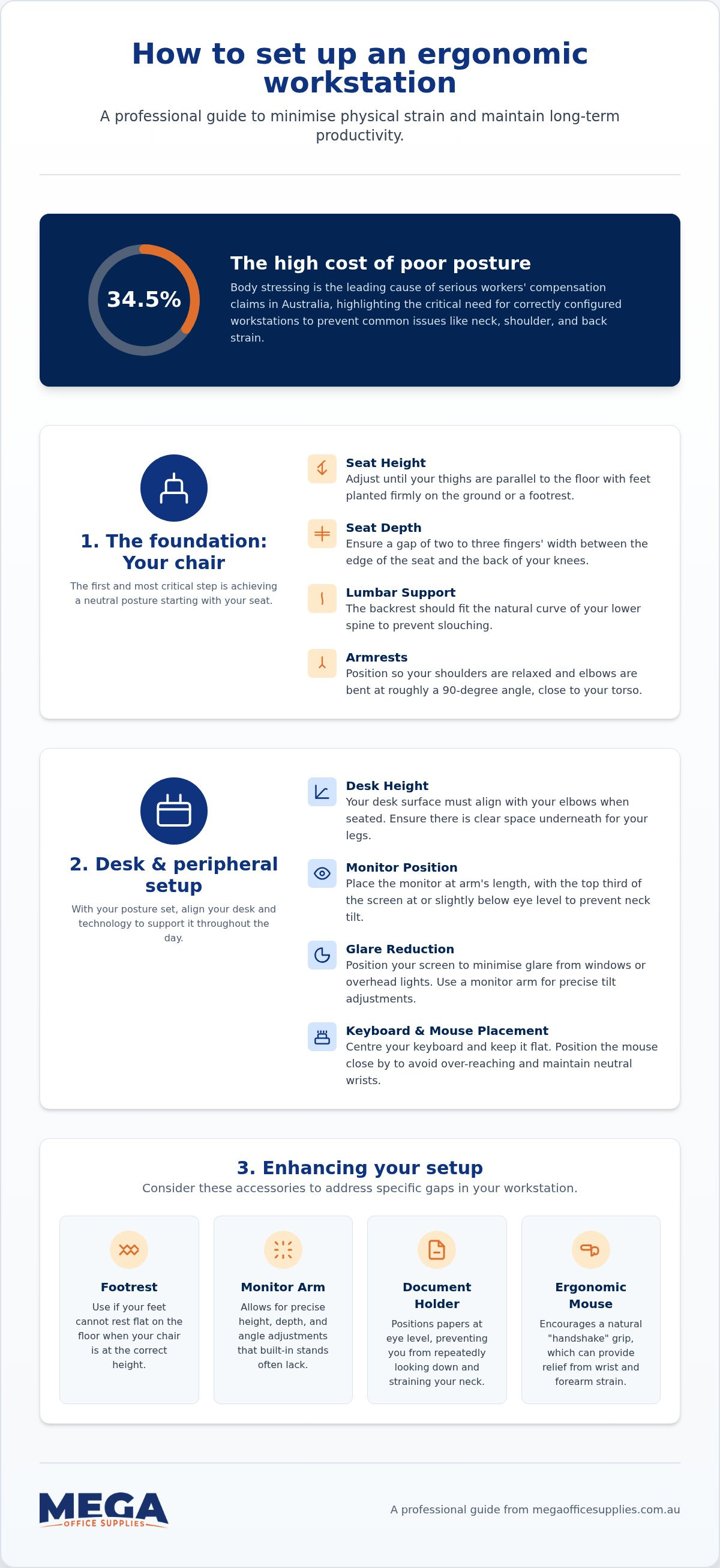
Did you know that body stressing is the leading cause of serious workers' compensation claims in Australia, accounting for 34.5% of all incidents? Knowing how to set up an ergonomic workstation is no longer just a matter of personal comfort; it's a critical requirement for maintaining a healthy, high-volume operation. We understand the frustration of trying to filter through contradictory advice while your shoulders continue to ache by mid-afternoon. Unless you actually enjoy the sensation of your neck turning into a block of concrete by 3:00 pm, these alignment errors require professional attention.
In this guide, we'll explain the precise geometry required to minimise physical strain and maintain long-term productivity. You'll learn how to achieve a neutral posture through specific, technical adjustments to your chair, desk, and monitor height. We've compiled a clear checklist for your next workstation audit, ensuring you have the confidence to select professional-grade equipment that supports a pain-free workday. This approach moves beyond guesswork to provide the functional clarity you need for a stable and efficient office environment.
Key Takeaways
- Master the foundation of neutral posture by adjusting your seat height until thighs are parallel to the floor and the lumbar support fits the natural curve of your spine.
- Optimise monitor and peripheral placement to reduce eye strain and ensure your wrists remain in a neutral, fatigue-free position throughout the day.
- Learn how to set up an ergonomic workstation by applying precise measurements that prevent common issues like "the turtle" neck tilt and shoulder tension.
- Identify the essential accessories, such as footrests and document holders, needed to complete a professional-grade office fit-out and maintain long-term productivity.
The foundation: Adjusting your chair and desk for neutral posture
Setting up your chair is the first step in learning how to set up an ergonomic workstation. If your seat is too high, you'll likely cut off circulation behind your knees; too low, and your lower back takes the unnecessary strain. We define neutral posture as the position where joints are naturally aligned to minimise stress. It's the technical goal of every adjustment you make to your hardware.
To better understand these physical requirements, watch this authoritative guide on desk ergonomics:
Achieving the correct seat height and back support
Start with the seat height. Your thighs should be parallel to the floor with your feet planted firmly. If you're dangling like a child at a dinner table, you need a footrest. Professional ergonomic office chairs feature adjustable tension to support different body weights, ensuring the backrest doesn't just collapse when you lean back. Ensure the lumbar support fits the natural curve of your spine to prevent slouching. You should also maintain a two-finger gap between the seat edge and the back of your knees. Finally, adjust armrests so your shoulders stay relaxed and your elbows remain close to your torso.
Optimising desk clearance and surface height
The "elbow height" rule is non-negotiable for long-term comfort. Your desk surface must align with your elbows when you're seated. Clear the space beneath your desk; archive boxes and CPUs belong in storage, not where your feet need to be. Your desk shouldn't double as a storage unit for old files if you actually want to fit your legs under it. If you're using a fixed-height desk that sits too high, raise your chair and incorporate a footrest to bridge the gap. For those utilising standing desks, the optimal height allows for a slight 5-degree bend in the elbows. This prevents you from leaning into the desk, which often leads to shoulder fatigue over long shifts.
Peripheral precision: Positioning monitors, keyboards, and mice
Once the foundation of your chair and desk is established, the next stage in how to set up an ergonomic workstation involves the precise placement of your technology. Misaligned screens and poorly positioned input devices are the primary drivers of chronic neck tension and repetitive strain. We recommend placing your monitor at roughly arm's length, ensuring the top third of the screen sits at eye level. This prevents the "turtle neck" posture that occurs when you're forced to tilt your head down for hours on end.
Monitor alignment and eye strain prevention
Precise depth and tilt adjustment are often difficult with factory stands. Using monitor arms allows for the minute changes required to find your ideal focal point. If you use a dual-monitor setup, align the screens in a slight arc; this configuration reduces excessive neck rotation by keeping both panels within your natural field of vision. You should also position your workstation to minimise glare from windows or harsh overhead lighting, as squinting leads to secondary postural issues. If you can't see the screen clearly, you'll lean forward, undoing all your previous adjustment work.
Keyboard and mouse ergonomics for wrist health
Centre your keyboard directly in front of you, leaving 10 to 15cm of desk space to support your wrists during pauses in typing. While many keyboards feature tilt-up feet, keeping the device flat is usually better for maintaining a neutral wrist position. Your mouse should remain on the same level as the keyboard and as close to it as possible to avoid overextending your shoulder. Position secondary tools like staplers or telephones within your primary reach zone. If you have to lunge across the desk every time the phone rings, you're inviting a shoulder injury. For users already experiencing carpal tunnel symptoms, switching to Kensington ergonomic mice can provide significant relief by encouraging a more natural handshake grip. We also suggest learning common keyboard shortcuts; every click you replace with a keystroke reduces the repetitive load on your hand. You can explore our range of professional computer accessories to find the right hardware for your specific layout.
Enhancing the setup: Essential ergonomic accessories and habits
Even with the correct chair and desk, knowing how to set up an ergonomic workstation requires attention to the smaller accessories that bridge the gap between standard furniture and your unique physical dimensions. These professional-grade additions ensure you maintain a neutral posture throughout a high-volume shift. Without these final adjustments, even high-end hardware can't fully protect you from repetitive strain.
Using monitor arms and footrests to bridge the gap
Footrests are essential if your feet don't reach the floor comfortably after you've adjusted your chair to the desk's height. They improve circulation by preventing the front edge of the seat from pressing into your thighs. Similarly, monitor arms reclaim desk real estate while providing the perfect ergonomic height for your specific eye line. We define the primary reach zone as the semi-circle area you can access with your elbows at your sides; keeping frequently used desk accessories here is vital for shoulder health. Position a document holder between your keyboard and monitor to keep reference materials at eye level and prevent the "turtle" neck tilt caused by looking down at flat papers.
Maintaining long-term health through movement
Physical hardware is only half the battle. We recommend the 20-20-20 rule: every 20 minutes, look at something 20 feet away for 20 seconds to reduce ocular strain. Incorporate micro-breaks every 30 minutes to reset your spine and stretch your hip flexors. Even the most advanced ergonomic office chair requires you to change positions periodically; staying static for eight hours isn't productivity, it's just a slow-motion health hazard. Finally, use task lighting for detailed documentation work to prevent leaning forward into the screen. This proactive approach ensures your workstation remains a functional, pain-free environment that supports your long-term health and efficiency.
Optimising your workspace for long-term health
Mastering the geometry of your office environment is a long-term investment in your physical health. By prioritising neutral joint alignment and the correct placement of monitors, you reduce the risk of body stressing, which accounts for 34.5% of serious Australian workplace claims. Understanding how to set up an ergonomic workstation ensures that your team remains productive without the distraction of chronic tension. Your chair shouldn't be the only thing supporting you during a long shift.
As a family owned and operated business since 2008, we specialise in supplying professional-grade hardware that stands up to daily use. Our team ensures you receive reliable advice and durable equipment. We understand the specific budget cycles of the public sector, which is why we proudly accept official Australian Government purchase orders to streamline your procurement process.
Browse our full range of ergonomic office solutions
A healthy workspace doesn't happen by accident, but it also doesn't have to be complicated. By making these technical adjustments today, you create a more efficient and sustainable environment for the years ahead. We're here to help you get it right the first time.
Frequently Asked Questions
How far should my monitor be from my eyes?
Your monitor should be positioned at approximately arm's length from your eyes, which typically ranges between 50cm and 70cm for most adults. If you find yourself leaning forward to read small text, you should increase the font size in your software settings rather than moving the screen closer. This distance helps minimise eye strain and prevents you from hunching forward, which is a common cause of neck and shoulder tension during long shifts.
Is a standing desk better for my back than a sitting desk?
A standing desk is not inherently better for your back; the primary benefit is the ability to change positions. Standing for eight hours straight can lead to lower back pain and circulatory issues just as prolonged sitting does. The most effective approach is to alternate between sitting and standing every 30 to 60 minutes. This movement keeps your muscles active and prevents the static loading that leads to spinal discomfort.
Do I really need an ergonomic chair if I don't have back pain yet?
You should invest in a professional-grade chair before pain develops because ergonomics is a preventive discipline. Once chronic discomfort appears, a musculoskeletal issue has often already taken hold. A high-quality chair provides the lumbar support and adjustability required to maintain a neutral posture. Taking a proactive stance helps you avoid the injuries that currently account for over a third of serious workers' compensation claims across Australia.
What is the best way to set up an ergonomic workstation on a budget?
The most effective way to learn how to set up an ergonomic workstation on a budget is to prioritise the geometry of your layout over expensive hardware. You can use stable items like sturdy books to raise a monitor to eye level or a firm, rolled-up towel for temporary lumbar support. We suggest focusing your initial budget on a professional chair first, as this is the most difficult component to replicate with household items. Correcting your angles with what you already own provides immediate relief while you plan for permanent equipment upgrades.

Article by
Mega Office Supplies Team
The Mega Office Supplies Team provides practical buying guides and workplace advice for Australian businesses, schools, government organisations, healthcare providers, hospitality venues, warehouses and home offices. Family owned and operated since 2008 and based in Tweed Heads South on the Gold Coast–Tweed border, Mega Office Supplies helps Australian workplaces choose the right office supplies, furniture, technology, cleaning, safety and education products — backed by genuine local service from real people.
General Information
This article is provided as general information only to help customers compare and choose office, workplace, school, cleaning, technology, furniture, safety and business supplies. Product details, specifications, compatibility, availability, pricing and suitability may vary. Always check the individual product page, manufacturer information, workplace requirements and relevant safety guidance before purchasing or using a product.


