

There is nothing more disruptive to an afternoon of warehouse organisation than the sudden, blinking light of an empty label cartridge. If you're currently stuck wondering how to refill a Brother P-touch label maker while facing a stubborn back cover, you're not alone. It's a common hurdle that stalls productivity in busy Australian offices, hospitals, and schools; after all, a label maker that won't label is just an expensive paperweight.
Learning the proper replacement technique shouldn't be a trial-and-error process that results in wasted tape and frayed nerves. We've seen every jammed cartridge and mismatched tape type imaginable. This guide provides the technical clarity you need to identify your specific tape series, install a new cartridge with manual precision, and adjust your settings to stop the machine from chewing through your margins. We'll help you choose the right durable materials for your environment, from freezer-safe labels to standard office stationery, so your workflow remains uninterrupted.
Key Takeaways
- Correctly identify your machine's tape requirements by checking for TZe, M, or DK symbols to ensure cartridge compatibility and print durability.
- Learn the professional method for how to refill a Brother P-touch label maker, including safe power-down procedures and proper cartridge seating to avoid mechanical damage.
- Minimise operational costs and tape waste by adjusting margin settings to "Small" or "Chain Print" for high-volume labelling tasks.
- Maintain professional-grade print quality with simple maintenance tips for cleaning the print head, ensuring your labels remain sharp and legible in any environment.
- Understand which specialty tapes are required for specific Australian workplaces, including freezer-safe and chemical-resistant options for healthcare or warehouse use.
Identifying the correct tape for your Brother P-touch model
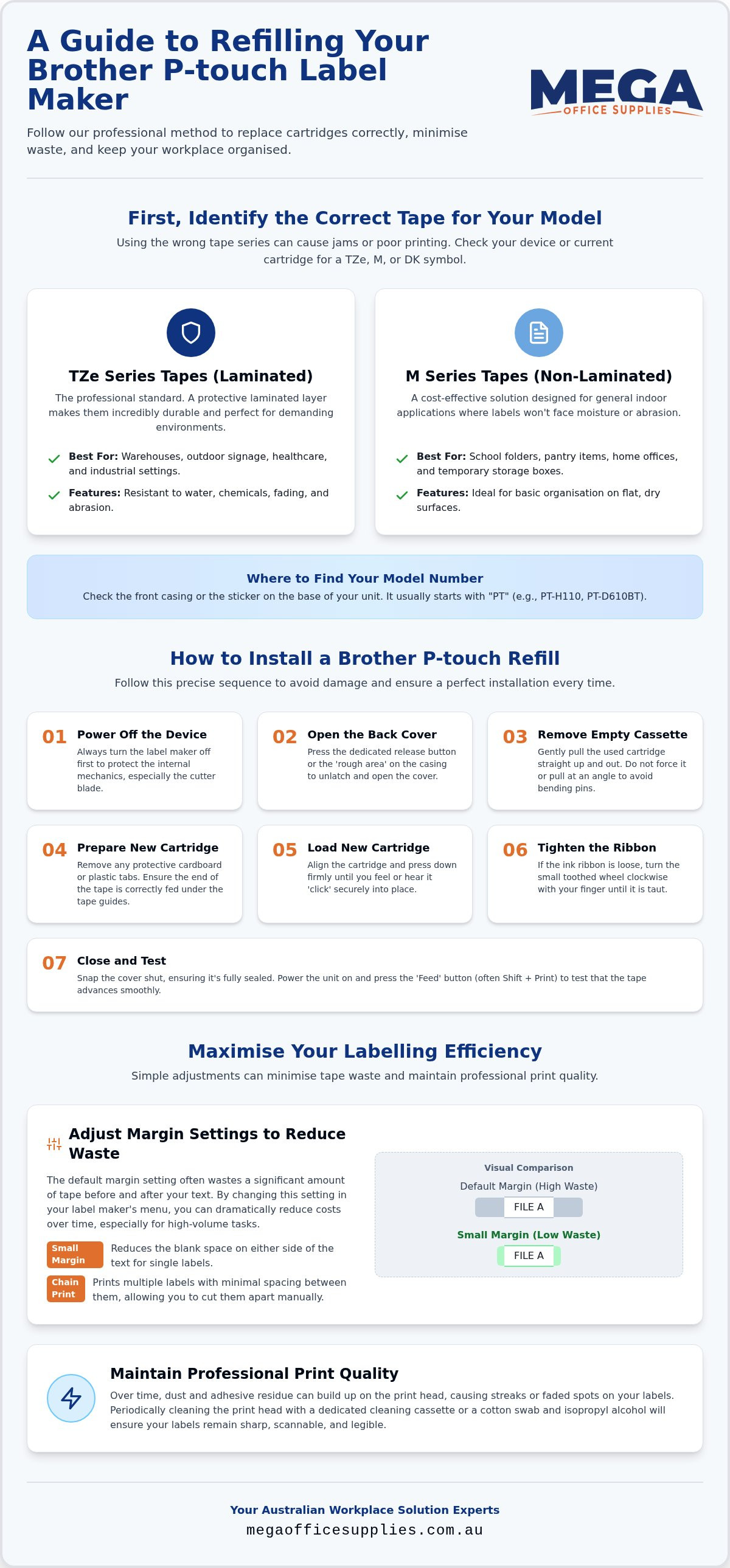
Before you can master how to refill a Brother P-touch label maker, you must identify the specific cartridge architecture your device requires. Brother utilises several distinct tape series, and installing the wrong one can lead to mechanical jams or poor print quality. Start by inspecting the logo on the front of your machine or the label on your existing cartridge. You are looking for a TZe, M, or DK symbol.
These cartridges rely on Thermal-transfer printing technology to produce crisp, smudge-proof text. While the underlying technology is consistent across the range, the physical dimensions and tape properties vary significantly. Tape widths range from 3.5mm for slim asset tagging up to 36mm for large-scale warehouse signage. Understanding the cartridge type is the first step in learning how to refill a Brother P-touch label maker without causing internal damage.
TZe vs M series: Which one do you need?
Selecting the right tape depends entirely on your specific environment. TZe tapes are the professional standard. They feature a laminated layer that protects the text from water, industrial chemicals, and fading. This makes them the reliable choice for Australian warehouses or outdoor signage exposed to harsh UV rays. They are built to last, ensuring your organisation remains intact for years.
Where to find your model number
Your model number is the key to ensuring a perfect fit. Most units display this on the front casing or a sticker on the base, usually starting with "PT" (e.g., PT-H110 or PT-D610BT). Once you have this number, you can cross-reference it with our Brother label makers collection for exact tape matches. Knowing your model ensures you never end up with a drawer full of incompatible cartridges that serve only as permanent desk clutter.
Step-by-step guide to installing a Brother P-touch refill
Executing the physical replacement is a straightforward task if you follow a precise sequence. Before you begin, power off the device. This prevents accidental printing and protects the cutter blade from damage while your hands are inside the unit. Locating the release mechanism is the next step. Most Brother models feature a 'rough area' or a dedicated release button on the side or top. Press this firmly to open the back cover and expose the internal compartment.
Once the cover is open, remove the empty cassette by pulling it straight up. Don't force it at an angle, as this can bend the guide pins. When you unbox your new cartridge, remove any protective tabs or cardboard inserts. Ensure the end of the tape is correctly positioned under the tape guides. If you need a visual aid for this part of the process, this demonstrates the manual precision required for various popular models.
Loading the new cartridge correctly
Align the cartridge with the internal pins and press down firmly. You should hear or feel a distinct 'click' as it seats into place. If it feels spongy, it isn't aligned correctly; Brother machines value firm commitment, not hesitation. Check the ink ribbon before closing the unit. If it appears loose, turn the toothed wheel on the cartridge clockwise with your finger until the ribbon is taut. This simple adjustment helps to minimise tape waste and prevents the 'ribbon tangle' that ruins expensive refills. If you've run out of stock during a busy shift, you can restock through our label supplies collection.
Closing and testing the unit
Snap the cover back into place. Ensure there are no visible gaps along the seam, as an unsealed cover can cause the machine to report a 'No Cassette' error. Power the unit back on and perform a test. Hold the 'Feed' button, often accessed by pressing Shift and Print simultaneously, to advance a small amount of tape. This confirms the gears are engaged and the tape is moving smoothly through the exit slot. Mastering how to refill a Brother P-touch label maker using this professional method ensures your device remains a reliable tool in your workplace toolkit.
Professional tips for maximising your labelling efficiency
Once you've mastered how to refill a Brother P-touch label maker, the next challenge is ensuring you don't burn through your budget on avoidable waste. Brother machines are notorious for leaving large margins by default, sometimes wasting up to 25mm of tape on every print. To fix this, navigate to your label settings and adjust the margin to "Small". This simple change significantly reduces the lead-in and lead-out tape, extending the life of every cartridge and keeping your organisation running efficiently.
Refilling your label maker shouldn’t require a PhD in mechanical engineering, though the back cover can occasionally feel like a puzzle designed by a bored architect. If you find your labels are appearing streaky or faint, it isn't always a sign of a low cartridge. Use a cotton swab dipped in isopropyl alcohol to gently clean the print head. This removes adhesive residue and dust, ensuring professional-grade clarity for every label. Additionally, store your spare refills in a cool, dry place. The Australian heat can cause the adhesive to degrade or the ink ribbon to stick, leading to jams when you eventually learn how to refill a Brother P-touch label maker for the next time.
Reducing operational costs and waste
For high-volume tasks, use "Chain Printing". This mode prints multiple labels in a single strip without cutting between them, eliminating the automatic lead-in cut on every individual tag. We also recommend matching the tape to the specific environment to avoid the cost of replacements. Use "Extra Strength Adhesive" for industrial equipment or "Flexible ID" for wrapping around cables to prevent peeling and ensure long-term durability.
Procurement for Australian schools and government
Managing stationery budgets for large organisations requires a focus on volume and speed of fulfilment. Bulk buying refills is the most efficient way to maintain stocks across multiple departments or campuses. We streamline this process for the public sector; for instance, we accept official Australian Government purchase orders to ensure your procurement workflow remains friction-free and compliant with budget cycles.
Streamline your workplace organisation with professional labelling
Maintaining a clear, logical filing system depends on having the right tools ready to go. By identifying your device's specific tape requirements and mastering how to refill a Brother P-touch label maker using the correct manual alignment, you prevent costly downtime and mechanical errors. Adjusting your internal settings to minimise tape waste and keeping your print heads clean ensures professional-grade results every time.
Mega Office Supplies serves as a trusted partner for Australian schools, government departments, and healthcare organisations. Our local team offers genuine support based right here in Australia, with no offshore call centres. We help you manage your workplace supplies with manual precision and logistical ease.
Browse our full range of Brother P-touch refills and label makers
Frequently asked questions
Why is my Brother label maker wasting so much tape at the beginning?
This occurs due to the physical distance between the thermal print head and the cutter blade. The machine must feed a specific length of tape to ensure the text is properly aligned before the cut occurs. To address this, navigate to your device settings and select the "Small" margin option. When you are managing high-volume tasks, the "Chain Print" feature is the most effective way to keep the tape engaged and eliminate the automatic lead-in cut between individual labels.
Can I use TZe tape in a machine that takes M tape?
You cannot swap these series because they use entirely different cartridge architectures. M tapes are non-laminated and designed for older, entry-level models, whereas TZe tapes are the professional standard with a protective laminated layer. Attempting to force a TZe cartridge into an M-series unit can bend the internal guide pins and cause permanent mechanical failure. Always verify your machine's tape requirements before you begin the process of how to refill a Brother P-touch label maker.
What should I do if the ink ribbon inside the cartridge snaps or gets tangled?
If the ribbon is simply loose, you can often save the cartridge by turning the toothed wheel clockwise until the film is taut. However, if the ribbon has snapped, the cartridge should be disposed of immediately. Thermal-transfer printing relies on a continuous ink film to create a crisp image. Trying to patch a snapped ribbon with adhesive tape is a risk to your hardware, as it can leave sticky residue on the print head that results in streaky, illegible labels.
Is it better to use genuine Brother tape refills or compatible alternatives?
Genuine Brother TZe tapes are the reliable choice for Australian workplaces that require long-term durability. While compatible alternatives may offer lower upfront costs, they often lack the patented lamination that protects against water, chemicals, and UV fading. For procurement officers in schools or government departments, genuine refills provide the peace of mind that asset tags and safety signs will remain legible for years, making the knowledge of how to refill a Brother P-touch label maker a sound long-term investment.
Article by
Mega Office Supplies Team
The Mega Office Supplies Team provides practical buying guides and workplace advice for Australian businesses, schools, government organisations, healthcare providers, hospitality venues, warehouses and home offices. Family owned and operated since 2008 and based in Tweed Heads South on the Gold Coast–Tweed border, Mega Office Supplies helps Australian workplaces choose the right office supplies, furniture, technology, cleaning, safety and education products — backed by genuine local service from real people.
General Information
This article is provided as general information only to help customers compare and choose office, workplace, school, cleaning, technology, furniture, safety and business supplies. Product details, specifications, compatibility, availability, pricing and suitability may vary. Always check the individual product page, manufacturer information, workplace requirements and relevant safety guidance before purchasing or using a product.


