

A professional-looking document starts before the binding. Consistent page layout, clean edges and a well-prepared cover all contribute to the finished result. If you’re working out how to create a professional looking bound document, it can be tempting to choose a binding style first and leave checks for uneven pages, margins or equipment until later.
Instead, plan around the document’s purpose and readers. This guide covers how to prepare pages and covers, compare comb, wire, coil and thermal binding, and check machine capacity and supply compatibility. Whether you’re creating an updateable staff manual or a formal report, a little preparation makes the finishing stage more straightforward.
Key Takeaways
- Start with the document’s purpose, audience and expected use to guide your choices.
- Check page order, print consistency and margins before binding to avoid a last-minute paper shuffle.
- Learn how to create a professional looking bound document by matching the binding method to handling needs and whether pages may need updating.
- Compare machine capacity and compatible supplies against your document requirements before you buy.
How to create a professional looking bound document starts with a clear purpose
Before choosing a binding style, decide what readers need to do with the document. Should they be able to follow information easily, refer to it regularly or handle it without pages shifting? Start by identifying the audience, purpose and expected use. These decisions help narrow down the right format and binding.
Consider the page count, required layout, how often the document will be handled and whether pages must stay in a fixed order. A meeting report, staff training pack and warehouse procedure manual can have different requirements. For example, a manual that needs regular updates may benefit from a binding style that allows pages to be changed, while a report intended for presentation may call for a more formal finish.
For a closer look at one detail of a finished book, watch this video on forming a clean spine hinge:
Match the document format to its audience and use
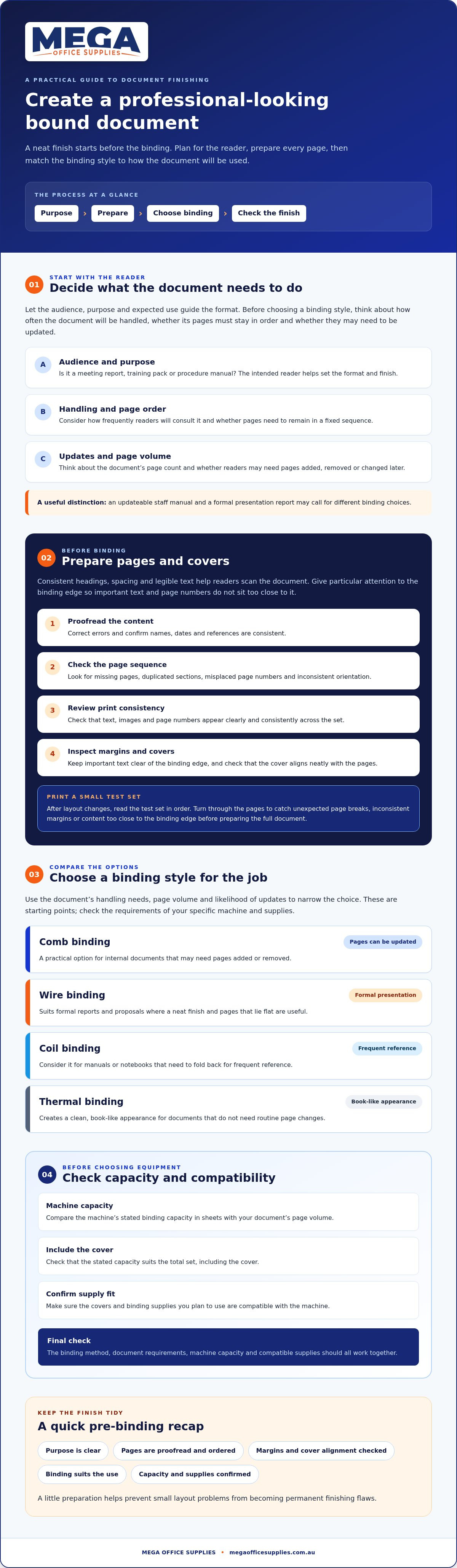
Let the document’s purpose guide the binding choice. Use these starting points to decide what matters most:
- Reports: Consider presentation, page volume and whether readers need to follow a fixed order.
- Training material: Think about how often it will be shared, consulted and updated.
- Frequently handled manuals: Prioritise practical handling, clear page layouts and pages that stay in sequence.
These are selection considerations, not one-size-fits-all answers. Once you’ve identified your document’s needs, compare relevant options in Mega Office Supplies’ binding machines and supplies collection.
Prepare pages and covers for a neat, readable bound document
Careful preparation helps every page look as though it belongs in the same document. Clear headings, consistent spacing and legible type make information easier to scan, whether you’re preparing a staff procedure or a report for a meeting. Keep heading styles consistent, use spacing to separate topics, and check that text and page numbers are easy to read. Pay particular attention to the binding edge, where text or page numbers can become difficult to see if the margin is too narrow.
Use a pre-binding checklist to catch avoidable finishing problems
Before assembling the document, work through these checks in order:
- Proofread the content. Correct errors and confirm names, dates and references are consistent.
- Check the page sequence. Look for missing pages, duplicated sections, misplaced page numbers and inconsistent page orientation.
- Review print consistency. Check that text, images and page numbers appear clearly and consistently across the set.
- Inspect margins and covers. Keep important text clear of the binding edge, and check that the cover aligns neatly with the pages.
After making layout changes, print a small test set and check it in the intended reading order before preparing the full document. Turn through the pages to spot unexpected page breaks, inconsistent margins or content that sits too close to the binding edge. These issues are easier to fix before binding the complete set.
These checks are a key part of how to create a professional looking bound document: they prevent small layout problems from becoming permanent finishing flaws. Before choosing supplies, confirm that they suit both your machine and document. You can browse Mega Office Supplies’ binding machines and binding and laminating supplies for relevant options.
Choose a binding method and finish that suit the document
The right method depends on the page count, how the document will be handled and whether readers may need to update it. Use this comparison to narrow your options, then check the requirements of your specific machine and supplies.
- Comb binding: A practical option for internal documents that may need pages added or removed.
- Wire binding: Suits formal reports and proposals where a neat finish and pages that lie flat are useful.
- Coil binding: Consider it for manuals or notebooks that need to fold back for frequent reference.
- Thermal binding: Creates a clean, book-like appearance for documents that don’t need routine page changes.
Before buying equipment, compare the machine’s stated binding capacity in sheets with your document’s page volume. Check whether the capacity suits the total set, including the cover, and confirm that the covers and binding supplies you plan to use are compatible with the machine. A method that looks right but doesn’t suit the document or equipment can make finishing more difficult than it needs to be.
Make the final quality check before distributing copies
Assemble one complete sample first. Check that the cover sits neatly, the pages align, text remains legible near the bound edge and the binding holds the pages securely. For a frequently handled manual, consider whether the construction is appropriate for repeated use. No binding choice can promise a particular lifespan.
That final inspection completes how to create a professional looking bound document: the finish should support the way readers will use it. Mega Office Supplies is an Australia-wide retailer of binding equipment and supplies. Browse binding machines and compare the available options with your document and supply requirements.
Put your document plan into practice
A professional finish starts with a clear purpose. Decide how readers will use the document, prepare pages and covers consistently, then choose a binding method suited to its page volume, handling needs and potential updates. Check the machine’s stated capacity and compatible supplies before assembling the full set. These practical steps are central to how to create a professional looking bound document, whether you’re preparing a report, training material or a frequently used manual.
Mega Office Supplies stocks binding machines and binding and laminating supplies, with GBC and Rexel among its listed brands. Compare the options with your document requirements in mind.
With a little planning and a careful final check, you can share a document that’s clear, consistent and ready for its readers.
Frequently asked questions
How do you make a bound document look professional?
Use a consistent layout and choose a binding style suited to how readers will use the document. The essentials of how to create a professional looking bound document include clear headings, legible text, even spacing, orderly pages and a cover that sits neatly. Before distributing copies, inspect a completed sample for alignment, readability and secure binding.
What should I check before binding a document?
Check the content, page order, print consistency and binding edge before assembling the document. Look for missing or duplicated pages, inconsistent orientation, misplaced page numbers and text too close to the edge. After layout changes, print a small test set and check it in reading order. This helps catch problems before they’re repeated across the full document.
Which binding method should I choose for a report or manual?
Choose based on the document’s purpose, page volume, handling and whether readers may need to update it. Comb binding can suit editable internal documents; wire binding gives reports a neat finish and allows pages to lie flat. Coil binding can suit frequently consulted manuals, while thermal binding offers a clean, book-like appearance for documents that won’t need regular updates.
Can I create a professional bound document in the office?
Yes, you can assemble documents in the office with a suitable binding machine and compatible supplies. Check the machine’s stated capacity against your page volume, and confirm which binding materials it accepts. Prepare the pages first, follow the machine’s instructions and make a sample before producing the complete set. Mega Office Supplies stocks binding machines and supplies for workplace use.
Article by
Mega Office Supplies Team
The Mega Office Supplies Team provides practical buying guides and workplace advice for Australian businesses, schools, government organisations, healthcare providers, hospitality venues, warehouses and home offices. Family owned and operated since 2008 and based in Tweed Heads South on the Gold Coast–Tweed border, Mega Office Supplies helps Australian workplaces choose the right office supplies, furniture, technology, cleaning, safety and education products — backed by genuine local service from real people.
General Information
This article is provided as general information only to help customers compare and choose office, workplace, school, cleaning, technology, furniture, safety and business supplies. Product details, specifications, compatibility, availability, pricing and suitability may vary. Always check the individual product page, manufacturer information, workplace requirements and relevant safety guidance before purchasing or using a product.


