




What if the primary cause of your persistent afternoon fatigue isn't your workload, but a five-centimetre height discrepancy between your monitor and your eyes? Most Australians spend over eight hours a day at a desk, only to finish the week with a stiff neck and a nagging headache. You've likely tried adjusting your chair or moving your mouse, but the relief is usually temporary and the advice you find online is often contradictory. This ergonomic workstation setup guide cuts through the noise to provide a professional, utilitarian approach to configuring your workspace for maximum efficiency.
We agree that a pain-free workday shouldn't be a luxury reserved for premium office fit-outs. We'll show you how to align your desk, chair, and technology to meet Australian health and safety guidelines without exceeding your budget. By the end of this guide, you'll understand why ergonomics is a proactive system of micro-adjustments rather than just a one-off purchase. We'll provide a clear shopping list for necessary upgrades, from monitor arms to footrests, ensuring you have the tools to maintain a healthy and productive office environment.
Key Takeaways
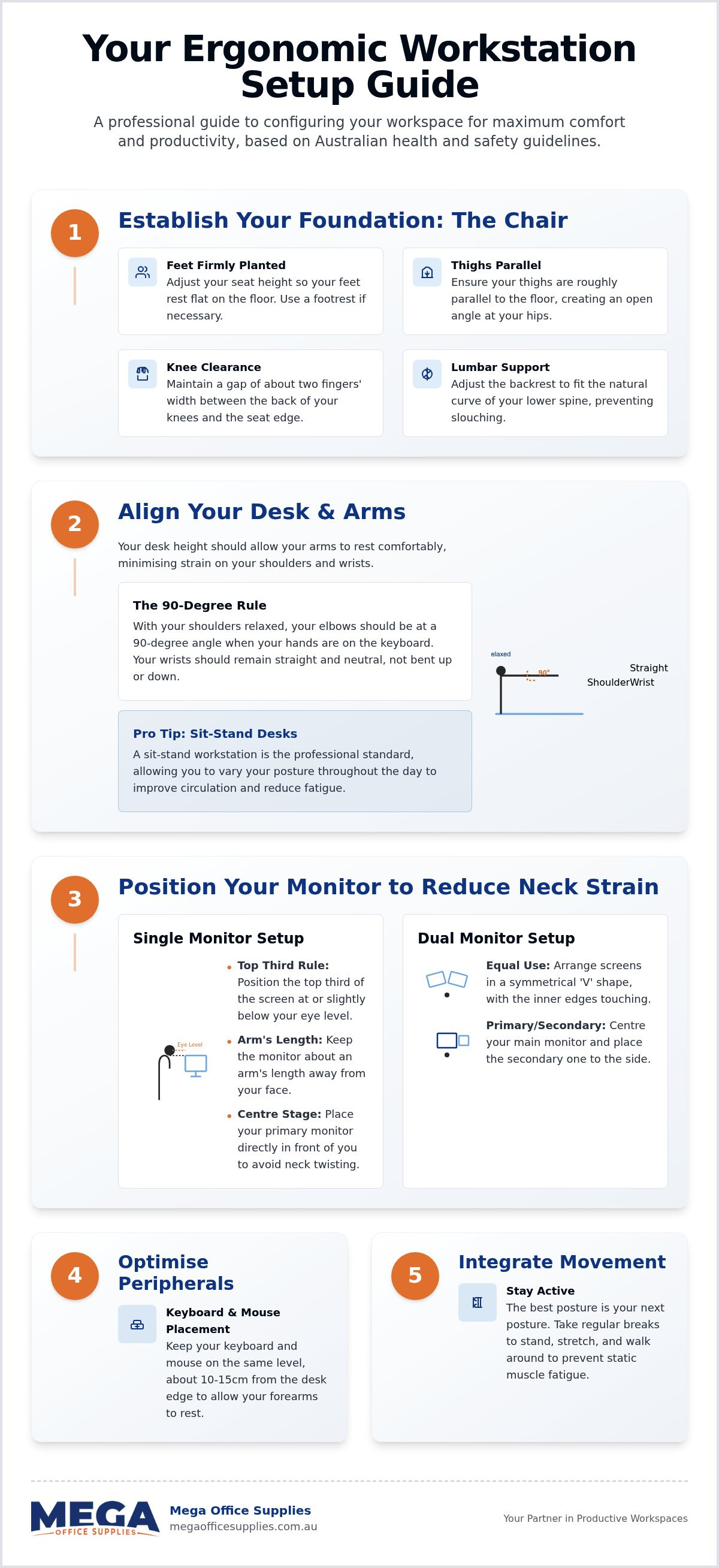
- Establish a solid foundation by adjusting your seat height so feet remain flat and thighs are parallel to the floor, ensuring the lumbar support fits the natural curve of your spine.
- Follow this ergonomic workstation setup guide to position your primary monitor with the top third of the screen at eye level, effectively reducing chronic neck and shoulder tension.
- Minimise wrist and shoulder fatigue by keeping your keyboard and mouse on the same level, approximately 10 to 15cm from the desk edge to allow for neutral arm placement.
- Utilise specific ergonomic accessories, such as footrests and document holders, to maintain healthy alignment in fixed-height environments or when referencing physical documents.
- Integrate movement strategies and regular posture variations to ensure long-term productivity and compliance with Australian workplace health and safety guidelines.
Establishing a foundation with correct chair and desk alignment
If you're finishing your shift with lower back pain or persistent fatigue, the issue usually starts at the floor. We've seen how minor misalignments in seating lead to major health issues over time. The first step in any ergonomic workstation setup guide is adjusting your chair height so your feet rest flat on the floor with your thighs parallel to the ground. This position distributes your weight evenly and prevents restricted circulation in your lower limbs.
To better understand the mechanics of a neutral posture, watch this helpful video:
Proper lumbar support is equally vital for maintaining spinal health. The backrest should fit the natural curve of your lower spine to prevent "turtling," where the shoulders round forward and the head protrudes toward the monitor. A chair without proper lumbar support is essentially just a stool with ideas above its station; we prioritise adjustable backrests that maintain alignment throughout the day. This configuration is rooted in the scientific discipline of ergonomics, which focuses on fitting the workspace to the human body.
Achieving the neutral sitting position
A neutral posture requires more than just height adjustments. Ensure there's a two-finger gap between the back of your knees and the front edge of the seat pan to maintain blood flow. Your armrests should support your forearms without forcing your shoulders to shrug or preventing you from pulling your chair close to the desk. For detailed model comparisons, view our ergonomic office chair buying guide.
Selecting the right desk for your environment
Your desk height should allow your elbows to rest at a 90-degree angle while typing, keeping your wrists in a neutral position. While fixed-height desks are a reliable choice for high-traffic schools or healthcare organisations, sit-stand workstations are the preferred professional standard for long-term health. For government and education buyers, we simplify procurement by accepting official Australian Government purchase orders for all durable office furniture and workstation components.
Configuring technology and peripherals to minimise physical strain
Once you've established your seating foundation, the next phase of this ergonomic workstation setup guide involves the precise placement of your technology. Chronic neck and shoulder tension often arise from a screen that is positioned too low or off-centre, forcing the cervical spine into a repetitive rotation. We recommend positioning your primary monitor so the top third of the screen is level with your eyes. This alignment, supported by Mayo Clinic's ergonomic guide, ensures your head remains balanced over your torso, reducing the load on your neck muscles.
To minimise glare, tilt the screen slightly and position it relative to overhead lighting or windows. If you find yourself squinting or leaning forward, your monitor is likely too far away; aim for roughly an arm's length from your face. Centring the monitor directly in front of your body is essential for preventing the muscular imbalances caused by constant, slight head turns during the workday.
Beyond visual alignment, consider how you handle voice calls.
Visual ergonomics and monitor placement
In modern Australian offices, dual-monitor setups are the standard. If you use both screens equally, place them in a symmetrical "V" shape directly in front of you. However, if one screen is dominant, centre it directly in front of your body and place the secondary monitor to the side. Utilising Kensington monitor arms is a practical way to achieve this precision while freeing up valuable desk real estate for physical files or stationery.
Keyboard and mouse optimisation
Position your keyboard and mouse on the same level, approximately 10 to 15cm from the desk edge. This gap provides enough space to support your forearms during brief pauses without compressing the carpal tunnel against the desk's hard edge. For those experiencing persistent wrist strain, a vertical mouse can reduce forearm pronation, while a split ergonomic keyboard encourages a more natural hand position. You can explore our range of office technology supplies to find peripherals that suit your specific workflow.
Integrating ergonomic accessories and movement strategies
Even a perfectly aligned chair and monitor cannot compensate for a lack of movement. While the previous sections of this ergonomic workstation setup guide established the structural foundation of your workspace, the final phase involves integrating accessories that support postural variety. If your desk height is fixed and cannot be lowered, a footrest is an essential requirement. It provides the necessary support for your lower back by ensuring your feet aren't dangling, which otherwise leads to pelvic tilting and lumbar strain.
We also recommend implementing document holders for tasks involving physical paperwork. Placing reference materials between your keyboard and monitor keeps them at eye level, effectively reducing the repetitive neck flexion that causes "tech neck." If you are transitioning to a standing desk, remember that it isn't a marathon; don't try to stand for eight hours on your first day unless you enjoy the sensation of leaden legs. Begin with 15 to 30 minute intervals and increase the duration gradually to allow your musculoskeletal system to adapt.
The role of ergonomic accessories
Specific environments require tailored solutions to maintain workplace health. In warehouses or retail centres, anti-fatigue mats are critical for standing desk users as they encourage subtle muscle contractions that improve circulation. For staff working remotely, laptop risers combined with separate keyboards and mice are mandatory. Relying on a laptop's integrated screen and keyboard for extended periods forces a hunched posture that no amount of stretching can fully fix.
Planning for movement and postural variety
Schedule micro-breaks every 30 minutes to reset your posture and circulation. We advocate for the "20-20-20 rule" to manage eye strain: every 20 minutes, look at something 20 feet away for 20 seconds. In schools and government departments, where schedules are often rigid, movement can be integrated through standing meetings or by placing shared equipment like printers in a central location. These small, deliberate changes ensure your ergonomic workstation setup guide translates into a sustainable, pain-free professional routine.
Take control of your workplace health
A professional workspace is more than a collection of furniture; it's a calibrated environment designed to support your physical well-being. By following this ergonomic workstation setup guide, you can transform your daily routine from one of chronic tension to one of sustained productivity. Prioritising your seating foundation, aligning technology to eye level, and integrating regular movement alongside supportive accessories ensures a healthier work life.
Our team understands the specific logistical demands of Australian workplaces. We simplify procurement by accepting official Australian Government purchase orders and providing reliable national delivery on all ergonomic solutions. Our inventory provides for all professional settings, supporting the needs of small home offices and large-scale government departments alike.
Browse our full range of ergonomic office furniture and accessories
Investing in your physical comfort today ensures a more efficient and pain-free career for years to come. We're ready to help you build a better workspace.
Frequently asked questions
What is the correct height for a computer monitor?
The top of your computer monitor should be positioned at or slightly below eye level to ensure you are looking slightly downward. For users with bifocals, lowering the screen further prevents the need to tilt the head back, which can strain the neck. Maintain a distance of approximately 50 to 70cm (roughly an arm's length) to minimise eye strain and keep your cervical spine in a neutral position throughout the workday.
Do I really need an ergonomic chair if I have a standing desk?
You absolutely require an ergonomic chair even if you utilise a standing desk. Most professionals in Australian office environments spend a significant portion of their day seated; an ergonomic chair provides the essential lumbar support and postural alignment that standard seating lacks. Standing for eight hours straight is as taxing on the musculoskeletal system as prolonged sitting, so having high-quality support for both modes is vital for long-term health.
How often should I switch between sitting and standing?
We recommend a sitting-to-standing ratio of roughly 3:1 or 2:1. For every hour of work, aim for 15 to 20 minutes of standing. Frequent transitions are far more beneficial for your circulation and joint health than remaining in a static position for several hours. This approach ensures your ergonomic workstation setup guide remains effective by preventing the fatigue associated with long periods of immobility. Listen to your body and adjust as needed.
What are the most common ergonomic mistakes in Australian offices?
The most frequent errors include "turtling" (leaning forward toward the screen) and using a laptop without a riser or external keyboard. Many workers also operate at desks that are too high, which forces the shoulders to shrug and creates tension. In shared or hot-desking environments, failing to readjust a chair after a previous user is a common oversight that leads to immediate postural misalignment and discomfort. Always check your settings at the start of each shift.

Article by
Mega Office Supplies Team
The Mega Office Supplies Team provides practical buying guides and workplace advice for Australian businesses, schools, government organisations, healthcare providers, hospitality venues, warehouses and home offices. Family owned and operated since 2008 and based in Tweed Heads South on the Gold Coast–Tweed border, Mega Office Supplies helps Australian workplaces choose the right office supplies, furniture, technology, cleaning, safety and education products — backed by genuine local service from real people.
General Information
This article is provided as general information only to help customers compare and choose office, workplace, school, cleaning, technology, furniture, safety and business supplies. Product details, specifications, compatibility, availability, pricing and suitability may vary. Always check the individual product page, manufacturer information, workplace requirements and relevant safety guidance before purchasing or using a product.


