


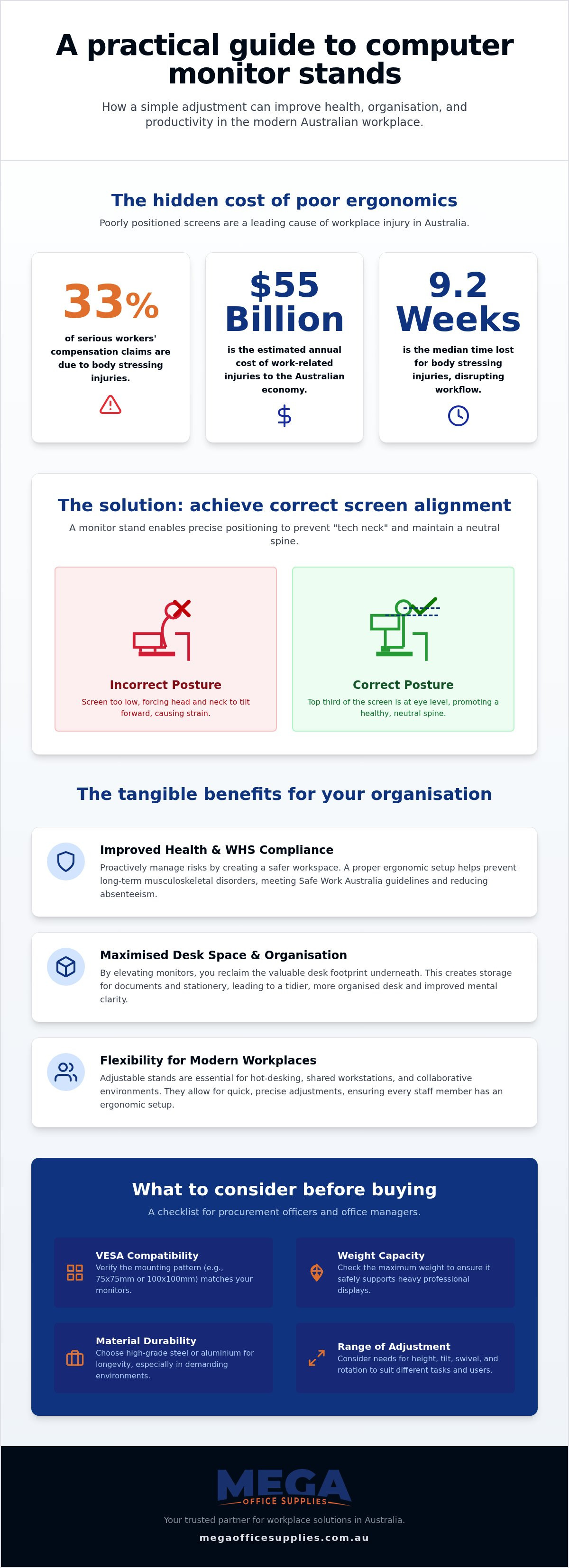
Did you know that body stressing, including injuries caused by sustained or awkward postures, accounts for over 33% of all serious workers' compensation claims in Australia? It is a staggering statistic that mirrors a common reality for many office workers. That persistent ache in your neck and shoulders by mid-afternoon is often a direct result of a screen positioned just a few centimetres too low. Understanding the core computer monitor stand benefits allows you to address these ergonomic hazards before they lead to costly absenteeism or long term health issues.
We recognise that a cluttered, uncomfortable desk hinders your focus and professionalism. This guide will show you how a simple adjustment can transform your posture, reclaim your workspace for physical paperwork, and significantly improve your daily productivity. We will examine the practical advantages of monitor stands, from achieving WHS compliance to creating a more flexible environment for shared workstations across your organisation.
Key Takeaways
- Positioning the top third of your screen at eye level minimises biomechanical stress and helps prevent long-term musculoskeletal issues.
- Maximising the vertical space on your desk allows for better organisation of stationery and files, leading to improved mental focus.
- Durable, industrial-grade materials are essential for equipment longevity in demanding environments like schools, hospitals, and warehouses.
- Understanding computer monitor stand benefits, such as VESA compatibility and weight capacity, helps procurement officers choose the right hardware for their specific technical needs.
Improving workplace ergonomics and physical health
Improper monitor height forces the head into a constant forward tilt, a condition often called "tech neck". This posture places excessive strain on the neck and upper back muscles. Safe Work Australia identifies poor ergonomics as a "hazardous manual task" that contributes to work-related musculoskeletal disorders, which cost the national economy an estimated $55 billion annually. While it might be tempting to use a spare ream of paper to boost your screen, it lacks the stability and precision of a dedicated Monitor mount. One of the primary computer monitor stand benefits is the ability to align the top third of your screen with your direct eye level, preventing the habitual slouching that leads to chronic strain.
In hot-desking environments or shared office furniture setups, a fixed height rarely suits every user. Different staff members require specific adjustments to maintain a healthy posture throughout their shift. Adjustable stands allow for rapid, manual precision when switching between users, ensuring every employee meets ergonomic requirements regardless of their stature. This flexibility is vital for reducing the median 9.2 weeks of lost time typically associated with body stressing injuries in Australian workplaces. It's also a far more professional solution than a precarious tower of A4 reams that tends to migrate across the desk.
Reducing neck strain and musculoskeletal issues
Maintaining a neutral spine position is essential for sustaining focus and productivity. When you elevate your screen to the correct height, you significantly reduce the physical load on your cervical spine and surrounding ligaments. Ergonomics, in the context of Australian WHS standards, refers to the systematic process of designing the workplace and equipment to fit the physical capabilities and limitations of the worker. By investing in proper computer accessories, you proactively manage risks rather than reacting to injuries after they have already occurred.
Maximising desk space and workplace organisation
A cluttered workstation often leads to fragmented focus. By elevating the screen, we reclaim the valuable footprint previously occupied by a bulky monitor base. This newly accessible space serves as an ideal storage area for daily office supplies, ensuring that essential tools remain within reach without encroaching on your primary writing area. Beyond physical storage, the psychological computer monitor stand benefits include reduced cognitive load. A clear, organised desk encourages mental clarity, allowing staff to focus on complex tasks rather than navigating desktop archaeology.
For collaborative environments, monitor arms provide the manual precision needed to share information quickly with colleagues. This is particularly useful in healthcare or educational settings where screens must be adjusted frequently for group viewing. When paired with a standing desk, these stands ensure that your ergonomic alignment remains consistent. One of the most practical computer monitor stand benefits is the ability to maintain a professional-grade appearance across multiple workstations. If you are planning a large-scale fit-out, we recommend browsing our range of office furniture supplies to find a compatible solution.
Cable management and desktop clearing
Managing the tangle of power and data cables is essential for both safety and aesthetics. Dedicated stands often feature built-in cable channels that minimise visual clutter and eliminate potential trip hazards in high-traffic zones. This creates a standardised, professional look across large government or corporate departments. Following the principles of Office Ergonomics, a tidy desk isn't just about appearance. It's about creating a safe, efficient workspace that supports long-term health and organisational standards.
Selecting the right monitor stand for your environment
Selecting the correct hardware for your organisation requires more than just a cursory glance at the price tag. If you don't verify the VESA mount pattern, typically 75x75mm or 100x100mm, you risk technical incompatibility with your existing monitor fleet. Procurement officers must also check the weight capacity for heavy-duty professional displays used in engineering or design departments. One of the key computer monitor stand benefits is the structural integrity provided by industrial-grade materials like high-grade steel or aluminium. These materials ensure the screen won't sag over time, which maintains the precise ergonomic height required for staff health.
Choosing professional-grade hardware from established brands such as Kensington or Fellowes ensures long-term reliability. These manufacturers design their products to withstand the rigours of constant adjustment in shared workspaces. Investing in high-quality mounts reduces the total cost of ownership by minimising the need for frequent replacements or repairs. For those managing large-scale fit-outs, we offer bulk pricing and accept official Australian Government purchase orders to facilitate a smooth acquisition process.
Considerations for healthcare and education sectors
Clinical and classroom environments have specific needs that standard office setups might overlook. In healthcare settings, stands must feature easy-clean, non-porous surfaces that support strict infection control and hygiene standards. Classroom environments require secure mounting options to prevent accidental damage or equipment theft in high-traffic student zones. These specialised computer monitor stand benefits ensure that your investment remains protected in demanding public-facing sectors. To view our complete range of durable solutions, you can browse our office furniture supplies online.
Improving your workplace ergonomics and efficiency
Investing in professional-grade equipment is a fundamental step toward meeting Australian WHS standards and protecting staff health. It's a proactive approach to workplace maintenance that effectively minimises the risk of chronic musculoskeletal issues while reclaiming valuable desk real estate. These computer monitor stand benefits extend beyond physical comfort, fostering a structured environment that supports high-level focus and long-term productivity.
As a family owned and operated business since 2008 with direct local support, we provide the logistical prowess and technical expertise required for large-scale fit-outs. Our catalogue focuses on hardware designed for longevity in demanding sectors like healthcare and education. Accessing bulk and business pricing allows your organisation to maintain financial transparency while securing the health of your workforce.
Browse our full range of ergonomic monitor stands and arms
We look forward to helping you build a safer and more efficient Australian workplace.
Frequently asked questions
How high should my monitor be for the best ergonomic benefit?
Your monitor should be positioned so the top third of the screen is at your direct eye level and roughly an arm's length away. This alignment allows your neck to remain in a neutral position, which is one of the most critical computer monitor stand benefits for reducing musculoskeletal strain. If you're using a sit-stand workstation, remember to re-adjust the height every time you change your posture.
What is the difference between a monitor riser and a monitor arm?
A monitor riser is a fixed platform that sits on your desk to provide height, whereas a monitor arm is a mechanical mount that clamps to the desk edge. Risers are excellent for simplicity and creating storage space underneath for stationery. Monitor arms offer superior manual precision, allowing you to tilt, swivel, and adjust the depth of your screen for a truly custom ergonomic setup.
Can a monitor stand help with eye strain?
Yes, a monitor stand helps reduce eye strain by ensuring your screen is kept at the recommended distance of 50 to 70 centimetres from your face. Correct height also prevents you from leaning closer to the screen, which can cause fatigue. We recommend following the 20-20-20 rule; looking at something 20 feet away for 20 seconds every 20 minutes, to further protect your vision.
Do monitor stands fit all screen sizes and brands?
Most modern screens are compatible with standard stands through the VESA mounting system; however, you must verify the specific hole pattern on the back of your monitor. While many computer monitor stand benefits apply universally, you need to check the maximum weight capacity and screen size limits before purchase. This is especially important for large-scale professional displays used in specialised government or healthcare departments.
Article by
Mega Office Supplies Team
The Mega Office Supplies Team provides practical buying guides and workplace advice for Australian businesses, schools, government organisations, healthcare providers, hospitality venues, warehouses and home offices. Family owned and operated since 2008 and based in Tweed Heads South on the Gold Coast–Tweed border, Mega Office Supplies helps Australian workplaces choose the right office supplies, furniture, technology, cleaning, safety and education products — backed by genuine local service from real people.
General Information
This article is provided as general information only to help customers compare and choose office, workplace, school, cleaning, technology, furniture, safety and business supplies. Product details, specifications, compatibility, availability, pricing and suitability may vary. Always check the individual product page, manufacturer information, workplace requirements and relevant safety guidance before purchasing or using a product.


