


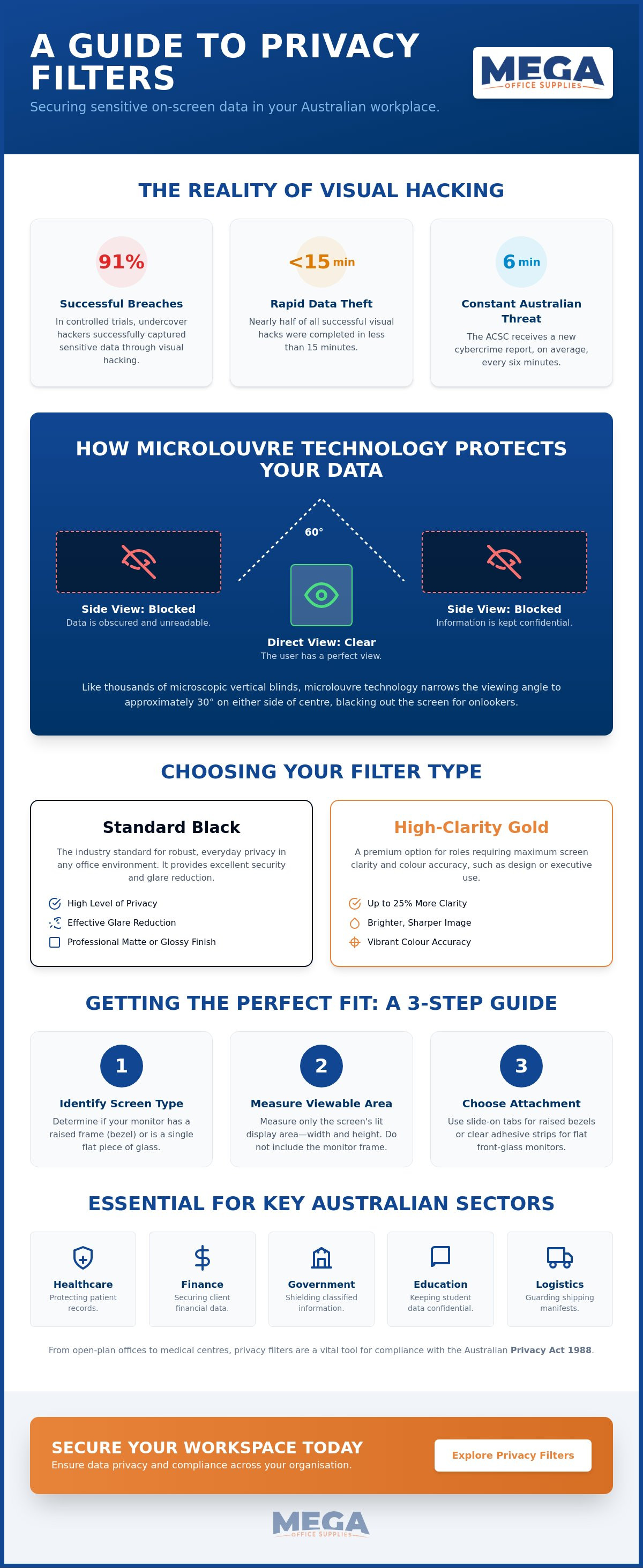
Did you know that in a controlled global experiment, undercover hackers successfully captured sensitive data through visual hacking in 91% of trials? In nearly half of those cases, the breach took less than 15 minutes. With the Australian Cyber Security Centre receiving a cybercrime report every six minutes, protecting your organisation's physical workspace is just as vital as securing your digital firewall. You're likely concerned about maintaining screen clarity while ensuring your team remains compliant with the Privacy Act 1988, especially with new mandatory disclosure obligations for automated systems arriving in December 2026.
This guide will show you how to select the right privacy screen filter for monitors to secure your data without sacrificing staff productivity or visual comfort. We'll cover everything from precise measurement techniques and blue light reduction to bulk ordering strategies for your entire office. You'll learn how to balance high-level security with the ergonomic needs of a modern Australian workplace, ensuring your procurement process is both efficient and effective.
Key Takeaways
- Understand how microlouvre technology physically restricts viewing angles to 30 degrees, effectively preventing visual hacking in open-plan Australian offices.
- Learn the technical differences between standard black filters and high-clarity gold versions to balance data security with screen brightness and colour accuracy.
- Discover the correct method for measuring the viewable area of your display to ensure your new privacy screen filter for monitors matches your specific aspect ratio.
- Compare professional attachment options, including slide-on tabs and clear adhesive strips, to maintain long-term durability on both framed and edge-to-edge monitors.
- Develop efficient procurement strategies for large-scale organisations to simplify bulk ordering and standardise privacy compliance across multiple departments.
Understanding Privacy Screen Filters and the Risk of Visual Hacking
Visual hacking is the physical act of capturing sensitive information from a display screen without authorisation. It doesn't require sophisticated software or remote access; it simply involves a bystander, visitor, or unauthorised staff member viewing or photographing confidential data. In high-traffic Australian environments like medical centres or open-plan corporate headquarters, this risk is constant. Implementing a professional privacy screen filter for monitors is a practical, immediate solution to this physical security vulnerability.
These devices utilise advanced microlouvre technology to control the light passing through the screen. Think of it as thousands of tiny vertical blinds. While the user sitting directly in front of the display sees a crisp, clear image, anyone viewing from the side sees only a dark, blank screen. Most professional-grade monitor filters and privacy screens restrict the effective viewing angle to approximately 30 degrees on either side of the centre, effectively "blacking out" the data for prying eyes.
To better understand this concept, watch this helpful video:
Why Visual Privacy is a Compliance Requirement
Under the Privacy Act 1988, Australian organisations have a legal obligation to protect personal information from unauthorised access or disclosure. The Notifiable Data Breaches (NDB) scheme makes this even more critical; a visual breach can be just as damaging as a digital one. Using a privacy screen filter for monitors serves as a robust "technical measure" for data protection. It's an essential component for government agencies and healthcare providers managing sensitive records, ensuring that patient data or classified briefings remain confidential even in shared workspaces.
Common Sectors Requiring Screen Protection
Different industries face unique visual security challenges. We've identified several sectors where screen protection is non-negotiable:
- Education: Administrative offices and reception desks often handle sensitive student records and financial data that must remain shielded from students and visitors.
- Finance: Banks and accounting firms deal with client portfolios and transaction details. A filter ensures this information is only visible to the authorised officer.
- Logistics: In busy warehouses, staff often manage shipping manifests and sensitive client data. Durable filters protect these displays from both prying eyes and harsh industrial lighting.
For organisations looking to standardise their equipment, exploring office technology supplies can help identify the right hardware for a secure, compliant fit-out.
Technical Features: Comparing Professional-Grade Filter Types
Choosing a privacy screen filter for monitors involves more than just selecting a size. It requires an understanding of how different materials interact with office lighting and user ergonomics. Professional filters often feature reversible designs. This allows users to switch between a matte finish for glare reduction and a glossy side for enhanced screen clarity. Such flexibility is vital in Australian offices where natural light levels change significantly throughout the day.
Black vs. Gold Privacy Filters
Black privacy filters remain the industry standard for general office use. They provide a high level of 180-degree privacy, ensuring that data is protected from side views while maintaining a professional look. For executive settings or roles requiring high-resolution detail, gold filters offer a premium alternative. These provide nearly 25% more clarity than standard black filters. While black filters darken the screen slightly, gold filters maintain a brighter, sharper image for the user.
The choice often depends on the specific environment. Black filters are excellent for minimising distractions in open-plan areas. Gold filters are better suited for high-density displays where colour accuracy is paramount. Data from the Global Visual Hacking Experiment suggests that the speed of a visual breach is high, making the consistent use of either filter type a necessary security baseline for any organisation.
Blue Light and Eye Wellness
Beyond security, these filters serve a significant ergonomic function. Modern workplace displays emit high levels of blue light. This can contribute to digital eye strain and disrupted sleep patterns. Professional-grade filters are designed to block up to 35% of blue light emissions. This reduction helps staff maintain focus during long shifts. It also reduces the frequency of headaches associated with screen glare and prolonged computer use.
Integrating these tools into a broader ergonomic workplace strategy ensures that employee health is prioritised alongside data security. Reducing glare and blue light creates a more comfortable environment, which directly impacts long-term productivity. When you're ready to upgrade your hardware, viewing the full range of office technology supplies will help you find a privacy screen filter for monitors that meets your specific technical requirements.
Selecting the Correct Size: Aspect Ratios and Measurements
Procuring a privacy screen filter for monitors requires manual precision to ensure a seamless fit and maximum data security. The most frequent error made by procurement officers is relying solely on the diagonal screen size advertised by the manufacturer. A 24-inch monitor from one brand may have different physical dimensions than a 24-inch model from another, particularly if they utilise different aspect ratios. For a professional-grade installation, you must measure the viewable area of the display with a metric ruler or tape measure.
How to Measure Your Monitor Correctly
Precision is the cornerstone of a successful office fit-out. To find the correct size, measure the height and width of the screen in millimetres. It's vital to exclude the plastic frame, or bezel, from these measurements unless you're using a filter designed to cover the entire front glass. Understanding how privacy screens work within these physical boundaries helps ensure the microlouvre technology aligns perfectly with the user's line of sight.
The type of screen design also dictates the measurement approach. Raised bezel monitors have a distinct frame that sits higher than the screen surface. For these, the filter must fit inside the frame. Conversely, flat glass or "edge-to-edge" monitors require a filter that covers the entire front surface. Relying on the diagonal measurement is a trap; it doesn't account for the height-to-width ratio, which is the most critical factor for a secure fit.
Common Aspect Ratio Reference Table
Most modern Australian workplaces standardise on 24-inch or 27-inch monitors. However, the aspect ratio determines the actual shape of the filter. You can identify your monitor's ratio by checking the "Recommended" resolution in your Windows or macOS display settings. Common standards include:
- 16:9 (Widescreen): The current industry standard for most desktop displays.
- 16:10 (Professional/Workstation): Often found in high-end business laptops and older professional monitors.
- 21:9 (Ultrawide): Increasingly popular in finance and creative sectors for multi-window workflows.
Government departments and educational institutions often maintain legacy equipment that may require non-standard sizes. In these cases, manual measurement is the only way to guarantee compatibility. If you're managing a large-scale deployment across various hardware generations, standardising your office technology supplies can simplify the procurement process. For organisations with specific compliance needs, we also provide resources for government official purchase orders to ensure a transparent and efficient transaction.
Curved monitors and dual-screen setups present additional challenges. Curved displays require flexible filters that can adhere to the arc of the screen without lifting at the edges. For dual-screen configurations, it's essential to order identical filters to maintain visual consistency and ensure both displays offer the same level of protection from visual hacking.
Installation and Maintenance for Long-Term Durability
Securely mounting a privacy screen filter for monitors is the final step in ensuring your visual data remains protected. If a filter isn't installed correctly, the internal microlouvres may not align with the user's line of sight, leading to blurred text or reduced privacy effectiveness. Proper installation also extends the life of the hardware, preventing physical wear on both the filter and the monitor display. Most professional-grade filters are designed to be compatible with ergonomic monitor arms, as they are lightweight and don't interfere with the tension or movement of the arm.
Choosing the Right Attachment Method
The best attachment method depends on your specific workspace requirements and how often you need to remove the filter. We recommend evaluating these three common professional options:
- Slide-on tabs: These small plastic guides attach to the monitor bezel. They allow the user to slide the filter in and out easily. This is the ideal solution for shared workstations or medical centres where staff may need to remove the filter for collaborative viewing.
- Clear adhesive strips: These transparent, double-sided strips attach directly to the screen. They offer a seamless, low-profile look. Use these for personal desks or frameless (edge-to-edge) monitors where there is no bezel to support slide-on tabs.
- Magnetic attachments: This modern innovation uses slim magnetic strips. It allows for rapid attachment and detachment without the need for adhesives or plastic tabs, making it a premium choice for high-end executive offices.
Maintenance and Cleaning Tips
Maintaining the clarity of your privacy screen filter for monitors requires a gentle touch. Dust and fingerprints can accumulate over time, potentially causing eye strain if not addressed. Always use a clean microfibre cloth for regular dusting. If deeper cleaning is necessary, use a small amount of water or a specialised screen cleaner. Avoid harsh chemicals like ammonia or alcohol, as these can strip the anti-glare coating and permanently damage the microlouvre structure.
If you need to move the filter to a different display, adhesive strips can often be re-applied after a quick rinse with water to restore their tackiness. When a filter isn't in use, store it flat in a cool, dry place. Avoid leaning heavy objects against it, as this can cause warping. Taking these simple steps ensures your security investment remains effective for years to come.
To ensure your workplace is fully equipped with professional-grade security tools, browse our complete range of office technology supplies and find the perfect fit for your organisation.
Procurement Strategies for Australian Organisations
Effective procurement of a privacy screen filter for monitors requires a shift from reactive purchasing to a standardised logistical strategy. For large-scale Australian organisations, consistency is the primary driver of efficiency. When every workstation utilises the same professional-grade hardware, IT support teams can troubleshoot fitment issues faster and compliance officers can easily verify data protection standards across the entire floorplate. This systematic approach reduces administrative friction and ensures that your organisation meets its obligations under the Privacy Act without unnecessary delay.
Integrating these security tools into a comprehensive office stationery budget allows procurement officers to forecast costs accurately. By treating privacy filters as essential workplace infrastructure rather than optional accessories, businesses can leverage volume pricing. This is particularly beneficial during end-of-financial-year (EOFY) fit-outs or when onboarding large cohorts of new staff in corporate or government sectors.
Government and Educational Purchase Orders
We understand the specific workflows required by public sector entities. To facilitate rapid acquisition, Mega Office Supplies accepts Australian Government official purchase orders from local, state, and federal departments. This direct authorisation process bypasses the complexities of standard retail transactions, allowing for faster fulfilment and delivery to secure sites.
Educational institutions and schools can also streamline their inventory management by establishing business accounts. This enables administrators to maintain a consistent supply of filters for both staff laptops and classroom desktops. Standardising on specific sizes and aspect ratios across a campus reduces the risk of incorrect ordering and ensures that sensitive student records remain protected from visual hacking at all times.
The Mega Office Supplies Advantage
Mega Office Supplies operates as a reliable industry veteran in the Australian e-commerce space. Our team holds cumulative decades of combined industry experience, providing us with a deep understanding of the practicalities of workplace maintenance and regional logistics. We don't just supply hardware; we act as a dependable partner for organisations that value stability and professional-grade durability. Our market position as a high-capacity provider ensures we can handle high-volume demands without compromising on speed or accuracy.
If you require assistance with complex sizing for legacy equipment or need a rapid quote for a national rollout, you can reach out for expert advice on workplace solutions. Our regional support team is available to provide direct assistance, distinguishing our service from faceless global competitors. Whether you are managing a single reception desk or a multi-storey government office, we provide the logistical prowess and financial transparency needed to secure your visual data effectively.
Future-Proofing Your Visual Data Security
Securing the physical workspace is a foundational requirement for any modern Australian organisation. By implementing a professional privacy screen filter for monitors, you effectively mitigate the risk of visual hacking while ensuring compliance with national privacy regulations. We've established that success depends on manual measurement precision and selecting the appropriate filter type for your specific lighting conditions. These technical measures, combined with ergonomic benefits like blue light reduction, create a safer and more productive environment for your staff.
Mega Office Supplies stands as a dependable partner with over 20 years of combined industry experience. As a family-owned Australian private company, we understand the logistical needs of local businesses and schools. We facilitate seamless procurement by accepting official government purchase orders and providing professional-grade workplace solutions. Browse our full range of professional privacy screen filters to find the right fit for your facility. It's a straightforward investment in your team's long-term security and peace of mind.
Frequently Asked Questions
Do privacy screen filters work on curved monitors?
Yes, but you must select a flexible model specifically engineered for curved surfaces. Standard rigid filters are unsuitable because they cannot maintain the necessary arc, causing them to pop off at the edges. For curved displays, use adhesive-backed filters that conform to the screen's shape. This ensures the microlouvres remain properly aligned across the entire panoramic view, maintaining consistent privacy levels from every angle.
Will a privacy filter make my monitor screen look blurry?
A high-quality privacy screen filter for monitors won't cause blurriness if it's installed correctly and kept clean. While the microlouvre technology darkens the display slightly, the image remains crisp for the person sitting directly in front. If you experience blurring, it's often due to a small gap between the filter and the screen. Using clear adhesive strips for a flush fit usually resolves this issue immediately.
Can I still use a touchscreen monitor with a privacy filter attached?
You can use a touchscreen with a privacy filter, provided the product is specifically rated for touch compatibility. Many professional filters are engineered to be thin enough to maintain capacitive touch sensitivity without lag. It's vital to check the manufacturer's specifications before purchase. Some thicker, older models might reduce responsiveness, making them unsuitable for interactive reception kiosks or medical tablets used in healthcare settings.
What is the best way to clean a privacy screen filter without damaging it?
The most effective method is using a dry microfibre cloth for daily dusting. For persistent fingerprints or smudges, lightly dampen the cloth with water or a dedicated screen-safe solution. Never use household glass cleaners containing ammonia or alcohol. These harsh chemicals will degrade the specialised anti-glare and scratch-resistant coatings, eventually ruining the filter's clarity and its ability to block side-angle viewing effectively.
How do I know if my monitor is 16:9 or 16:10 aspect ratio?
You can identify your aspect ratio by checking your computer's display resolution settings in Windows or macOS. A resolution of 1920 x 1080 indicates a 16:9 widescreen ratio, while 1920 x 1200 signals a 16:10 professional ratio. If you're unsure, divide the width of the viewable area by the height. A result of 1.77 is 16:9, whereas a result of 1.6 indicates a 16:10 screen.
Are privacy filters effective against blue light and eye strain?
Yes, professional-grade filters are highly effective at reducing blue light emissions and digital eye strain. Most models block approximately 35% of harmful blue light, which can help regulate sleep patterns and reduce fatigue during long office shifts. This secondary benefit makes them a valuable addition to an ergonomic workplace, especially for staff members who spend more than six hours a day behind a screen.
Do privacy filters protect the monitor screen from physical scratches?
Privacy filters provide a durable physical barrier that protects your monitor's delicate panel from scratches and scuffs. In busy environments like warehouses or shared staff kitchens, screens are prone to accidental damage from pens or equipment. A filter absorbs these minor impacts and prevents fingerprints from reaching the actual display surface, helping to maintain the condition and the long-term resale value of your hardware.
Can I remove and reattach the privacy filter multiple times?
You can remove and reattach most filters multiple times, particularly those using magnetic mounts or slide-on tabs. These systems are designed for shared workstations where privacy is only required occasionally. Even filters using adhesive strips can be repositioned if handled carefully. If the strips lose their tackiness, simply rinse them under cold water and let them air dry to restore their adhesive properties for a fresh application.
Article by
Mega Office Supplies Team
The Mega Office Supplies Team provides practical guidance for Australian businesses, schools, government organisations, healthcare providers, hospitality venues, warehouses and home offices. Based in Tweed Heads South, Mega Office Supplies is a family-owned and operated Australian business offering office stationery, workplace furniture, technology products, labels, printers, cleaning and janitorial supplies, safety products, art materials, education resources and everyday business essentials from trusted brands.
General Information
This article is provided as general information only to help customers compare and choose office, workplace, school, cleaning, technology, furniture, safety and business supplies. Product details, specifications, compatibility, availability, pricing and suitability may vary. Always check the individual product page, manufacturer information, workplace requirements and relevant safety guidance before purchasing or using a product.


