


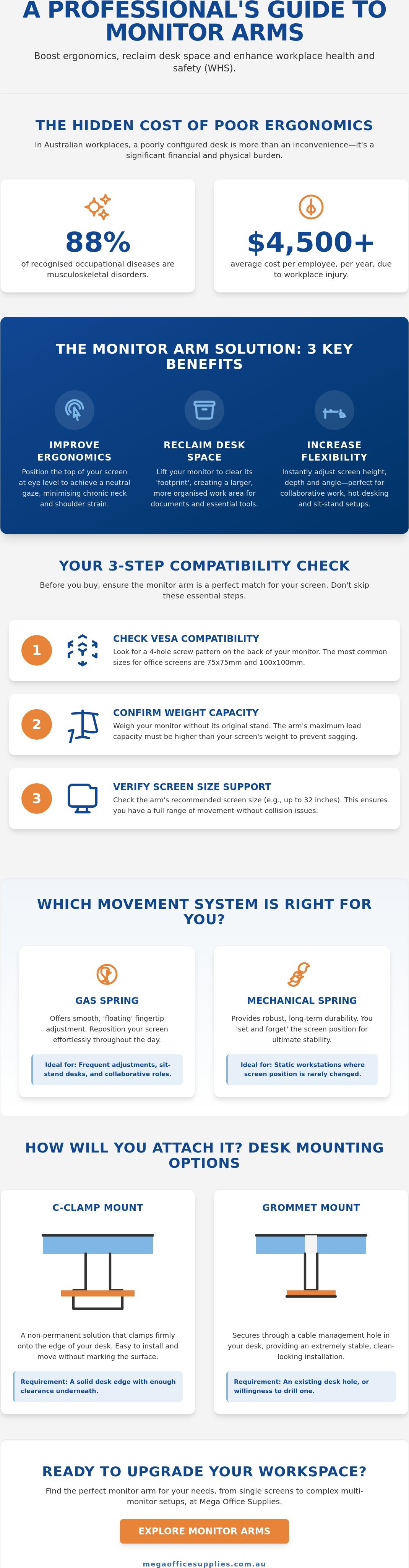
Did you know that musculoskeletal disorders accounted for nearly 88% of recognised occupational diseases in 2025? With the average cost exceeding $4,500 per employee each year, the physical and financial toll of a poorly configured workspace is a reality Australian businesses cannot ignore. This monitor arm buying guide addresses the common frustrations of neck strain and desk clutter by focusing on precision ergonomics. You likely already recognise that a fixed-height screen limits productivity, yet the fear of purchasing a mount that's incompatible with VESA standards often stalls necessary workplace upgrades.
We'll help you master the technical specifications and weight requirements needed to select the ideal mount for your office or home workspace. You'll gain the confidence to choose hardware that supports your specific monitor size while ensuring long-term durability in a commercial environment. This article previews essential factors like gas-spring adjustability, cable management, and desk thickness compatibility. By following these professional standards, you can create a clean, ergonomic workstation that minimises physical strain and protects your technology investment for years to come.
Key Takeaways
- Understand how to achieve a neutral eye-level gaze to minimise physical strain and transform your daily workplace efficiency.
- Use this monitor arm buying guide to master VESA mounting standards and weight calculations for a secure, sag-free screen setup.
- Compare the smooth, fingertip adjustment of gas spring mechanisms against the long-term durability of traditional mechanical tension systems.
- Evaluate different installation methods, including non-permanent C-Clamps and stable Grommet mounts, to find the best fit for your desk type.
- Identify the ideal configuration for your specific role, whether you require a single arm for general tasks or a multi-screen setup for complex data analysis.
Beyond the Basics: How a Monitor Arm Transforms Your Workplace
A monitor arm is a flexible mounting solution designed to replace the static factory base of your computer screen. It functions as a mechanical extension that secures your display to the desk or wall, allowing for a range of movement that a standard stand cannot provide. This monitor arm buying guide focuses on how these tools facilitate a neutral eye-level gaze. By positioning the top third of your screen at eye level, you eliminate the need to tilt your head down, which is a primary cause of chronic neck and shoulder tension in the modern office.
Beyond the immediate physical benefits, lifting a screen off the desk surface reclaims significant real estate. Many Australian workstations are cluttered with hardware, cables, and stationery, leaving little room for actual work. A monitor mount clears the "footprint" of the screen, providing space for documents or other essential tools. This is particularly valuable in agile work environments or hot-desking setups. In these scenarios, different staff members use the same desk throughout the week, and the ability to instantly adjust the screen height ensures every individual remains productive and comfortable.
To better understand the practical impact of these tools on your daily workflow, watch this helpful video:
The Ergonomic Impact on Productivity
Adjustable height and tilt settings are not just about comfort; they are essential for maintaining focus. When a screen is too low or too far away, the body naturally compensates by slouching or leaning forward. This posture leads to rapid fatigue and can cause significant eye strain during long shifts. By maintaining a proper focal distance, usually about an arm's length, you reduce the workload on your eye muscles. Proper screen alignment also supports the benefits of high-quality ergonomic office chairs. When your chair and monitor work in tandem, your spine remains in its natural curve, which helps maintain energy levels throughout the day.
WHS and Workplace Safety Considerations
Implementing monitor arms is a proactive step toward meeting Australian workplace health and safety (WHS) guidelines. Musculoskeletal disorders are a leading cause of absenteeism, and providing adjustable equipment is a recognised method for reducing these risks. Most professional screens adhere to VESA mounting standards, ensuring the arm and display are securely joined. This stability is crucial in public-facing areas, such as reception desks or classrooms, where loose equipment could pose a safety hazard. For organisations outfitting a commercial space, selecting professional-grade hardware from Mega Office Supplies Technology ensures that every component is built for the rigours of daily use in a busy environment.
Essential Technical Specifications: VESA, Weight, and Size
Hardware compatibility is the foundation of any successful ergonomic upgrade. Before selecting a mount, you must audit the physical characteristics of your screens to ensure they align with the monitor arm buying guide standards. The most critical factor is the mounting interface, followed closely by the weight of the panel itself. Overlooking these details often leads to costly returns or, worse, equipment damage during installation.
Understanding VESA Compatibility
The Video Electronics Standards Association (VESA) created a standardised interface to ensure screens and mounts from different manufacturers work together. To verify your monitor's compatibility, inspect the back of the panel for four screw holes arranged in a square or rectangular pattern. For most standard Australian office displays, you will find 75x75mm or 100x100mm patterns. If your screen lacks these holes, it is likely a non-VESA model, which requires a specialised adapter bracket to secure it to a standard arm. You should also check the technical specifications for monitor arms to ensure your chosen mount supports the specific hole spacing on your hardware.
Physical clearance is another practical consideration. Verify the location of your power and video ports. Some VESA plates are large enough to block recessed ports, particularly on older or budget-friendly monitors. Ensuring your cables have enough room to plug in without being crimped by the mounting plate is essential for long-term hardware health.
Weight Capacity and "Sagging" Prevention
Weight capacity is a non-negotiable specification. Every arm has a load range designed to keep the monitor stable while allowing for movement. If you exceed the maximum weight limit, the arm will inevitably droop or experience joint failure. Conversely, gas spring arms have a "minimum weight" requirement. If a monitor is too light, the internal tension will cause the arm to pop upwards constantly. Always verify the monitor weight without its original base, as the arm only supports the panel itself. This "net weight" is usually listed in the product manual under "Weight (without stand)."
Screen size also dictates the range of motion. While an arm might support the weight of a 34-inch ultrawide, the physical width of the screen may limit how far you can tilt or rotate the display before it hits the arm's own structure or the desk surface. If you are currently auditing your workstation requirements, browsing the range of monitor arms at Mega Office Supplies can help you identify the specific load capacities required for your hardware. Matching the weight and size precisely ensures the internal mechanisms function as intended, providing that "floating" sensation that defines a professional ergonomic setup.
Gas Spring vs. Mechanical Spring: Which Movement System Suits You?
The choice between gas and mechanical movement systems is a pivotal decision in any monitor arm buying guide. It dictates how you'll interact with your workstation every day. A gas spring mechanism uses a pressurised cylinder to counterbalance the screen's weight, allowing for effortless, fingertip adjustment. You can pull the monitor toward you or push it away with minimal resistance. This fluid motion is excellent for dynamic environments where users need to reposition their hardware frequently to suit changing tasks.
Mechanical tension springs use a heavy-duty coiled metal spring to provide support. These are robust, durable, and generally more cost-effective for large-scale deployments. While they lack the weightless feel of gas models, they offer exceptional longevity. In high-volume commercial settings, the lifecycle of a gas cylinder is a valid consideration. Over several years of constant use, seals can eventually degrade, which leads to a loss of pressure. In contrast, a mechanical spring is a simple physical component that rarely fails. If your organisation prioritises long-term reliability over frequent repositioning, the mechanical option is often the superior investment for your facility.
When to Choose a Gas Spring Arm
These models are highly recommended for sit-stand workstations. When you transition from sitting to standing, your monitor height must change to maintain proper ergonomic alignment. Gas arms make this transition seamless. They're also ideal for collaborative spaces where screens are frequently rotated to show colleagues data or visual designs. Beyond the functionality, gas spring models often feature a more streamlined, premium aesthetic that suits modern office fit-outs and executive suites.
The Case for Mechanical Tension Arms
Mechanical arms are best for static workstations. If you set your monitor height once and rarely change it, the additional cost of a gas cylinder is unnecessary. These arms are also the preferred choice for heavy, large-format monitors over 10kg. The physical resistance of a metal spring provides a stable anchor for ultrawide displays that might cause a gas arm to drift. Adjustment usually requires a one-time setup using Allen keys or hex bolts to calibrate the tension to your screen's specific weight. This "set and forget" approach ensures the screen remains exactly where you need it, making it a reliable component in any professional monitor arm buying guide checklist.
Installation and Desk Compatibility: Ensuring a Secure Fit
Choosing the right hardware is only half the battle; the installation method determines the long-term stability of your workstation. This monitor arm buying guide highlights that even a high-grade arm will fail if the desk interface is insecure. Most professional setups utilise one of two mounting styles: the C-clamp or the grommet mount. The C-clamp is the most common solution, gripping the edge of the desk lip. It is ideal for standard office furniture where you want a fast, non-permanent installation. Conversely, the grommet mount uses an existing cable hole to bolt the arm through the desk surface. This provides a more central, stable fix that is often necessary for heavy dual-arm configurations.
Desk material is a critical safety factor that many buyers overlook. Solid timber and high-density particle board, typically 18mm to 25mm thick, are the standard for Australian commercial environments. These materials handle the concentrated pressure of a mount without issue. However, you must exercise caution with glass tops or hollow-core "honeycomb" desks. These surfaces lack the structural integrity to support the torque of a monitor arm. Using a clamp on these materials can lead to the desk surface cracking or collapsing under the weight of the screens.
Checking Your Desk Thickness
Before you commit to a purchase, measure the thickness of your desk and the depth of the under-desk clearance. Most clamps require at least 50mm of flat surface on the underside to grip effectively. If your desk has a metal frame or "modesty panel" too close to the edge, the clamp may not fit. For softer timber or thinner particle board, we recommend using reinforcement plates. These metal plates spread the load over a larger surface area, preventing the mount from biting into the wood and causing permanent damage.
Organising Cables for a Professional Finish
A tidy workspace requires more than just lifting the monitor. Integrated cable channels within the arm are essential to prevent cord strain and clutter. When configuring a standing desk, you must leave enough "slack" in your power and video cables. If the cords are too tight, they can be pulled out or damaged when the arm is moved. Using clips and cable spines ensures a clean transition from the monitor to the floor, maintaining a professional appearance while protecting your technology. Ensure your workspace is both safe and efficient by selecting compatible hardware from our range of office furniture and ergonomic accessories.
Selecting the Right Model for Your Professional Environment
The final step in this monitor arm buying guide is matching hardware to the specific workflow of your staff. While technical compatibility ensures the arm fits the screen, the configuration must support the daily tasks performed at the desk. Single arms are the standard for reception areas, staff kitchens, and general administrative roles where space-saving is the priority. These models allow for a clean, professional aesthetic while providing enough flexibility to adjust height for different users in shared spaces.
By contrast, data-heavy roles in finance, healthcare, and software development often require dual or triple configurations. A side-by-side dual setup is the most common choice, effectively increasing the available digital workspace by up to 50%. This allows employees to view large spreadsheets alongside communication tools without constant window switching. For desks with limited width, vertical stacking is a viable alternative. Stacking monitors vertically uses the same footprint as a single screen while providing a secondary display at a higher viewing angle, which is particularly useful for monitoring live feeds or long lines of code.
Configurations for Multi-Tasking
Modern professionals often work across multiple device types. Combining a laptop tray with a standard monitor arm allows for a seamless transition between a notebook and a larger external display. This setup is highly effective for hybrid workers who bring their own devices into the office. For creative sectors like graphic design or video editing, heavy-duty arms are required to support ultrawide or curved screens. These larger displays provide an immersive canvas but require the robust joints found in premium mechanical spring models to prevent drifting over time.
Procurement for Large Organisations
When managing bulk office fit-outs for government departments or large corporations, standardisation is key. Selecting a single, versatile model across an entire floor simplifies long-term maintenance and makes it easier for IT teams to swap hardware when needed. You should prioritise models with tool-less adjustment features. This allows staff to customise their own screen tension and height without needing an Allen key or a visit from facilities management. For large-scale projects and commercial enquiries, we recommend browsing our comprehensive range at Mega Office Supplies Furniture. Our team provides the logistical support and inventory depth required to outfit diverse Australian workplaces, from school classrooms to high-capacity distribution centres.
Securing Your Ergonomic Future with Professional Mounting Solutions
Selecting a monitor mount is a precision task that balances technical specifications with human movement patterns. As outlined in this monitor arm buying guide, your primary focus should be verifying VESA compatibility and net weight limits to ensure long-term stability. Whether you choose the effortless adjustment of a gas spring for a sit-stand workstation or the robust durability of a mechanical tension arm for a static desk, the objective remains the same: achieving a neutral eye-level gaze. Proper installation on a compatible desk surface, combined with disciplined cable management, creates a professional environment that minimises physical strain and protects your technology investment.
Mega Office Supplies is a family-owned Australian company with decades of combined industry experience. We provide reliable national delivery for the commercial, healthcare, and educational sectors, maintaining a comprehensive range of professional-grade ergonomic solutions. Our team understands the logistical demands of modern organisations and is ready to support your next workplace upgrade with regional expertise and stable fulfilment.
Browse our full range of professional monitor arms and ergonomic accessories to find the ideal fit for your office. Investing in the right hardware today ensures a healthier, more productive workspace for years to come.
Frequently Asked Questions
Will a monitor arm fit any monitor?
A monitor arm will only fit screens that possess a compatible mounting pattern or those used with a specific adapter bracket. You must ensure the monitor's net weight falls within the arm's load capacity. Curved and ultrawide screens often require heavy-duty mounts to prevent the arm from sagging or the joints from failing during daily use in a professional environment.
Can I mount a monitor arm on a glass desk?
Mounting a monitor arm on a glass desk is generally discouraged due to the risk of the surface shattering under concentrated pressure. Glass lacks the structural integrity to withstand the torque generated by a clamped arm. If you must use a glass surface, a freestanding mount or a wall-mounted solution is a much safer alternative for your workspace safety.
What is VESA compatibility and how do I check it?
VESA compatibility refers to the standardised hole pattern on the back of a monitor used for mounting hardware. You can check this by measuring the distance between the four screw holes in millimetres. The most common patterns for Australian office screens are 75x75mm and 100x100mm. This technical check is a vital step in any monitor arm buying guide to ensure a secure hardware match.
Is a gas spring or mechanical spring monitor arm better?
Neither is universally better; the choice depends on how frequently you intend to adjust your screen height. Gas spring arms provide effortless, fingertip movement, making them ideal for sit-stand desks or collaborative environments where screens are shared. Mechanical spring arms are more robust and cost-effective for static setups where the height is rarely changed after the initial installation process.
How many monitors can a single arm support?
A single monitor arm assembly can support one, two, or even three screens depending on its specific configuration. While a single arm is standard for administrative tasks, dual and triple mounts are frequently used in finance and data-heavy roles. Selecting the correct configuration is a key part of following a monitor arm buying guide to ensure your desk remains functional.
Do monitor arms damage desks?
Monitor arms can damage desks if they are overtightened or used on soft materials like thin particle board or hollow-core wood. To prevent indentation or cracking, it's advisable to use a reinforcement plate. This accessory distributes the clamping force over a larger area, protecting the desk finish and ensuring the mount remains stable over years of constant use.
Can I use a monitor arm with a laptop?
You can use a monitor arm with a laptop by attaching a specialised laptop tray to the VESA plate. This configuration allows you to lift your notebook to eye level, which is a significant ergonomic improvement over a standard desk position. It's an effective way to create a dual-screen environment when paired with an external monitor on a secondary arm.
What should I do if my monitor doesn’t have VESA holes?
If your monitor lacks VESA holes, you can use a non-VESA adapter bracket that grips the outer edges of the screen. These brackets allow you to secure almost any display to a standard mounting plate. This is a practical solution for older monitors or specific consumer-grade screens that were not originally designed for professional mounting in a commercial office setting.
Article by
Mega Office Supplies Team
The Mega Office Supplies Team provides practical guidance for Australian businesses, schools, government organisations, healthcare providers, hospitality venues, warehouses and home offices. Based in Tweed Heads South, Mega Office Supplies is a family-owned and operated Australian business offering office stationery, workplace furniture, technology products, labels, printers, cleaning and janitorial supplies, safety products, art materials, education resources and everyday business essentials from trusted brands.
General Information
This article is provided as general information only to help customers compare and choose office, workplace, school, cleaning, technology, furniture, safety and business supplies. Product details, specifications, compatibility, availability, pricing and suitability may vary. Always check the individual product page, manufacturer information, workplace requirements and relevant safety guidance before purchasing or using a product.


