




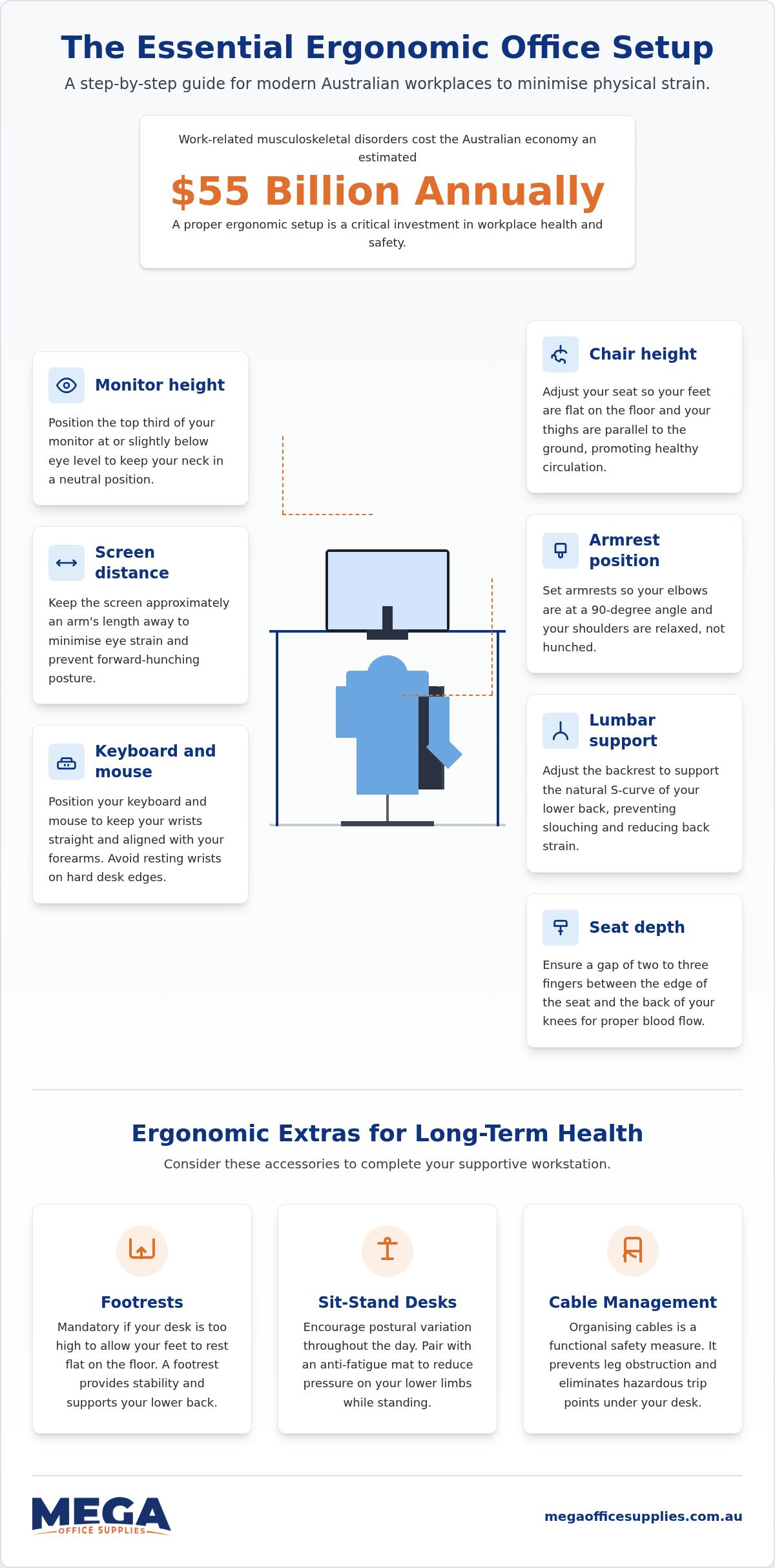
With work-related musculoskeletal disorders costing the Australian economy an estimated $55 billion annually, that persistent neck ache is clearly more than just a minor workplace grievance. It's frustrating to invest in expensive gear only to find your shoulders still hunched by mid-afternoon, often because the equipment isn't actually tailored to your specific frame. We know that a label saying "ergonomic" doesn't mean much if the chair is currently set to the height of a primary school stool. We have compiled this essential ergonomic office setup checklist designed specifically for modern Australian workplaces. This guide provides a practical, step-by-step sequence for adjusting your desk, chair, and monitors to minimise physical strain and ensure you meet your WHS obligations without the usual guesswork.
Key Takeaways
- Align your workstation from the floor up by adjusting your chair height until your feet are flat and your thighs remain parallel to the ground.
- Minimise neck and eye strain by positioning the top third of your monitor at eye level and keeping the screen approximately an arm's length away.
- Follow our ergonomic office setup checklist to identify and correct common configuration errors that lead to persistent shoulder and back tension.
- Improve long-term comfort by integrating sit-stand desks and footrests to encourage postural variation and support proper alignment throughout the day.
The foundation of comfort: your chair and desk alignment
Effective workstation configuration begins at floor level. When using an ergonomic office setup checklist, your first priority is adjusting your seat height until your feet rest flat on the ground with your thighs parallel to the floor. This position prevents unnecessary pressure on the underside of your legs and encourages healthy circulation. If your desk is fixed too high to allow this primary alignment, a dedicated footrest becomes a necessary addition to bridge the gap and maintain stability.
Your chair must also support the natural S-curve of your spine. Adjust the lumbar support so it sits firmly against the small of your back to prevent slouching. To ensure adequate blood flow to the lower legs, check for a "two-finger gap" between the front edge of the seat and the back of your knees. Shoulders should remain relaxed at all times, with armrests positioned so your elbows stay at a 90-degree angle. This setup reduces the risk of developing ergonomic hazards such as shoulder impingement or chronic neck strain.
Achieving the ideal neutral posture
A neutral posture keeps your joints aligned and reduces the physical stress placed on muscles and tendons. To maintain this, organise your "neutral reach zone" by keeping frequently used stationery and equipment within easy reach of your forearms. We recommend selecting ergonomic office chairs that offer multi-point adjustability to accommodate different body types across your organisation. Properly configured furniture supports everyone from healthcare administrators to home office workers. Some experts suggest sitting is the new smoking; if that is the case, you might as well smoke in a chair that actually supports your frame. Following a structured ergonomic office setup checklist ensures every adjustment works together to protect your long-term health.
Fine-tuning your field of vision and peripheral reach
Your input devices require similar precision. Align your keyboard and mouse so your wrists remain straight while typing. Avoid resting your wrists on the hard edges of the desk; this can compress nerves and lead to long-term discomfort. If you reference physical paperwork, place document holders centrally between your keyboard and monitor. This reduces the repetitive neck rotation required to look back and forth, keeping your spine in a neutral position throughout the day.
Monitor height and hardware placement
Properly executing an ergonomic office setup checklist often requires adjustable hardware. For those managing multi-screen environments, Kensington monitor arms provide the necessary flexibility to maintain precise alignments across several displays. These tools allow you to clear desk space, moving non-essential items out of your primary reach zone. Keep high-use items within a 25cm radius to avoid overreaching. Finally, position your screens perpendicular to windows. This simple shift significantly reduces glare and prevents the squinting that causes headaches. You can view our professional-grade monitor mounts to find the right hardware for your specific desk depth.
The ergonomic extras that sustain long-term health
Beyond the core configuration of chairs and monitors, specific accessories often bridge the gap between a standard workstation and a truly supportive environment. If your desk height is fixed and prevents your feet from resting flat after your chair is properly aligned, a footrest is a mandatory addition. This ensures your weight is distributed through your feet rather than placing stress on your lower back. Proper cable management also plays a functional role in workplace safety. Organising cords prevents leg obstruction and eliminates hazardous trip points, allowing you to move your feet freely without risk.
For those implementing a sit-stand workstation, anti-fatigue mats are professional-grade tools that reduce cumulative pressure on your lower limbs. These mats encourage micro-movements that prevent the blood pooling and joint stiffness associated with standing on hard surfaces for extended periods. Including these items in your ergonomic office setup checklist ensures the physical environment remains adaptable to your needs throughout a full shift.
Sit-stand transitions and supportive accessories
Postural variation is the most effective defence against sedentary strain. We recommend transitioning between sitting and standing every 30 to 60 minutes to maintain circulation. Avoid standing for too long at once, as this can lead to lower back fatigue. If you are managing existing workplace injuries, keeping office first aid supplies like hot/cold packs or support bandages nearby can assist with recovery. Finally, protect your ocular health by following the 20-20-20 rule. Every 20 minutes, look at an object 6 metres away for 20 seconds. Combining these habits with a completed ergonomic office setup checklist provides a holistic approach to long-term workplace wellbeing.
Securing your workplace health for the long term
Implementing a structured ergonomic office setup checklist is a proactive step toward reducing musculoskeletal strain. It enhances daily productivity. By aligning your chair from the floor up and positioning monitors at eye level, you address the primary causes of neck tension. We've seen that consistent postural variation through sit-stand desks provides the necessary foundation for a healthy Australian workplace. As a family owned and operated business since 2008, we provide reliable solutions for every environment. We also accept official Australian Government purchase orders and offer award-winning service to help you make informed decisions.
Browse our full range of ergonomic office furniture and accessories
Take the time to adjust your workstation today; your body will certainly thank you by Friday afternoon.
Frequently asked questions
What is the most important part of an ergonomic office setup?
Individual adjustability is the most critical factor. Every worker possesses a unique physical build, so an ergonomic office setup checklist must be treated as a sequence of personalised calibrations rather than a one-size-fits-all rule. The goal is to ensure your furniture adapts to your body, rather than forcing your body to adapt to the furniture.
How often should I switch between sitting and standing at my desk?
We recommend changing your posture every 30 to 60 minutes. Safe Work Australia guidance suggests avoiding sitting for more than 30 minutes at a time. While we previously noted standing for 15 to 30 minutes per hour, the key is the transition itself. Regular movement prevents the static muscle loading that leads to long-term musculoskeletal strain.
Do I really need a monitor arm for a single screen?
A monitor arm is essential if your standard screen base lacks height or tilt flexibility. It is especially valuable in hot-desking environments across Australian workplaces. These arms allow different users to quickly align the screen to their specific eye level, which prevents neck craning and clears desk space for other essential equipment and stationery.
Can I make a standard chair ergonomic without buying a new one?
You can improve comfort by adding external lumbar supports and footrests to achieve better alignment. However, these are typically supplemental fixes. For full WHS compliance and long-term health, using a professional ergonomic office setup checklist often highlights that makeshift solutions lack the integrated, multi-point adjustments found in purpose-built ergonomic chairs.

Article by
Mega Office Supplies Team
The Mega Office Supplies Team provides practical buying guides and workplace advice for Australian businesses, schools, government organisations, healthcare providers, hospitality venues, warehouses and home offices. Family owned and operated since 2008 and based in Tweed Heads South on the Gold Coast–Tweed border, Mega Office Supplies helps Australian workplaces choose the right office supplies, furniture, technology, cleaning, safety and education products — backed by genuine local service from real people.
General Information
This article is provided as general information only to help customers compare and choose office, workplace, school, cleaning, technology, furniture, safety and business supplies. Product details, specifications, compatibility, availability, pricing and suitability may vary. Always check the individual product page, manufacturer information, workplace requirements and relevant safety guidance before purchasing or using a product.


