





Did you know that musculoskeletal injuries account for over 35% of all serious workplace claims across Australia? If you're currently shifting in your seat to ease a dull ache or rubbing a stiff neck, you likely need to learn how to set up an ergonomic workstation that actually supports your body. It's frustrating when you know your posture is the problem, but conflicting advice and expensive equipment recommendations often leave you unsure where to start. You shouldn't have to choose between a productive workday and your physical well-being.
We've drawn on decades of collective industry experience to simplify the process of configuring a professional office environment. This guide provides the technical specifications you need for a pain-free, compliant, and highly efficient workspace. You'll learn the precise measurements for monitor height, the ideal sit-stand ratio for dynamic workstations, and how to select equipment that meets Australian standards like AFRDI Level 6. By the end of this article, you'll have a clear, step-by-step plan to minimise strain and maximise your daily output.
Key Takeaways
- Learn the fundamental principles behind how to set up an ergonomic workstation to reduce the risk of chronic strain and improve long-term productivity.
- Discover the specific adjustments for chairs and desks that ensure your spine is supported and your limbs remain in a neutral, relaxed position.
- Master the correct alignment for monitors and peripherals to prevent common workplace issues like neck tilting and eye fatigue.
- Identify which ergonomic accessories, such as footrests and monitor arms, are necessary to customise a standard office fit-out for individual needs.
- Understand the business case for investing in dynamic solutions like standing desks to foster a healthier and more engaged workforce.
Understanding the Core Principles of Office Ergonomics
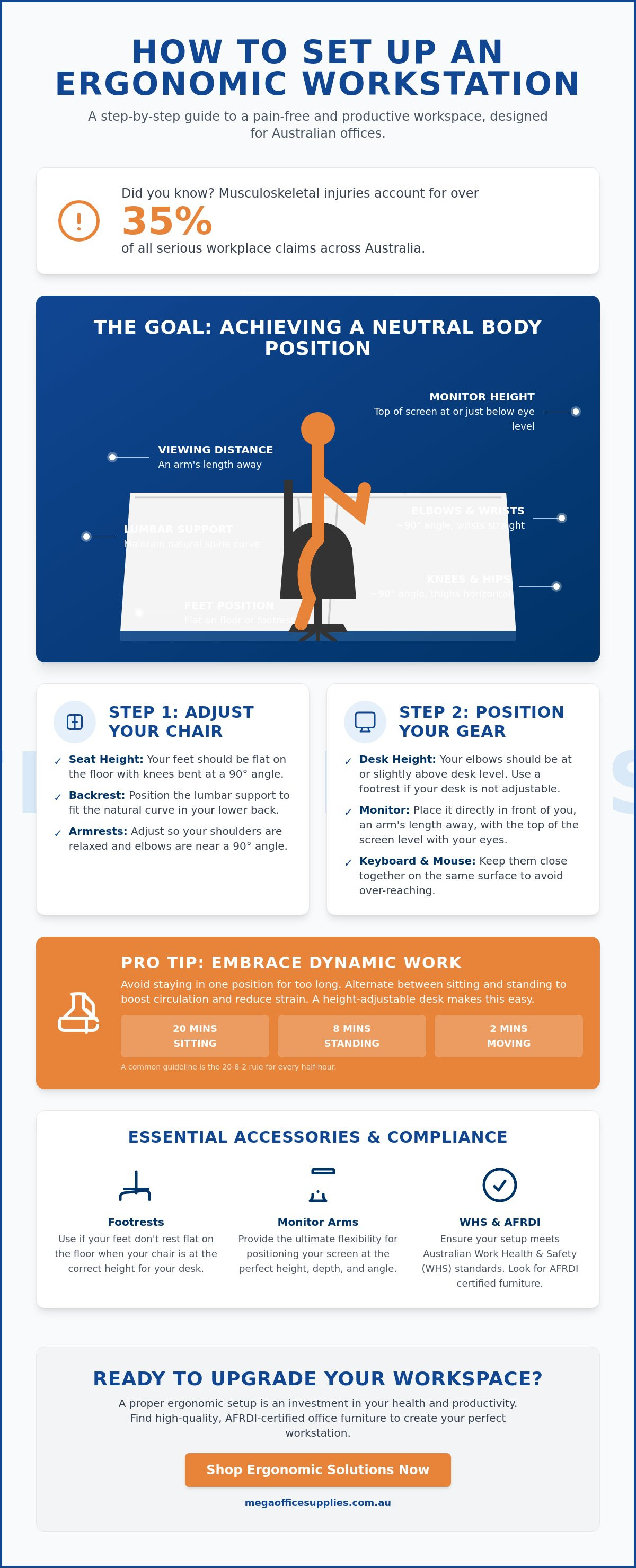
Ergonomics in the Australian workplace isn't just about a comfortable chair; it's a science-based approach to fitting the environment to the individual. By applying the Core Principles of Ergonomics, businesses can design spaces that promote efficiency while protecting staff health. The objective is to achieve a Neutral Body Position. This is a posture where your joints are naturally aligned, reducing stress on muscles, tendons, and the skeletal system. When you understand how to set up an ergonomic workstation, you move away from the "one size fits all" myth and toward a configuration that respects individual physical requirements.
Poor workstation organisation carries a heavy price for both employees and employers. Research indicates that musculoskeletal disorders cost the Australian economy over $55 billion annually through lost productivity and direct healthcare expenses. For procurement officers and administrators, investing in high-quality office furniture is a strategic move to stabilise long-term operational costs and reduce staff turnover.
To better understand this concept, watch this helpful video:
The Impact of "Turtling" and Sedentary Strain
Many office workers suffer from "turtling," a habit where the chin pokes forward and the shoulders hunch toward the screen. This posture often stems from poorly positioned monitors or non-adjustable desks. It places immense strain on the cervical spine and can lead to repetitive strain injuries (RSI). Professional-grade equipment, such as adjustable monitor arms and chairs with lumbar support, helps maintain the spine's natural curve. Preventing these issues at the procurement stage is far more cost-effective than managing chronic injuries later.
WHS Requirements for Australian Businesses
Under the model Work Health and Safety (WHS) Act, Australian employers have a primary duty of care to provide a safe working environment. This includes managing the risks associated with poor workstation design. A compliant setup isn't a one-time task; it requires regular ergonomic reviews to account for changes in staff or equipment. Proper implementation of how to set up an ergonomic workstation protocols significantly reduces workers compensation risks. It ensures your organisation meets its legal obligations while fostering a culture of safety and professional care.
Step-by-Step Guide to Configuring Your Ergonomic Office Chair and Desk
Configuring your workspace begins with the foundation of your seating and work surface. To understand how to set up an ergonomic workstation effectively, you must start by adjusting your chair height. Sit with your feet flat on the floor and your knees at a 90-degree angle. Your thighs should remain horizontal to the seat. This position minimises pressure on the underside of your legs and promotes healthy circulation. If your desk is too high and cannot be adjusted, use a footrest to maintain this neutral leg position rather than letting your feet dangle.
Lumbar support is the next critical adjustment. Position the backrest so the curve fits snugly into the small of your back. This maintains the natural "S" shape of your spine and prevents the slouching that leads to lower back pain. Ensure your armrests are set so that your shoulders remain relaxed while your elbows stay at roughly a 90-degree angle. This alignment is essential for reducing tension in the neck and upper trapezius muscles. For more detailed medical insights on posture, you can refer to Mayo Clinic's guide to office ergonomics.
Selecting and Adjusting Your Ergonomic Office Chair
When procurement teams evaluate seating, they should prioritise pneumatic height adjustment and tilt tension controls. These features allow for the manual precision required to suit different body types. In the Australian climate, breathable mesh backrests are often preferred over heavy padding to improve airflow and thermal comfort during summer months. For a deeper dive into hardware specifications, read The Professional Buying Guide to Ergonomic Office Chairs in Australia. Selecting high-quality ergonomic office furniture ensures durability and long-term support for your team.
Optimising Desk Height and Surface Layout
Your desk height must allow your forearms to rest parallel to the floor while typing. If you are using a fixed-height desk that is too low, sturdy risers or blocks can be used to achieve the necessary elevation. Clear the space under your desk to ensure full freedom of movement for your legs. Organise your surface into "reach zones" to increase efficiency. Place frequently used items, like your telephone or notepad, within the primary reach zone to avoid repetitive overreaching. This structured approach to how to set up an ergonomic workstation creates a professional and high-functioning environment.
Optimising Your Computer Interface: Monitors, Keyboards, and Mice
Your interaction with digital hardware is where most repetitive strain injuries occur. Understanding how to set up an ergonomic workstation requires precise placement of your monitor, keyboard, and mouse to ensure a neutral interface. Position your monitor directly in front of you, approximately an arm's length away. The top third of the screen should sit at eye level. This configuration prevents the neck tilting and forward head posture that lead to cervical strain. For workplaces relying on laptops, the use of a docking station and external peripherals is non-negotiable to avoid the postural collapse caused by small, low-set screens.
Centring your primary tools is essential for maintaining symmetry. Your keyboard should be positioned directly in front of your body, with the mouse placed as close to it as possible. This layout prevents overreaching, which can cause shoulder fatigue and rotator cuff issues. Integrating high-quality computer accessories into your office fit-out ensures that hardware supports rather than hinders the user's natural range of motion. Professional buyers should prioritise peripherals that offer tactile feedback and adjustable sensitivity to suit different task requirements.
By elevating the screen and using a separate keyboard, you satisfy the core requirements of how to set up an ergonomic workstation in a flexible, modern office setting.
While a physical setup is paramount for health, a secure digital environment is equally important for business continuity.
Monitor Placement and Visual Comfort
In dual-monitor environments, your setup should reflect your daily workflow. If you use both screens equally, place them symmetrically in a slight "V" shape. If one screen is dominant, position it directly in front with the secondary monitor to one side. Utilising monitor arms allows for manual precision in height and tilt while reclaiming valuable desk space. To minimise eye fatigue, adjust your screen's brightness to match the surrounding light and increase contrast to ensure text is sharp and legible.
Keyboard and Mouse Ergonomics
Maintain a 10-15cm gap between the front of your keyboard and the edge of the desk. This space allows your wrists to rest in a neutral position between bouts of typing. Avoid resting your palms on the desk while actively typing, as this can compress the carpal tunnel. Ergonomic mice, particularly vertical models, are excellent for preventing forearm pronation and reducing strain. Keeping your wrists straight and avoiding awkward angles is a fundamental part of a professional workstation configuration that remains comfortable throughout an eight-hour shift.
Enhancing Comfort with Ergonomic Accessories and Environmental Factors
While the chair and desk form the foundation of your workspace, specialised accessories and environmental variables provide the necessary refinement for a truly healthy office. Mastering how to set up an ergonomic workstation involves addressing contact stress and environmental stressors that often go unnoticed until they manifest as chronic fatigue. Contact stress occurs when hard surfaces press into soft tissues, such as the underside of the wrists or thighs. Utilising wrist rests with a neutral profile and ensuring your desk has rounded edges can significantly mitigate this. For individuals using fixed-height desks, a professional-grade footrest is a necessity to ensure feet remain supported, preventing the blood pooling and lower back strain associated with dangling legs.
Document holders are another vital tool for maintaining a neutral neck position. By placing reference materials between the keyboard and monitor, you eliminate the repetitive twisting and downward looking that causes cervical strain. This configuration is particularly effective in healthcare and administrative environments where data entry from physical forms is common. When you refine these details, you transition from a basic office setup to a high-performance workspace designed for longevity. To ensure your team has the right tools for the job, you can view our professional-grade ergonomic accessories to complete your fit-out.
Essential Ergonomic Accessories
The choice between a footrest and a chair mat depends largely on your existing furniture and flooring. If your desk height is non-adjustable, a footrest is essential for shorter users to maintain the horizontal thigh position mentioned in earlier sections. On carpeted floors, a heavy-duty chair mat provides the manual precision needed to glide easily, reducing the physical effort required to reposition yourself. Additionally, for staff who spend significant time on calls, headsets are mandatory to prevent "phone neck," a common injury caused by cradling a handset between the ear and shoulder. These furniture solutions for modern offices are key to reducing long-term musculoskeletal risks.
Environmental Ergonomics: Light and Sound
Environmental factors like lighting and noise levels directly impact cognitive load and physical comfort. To how to set up an ergonomic workstation for visual clarity, position your desk perpendicular to windows. This orientation avoids the harsh screen glare common in Australian offices while still providing access to natural light. Incorporating adjustable task lighting reduces the need for squinting, which can lead to tension headaches and eye strain. Furthermore, maintaining a tidy desk with organised office supplies reduces clutter-induced stress, allowing for a more focused and productive workday. A well-ordered environment signals a professional operation and supports the mental well-being of all staff members.
Implementing Office Ergonomics Training for Staff and Selecting the Right Gear
Establishing a repeatable training program is the most effective way to ensure your organisation maintains a healthy workforce. Educating staff on how to set up an ergonomic workstation shouldn't be a one-off event during induction. Instead, develop a standardised workstation assessment that new employees must complete within their first week. This formal review identifies potential postural risks early and confirms that every team member knows how to utilise the manual adjustments on their equipment. Consistency in training leads to a compliant workplace and reduces the likelihood of staff absenteeism due to preventable strain.
Encouraging postural changes is equally vital for long-term health. Even with the best equipment, static positions lead to muscle fatigue and reduced circulation. Advise your team to implement "micro-breaks" every 30 minutes to stretch and reset their alignment. This habit prevents the gradual postural collapse often seen during long afternoon shifts. Procuring professional-grade gear ensures that your furniture remains supportive through years of heavy use, providing a stable foundation for these healthy habits.
In addition to workplace adjustments, maintaining an active lifestyle through sports like tennis or pickleball can significantly improve long-term musculoskeletal health.
Just as high-quality furniture provides a foundation for health, reliable technology is the backbone of a productive office.
Transitioning to Sit-Stand Workstations
The business case for investing in standing desk solutions is rooted in the benefits of dynamic movement. When transitioning to a sit-stand model, staff should alternate between positions every 45 to 60 minutes rather than standing for the entire day. The ideal standing height is level with your elbows at a 90-degree angle. When selecting these units, prioritise weight capacity and lateral stability to ensure the work surface remains still while typing at full elevation.
Procurement Strategy for Ergonomic Success
Buying for national fit-outs or large-scale office upgrades requires a focus on standardised quality and durability. Standardising your equipment makes it easier to provide consistent training and simplify future maintenance. Evaluate the warranty periods and the precision of adjustment mechanisms before committing to a bulk purchase. High-quality technology and computer accessories for ergonomic setups should be chosen for their compatibility and ease of use. By selecting reliable, professional-grade hardware, you protect your organisation's bottom line and the physical well-being of your most valuable assets.
Achieving Long-Term Workplace Health and Efficiency
Correct posture starts with foundational seating and desk height, but it's perfected through the precise alignment of monitors and peripherals. Regular movement and standardised staff training ensure these ergonomic benefits are sustained across the entire organisation. Mastering how to set up an ergonomic workstation is a strategic investment that pays dividends in reduced physical strain and higher operational productivity. By focusing on manual precision and professional-grade equipment, you create a workspace built for longevity and stability.
Mega Office Supplies has been family owned and operated since 2008, supporting local businesses, schools, and government departments. We provide reliable national delivery on all office essentials to ensure your fit-out is seamless. Browse our full range of ergonomic office furniture and accessories to find the right solutions for your specific workplace needs. With the right configuration and high-quality hardware, a pain-free and focused workday is well within your reach.
Frequently Asked Questions
How often should I change my posture during the workday?
You should aim to change your posture or take a micro-break every 30 to 60 minutes. While staying in a neutral position is beneficial, sedentary strain occurs when any posture is maintained for too long. Alternating between sitting and standing, or simply walking to the staff tea room, encourages blood flow and reduces muscle fatigue throughout the day.
Can I use a laptop on its own as a permanent workstation?
Using a laptop on its own as a permanent solution is not recommended due to the fixed relationship between the keyboard and screen. This design forces you to look down, which significantly strains the neck and upper back. For a professional setup, connect your laptop to an external monitor and separate keyboard to satisfy the core requirements of how to set up an ergonomic workstation.
What is the best desk height for an average person?
There is no single "best" height, as the surface must align with your seated elbow height. Most standard Australian office desks are fixed at 720mm, which is actually too high for many users. An adjustable desk allows you to set the surface so your forearms remain parallel to the floor, preventing the shoulder elevation and wrist strain caused by high surfaces.
Do I really need an ergonomic chair if I have a standing desk?
Yes, a high-quality ergonomic chair remains essential even if you utilise a sit-stand desk. Most health professionals recommend a ratio where you spend significant portions of the day seated to avoid leg and foot fatigue. When you are sitting, your spine requires the lumbar support and pneumatic adjustments that only a professional-grade chair provides to prevent musculoskeletal disorders.
How do I know if my monitor is at the correct height?
Your monitor is correctly positioned when the top third of the screen sits at eye level while you are sitting upright. It should be approximately an arm's length away from your face. If you find yourself leaning forward or tilting your chin up to read, the height or distance needs immediate adjustment to maintain a neutral cervical spine.
Are standing desks better for your back than sitting?
Standing desks are most effective when used to facilitate movement rather than as a total replacement for sitting. Research indicates that alternating between sitting and standing is the most effective way to reduce lower back pain. Standing for excessive periods can lead to other issues, such as circulatory strain, making the frequent transition intervals mentioned in this guide critical.
What is the most common mistake people make when setting up a desk?
The most common error is failing to adjust furniture to the individual user's specific body dimensions. Many staff members accept a desk or chair in its default state without utilising the available manual adjustments. This "one size fits all" approach often leads to awkward postures, such as hiked shoulders or dangling feet, which are the primary causes of workplace strain.
How do I conduct office ergonomics training for my staff?
Effective training involves a formalised workstation assessment for every team member during their induction. Start with a standardised checklist that covers how to set up an ergonomic workstation according to the principles of neutral positioning. Periodic reviews and providing access to adjustable equipment ensure that staff remain compliant and protected from long-term injury as their tasks or environments change.

Article by
Mega Office Supplies Team
The Mega Office Supplies Team provides practical guidance for Australian businesses, schools, government organisations, healthcare providers, hospitality venues, warehouses and home offices. Based in Tweed Heads South, Mega Office Supplies has been family owned and operated since 2008, offering office stationery, workplace furniture, technology products, labels, printers, cleaning and janitorial supplies, safety products, art materials, education resources and everyday business essentials from trusted brands.
General Information
This article is provided as general information only to help customers compare and choose office, workplace, school, cleaning, technology, furniture, safety and business supplies. Product details, specifications, compatibility, availability, pricing and suitability may vary. Always check the individual product page, manufacturer information, workplace requirements and relevant safety guidance before purchasing or using a product.


