


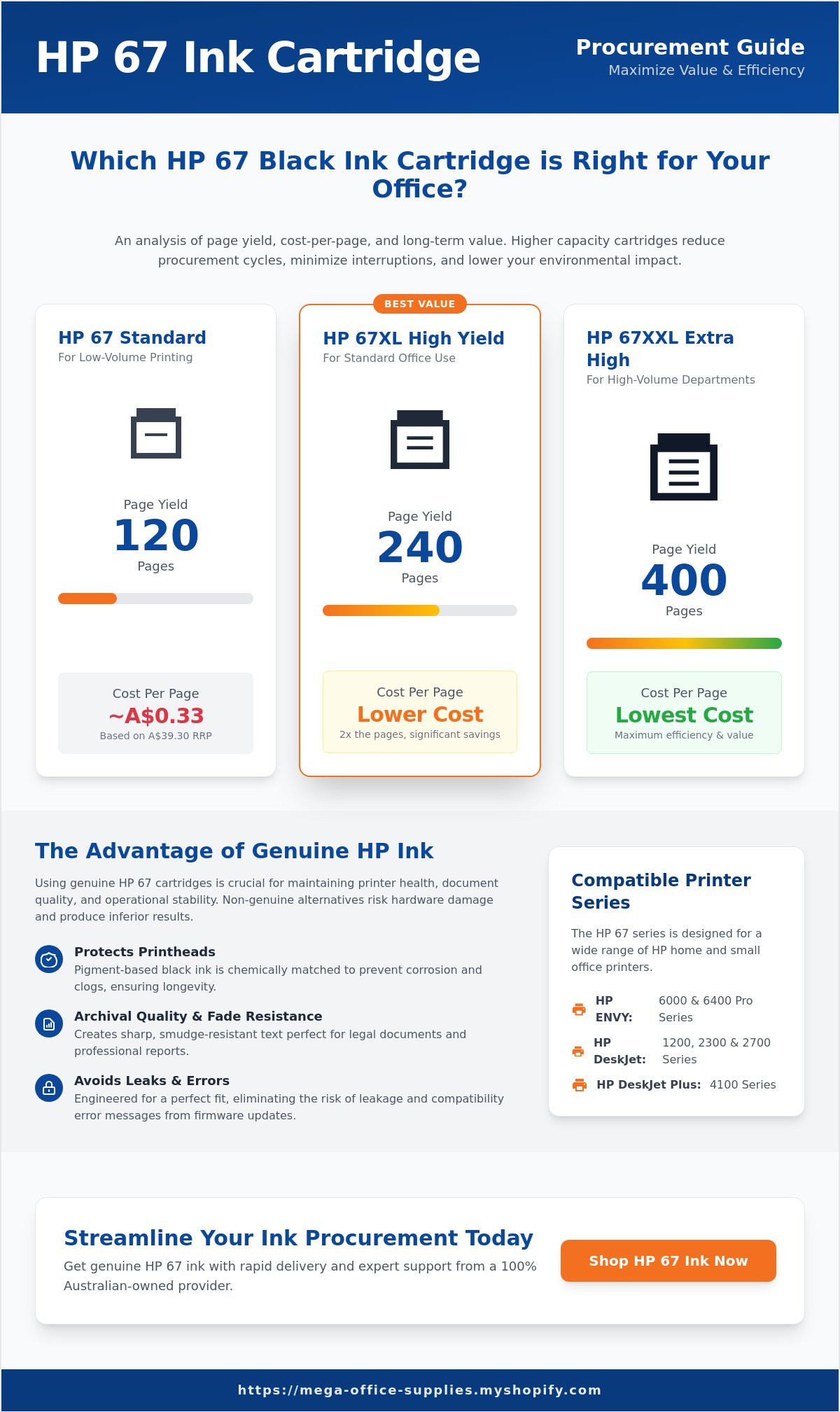
Opting for the entry-level hp 67 ink cartridge often results in the highest long-term operational cost for your department. While the $39.30 AUD standard black cartridge is a common purchase, its 120-page limit frequently leads to mid-project interruptions and increased administrative friction. We recognise the difficulty of managing supply compatibility across the HP ENVY 6000 and Deskjet 2700 series while maintaining a professional standard for your workplace essentials. This guide provides the logistical clarity needed to master your ink procurement, from verifying hardware fit to calculating the exact cost-per-page benefits of high-yield alternatives.
You'll learn how to leverage the 240-page capacity of the HP 67XL or the 400-page yield of the XXL tier to reduce cartridge change intervals and improve efficiency. We'll also compare the May 2026 HP Instant Ink subscription plans, which start at $3.49 AUD for 10 pages per month, against traditional bulk purchasing. This analysis ensures you achieve crisp documents and seamless installation without error messages, supported by our reliable Australian based support. We'll preview the latest yield data and Australian Consumer Law protections to ensure your printer maintenance remains cost-effective and compliant.
Key Takeaways
- Understand the technical benefits of pigment-based black ink systems for maintaining printhead longevity and document archival quality.
- Compare page yields across standard and high-capacity tiers to determine if the XL or XXL hp 67 ink cartridge provides the best cost-per-page for your department.
- Implement a standardised installation checklist to eliminate common setup errors and ensure seamless integration with ENVY and Deskjet series printers.
- Assess the logistical risks of using remanufactured supplies, including potential leakage and the loss of fade resistance in professional documentation.
- Streamline your procurement through a 100% Australian-owned provider offering rapid delivery and administrative support for institutional purchase orders.
Understanding HP 67 Ink Cartridge Compatibility and Use
The hp 67 ink cartridge utilises a dual-chemistry system designed for professional administrative output. The black cartridge contains pigment-based ink, which provides the smudge resistance and sharp edges required for legal documents and purchase orders. In contrast, the tri-colour units use dye-based inks to achieve fluid colour gradients. Selecting "Original" HP supplies ensures that the chemical viscosity matches the precise thermal requirements of your printer's delivery system. This technical alignment prevents premature printhead degradation, a common issue with non-genuine alternatives that can lead to costly hardware replacements. As of May 2026, recent firmware updates across the HP ecosystem have reinforced the necessity of genuine chips to maintain full functionality and cloud-based monitoring features. These updates ensure that your device stays secure and that ink level reporting remains accurate across your networked fleet.
Complete List of Compatible HP Printer Models
Identifying the correct supply for your fleet is essential for maintaining operational efficiency. The hp 67 series supports a broad range of consumer and small-office hardware. You can verify your model by checking the sticker on the front chassis or via the HP Smart software dashboard. Ensuring a match before procurement prevents the administrative burden of processing returns.
- HP ENVY Series: 6010, 6020, 6022, 6030, 6032, 6052, 6055, and the 6400 Pro series including 6420, 6430, 6452, 6455, and 6458.
- HP DeskJet Series: 1255, 2300, 2710, 2720, 2721, 2722, 2723, 2724, 2725, 2732, 2752, and 2755.
- HP DeskJet Plus Series: 4120, 4121, 4122, 4123, 4130, 4132, 4140, 4152, 4155, and 4158.
The Technology Behind HP 67 Thermal Inkjet
These cartridges operate using advanced thermal ink cartridge technology. This process involves heating the ink to create a vapour bubble, which then ejects a precise droplet onto the page. Unlike fixed-head printers, the hp 67 ink cartridge features an integrated printhead. This design choice means that every time you replace the cartridge, you're installing a factory-fresh printing mechanism. It eliminates the risk of long-term ink buildup within the printer itself, ensuring consistent text clarity for high-stakes business communications.
For government and education sectors, this modular design reduces maintenance downtime and simplifies the procurement process. You don't need to worry about cleaning cycles or manual printhead alignment as often. The hardware refreshes itself with every swap. This reliability is why we recommend genuine cartridges for critical workplace essentials. It's about maintaining institutional stability and ensuring your printing infrastructure is always ready for the next project.
Comparing HP 67 Yields: Standard vs. XL for Maximum Value
Selecting the appropriate hp 67 ink cartridge capacity is a critical decision for maintaining departmental budget efficiency. Page yield is calculated based on the ISO/IEC 24711 standard, which assumes approximately 5% page coverage. For the standard black cartridge, this translates to a 120-page capacity. The XL high-yield variant doubles this output to 240 pages, while the extra high-yield XXL options can reach up to 400 pages. Choosing a higher-capacity cartridge reduces the frequency of procurement cycles and lowers the administrative burden of inventory management. Beyond the logistical advantages, XL and XXL cartridges offer a superior environmental profile. By containing more ink within a single plastic housing, these units significantly reduce the amount of structural waste generated per printed page compared to standard alternatives.
When calculating the total cost of ownership, the "Cost Per Page" metric serves as the most reliable indicator of value. While a standard cartridge has a lower entry price, its higher cost-per-impression often makes it the most expensive option over a 12-month period. Procurement officers should also be wary of suspiciously low prices from unverified sources, as the market for counterfeit printer ink remains a persistent risk to hardware integrity. Utilising original high-yield supplies ensures that your cost savings don't come at the expense of printer downtime or document quality.
When to Choose Standard Yield Cartridges
Standard yield cartridges are specifically designed for low-volume environments where printing is an occasional requirement rather than a daily task. If your department prints fewer than 20 pages per month, the 120-page standard unit is the most logical choice. This prevents ink from sitting idle in the reservoir for extended periods, which can lead to nozzle clogging or pigment settling. To maintain performance during periods of inactivity, ensure the printer remains connected to a power source to allow for automatic maintenance cycles. Storing spare units in a cool, climate-controlled environment will also preserve the chemical integrity of the ink until it's needed for a project.
The ROI of HP 67XL High Yield Cartridges
For active home offices and small Australian businesses, the HP 67XL provides a 100% increase in page yield over the base model. This 240-page capacity is achieved by utilising a larger internal ink reservoir within the same physical footprint. Because the external dimensions are identical to the standard version, the XL cartridge fits seamlessly into the existing carriage of your ENVY or DeskJet printer without modification. For departments managing multiple workstations, purchasing high-yield workplace essentials in bulk streamlines the procurement cycle and ensures a lower price-per-unit. This approach provides a predictable return on investment by maximising the uptime of each device in your fleet.
Step-by-Step: How to Install and Troubleshoot HP 67 Cartridges
Installing a new hp 67 ink cartridge requires a specific sequence to ensure immediate hardware recognition and optimal print quality. Begin by powering on your device; the carriage won't move to the accessible centre position if the unit is off. Once the carriage is stationary, remove the spent cartridge and prepare the new unit. It's vital to pull the orange or pink plastic tab to remove the protective tape covering the nozzles. Neglecting this step is the primary cause of "empty page" errors in the ENVY 6000 and DeskJet 2700 series. When inserting the new unit, hold it by the plastic housing only. Avoid touching the copper-coloured electrical contacts or the ink nozzles, as skin oils can cause intermittent communication failures between the printer and the cartridge chip.
After physical installation, your printer will prompt an alignment page. Don't skip this process. Scanning the printed calibration sheet allows the internal sensors to synchronise the printhead's position. This ensures that text remains crisp and vertical lines stay straight, which is essential for professional correspondence and administrative records. Completing this calibration immediately after installation prevents the printer from repeating the prompt, which can otherwise consume unnecessary ink over time.
Resolving Common "Cartridge Not Recognised" Errors
If your device displays a "Cartridge Problem" or "Incompatible" message, the issue often stems from poor electrical connectivity. Use a dry, lint-free cloth to gently wipe the copper contacts on the hp 67 ink cartridge to remove any microscopic debris or oxidation. If the error persists, perform a hard reset by disconnecting the power cord from the printer for 60 seconds while the unit is still switched on. This clears the printer’s temporary memory and forces a fresh handshake with the cartridge chip. As of May 2026, ensure your HP Smart App is updated; recent security firmware can occasionally block genuine cartridges if the software environment is outdated.
Optimising Print Quality and Ink Usage
Maximising the utility of your workplace essentials involves adjusting software settings based on the document type. For internal drafts or high-volume administrative logs, select "Draft Mode" in your print settings. This reduces ink consumption by approximately 25% while maintaining legible text. If you notice streaking or faded lines, run the automated printhead cleaning utility via the HP Smart App rather than performing manual wipes. Finally, distinguish between "Low Ink" and "Empty" alerts. A "Low" status is merely a procurement reminder. You can typically continue printing until the output quality visibly degrades, ensuring you extract every millilitre of value from your investment.
Genuine HP 67 Ink vs. Remanufactured: Why Quality Matters
Procurement decisions often hinge on immediate price points, yet the technical disparity between genuine and remanufactured supplies has long-term hardware implications. A genuine hp 67 ink cartridge is engineered with a specific chemical viscosity that matches the thermal ejection frequency of your printer. Third-party refills frequently use generic ink formulas that lack the pigment stability required for professional documentation. These inconsistencies often lead to nozzle clogging or internal leakage, which can contaminate the electrical carriage. While Australian Consumer Law prevents manufacturers from voiding warranties simply due to the use of compatible ink, this protection doesn't extend to hardware damage directly caused by a faulty third-party consumable.
The hidden costs of generic ink manifest in operational downtime and resource waste. Industry testing indicates that a percentage of non-genuine cartridges fail prematurely or produce substandard output that requires reprinting. For an office environment, choosing a substandard alternative to the hp 67 ink cartridge translates to wasted paper, increased power consumption, and lost administrative time. Reliability is the cornerstone of institutional stability. Ensuring your team has access to dependable supplies eliminates the friction of troubleshooting failed print jobs and maintains the professional standard of your output.
Reliability in Professional Contexts
Government and education sectors often mandate the use of genuine consumables to ensure archival quality. Documents printed with original HP pigment ink are designed to resist yellowing and fading for over 50 years when stored under standard conditions. This longevity is essential for legal records, certificates, and long-term project documentation. Beyond durability, consistency remains a primary advantage. A genuine cartridge ensures the first page of a high-volume run maintains the same saturation and clarity as the last, providing a uniform professional appearance for all external communications.
Sustainability and Recycling Programmes
Maintaining an environmentally responsible workplace is streamlined through the HP Planet Partners programme. In Australia, this initiative allows businesses to return used cartridges for closed-loop recycling, preventing plastic from entering local landfills. Approximately 80% of original HP ink cartridges are now manufactured using a percentage of recycled plastic from old cartridges and other post-consumer sources. By choosing original supplies, you support a circular economy that reduces your office’s carbon footprint without compromising on performance. Secure your supply of genuine HP 67 workplace essentials to ensure your procurement strategy aligns with these sustainability goals.
Fast HP 67 Ink Delivery Across Australia from Mega Office Supplies
Securing a reliable supply chain for your hp 67 ink cartridge is as critical as the hardware itself for maintaining business continuity. Mega Office Supplies operates as a 100% Australian-owned and operated entity, providing the institutional stability required by procurement officers across the country. Our logistics network is designed for speed, facilitating fast delivery to Sydney, Melbourne, Brisbane, and regional hubs to ensure your printing operations never stall. We understand the administrative complexities of large-scale operations; this is why we offer a professional handshake to our institutional clients by accepting and processing purchase orders with the efficiency your department demands.
Our team of local experts provides a level of service that international digital-only retailers cannot match. When you contact us, you speak with Australian-based support staff who understand the specific requirements of local education and government sectors. This domestic accountability ensures that if you face a compatibility question or a logistical challenge, you receive a solution-oriented response grounded in professional competence. We focus on the ease of procurement, moving quickly from identifying your inventory needs to confirming the final transaction.
Bulk Procurement and Workplace Essentials
Efficiency in the workplace is often found in the consolidation of supplies. Beyond the hp 67 ink cartridge, our inventory includes a comprehensive range of workplace essentials such as Reflex paper, Marbig binders, and essential stationery. Consolidating these items into a single replenishment order reduces administrative overhead and simplifies your accounts payable process. We offer volume discounts for high-capacity office requirements, ensuring that large-scale buyers receive the best possible value for their budget. Our streamlined checkout process is built for regular business replenishment, allowing you to save time on recurring logistics so you can focus on core operational goals.
Reliable Support and Domestic Accountability
Choosing a local partner means you are backed by Australian consumer protections and a straightforward returns policy. If you require technical advice regarding the cost-per-page analysis of XL cartridges or need assistance with a firmware-related recognition issue, our specialists are available for direct consultation. This grounded authority positions us as a specialised utility rather than just a retail store. We prioritise your time by delivering essential value propositions without unnecessary filler. To maintain your printer’s performance with genuine, high-quality supplies, Order your HP 67 Black Original Ink Cartridge from Mega Office Supplies today. Our commitment to logistical precision ensures your order is handled with the professional care your organisation deserves.
Optimising Your Institutional Printing Infrastructure
Maintaining a high standard of professional documentation depends on selecting the correct supply tier for your specific operational volume. Whether you require the standard 120-page capacity for occasional tasks or the 240-page XL hp 67 ink cartridge for high-volume administrative logs, choosing genuine consumables ensures your hardware remains protected. This strategy prevents technical downtime and guarantees that your records maintain their integrity for decades. It's the most efficient way to manage your workplace essentials while supporting your printer's long-term performance and reliability.
Mega Office Supplies stands as a dependable partner for Australian schools, businesses, and government agencies. We simplify procurement through our 100% Australian owned operation, providing fast nationwide shipping and accepting purchase orders to suit your internal administrative requirements. Our local support team ensures you get the right advice for your fleet's specific needs with logistical precision. Shop Genuine HP 67 Ink Cartridges at Mega Office Supplies today to experience institutional reliability and professional service. You're now equipped to manage your printing needs with total precision and ease.
Frequently Asked Questions
Is HP 67 ink the same as 67XL?
HP 67 and 67XL cartridges utilise the same pigment-based ink chemistry but differ significantly in their internal reservoir volume. The standard cartridge is designed for 120 pages, while the XL version contains enough ink to produce approximately 240 pages. Both units share identical external dimensions, ensuring they fit into the same printer carriage without requiring hardware modifications.
Why is my HP printer saying the cartridge is incompatible?
Incompatibility messages often stem from microscopic debris on the copper electrical contacts or outdated system firmware. As of May 2026, HP printers require a stable handshake with the cartridge chip to verify authenticity. Cleaning the contacts with a dry, lint-free cloth or performing a hard power reset usually resolves these communication errors for a genuine hp 67 ink cartridge.
How many pages does an HP 67 black cartridge actually print?
The standard black cartridge yields approximately 120 pages based on the ISO/IEC 24711 testing standard. This metric is calculated using 5% ink coverage on an A4 sheet. If your department prints high-density administrative documents, your actual yield will vary. For higher volumes, the 67XL provides 240 pages and the 67XXL tier reaches 400 pages.
Can I use an HP 67 cartridge in a printer that takes HP 65?
No, these cartridge series aren't interchangeable despite having similar physical shapes. Each series uses a unique electronic pin mapping and encrypted chip that the printer's logic board must recognise. Attempting to install a 67 series unit into an older HP 65 printer will result in a "Cartridge Not Recognised" error and can potentially damage the carriage.
Does HP 67 ink dry out if not used for a month?
Pigment-based ink can settle or clog the nozzles if the printer remains disconnected from a power source for more than 30 days. Keeping your device plugged in allows it to perform automated maintenance cycles that preserve the ink's chemical fluidness. For infrequent printing, the standard 120-page unit is the most reliable choice to ensure the ink is consumed before its integrity degrades.
What happens if I only replace the black HP 67 cartridge and not the colour one?
Your printer will enter "Single-Cartridge Mode" to allow continued operation using only the available black ink. This is a useful feature for maintaining administrative output when colour supplies are exhausted. You'll be able to print text documents clearly, though colour-dependent graphics and photo printing will be disabled until a new tri-colour unit is installed.
How do I check the ink levels of my HP 67 cartridge on my iPhone?
You can monitor your supply levels remotely by utilising the HP Smart App on your iOS device. Once your printer is networked, the app dashboard displays a real-time percentage estimate for your hp 67 ink cartridge. This visibility is essential for procurement officers managing workplace essentials across multiple office locations to prevent mid-project interruptions.
Are HP 67 cartridges refillable?
While third-party refill kits are available, they aren't recommended for professional or institutional environments. Manual refilling doesn't reset the electronic chip, which often leads to persistent "Low Ink" alerts or complete hardware blocks. For business, education, and government sectors, utilising genuine high-yield cartridges ensures the document clarity and hardware reliability required for institutional stability.


